# Supabase Pricing: Free Tier Limits, Pro Costs & Egress
By Desmond Achebe · 2026-09-30 · Source: https://www.activepieces.com/blog/supabase-pricing-free-tier-limits-pro-costs-egress
---
Rather than seat counts, Supabase structures its costs around resource utilization, dividing its service into four distinct tiers that scale from shared environments to dedicated infrastructure, which means your bill, much like when you automate workflows using [Activepieces](https://www.activepieces.com), fluctuates based on actual usage rather than user headcount.
Supabase pricing is a **usage-based model** that scales from a free tier for hobbyists to dedicated enterprise infrastructure, charging primarily for database instances, storage, and data transfer rather than per-user seats.
Early-stage developers can validate concepts without overhead, while growing businesses pay primarily for the database compute and egress bandwidth they consume.
## Supabase pricing plans and monthly costs
### The Free Tier for hobbyists and prototyping
A non-commercial sandbox for testing small-scale applications, the Free Tier allows for learning the platform’s core features. Because this tier operates on shared infrastructure, it is unsuitable for production traffic where consistent latency is required.

Supabase pauses projects in this tier after a period of inactivity. The first user request after a long hiatus will face a significant delay while the database wakes up.
### Pro Plan for scaling production apps
The baseline for production-ready software is the Pro Plan. It has increased resource limits and removes the inactivity pause.
It introduces a usage-based billing model where costs increase automatically if the application exceeds the included quotas for storage or data transfer. Service interruptions are prevented during traffic spikes, but this requires developers to monitor workflows to avoid unexpected overage charges.
This is also the entry point for configuring custom domains, necessary for maintaining brand consistency in authentication flows.
### Supabase Team and Enterprise plan features
Centralized management and advanced infrastructure options are provided by the Team and Enterprise tiers for companies requiring higher security. These plans include features absent from lower tiers:
* Standardized organizational billing that aggregates multiple projects into a single invoice.
* Priority support channels to ensure faster resolution times for critical infrastructure issues.
* Single Sign-O (SSO) for dashboard access, which allows IT departments to manage developer permissions through their existing identity providers.
* Point-in-Time Recovery (PITR) for restoring databases to a specific second, providing a safety net against accidental data corruption.
Custom contractual terms and dedicated support engineers are offered through the Enterprise tier. This is the mandatory choice for highly regulated industries.
## Comparison of Supabase plan limits and features
Supabase segments its offerings into four distinct tiers, which allows users to select a plan tailored to their specific scale and feature requirements, ensuring they only pay for the resources they actually consume.
Each gates features like point-in-time recovery and compute scalability behind increasing monthly commitments.
While the entry-level options provide a low-friction start, the jump to managed infrastructure reflects a significant shift in operational overhead. The following table outlines the primary resource allocations across the available tiers:
| Tier | Database Size | Egress | Monthly Active Users (MAUs) |
| :--- | :--- | :--- | :--- |
| Free | 500MB | 5GB | 50,000 |
| Pro ($25/mo) | 8GB (included) | 250GB (included) | 100,000 (included) |
| Team ($599/mo) | Unlimited (usage-based) | Unlimited (usage-based) | Unlimited (usage-based) |
| Enterprise | Unlimited | Unlimited | Unlimited |
_Prices and plan limits checked against [supabase.com](https://supabase.com/pricing) on September 30, 2026._
### Scaling limits and user caps
**50,000 monthly active users** is the cap for the Free plan, so a viral launch can trigger a service pause if the account is not upgraded.
Moving to the Pro plan at $25 per month increases this limit to 100,000 users, so scaling your application becomes significantly more affordable as your user base grows. At the Team tier, starting at $599 per month, the pricing model shifts entirely toward usage-based billing.
Egress costs remain the most volatile variable:
* While PlanetScale, a competing serverless database platform, often focuses on row reads and writes, Supabase charges for the raw data leaving the network.
* For teams utilizing Gemini 3.8 Flash to process high volumes of database-driven context, these egress fees can accumulate faster than the base subscription cost.
* Consequently, the $25 Pro plan is rarely a flat fee; it is merely the starting point for a bill that scales with every byte sent to your frontend or external APIs, meaning that actual monthly expenditures will likely exceed the advertised base price.

## Avoid hidden costs and overage charges
Once a project exceeds the 8GB database limit or the 100GB file storage quota included in the Pro tier, Supabase transitions to a variable-usage utility. Your monthly bill becomes unpredictable as soon as your data footprint expands.
### Database size and storage scaling costs
Supabase calculates storage costs based on the average daily volume hosted throughout the billing cycle.
While the Pro plan covers the first few gigabytes, scaling beyond that requires paying **$0.125 per GB** according to [Supabase](https://supabase.com/docs/guides/platform/manage-your-usage), so heavy data usage will directly inflate your monthly invoice.
For context, this rate is slightly more competitive than the $0.023 per GB charged by [Amazon S3](https://www.cloudzero.com/blog/s3-pricing/), meaning customers can achieve better margins on their data-heavy workloads. High-volume projects might find better margins with [Cloudflare R2](https://vercel.com/changelog/vercel-blob-is-now-generally-available).
$0.015 per GB is the price for storage on Cloudflare R2, making it a more cost-effective alternative for high-volume storage needs, as users can store massive datasets without incurring prohibitive costs.
### Default compute credits and entry pricing
The Pro plan includes a $10/mo compute credit by default, enough to cover one Micro instance. This credit is designed to cover the cost of the default Micro compute instance, which is the baseline hardware for a production database.
A $10 compute credit partially offsets the $25 base fee, effectively lowering the entry price for smaller projects to $15, which reduces the financial barrier for developers just starting out.
This credit applies automatically to the first compute instance on the account, ensuring that the transition from Free to Pro remains affordable for simple applications.
Variable "Overage" blocks for Egress and Disk Space stack on top to create the final total, making it difficult to forecast exact expenditures without monitoring usage patterns.
### Egress and bandwidth overage rates
Egress is the most volatile component of the Supabase bill because it triggers at **$0.09 per GB** the moment you exceed the 250GB monthly allowance.
This means a viral launch that serves 500GB of assets will result in a $22.50 overage charge on top of the base subscription cost.
### Supabase compute instance pricing and upgrade costs
Compute costs scale vertically based on hardware requirements:
* Small instances cost $0.0206 per hour, so keeping one active for a 30-day month adds $15.04 to the bill.
* Medium instances cost $0.0822 per hour, which means a production environment requiring 4GB of RAM will cost $60.01 monthly.
* Large instances cost $0.1517 per hour, so high-traffic applications needing dedicated CPU resources will see a $110.74 baseline charge.
Supabase bills these upgrades hourly, so a developer can scale up for a migration and scale back down to avoid paying for idle hardware.
## Managing Supabase costs with Activepieces automation
By offloading complex logic to an external workflow engine, Activepieces reduces Supabase compute overhead, preventing unnecessary database CPU cycles during high-traffic events.
The platform bills 1 credit per flow run regardless of the number of steps, so a complex ten-step cleanup routine costs exactly the same as a simple two-step trigger.
By decoupling event processing from the core database, developers avoid the horizontal scaling costs typically required to maintain responsiveness under heavy API load.
Every Activepieces plan, including the free tier, allows for unlimited flows to help developers prototype these cost-saving measures without upfront investment.
Because this tier pauses projects after a period of inactivity, automated workflows built in Activepieces must include error-handling logic to manage connection timeouts when the database is hibernating.
Moving to the Pro plan introduces dedicated compute instances. These eliminate the latency spikes caused by shared resource contention in lower tiers.
The Activepieces flow builder, shown here, demonstrates a "new flavor created" trigger that listens for database changes to initiate downstream tasks without polling the API, utilizing one of the 735+ integrations available in the open source monorepo.
This direct integration synchronizes with external tools in real-time while keeping the database footprint small. To maintain these efficiencies as traffic grows, developers must monitor the following hourly compute variables:
* Compute Instance Size: Upgrading from the default to larger instances increases the hourly burn rate to accommodate higher concurrent connection limits.
* Egress Volume: Data sent from Supabase to Activepieces counts toward monthly transfer quotas, making efficient payload filtering essential to prevent overage charges.
* Disk IOPS: High-frequency automation triggers can saturate disk throughput, necessitating paid IOPS upgrades to prevent workflow bottlenecks.
Higher tiers provide the infrastructure required for complex, multi-tenant architectures where security and predictable billing are the primary concerns.
While many vendors restrict governance features to their managed cloud, Activepieces provides the same SSO, SCIM, and audit logs in its air-gapped edition as it does in the cloud, which is why regulated organizations like FundingSocieties run it in production.
By utilizing the MIT-licensed core of Activepieces, teams can self-host their automation layer to keep data processing within their own VPC, effectively eliminating the egress costs associated with sending sensitive database payloads to a third-party cloud.
This prevents unauthorized changes that could unexpectedly inflate egress costs.
## Supabase vs Firebase and PlanetScale pricing compared
By capping data transfer rates, Supabase manages egress costs more predictably than legacy NoSQL providers.
Developers must weigh the $0.09 per GB egress fee on Supabase against the $0.06 per GB charged by PlanetScale, a MySQL-compatible serverless platform, as data transfer costs will directly impact the long-term profitability of their architecture.
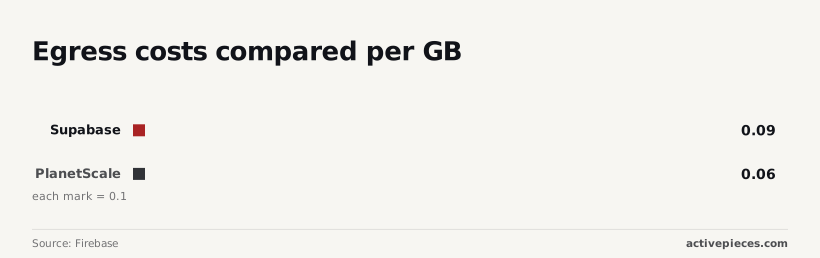
This pricing sits in the middle of the market, significantly undercutting the $0.20 per GB charged by [Firebase](https://firebase.google.com/pricing/), which is Google’s mobile and web application development platform, so developers can save substantially on their monthly infrastructure bills.
500MB of database space and 5GB of bandwidth are provided by the Free Tier at no cost, which gives hobbyists enough room to build and deploy small applications without an upfront investment.
Unlike serverless functions that suffer from "cold starts" Supabase keeps the database instance active.
However, this tier pauses projects after 7 days of inactivity, so developers must manually restart their work if they step away for a week. A developer must manually log in to the dashboard to restore a dormant site.

The $25/month Pro Plan removes the inactivity pause and introduces a "Pay-as-you-go" model for storage, meaning users no longer have to worry about their services being suspended due to a lack of traffic.
Overages are billed at $0.125 per GB, which adds a significant premium to the standard storage costs once a user exceeds their plan's limits.
Teams can store large assets without the 300% markup common in managed database ecosystems. To avoid performance bottlenecks, this tier allows for compute upgrades:
* Micro Instance: Included in the base price, suitable for low-concurrency apps.
* Small Instance: $0.0206 per hour, providing shared compute cycles for consistent query execution, which means a predictable monthly budget of roughly $15.04 for always-on infrastructure.
* Medium Instance: $0.0822 per hour, doubling available RAM to handle larger in-memory joins.
Starting at $599/month, the Team tier is the only tier that offers a 99.9% Service Level Agreement (SLA).
For larger organizations, the Enterprise plan requires a sales call. On the Enterprise plan, it is the only way to access HIPAA compliance, which is a legal requirement for any application handling protected health information in the United States.
## Calculating your total cost of ownership on Supabase
The intersection of platform fees and the hourly burn rate of your compute instance determines the total cost of ownership. While the Pro plan starts at $25, scaling requires moving beyond the shared micro-instance.
Costs accrue by the hour regardless of traffic volume. The following table compares the hourly rates for dedicated compute instances:
Costs accrue by the hour regardless of traffic volume.
| Instance Size | Hourly Rate | Monthly Estimate (730 hours) |
| :--- | :--- | :--- |
| Small | $0.0206 | ~$15.04 |
| Medium | $0.0822 | ~$60.01 |
| Large | $0.1517 | ~$110.74 |
| XL | $0.2877 | ~$210.02 |
### Supabase hourly compute costs explained
Once you outgrow the starter tier, these hourly rates represent the unavoidable floor of your monthly bill. A [Small](https://supabase.com/docs/guides/platform/compute-and-disk) instance costs $0.0206 per hour, adding roughly $15 to your monthly bill.
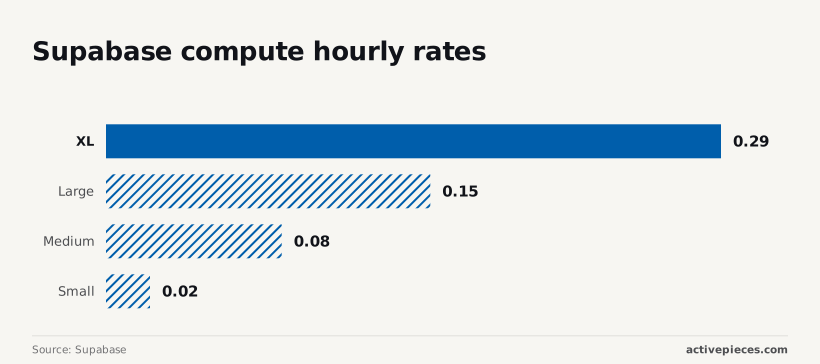
Stepping up to a Medium instance at $0.0822 per hour commits you to a $60 monthly overhead. The Large instance, priced at $0.1517 per hour, results in a $110 monthly charge.
Finally, the XL instance at $0.2877 per hour creates a $210 monthly baseline. This ensures that heavy analytical workloads do not suffer from disk I/O throttling.
To audit your next 12 months of billing, you must calculate the following three variables:
1. The **hourly compute cost** for your required RAM and CPU, which sets your monthly minimum.
2. Egress fees at $0.09 per GB, which can exponentially increase if you serve large media files directly from storage, meaning a single viral spike could unexpectedly inflate your monthly invoice.
3. Database size surcharges at $0.125 per GB, which penalizes long-term logging or data hoarding without a cleanup strategy, so failing to prune old records will lead to a perpetual rise in your operational overhead.
## Frequently asked questions about Supabase billing?
### Does Supabase charge for idle projects?
Supabase does not charge a fee for projects that sit idle, but it will pause them on the Free Tier to reclaim resources for active users. When a project is paused, the REST API and database connections become unavailable.
Any application attempting to fetch data will receive a connection error until the project is manually resumed through the dashboard.
On the Pro plan, projects remain active regardless of traffic levels. You are paying for the guaranteed availability of your compute instance even if it processes zero requests.
### What happens if I exceed the Free Tier limits?
Rather than triggering an automatic bill, exceeding the limits on a Free Tier project results in the service becoming read-only or restricted.
Because the Free Tier lacks a payment method by default, the platform prevents overages by disabling writes to the database or blocking further file uploads to storage.
Your application will effectively break for your users until you upgrade to a paid tier.
Once you move to the Pro plan, these hard stops are replaced by metered surcharges, ensuring the service remains functional while your monthly invoice scales with your usage.
### Can I set a hard spending cap on the Pro plan?
To prevent your monthly bill from exceeding the base subscription price plus any pre-configured add-ons, Supabase allows you to toggle "Spend Caps".
Enabling the spend cap ensures you are never surprised by viral traffic spikes or runaway egress costs, but it also means your project will return errors once the included quota is exhausted.
If your application relies on high-reasoning models like Claude Opus 5.5 or GPT-6 Astra for agentic workflows, a hard cap might shut down your backend mid-task.
Most production environments opt for notifications rather than strict enforcement.
### Is there a discount for annual Supabase billing?
Available for the Pro plan, annual billing provides a reduced effective monthly rate compared to paying month-to-month. Choosing the yearly option commits you to a fixed term, so you lose the flexibility to downgrade or cancel instantly if your project requirements change.
This trade-off benefits established businesses with predictable workloads. The upfront payment lowers the total cost of ownership for the infrastructure over the course of the year.
## Related reading
- [Jotform Pricing 2026: Plans, Costs & What You Get](https://www.activepieces.com/blog/jotform-pricing-2026-plans-costs-what-you-get)
- [Webflow Pricing 2026: Plans, Seats, and Real Costs](https://www.activepieces.com/blog/webflow-pricing-2026-plans-seats-and-real-costs)
- [Xero Pricing Plans Compared: Costs and Fees in 2026](https://www.activepieces.com/blog/xero-pricing-plans-compared-costs-and-fees-in-2026)
## References
- [Supabase](https://supabase.com/docs/guides/platform/compute-and-disk)
- [Firebase](https://firebase.google.com/pricing/,)
- [Vercel](https://vercel.com/changelog/vercel-blob-is-now-generally-available,)