### What the REST API lets you do Anything a person does on a board, a script can do: create cards, move them between lists, assign members, comment, attach files and read board state. Webhooks push changes to your endpoint, so you can react to a card moving instead of asking repeatedly whether it moved. ### Which Trello plans include API access As of 2026-11-23, the table shows list price and API terms for each plan. | Plan | Price per user/month | API access included | API calls priced separately | |---|---|---|---| | Free | $0 | Yes | No | | Standard | $5 billed annually, $6 billed monthly | Yes | No | | Premium | Listed on Trello's pricing page | Yes | No | | Enterprise | Listed on Trello's pricing page | Yes | No | On Standard, a team committing for the year saves a little per seat, because annual billing runs $1 below monthly. That's a finance decision, not a technical one, so it never gates your build. No. You pay no per-call fee on any plan. The limit you'll meet is **a rate limit, not a bill**, and that's where production work begins. ## Get a Trello API key and token To get a working token, you take the key from a Power-Up record and turn it into a token with a single authorize URL. The sequence below shows the whole path, so you can see that only the last two steps involve a person.  1. Open the Power-Ups admin portal at trello.com/power-ups/admin. 2. Create a new Power-Up. 3. Generate the API key on its API key tab. 4. Copy the key and the secret. 5. Build the authorize URL with `key`, `scope`, `expiration`, `response_type=token` and a `name`. 6. Open the URL while signed in and approve. 7. Copy the token from the page that follows. ### Setting up the key You do steps one to four once per integration. Steps five to seven repeat for every account that grants access. You don't need to build a working Power-Up, because it's only a container that owns the key. Keep the secret out of client-side code, because it's what lets you use OAuth 1.0a. ### Building the authorize URL Start from `https://trello.com/1/authorize` and add your parameters. The token it returns acts as whoever approved it, so use a dedicated service account if you don't want automation tied to a person who may leave. Pick a scope of `read`, `write` or `account`, and combine them if you need to. Request the narrowest set the process needs. Expiration can be short-lived or `never`, and a token that never expires is one you must be able to revoke. ### Choosing a token method and sending credentials For scripts and internal tools, the authorize URL token fits: it acts as the approving member, with scope and expiration set in the URL. For apps serving many users, OAuth 1.0a fits: it acts as each member who approves, with scope and expiration requested per user. Both are covered in [Trello's authorization guide](https://developer.atlassian.com/cloud/trello/guides/rest-api/authorization/). You can send both as `key` and `token` query parameters, which is easy but leaves credentials in logs and proxies. Sending them in an `Authorization: OAuth` header keeps them out of URLs, so prefer it in production.  ## Make a first Trello API request that works If one authenticated GET to `/1/members/me/boards` returns your boards as JSON, your key, token and header format are all correct, and everything after it's the same pattern. ### List your Trello boards with curl Use the header format from the previous section so credentials never appear in a URL: ```bash curl --request GET \ --url 'https://api.trello.com/1/members/me/boards?fields=name,url' \ --header 'Authorization: OAuth oauth_consumer_key="YOUR_KEY", oauth_token="YOUR_TOKEN"' ``` When the call succeeds, you get a JSON array with one object per board: ```json [ { "id": "64a1f0c2e9b3d47a1c5e8f90", "name": "Q3 Rollout", "url": "https://trello.com/b/abc123/q3-rollout" } ] ``` You'll need the `id` that every object carries to find lists. An empty array means the token works but belongs to a member with no open boards. An unauthorized response means the key or token is wrong, so fix that before going further. To create a card, you first need a list, because cards are created inside one. Fetch the list ID with `GET /1/boards/{boardId}/lists`. Then post to `/1/cards` with `idList` and `name`: ```bash curl --request POST \ --url 'https://api.trello.com/1/cards' \ --header 'Authorization: OAuth oauth_consumer_key="YOUR_KEY", oauth_token="YOUR_TOKEN"' \ --data-urlencode 'idList=YOUR_LIST_ID' \ --data-urlencode 'name=First card from the API' ``` Once the post succeeds, the response is the full card object, including its `id` and `shortUrl`. The main endpoint families are: - boards and the lists inside them - cards, including attachments, comments and labels - members and workspaces - checklists - webhooks Parameters, response shapes and the current list of routes are in the [Trello REST API reference](https://developer.atlassian.com/cloud/trello/rest/). ## Understand Trello API rate limits At 300 requests per API key and 100 per token in each 10-second window, **the token's the tighter limit**, making per-token throughput your actual bottleneck, so **you need more tokens, not more keys**, to scale.  ### Per-key and per-token windows Both limits run over the same window, according to the [Trello Developer Docs](https://developer.atlassian.com/cloud/trello/guides/rest-api/rate-limits/). According to Atlassian [Developer](https://developer.atlassian.com/cloud/trello/guides/rest-api/rate-limits/), the per-minute equivalents are 1,800 for the key and 600 for the token. 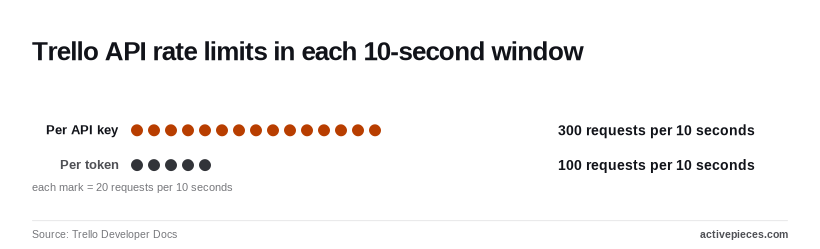 If 20 users each run on their own token, the key ceiling is reached long before the token ceilings are, because the 300-per-10-seconds key limit is shared by every user of your integration. The token limit is your real budget. Per Atlassian Developer, the 600-per-minute token limit is the figure for one user's board sync or bulk import. A job that loops over cards without pacing can exhaust it within seconds. Nowhere on the rate-limit page, checked on 2026-11-23, is there a tier table. It states the two limits above without varying them by Trello plan, so treat 300 and 100 per 10 seconds as the numbers to build against. When a window is exceeded, Trello rejects the request with HTTP status 429. Treat it as a pacing signal, not a failure. Wait out the 10-second window before retrying, and queue your calls so a burst never reaches the ceiling in the first place. 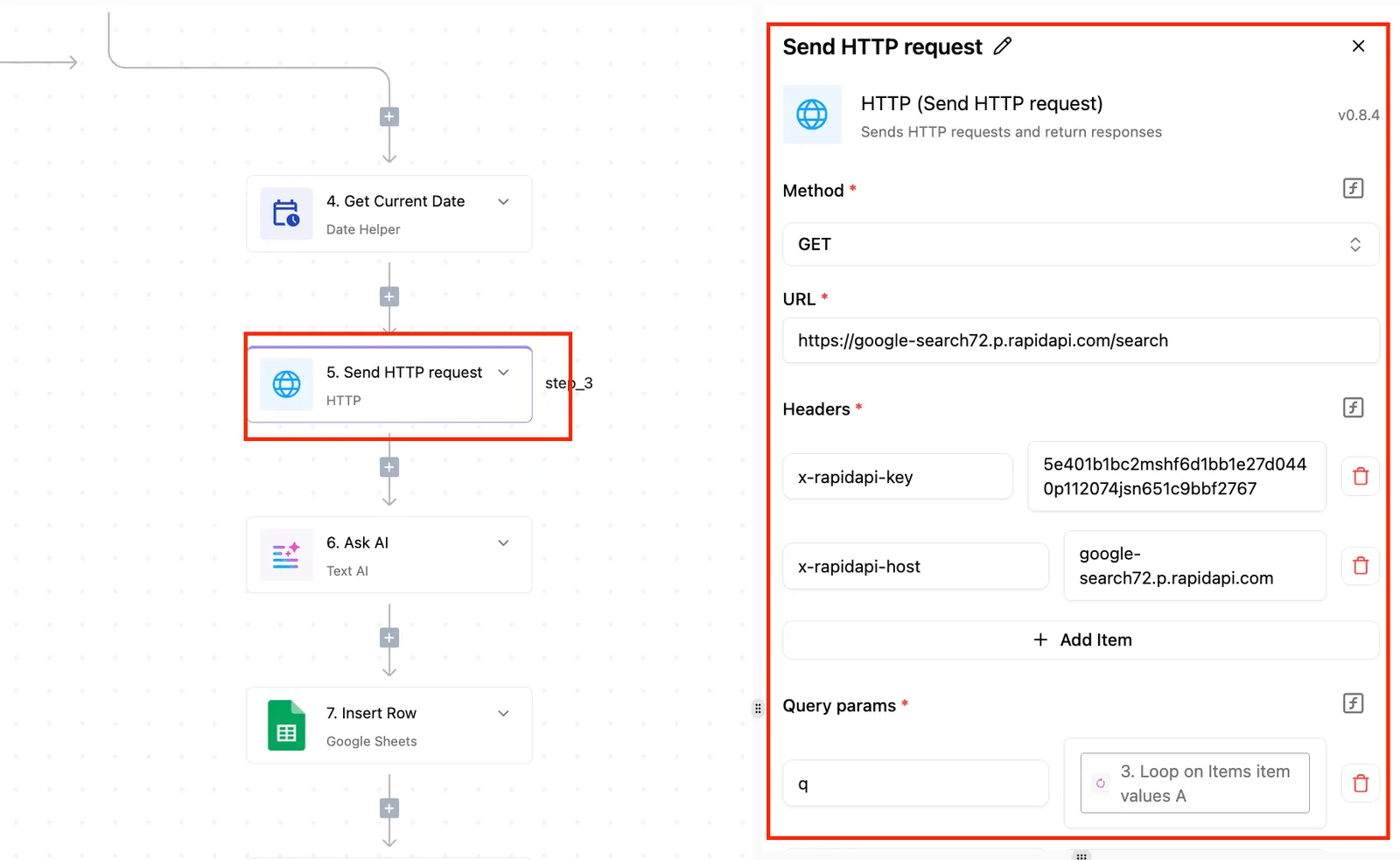 The token scoping, pacing and queueing above is work someone has to build and own, and [Activepieces](https://www.activepieces.com) lets you describe the process to its built-in chat instead. The chat publishes a live flow, the same artifact a builder would have assembled by hand, under the same RBAC and audit logs as every other flow, and each run leaves a trace anyone can read. MoneyGram, Moneypenny, Alan and FundingSocieties run Activepieces in production. ## Fix common Trello API errors Only the 429 clears by waiting; the other four need a change to the request or the credential. Five responses cover most failures. The table below pairs each one with its usual cause, the fix and the page to check, so you can triage from the status code alone. | Status / message | Usual cause | Fix | Docs link | |---|---|---|---| | 401 invalid key or token | Key or token missing, mistyped or revoked | Resend both with the request and regenerate if revoked | [Authorization](https://developer.atlassian.com/cloud/trello/guides/rest-api/authorization/) | | 400 bad parameters | Malformed ID, missing required field, wrong value type | Compare the request to the endpoint's parameters | [REST reference](https://developer.atlassian.com/cloud/trello/rest/) | | 404 not found or no access | Wrong ID, or the token's member cannot see the object | Confirm the ID, then confirm membership | [REST reference](https://developer.atlassian.com/cloud/trello/rest/) | | 429 rate limited | Calls arrived faster than the limit allows | Back off, then queue calls | [Rate limits](https://developer.atlassian.com/cloud/trello/guides/rest-api/rate-limits/) | | Expired token | Token was issued with an expiration that has passed | Re-authorize and store the new token | [Authorization](https://developer.atlassian.com/cloud/trello/guides/rest-api/authorization/) | Because expired tokens surface as 401s, the sections below take the ambiguous cases in turn. Check the expiration before anything else. A token issued with a fixed lifetime fails the same way as a mistyped one, so a pipeline that worked last week and now returns 401 has usually aged out, not broken. You cannot tell a missing board from a hidden board, because [Trello](https://trello.com/pricing) returns 404 for objects the token's member cannot see. Open the board as the member who authorized the token. If you can't see it, add that member to the board or workspace; the code is fine. For 429s, retry with a delay that grows after each failed attempt, and add a small random offset so parallel workers don't retry in lockstep. ## Cut Trello API calls with webhooks and batching Register a webhook with POST /1/webhooks and Trello pushes changes to you. You stop spending requests on polls that mostly return nothing, and the queue you just built only has to absorb real events. ### Create Trello webhooks instead of polling the API Give the request a callback URL, the ID of the model to watch (a board, list or card) and an optional description. Trello checks that your callback URL answers before it creates the webhook, so the endpoint has to be live and reachable from the public internet first. 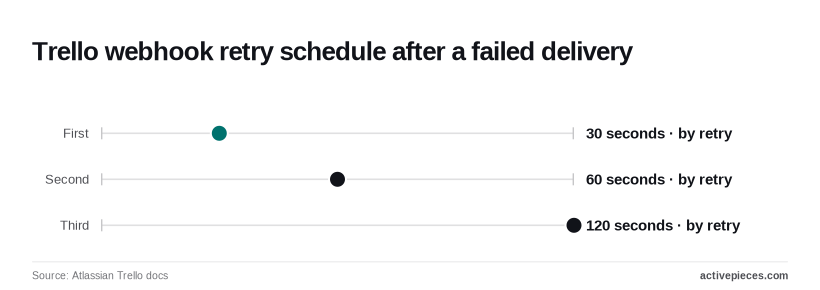 When your endpoint fails to respond, Trello retries on a fixed schedule. Per the [Atlassian Trello docs](https://developer.atlassian.com/cloud/trello/guides/rest-api/webhooks/), the sequence below is what a reader should plan around: 1. Delivery fails. 2. Rate-limited requests clear once the 10-second window passes, so wait before retrying. 3. If that fails, it waits 60 seconds, then retries. 4. If that fails, it waits 120 seconds, then makes a final retry. 5. If the final retry fails, the webhook is disabled. If the restart is brief, you lose one delay and nothing more, because **the first retry comes after 30 seconds**. The second wait of 60 seconds and the third of 120 seconds mean the whole sequence closes in roughly three and a half minutes of waiting. **An outage longer than that ends in a disabled webhook, not a late one.**  **Disabled means events stop arriving** until you notice and re-enable it, so alert on that state instead of discovering it from a stale dashboard. ### Fields, batch and pagination Ask only for what you use. The `fields` parameter on a card or board request trims the response to the named properties, which cuts payload size and parsing work on every call. When a single screen needs a board, its lists and its members, use the batch endpoint, `/1/batch`, which takes a list of read URLs in one request. One round trip replaces several and counts against your rate limit more gently. For long result sets, page through them with the `limit` and `before` parameters instead of pulling everything at once. A bounded page keeps each response small, so one slow request can't stall the whole sync. ## Call Trello endpoints without code using Activepieces ### Automate Trello without writing code For most Trello work, you can skip code with [Activepieces](https://www.activepieces.com/blog/trello-api-keys-tokens-rate-limits-and-webhooks). It handles creating cards, reacting to board changes and syncing data through its Trello integration, with an HTTP action for endpoints the integration doesn't expose. That means the pagination loop above is something you only write yourself when you choose to. ### Reading a workflow In the screenshot below, a flow named "Test Flow" sits on the builder canvas. It's not a Trello flow, but the shape's what matters. A schedule trigger ("Every Day") starts it, a Code action picks a topic, an HTTP request step calls an outside search service, and two Agent steps write and refine a draft, so if search is down, nothing gets written that day.  Read it as a row of cards: each step has a type label, and connectors with a plus button for inserting more join them. For Trello, you swap the first card for a board trigger and put card creation or an HTTP call further down. The process reads top to bottom, and nobody has to maintain a polling script. ### When to write Trello API code instead The next section covers the edges of that fit. Write code instead when you need custom batching across many boards, strict latency, or logic that doesn't read cleanly as steps. Those cases are where a hand-built client earns its upkeep. For everything else, a template you copy and adjust is faster to roll out. On Monday: 1. Generate your Trello API key. 2. Authorize a token limited to the access the flow needs, and nothing broader. 3. Make one first call, such as creating a card on a test board. 4. Add backoff on the HTTP step for rate-limit responses. 5. Switch from scheduled checks to a webhook-based trigger where the integration offers one. ## Frequently asked questions Once the first integration is running, four questions tend to come up, and each has a short answer. ### Is the Trello API free to use? Yes. The REST API is available to any Trello account, and you don't need a paid plan to call it. Paid plans change what a board can hold, such as Power-Up limits and automation allowances, so a workflow that's fine on a free workspace can hit those limits as adoption grows. Check the plan details before you promise a team a rollout date. Docs: https://developer.atlassian.com/cloud/trello/ ### Does a Trello API token expire? It can. The authorization URL takes an expiration parameter, so the lifetime's your choice when you generate the token. A short-lived token limits the damage if it leaks but breaks a scheduled job without warning, so match the lifetime to how the job runs. Tokens can also be revoked by the member who granted them. Docs: https://developer.atlassian.com/cloud/trello/guides/rest-api/authorization/ ### Can I use the Trello API without a Power-Up? Not for getting a key. Trello now issues API keys from a Power-Up's admin page, so you register one first. It can be a bare registration with no interface or capabilities. That means the first step of any integration is an admin-portal task, not a code task, so assign it to someone with the right workspace access before the build starts. Docs: https://developer.atlassian.com/cloud/trello/power-ups/ ### How do I get a Trello board ID? Open the board in a browser and add `.json` to the end of its URL. The `id` field at the top of the response is the board ID. You can also list your boards through the API and read the IDs from the result, which is the better route when a script has to find boards itself. The full endpoint list is in the API reference. Docs: https://developer.atlassian.com/cloud/trello/rest/api-group-boards/ ## Related reading - [Google Docs API Rate Limits for Developers (2026)](https://www.activepieces.com/blog/google-docs-api-rate-limits-for-developers-2026) - [Zoom API Authentication and Rate Limits for Developers](https://www.activepieces.com/blog/zoom-api-authentication-and-rate-limits-for-developers) - [Firecrawl API Limits and Credits for Developers](https://www.activepieces.com/blog/firecrawl-api-limits-and-credits-for-developers) ## References - [Atlassian Developer](https://developer.atlassian.com/cloud/trello/guides/rest-api/rate-limits/) - [Atlassian Trello docs](https://developer.atlassian.com/cloud/trello/guides/rest-api/webhooks/)Your cost is the seat you already pay for.