# vidIQ Automation Tools for YouTube Channels in 2026

By Petra Vlk · 2026-11-18 · Source: https://www.activepieces.com/blog/vidiq-automation-tools-for-youtube-channels-in-2026

---
<aside class="tldr"><p class="tldr-label">Summary</p><p>VidIQ automates YouTube research and titling, not filming or publishing, and every draft needs human review before use.</p><ul><li>Free tier provides 150 monthly AI credits, insufficient for weekly titling.</li><li>Free plan limits keyword searches to 3 results instead of unlimited.</li><li>Hitting the monthly AI credit limit breaks your pipeline silently, no warning.</li></ul></aside>

**vidIQ automates the research, titling and optimisation work around a YouTube channel, and it doesn't run the channel: nobody films, edits or publishes on your behalf.** If you wanted a channel that runs itself, the tool will quietly disappoint you; if you wanted the desk work done faster, it won't.

Think of vidIQ as a browser extension and web dashboard that reads YouTube's public data and your own channel analytics, then turns them into keyword scores, competitor comparisons and draft metadata.

Per [Lenspov](https://lenspov.com/articles/vidiq-pricing-2026), every claim about what it does, and every limit tied to a plan, was checked on 18 November 2026 against vidIQ's pricing page, its help centre and its changelog.

Where a limit isn't stated on one of those pages, this article doesn't state it. That matters because plan limits change without announcement, and a quota you assumed is the one that stops a workflow at the worst moment.

## VidIQ automation is research and optimisation, not autopilot

### What vidIQ automates today

Anything that is search or drafting, the tool takes over. It finds keywords and scores them, surfaces outlier videos that beat their channel's usual performance, proposes ideas on a schedule, and drafts titles, descriptions and tags.

Read the list below as a division of labour: the left side is work you can hand over and review, the right side is work that stays with you.

<!-- list sits here -->

Take from it that the left column ends at a draft. Everything vidIQ produces still needs a person to accept it, which is the point where a pipeline needs a deliberate step rather than a hopeful one.

### What it doesn't do

**It doesn't film, edit, upload or publish**. It has no camera, no timeline and no scheduler that pushes a finished video live. A suggested title is text in a dashboard until someone, or something else, applies it.

When an article says vidIQ "automates your channel", it is describing the drafts and skipping the handover. That gap is where the work you thought was done turns out not to be.

![Two desks with a gap between them: a tidy stack of finished drafts on the left, an empty tray on the right, and one sheet…](https://ap-marketing-media.fra1.cdn.digitaloceanspaces.com/uploads/03d7ea76-a47c-4934-b04a-c6e4445c5cfa/vidiq-automation-tools-for-youtube-channels-in-2-543febad.webp)

**The steps don't connect themselves**. That is a separate job.

### What you'll have working by the end

In about 90 minutes you'll have a short pipeline set up in stages, by which point you're ready to test. Research feeds ideas, ideas feed drafted titles and descriptions, and a human reviews before anything is applied to a video.

It won't make videos. It will make the decisions that precede them quicker to reach and easier to check, and each stage will carry its limit, verified against vidIQ's own pages, so you know where it stops.

## VidIQ setup and niche selection

Stages 1 and 2 take most of that time. You install vidIQ's extension, connect your channel, and end with a saved shortlist of keywords in a niche that pays enough to justify the work.

1. Add the vidIQ browser extension and create an account.
2. Sign in on YouTube so the extension appears beside every video and search result.
3. Connect your channel, so the tools score ideas against your own history rather than a blank slate.

Do this before choosing a plan. The free tier is enough to see what the sidebar gives you, and you'll know what you're paying for.

### Building a vidIQ keyword shortlist for video topics

Run each candidate topic through the keyword tool and read the search volume and competition scores together. High volume against heavy competition means you're bidding against established channels.

Then use the outlier view to find videos that beat their own channel's average, which tells you the topic carried the video, not the uploader's audience.

Weigh the result against what the niche pays. [NicheRPM](https://www.nicherpm.com/youtube-rpm-by-niche) puts **finance at $10.50 to $20.25 per 1,000 views**, so a million views earns roughly $10,500 to $20,250.

![What 1,000 views pay across YouTube niches](https://ap-marketing-media.fra1.cdn.digitaloceanspaces.com/uploads/740f28ae-294d-4a02-a788-d0f94c033191/vidiq-automation-tools-for-youtube-channels-in-2-93e8a10f.svg "Source: NicheRPM")

At the other end, entertainment sits at $1.50 to $4, so entertainment creators earn the lowest rates across these categories. The same million earns $1,500 to $4,000, meaning creators see modest payouts even at scale.

Tech ($7 to $13.50), education ($6.30 to $12.15) and gaming ($2 to $5) fall between, earning creators significantly more than entertainment generates.

A topic with modest search volume in finance can therefore out-earn a crowded entertainment one. Save the five to ten keywords that survive both tests; that list feeds every later stage.

### VidIQ plans and pricing for automation

On vidIQ's [plans page](https://vidiq.com/plans/), Boost is listed at $19 a month, or $16.58 on yearly billing, and Max at $49 a month, or $39 yearly, so annual subscribers save significantly over monthly billing. You pay substantially more if you choose monthly billing.

![What vidIQ's paid plans cost per month](https://ap-marketing-media.fra1.cdn.digitaloceanspaces.com/uploads/32b1cf5f-388d-4477-9c5d-bae29ad31924/vidiq-automation-tools-for-youtube-channels-in-2-2f81ec2e.svg "Source: vidIQ")

Yearly billing saves about $29 a year on Boost and $120 on Max, but only if you stay twelve months.

For this pipeline, these are the limits that matter:

| Plan | AI credits | Keyword results |
|---|---|---|
| Free | 150 | 3 |
| Pro | 1,000 | Unlimited |
| Boost | 2,000 | Unlimited |
| Max | 6,000 | Unlimited |

![A printed plan table card with rows Free, Pro, Boost, Max: AI credits as token stacks growing taller down the rows, Free…](https://ap-marketing-media.fra1.cdn.digitaloceanspaces.com/uploads/bb94284f-ddbb-423b-a3f0-c4e126ce4187/vidiq-automation-tools-for-youtube-channels-in-2-4667a29e.webp)

Build a shortlist on Free and **you have three guesses, not research**, because it shows only three keyword results.

Every paid tier lifts that cap, so the real choice between them is how many AI credits your titling and ideation will burn. The next stages show where credits go, so you can size the plan against actual use.

## Generating ideas, titles and descriptions

Nothing in these stages produces a finished upload; the credits go on suggestions. vidIQ will draft a week of ideas, titles, descriptions and tags. Every draft still needs a person before it's saved.

The sequence below shows the order that keeps the spend small and the edit in place, and the three subsections explain the reasons.

1. Open the daily ideas screen.
2. Pick a week of ideas from it, one per planned upload.
3. Generate titles for each chosen idea.
4. Draft the description, staying within the 5,000-character limit, so nothing is silently cut off at the end where links usually sit.
5. Add tags, staying within the 500-character limit, so an overlong list isn't rejected or truncated at upload.
6. Edit and rewrite by hand before saving.

Automations drop step six first, and the last subsection explains why that's a mistake.

### Generating and scoring a week of video ideas

Work from the daily ideas screen once, not every day. Choosing a week in one sitting means you spend credits on one deliberate pass instead of seven impulsive ones.

Read each suggestion against your own channel's recent uploads before you accept it. A suggestion that fits the market but not your audience will lose you viewers the tool never sees.

### Stage 4: Draft titles and descriptions, then edit by hand

Generate several title options per idea and treat them as raw material. The tool has no idea what your video says, so a title it writes can promise something the footage doesn't deliver.

Do the same with descriptions and tags: let the tool produce a first draft, then check each claim against the finished video.

Rewrite the opening lines in your own words, because they're what viewers see before they click to expand. Save only after you've done that.

### Where YouTube's monetisation policy limits automation

You can have an AI write ideas, titles and descriptions without breaching YouTube's Partner Program policies.

What those policies exclude from monetisation is mass-produced or repetitive content, and the wording is about the content, not the tool that made it. A channel where every upload is templated and no one has changed anything can breach them.

Read the current policy text on YouTube's own help pages before you scale up, since the wording is YouTube's to change. **The human edit is therefore not a courtesy**. It's the part of the pipeline that keeps the channel eligible to earn.

## Pipeline connection with workflow tool

Because vidIQ doesn't run publishing, the last link is a small workflow that moves each approved idea into a tracker and sends you a reminder when it's due. Without it, approved ideas sit in a vidIQ list and nothing prompts you to act on them.

<blockquote class="pull"><p>The human edit is therefore not a courtesy. It's the part of the pipeline that keeps the channel eligible to earn.</p></blockquote>

### What the workflow does

There is one trigger and one action. The trigger is an idea reaching "approved" status. The action is a new row in your tracker, plus a reminder message to you.

It does no research or titling, and it never touches the channel. It only carries a decision from one place to another so that the decision isn't lost.

Set it up in this order:

1. Choose the trigger: a new or changed row in the sheet where you approve ideas, filtered to approved status only.
2. Add the action that creates a tracker entry.
3. Map the fields: working title, target keyword, the thumbnail note, a due date, and a link back to the source idea.
4. Add a second action that sends the reminder to your email or chat, with the title and due date in the body.
5. Run one test row and check that every field arrived filled in, not blank.

Step 5 is the one people skip. A mapped field that arrives empty fails without any error, and you find out only when a reminder says "Publish: " and nothing else.

![A reminder card pinned on a corkboard, its message area completely blank, with a person in front of it leaning in with a…](https://ap-marketing-media.fra1.cdn.digitaloceanspaces.com/uploads/3b2c4fa4-b319-4bf8-bf7b-754fbdfc3cc3/vidiq-automation-tools-for-youtube-channels-in-2-fc2b0a75.webp)

[Activepieces](https://www.activepieces.com) meters the run, not the steps inside it: this flow costs 1 credit whether it has two steps or ten, so adding the status filter and the field check never raises the bill, which it would under Zapier's per-task billing.

Those extra steps are what make the flow dependable, and a week of approved ideas still uses a handful of the free plan's 1,000 monthly credits, leaving most of your quota for other uses.

### Manual and other options

You can skip the tool. The table compares the three routes on what you set up, what you pay and how each one fails.

| Route | Setup effort | Cost | What breaks |
|---|---|---|---|
| Manual copy-paste | None beyond a tracker template | Your time only | You forget. Ideas stay approved and unscheduled, and nothing tells you. |
| Activepieces no-code workflow | An afternoon to build and test | Check the tool's own pricing page for the plan you need | A renamed column or an expired connection stops the run, and the reminder never fires. |
| vidIQ's own features | Already in your account | Whatever your vidIQ plan costs | It stops at ideas and optimisation, so there is no tracker or reminder to configure. |

Look at the last column: the cheapest route fails silently, and the most automated route fails silently too, just later. Whichever you pick, put a weekly check on your calendar to confirm the reminders still arrive.

## VidIQ limits, errors, and fixes

Before you open a support ticket, find your failure among five categories. They cover nearly every vidIQ failure that stops an automation, and each has a fix you can try in minutes.

If the extension isn't showing, confirm it's enabled and pinned in your browser's extensions menu, then reload the YouTube tab. If it's still missing, reinstall it.

If the channel won't connect, sign in with the Google account that owns the channel, not a manager login, then reconnect.

When you hit a credit or plan limit, check your allowance in vidIQ's [credits-by-plan article](https://support.vidiq.com/en/articles/13928456-features-credits-by-plan) and either wait for the reset or move up a tier.

![vidIQ monthly AI credits by plan](https://ap-marketing-media.fra1.cdn.digitaloceanspaces.com/uploads/29b6269e-c208-43f2-9760-852b407d3443/vidiq-automation-tools-for-youtube-channels-in-2-9d0a9421.svg "Source: vidIQ Help Center")

For stale data, refresh the page, then compare the number against YouTube Studio, which is the source of truth.

For billing or cancellation, search the [vidIQ Help Center](https://support.vidiq.com/) for the billing article before you act, and cancel ahead of the renewal date.

### VidIQ extension and channel connection problems

When the extension goes missing, it's usually a browser setting, not a vidIQ outage. Browsers hide new extensions inside a menu, so the toolbar icon is often simply collapsed.

If the channel won't connect, it's usually an account mismatch: you're signed in to a Google account that isn't the channel's owner. Fix the account first, because reconnecting repeatedly under the wrong login will fail every time.

### VidIQ plan limits and AI credits

Run out of AI credits and **a pipeline breaks silently**, much like an empty mapped field. Free gets [150 a month](https://support.vidiq.com/en/articles/13928456-features-credits-by-plan), so a weekly titling workflow can run dry before the month ends and every later step fails.

If you're on an old subscription, don't expect it to match current tiers: the retired Pro plan had 1,000.

On Boost you get 2,000, enough for a daily research habit. Max has 6,000 credits a month against 150 on Free and the only sensible choice if several automated steps spend credits unattended.

Count the credits each automated step uses before you schedule it, and set a mid-month check so a dead allowance doesn't look like a broken workflow.

If a feature isn't listed in the credits article, ask vidIQ support whether it costs credits or needs a higher plan, and keep the written reply.

When data looks stale or mismatched, it's almost always a timing gap between vidIQ's snapshot and YouTube's live figures. Refresh first, then compare against YouTube Studio.

If the gap persists after a day, send support the video URL, the two numbers, and a screenshot with the time visible. A dated screenshot is the thing they can actually act on.

## What Activepieces does about this

The gap this article keeps returning to is the handover: vidIQ ends at a draft, and nothing carries an approved idea to the place where you'll act on it. Activepieces is built for that link.

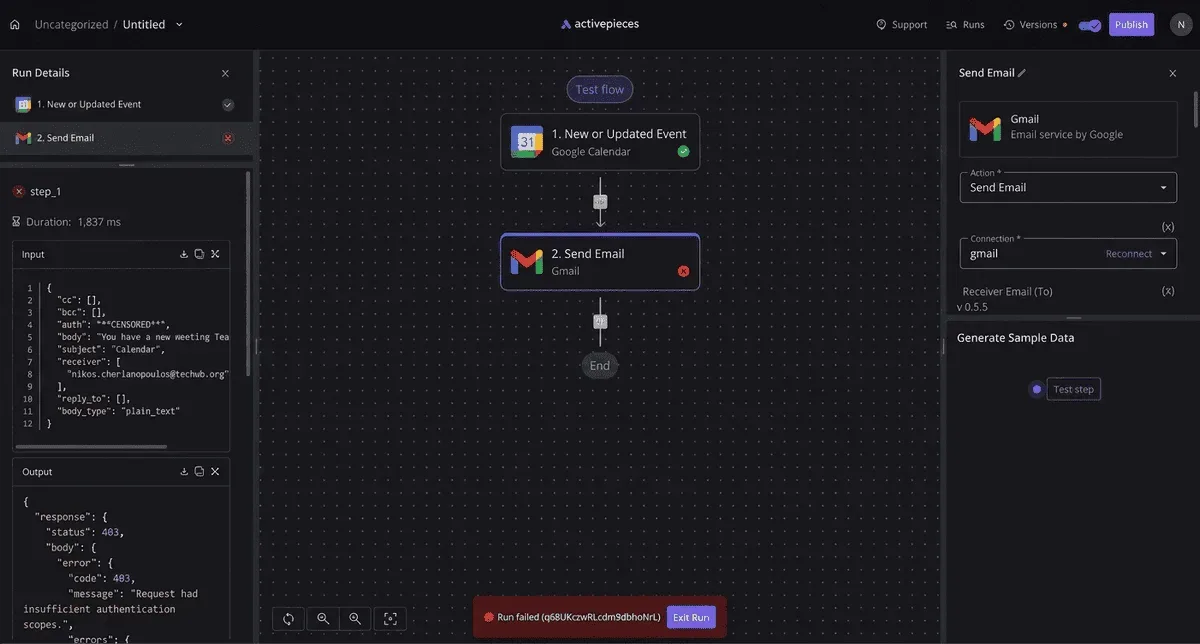
It's a workflow tool where you set a trigger, add actions and map fields, which is the five-step flow described above: a row in your approval sheet reaches "approved", a tracker entry is created, and a reminder goes out with the title and due date.
![A failed two-step workflow in Activepieces showing a Google Calendar trigger connected to a Gmail send email action, with…](https://ap-marketing-media.fra1.cdn.digitaloceanspaces.com/uploads/d92eb24d-50c6-4cf1-8445-b563b17f0966/lever-api-rate-limits-and-webhooks-2026-guide-sc-e97557a6.webp)

It doesn't research, title or publish, and it doesn't pretend to. It moves a decision from one place to another so the decision isn't lost.

The pricing is what makes the dependable version of that flow affordable. Activepieces counts a run as one credit however many steps sit inside it, and the free plan includes 1,000 credits a month.

The status filter, the field check and the reminder therefore cost the same as a bare two-step flow, and a week of approved ideas barely dents the allowance.

Pricing changes, so check the figure on the Activepieces pricing page on the day you sign up, as you would with vidIQ's.

The code is open source under the MIT licence, so you can run it on your own server if you'd rather not depend on a hosted plan.

That's a real option for a one-person channel with a small, steady flow, though self-hosting trades the credit allowance for upkeep you now own.

Either way, build the single flow first, run one test row, and add the weekly check that confirms the reminders still arrive. A renamed column or an expired connection will still stop a run, and that's true of any workflow tool.

## Frequently asked questions

Is vidIQ free to use for automation? The free plan is enough to test the research and titling stages, but not to trust them. Limits on AI credits and keyword lookups sit on vidIQ's pricing page and change.

Screenshot that page the day you sign up, with the date visible. If a feature stops working mid-week, that image shows what you were promised.

Can vidIQ upload videos automatically? No. Nothing in vidIQ's documentation describes it publishing videos to your channel. It handles research, titles, descriptions, tags and optimisation suggestions.

Recording, editing and uploading stay with you or with other tools, so a pipeline built on vidIQ still needs a human or a separate publishing step at the end.

### Does YouTube allow automated channels to earn money?

Sometimes. Automation isn't the test. The YouTube Partner Program's rules on repetitive, mass-produced or inauthentic content are.

A channel that runs research and titling through software but publishes original videos with real work in them is in a different position from one that turns out near-identical uploads.

Read the current monetisation policy on YouTube's help pages before you build anything around revenue. AI-written titles don't break policy by themselves. Misleading titles and thumbnails do, whoever wrote them.

### How is vidIQ different from TubeBuddy?

Both are tools that sit around a YouTube channel rather than running it, and both cover keyword research, titles and optimisation.

Where they differ is in which features each plan includes and where the limits fall.

Those details change, so compare the two pricing pages side by side on the same day and take your answer from the features you'll use, not from a summary written by someone else.

### What should I do first on Monday?

Do one stage, not the pipeline. Pick the one channel you're working on, connect it to vidIQ, and run a single round of research for your next video.

Write down which limit you hit first, with the date. That note tells you whether the free plan is enough, and it's a better basis for the next stage than any feature list.

## Related reading

- [Automate YouTube: Tools and Methods (2026 Guide)](https://www.activepieces.com/blog/automate-youtube-tools-and-methods-2026-guide)
- [vidIQ Pricing 2026: Free, Boost and Max Plans](https://www.activepieces.com/blog/vidiq-pricing-2026-free-boost-and-max-plans)
- [YouTube API Quota Exceeded? How to Fix and Avoid It](https://www.activepieces.com/blog/youtube-api-quota-exceeded-how-to-fix-and-avoid-it)

## References

- [NicheRPM](https://www.nicherpm.com/youtube-rpm-by-niche)
- [vidIQ Help Center](https://support.vidiq.com/en/articles/13928456-features-credits-by-plan)
- [vidIQ](https://vidiq.com/plans/)
