### WhatsApp API users by country and market If you build for Indian customers, one channel reaches most of a very large market: according to World Population Review, **India has 853.8 million users**. Brazil has 148 million, Indonesia 112 million and Mexico 77 million, according to World Population Review, and customers in all three markets expect to message a business rather than email it. 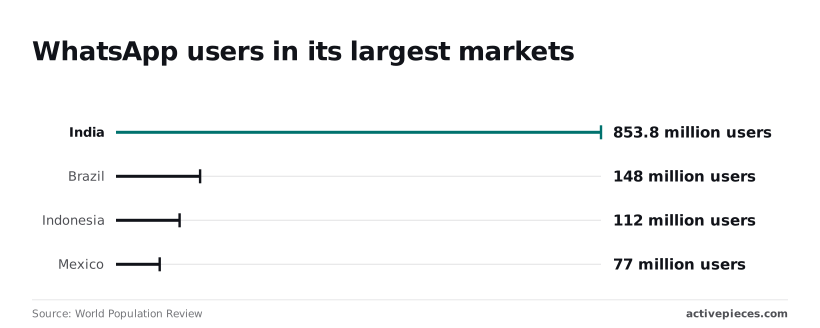 By the end you'll have a test message sent through the API and a clear list of what keeps it sending. ### What you can send You can send and receive text, media and pre-approved template messages, and delivery status is reported back to a webhook you host. You can't message a stranger freely: outside a customer's reply window, **you can only send an approved template**. There is also no chat interface, so someone must build or buy the inbox.  ### Cloud API versus the WhatsApp Business app One small team answering chats by hand is what the Business app is for; it is a phone app. The Cloud API is hosted by Meta and driven by code, with no phone in the loop; [Activepieces](https://www.activepieces.com), which has 750 integrations including a WhatsApp connector (so you're not limited to a few key services) drives it from a flow instead. The trade is control for rules: the API scales to automated volume, but Meta enforces template, pricing and quality policies the app never shows you. You need a Meta business account, a phone number not already registered to WhatsApp, and an owner named for the account. Then set up four things before writing code, because each can stop sending. Start with template approval: Meta must approve any template before you can use it to open a conversation, so **an unapproved or rejected one blocks the message**. Each template also carries a per-message pricing category, billed as marketing, utility or authentication, and a miscategorised one costs more than you budgeted. If you reach the cap of your number's messaging limit tier, new conversations pause; the tier caps how many customers it can message per day. The quality rating matters too: if recipients block or report you, the rating drops, and a low rating can stop your limit from rising. ## Setup walkthrough from developer account to first message From a developer account to a delivered `hello_world` message is six stages, and the whole path takes minutes. Decide who owns each credential as you go, because that person gets paged when it stops working. Follow the order below, with the screens you'll touch at each step. 1. Create a Business-type app in the Meta developer dashboard. 2. Add the WhatsApp product to that app. 3. On the API Setup screen, copy the Phone number ID and the WhatsApp Business Account (WABA) ID. 4. Create a System User in Business Settings and generate its token. 5. POST the `hello_world` template to `/{PHONE_NUMBER_ID}/messages`. 6. Configure the webhook on the Webhooks screen. For stage 1, choose the Business app type, then add WhatsApp. The API Setup screen shows a test phone number with its Phone number ID and your WABA ID. Copy both into a secrets store, not a chat thread. The Phone number ID goes in every send request's path; the WABA ID is what you use for templates later. ### Stage 2: Generate a permanent access token Build a demo on the temporary token from the API Setup screen and it fails overnight, because that token expires. Create a System User in Business Settings, assign it the app, and grant the messaging and management permissions for WhatsApp. Generate the token from there.  Because a System User belongs to the business, not to a person, the token survives an employee leaving. Record who can rotate it. ### Stage 3: Send a template message with cURL Send a POST to `/{PHONE_NUMBER_ID}/messages` with the token as a Bearer header and a JSON body. Set `messaging_product` to `whatsapp`, `to` to a recipient number you have added to the test allow-list, `type` to `template`, and the template name to `hello_world` with language `en_US`.  That template is pre-approved, which is why this works before you have submitted anything of your own. For stage 4, a plain `text` message only delivers if the recipient has messaged you within the last 24 hours, so anyone who hasn't messaged you back in that period won't receive your text. Reply to your test number from the recipient phone, then send a text body to the same endpoint. Outside that window the request is rejected, and only an approved template will go through. That rule is why your own templates matter. At stage 5, on the Webhooks screen, enter a public HTTPS callback URL and a verify token you choose. Meta sends a verification GET, and your endpoint must echo back the challenge value. Then subscribe to the `messages` field. Inbound replies and sent, delivered, read and failed statuses arrive there. Failed statuses are your early warning, so route them to a person. ## WhatsApp API pricing and messaging limits by tier When a template message is delivered, Meta bills it by category and recipient country. It also caps how many people you can start conversations with each day by tier, which your quality rating moves up or down. Whoever owns the billing account and the phone number's health is the person paged when sends stop.  ### Message categories and what each costs Before it can be sent, every template is submitted to Meta for review, and Meta assigns the category. If it judges a template to be marketing rather than the utility you declared, it can recategorise it, and you pay the marketing rate. Read the table below as the reason to check the category on each approved template instead of trusting the one you chose. It shows how the four categories differ on when they are charged, what is free and whether the country rate card applies. According to [Help](https://help.twilio.com/articles/30304057900699), it follows Meta's WhatsApp Business Platform pricing page, consulted on 2026-11-19. | Category | When charged | What is free | Rate varies by country on rate card | |---|---|---|---| | Marketing | Per delivered template message | Nothing by category | Yes | | Utility | Per delivered template message | Utility templates sent inside an open customer service window | Yes | | Authentication | Per delivered template message | Nothing by category | Yes | | Service | Per delivered non-template message | A free tier of monthly service messages | Yes | Because the rate varies by country, a campaign across several markets has no single unit cost. Budget from the rate card for each destination, not from one blended figure. ### Messaging limit tiers In any rolling 24 hours, each business phone number can message only so many unique customers with business-initiated conversations, and its tier sets that cap, so you have a daily message budget.  New numbers start at the lowest tier, and the ladder rises in steps to unlimited. Inside a customer service window, replies don't count against it. A launch that assumes the top tier on day one will hit the cap and stall. You can sit well under your tier and still see throttling during a burst, because throughput is separate from the daily cap. It governs how many messages per second the number can send. Queue sends and retry with backoff instead of firing a whole list at once, and check Meta's current throughput figures in its developer docs. How recipients respond to your messages, including blocks and reports, is what the quality rating reflects. Sustained good quality lets a number move up a tier, while poor quality can stop upgrades and, in bad cases, restrict sending. Watch this rating as an operational alert, because it's the earliest signal that a template is annoying people. ## Troubleshoot common WhatsApp API errors When sends fail overnight, whoever is paged needs to know which is which: **most failures come down to ten error codes**, and they split into those you fix once, those you retry, and those that mean your quality rating is already in trouble. The table follows [Meta's error-code reference](https://developers.facebook.com/docs/whatsapp/cloud-api/support/error-codes), which is the authority if the wording drifts. | Code | Meaning per Meta docs | Fix | Retry? | |---|---|---|---| | 131030 | Recipient is not on the allowed list | Add the number to the test recipient list, or move off the test number | No | | 131047 | Customer-service window has closed | Send an approved template, or wait for the customer to reply | No | | 131026 | Message undeliverable | Confirm the number is on WhatsApp and valid | No | | 130429 | Cloud API throughput limit reached | Slow the send rate and queue | Yes, with backoff | | 131056 | Too many messages to the same recipient from your number | Space out messages to that person | Yes, after a pause | | 131048 | Spam rate limit hit | Review template content and audience | No | | 132001 | Template does not exist in that language | Match the template name and language code exactly | No | | 132000 | Template parameter count does not match | Supply every variable the approved template defines | No | | 190 | Access token invalid or expired | Issue a new token and update the stored secret | Yes, once replaced | | 100 | Invalid parameter | Correct the payload field the error names | No | Most rows say "No". A retry loop on those codes adds volume without changing the outcome, and on 131048 it makes things worse. 131047 means you sent free-form text outside the customer-service window; only a template can reopen the conversation. 132001 and 132000 are deployment faults, usually a renamed template, a wrong language code or a variable added after approval. Treat them as release defects, not runtime noise. 130429 is a throughput ceiling on your account, so queue and back off. 131056 is narrower: you are messaging one person too often. Spread those sends out. 131048 is different in kind, because it signals recipients are reporting or ignoring you, which feeds straight back into the quality rating discussed above. 190 at 2am almost always means a temporary token expired. A system-user token avoids that, and someone should own its renewal by name. 100 is a malformed request, so read the field the message points to before changing anything else. 131030 belongs here in practice: it's an access boundary of the test setup, not a fault. **Retry only 130429, 131056 and 190, and cap attempts.** Meta can deliver the same webhook more than once, so key your handler on the message ID and make processing idempotent. Template rejections arrive as status updates, not API errors, so alert on those separately. The same `/messages` call can also be made through the Activepieces WhatsApp connector, with a webhook trigger catching replies; it is optional, and Meta setup, pricing and limits apply unchanged. When the 2am question is who changed the template variable before it broke, Activepieces answers from its audit logs and log and event streaming, and the same product carries custom RBAC, SSO, SCIM, environments and git sync, an identical list on Activepieces Cloud and on a self-hosted install, with no cut-down build on either side. MoneyGram, Moneypenny, Alan and FundingSocieties run it in production. ## Call WhatsApp endpoints without code in Activepieces You can send WhatsApp templates and receive replies without writing code in Activepieces, an open-source automation tool with an MIT-licensed core and 750 integrations, so you can almost certainly connect it to whatever other systems your business already uses. It doesn't remove the Meta setup: the business account, phone number, template approval and messaging limits still sit with you. Inside a flow, a rejected template or a degraded quality rating fails exactly as it does in a script, and the person paged will be whoever owns that flow. ### What the connector covers Through the WhatsApp Business Platform, the Activepieces connector, one of the 750 integrations counted in the open source monorepo, sends text messages and template messages. Before you build anything, you supply it with credentials from your own Meta account, so the connection is only as healthy as that account. Meta decides approved templates, pricing category and per-number limits; the connector only passes your request along. To receive replies, you use a webhook trigger. You register the webhook URL that Activepieces gives you in your Meta app's webhook configuration, and each reply or status update then starts a run of the flow. Every plan, including free, allows unlimited flows, so the reply flow never competes with your other automations for a flow allowance. Back to the previous section's warning: template rejections come back as status updates, so a flow triggered by that webhook can route them to a separate alert instead of letting them pass unnoticed. For endpoints the connector doesn't expose, an HTTP step calls the Graph API directly with your access token. You get the same reach as code, but you read the endpoint's documentation and handle its errors yourself. ### Example: template message from a form submission A form submission starts an Activepieces flow, and the flow's send-template step delivers an approved template to the customer's phone. On Activepieces Cloud, a run costs 1 credit however many steps it has.  The customer's reply returns through a webhook trigger that starts a second flow, with an HTTP step beneath it for any follow-up call. What to take from it is that there are two separate entry points, one outbound and one inbound, and each needs its own owner and its own failure alert. The send step names a template by its approved name and language and fills its variables from the form fields. If the template isn't approved, or the variable count doesn't match, the step fails, and that failure should notify a person rather than sit in the run history. Handle opt-outs and route conversations to a human in the reply flow, since a reply opens a service window that your next message depends on. On Monday, work through these in order: 1. Write down who owns the Meta business account and who owns each flow, by name. 2. Confirm the template you plan to send is approved, in the language you'll use. 3. Check your messaging limit and quality rating in Meta's dashboard before connecting anything. 4. Register the webhook and route status updates, including rejections, to an alert channel. 5. Add a failure notification to every send step. 6. Send one real message from a form submission and read the run end to end. ## Frequently asked questions Whoever owns the reply flow also owns the small rules that decide whether it keeps running, and these four are the ones the body leaves open. Each answer reflects Meta's WhatsApp Business Platform documentation as checked on 19 Nov 2026. Re-check the pages before you rely on them, because pricing and limits are the parts Meta changes most. ### Is the WhatsApp API free to use? **Calling the API costs nothing**; sending messages through it can. Meta bills per delivered template message, with the rate set by the template's category and the recipient's country. Inside the free service window, the period after a customer messages you, replies aren't charged as templates. So a flow that answers customers promptly is cheaper than one that pushes marketing templates. Check Meta's pricing page for the current rate card before you budget. ### Can I use the API with my existing WhatsApp number? Often yes, but not while the number is still registered as an ordinary personal WhatsApp account. A number in normal use on the consumer app has to be released from it before the API can claim it. If you want the app and the API on one number, Meta's WhatsApp Business app has a coexistence arrangement for that. Confirm the current conditions in Meta's onboarding docs before you migrate, because moving a live customer number is hard to undo. Name an owner for that decision first. ### How long does template approval take? Usually quickly, but Meta gives no guarantee, so treat approval as a dependency and never as a formality. Templates are reviewed against Meta's content and category rules, and a rejection or a category change lands on your schedule and your cost. Submit templates before you build the flow around them, and check status in the template section of Meta's docs. A launch that waits on a template nobody submitted ends with a 2am page. ### Do I need business verification to send messages? You can start testing without it, but you can't run in production on a thin, unverified account. Meta's test number lets you send only to a short list of recipients you have registered. Higher messaging limits and wider use of the platform depend on verification of the business. If your account is unverified, your ceiling is lower than your plan assumes. Start verification early, since it depends on someone in your company producing the right documents, and ask who that someone is today. ## Related reading - [WhatsApp Workflow: Setup Options and Examples (2026)](https://www.activepieces.com/blog/whatsapp-workflow-setup-options-and-examples-2026) - [Firecrawl API Limits and Credits for Developers](https://www.activepieces.com/blog/firecrawl-api-limits-and-credits-for-developers) - [Google Docs API Rate Limits for Developers (2026)](https://www.activepieces.com/blog/google-docs-api-rate-limits-for-developers-2026) ## References - [World Population Review](https://worldpopulationreview.com/country-rankings/whatsapp-users-by-country)Calling it is easy. Keeping it sending is the work, and whoever is on call when it stops at 2am on a Tuesday needs to know who owns that.