# Wispr Flow Pricing: Every Plan and Free Limit
By Alex Kim · 2026-10-29 · Source: https://www.activepieces.com/blog/wispr-flow-pricing-every-plan-and-free-limit
---
## Wispr Workflow pricing table with every current plan
### Wispr Workflow plans and free tier limit
Wispr Flow has three plans in scope here:
- Free
- Pro
- Growth (dictation only)
The free tier is **capped at 2,000 words a week**, Pro costs 15 $ a month or 144 $ a year, and **Growth costs more than Pro**. Where the material states no figure, such as Pro's weekly limit, the table says "not stated".

Wispr Flow is a voice dictation app that turns speech into typed text inside whatever application has your cursor.
If you pipe dictated notes into [Activepieces](https://www.activepieces.com), which allows unlimited flows on every plan including free, the cap matters even more, because a dictation limit that runs out mid-week stops that input too.
### What the table shows plan by plan
Four things decide a purchase, and the table sets the three plans against them:
- Monthly price
- Annual price
- Weekly word limit
- Key features
Where a figure is missing the cell reads "not stated", because a guessed price would be worse than a blank.
| Plan | Monthly price | Annual price | Weekly word limit | Key features |
|---|---|---|---|---|
| Free | Free | Free | 2,000 words | Dictation up to the weekly cap; other features not stated |
| Pro | 15 $ | 144 $ per year (432 $ over three years) | not stated | not stated |
| Growth (dictation only) | 33 $ | 312 $ per year (936 $ over three years) | not stated | Dictation only |
_Prices and plan limits checked against [docs.wisprflow.ai](https://docs.wisprflow.ai/articles/1128761434-flow-discounts) on October 29, 2026._
Growth is the dictation-only tier. It includes speech-to-text and nothing beyond it, and it costs more than Pro: 936 $ over three years on annual billing, against 432 $ for Pro.
### Where the Wispr Workflow pricing figures come from
When you need a price or limit for a subscription app, take it from the vendor's own pricing page, and remember that those pages change.
The plan names and figures above were checked in October 2026, except the weekly limits for Pro and Growth, which I could not confirm. Before you pay, open Wispr Flow's pricing page and read the weekly limit for each plan.
Then estimate how many words you dictate in a normal working day and multiply by the days you work. That tells you which plan covers a full week and which one stops on Thursday.
## The Tuesday the free word limit ran out
In this illustrative case, a three-person agency's free Wispr Flow allowance ran out at 14:10 on Tuesday, mid-draft, about a day and a half after the first dictation. No one had warned them it was coming.

1. Monday morning: the account lead dictates her first client email and the two colleagues install the app.
2. Monday afternoon: all three dictate by habit, and each now treats it as the default way to draft.
3. Tuesday 14:10: dictation stops in the middle of a proposal, with the limit reached.
4. Tuesday afternoon: the team types, or waits, while the draft sits half finished.
5. Reset wait: the allowance doesn't return until its renewal date, which falls later in the week.
6. Upgrade decision and bill: the lead upgrades herself to get unblocked, and the per-seat charge appears only when the other two follow.
Illustratively, the lost time was roughly two hours of typing a draft that would've been spoken, plus the delay on a proposal due that day.
Waiting for the reset would've cost more than the upgrade.
### Limits and charges nobody read beforehand
Look at the funnel in one Wispr Flow campaign reported by [Marketing Monk](https://www.marketingmonk.so/p/wispr-flow-word-of-mouth-marketing-strategy) and the agency's path matches it.
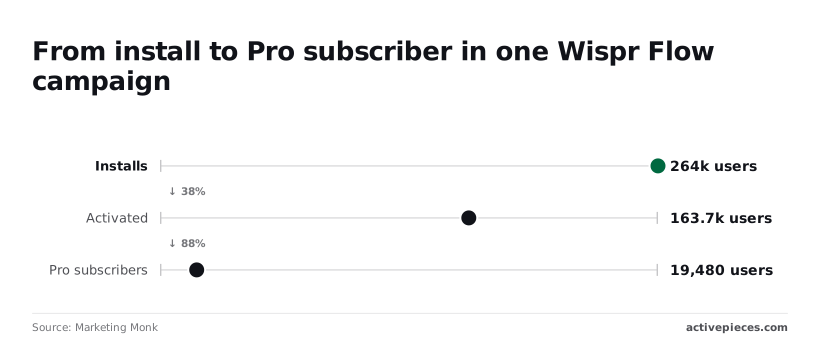
The campaign counted **264,000 installs**, so the product was easy to try. Of those, 163,700 users activated, about 62%, so most people who install do start dictating.
Only 19,480 became Pro subscribers, about 7% of installs and 12% of activated users, so the free tier is where most of the user base stays.
This is a single campaign, not a benchmark, but it suggests the free tier works as a trial of a daily habit. Paying comes after the habit forms, and the per-seat bill appears after that.
## Which Wispr Workflow plan fits three everyday uses
Of the three uses, only replies fit inside the free tier's 2,000-word weekly cap; long drafts, meeting notes and a team of three each cross it, so those uses need a paid plan. The cap was predictable from speaking speed alone.
Put phone typing at 36.17 words per minute and keyboard typing at 51.56, against 152.86 for corrected dictation, according to studies of [typing and speech rates](https://doi.org/10.1145/3173574.3174220).

Against the 2,000-word line, the chart shows estimated words per week for each use. Only replies stay under it.
### Wispr Workflow free plan for light use
Only short replies fit the free tier. The raw dictation figure of 178.92 words per minute drops to the 152.86 corrected rate once you fix errors, so budget on the lower number.
At that rate, 2,000 words is about 13 minutes of speech, which a light replier spreads across a week without hitting the cap. Stay free here, and upgrade only when the limit first interrupts you.
### Wispr Workflow plan for heavy dictation use
**On drafts and meeting notes, the cap fails**. Reading aloud runs at 183 words per minute and phone talking at 196, so a single long note dictated at conversational pace spends a large share of the weekly allowance in one sitting.
Midweek, mid-document, the limit arrives. Choose the paid plan by the day you'd hit the cap: if that's Tuesday or Wednesday, the free tier isn't a plan for you.
### Small team: cost per seat per year
For three people, each person hits the cap on their own, so the free tier can't be shared or pooled. The bill is the per-seat price multiplied by three, then by twelve months, or the annual rate if you commit.

Compare that total with the hours the heavy user saves, since one heavy user usually justifies the plan before the other two do.
## Wispr Workflow against its closest dictation alternatives
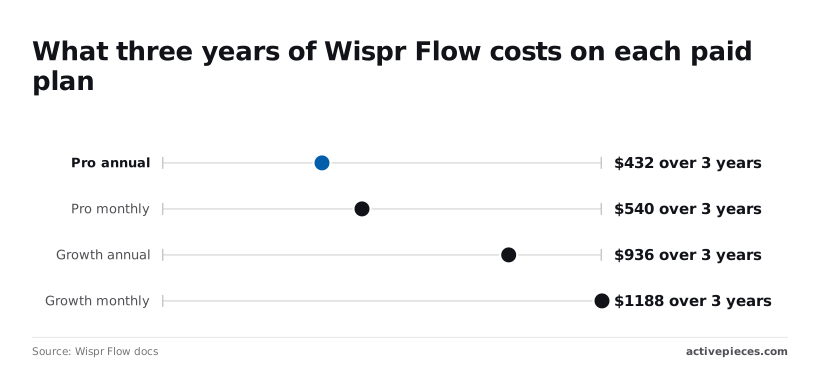
Judge every alternative against the same yardstick: [Wispr Flow's Pro annual plan](https://docs.wisprflow.ai/articles/9559327591-flow-plans-and-what-s-included) costs **432 $ over three years**, so a rival has to undercut that or win on platform or offline use.
### Price and free-tier limits side by side
Read the table below as what each vendor's published material lets me state. Every "not stated" is a figure to confirm on the vendor's pricing page before you budget around it.
| Tool | Free-tier limit | Monthly price | Annual price | Platforms | Offline use |
|---|---|---|---|---|---|
| Wispr Flow | 2,000 words per week | 15 $ (Pro) | 144 $ per year (Pro) | not stated | not stated |
| Superwhisper | not stated | not stated | not stated | not stated | not stated |
| Apple dictation | not stated | not stated | not stated | not stated | not stated |
| Dragon | not stated | not stated | not stated | not stated | not stated |
Only Wispr Flow can be priced here, and the gap matters: you can't call a rival cheaper until you have its number.
Pro monthly totals 540 $ over three years, 108 $ more than annual, so paying monthly is a premium for flexibility. Growth annual totals 936 $ and Growth monthly 1188 $, a 252 $ difference.
Before price enters, platform and offline support decide whether a tool works at all on your hardware.
None of those cells is confirmed for any tool, so check them against your actual devices and your connectivity. If you dictate on flights or on a restricted network, offline use's the first filter, not the last.
### When a free dictation tool beats Wispr Workflow
If you dictate a few short messages a week, a free built-in tool such as Apple dictation is enough, and no Wispr Flow plan will repay its 432 $ three-year cost.
Only when daily volume makes the free tier's mid-week cap a recurring interruption does the paid plan earn its place. Test this directly: use the free tier for a normal week and note the day it stops you.
That day, not the sticker price, tells you which plan to buy, and the next section turns it into a decision rule.
## Sending dictated text onward with Activepieces
Filing dictated text is something an Activepieces flow can do; MoneyGram, Moneypenny, Alan and FundingSocieties are among the teams that run Activepieces. Changing how much Wispr Flow lets you dictate is not something it can do.
That distinction matters because the cap's a billing rule, while the copy-and-paste afterward's a workflow problem, and only the second is automatable.
On the left of the illustration below sits dictated text in a note, in the middle an Activepieces flow (its core is MIT-licensed) with a trigger and action steps, and on the right three destinations (a tracker, a CRM, a doc).
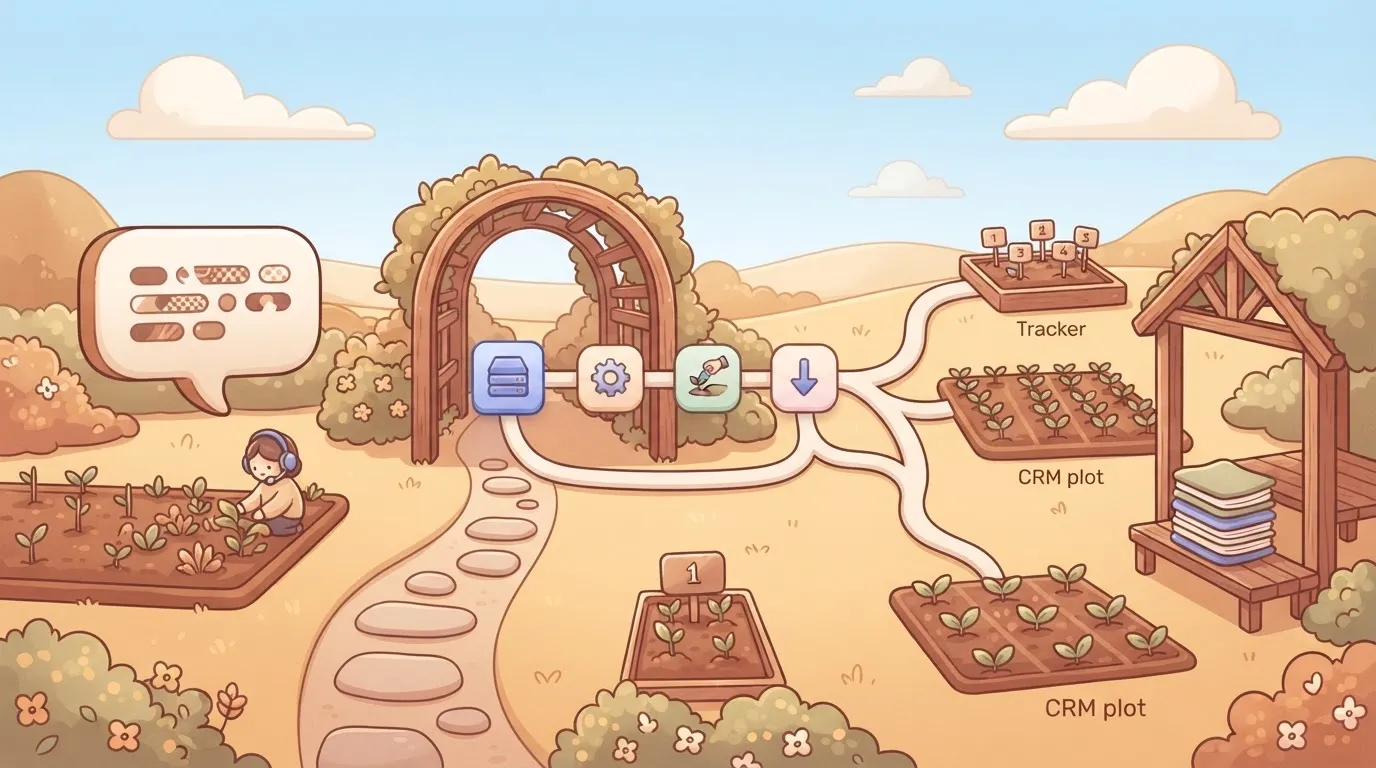
A Wispr Flow billing box sits apart, connected to nothing.
Read it as two separate systems. The flow moves words; the billing box decides how many you can produce, and no line joins them.
### How to send dictation to other apps?
When dictation ends, the text is sitting in an app. In practice, someone then copies it into a task tracker, a customer record in the CRM, or a shared document. That handoff is manual, easy to forget, and it's where dictated notes tend to die.
To replace it, an Activepieces flow uses a trigger followed by actions, and a run costs 1 credit however many actions it has.
The trigger is the event that starts a run, such as a new entry appearing in the note app or a form being submitted.
Each action step then writes to one destination: create a task, update a contact, append to a document. Because a single trigger can feed several steps, one dictated note can reach all three places without being retyped.
Whether your note app and tracker are covered comes down to one count: Activepieces has 746 integrations, counted directly from the packages/integrations/community directory of its open source monorepo on GitHub, where each integration is its own folder, and the core is MIT-licensed, which makes the integration count fully transparent and verifiable.
Triggers, actions and branching are the building blocks you assemble from them in the flow editor.
The practical gain is consistency. **The same note lands in the same place** in the same shape every time, which matters more once dictation becomes a daily habit.
### What it does not change
Downstream of Wispr Flow is where Activepieces sits. It never sees your dictation quota and can't raise, reset or pause it.
Its own free plan has a cap too, 1,000 credits a month, but there the flows stay on and runs simply wait for the credits to refresh.
If the free tier's limit arrives mid-week, the flow keeps working on whatever text already exists, but you simply have less new text to send.
So automating the handoff doesn't move the day you hit the cap, and it's no reason to choose a cheaper plan. The paid-plan decision still rests on the day your usage runs out, which is what the next section turns into a rule.
## Wispr Workflow plan for your needs
Choosing a plan takes one trial week and a few decisions made in a set order. Six steps, in order:
1. Dictate normally for one trial week and record the word count each day.
2. Compare the weekly total with the free word limit.
3. Set a calendar date before the allowance would run out.
4. Start on the monthly plan.
5. Move to annual after a month of steady use.
6. Name one person who owns the seat.
Use the app for your actual work, not a test run. A light first day teaches you nothing, because the cap arrives on the heavy day, usually mid-week. Write down the busiest day, since that's the day that decides the plan.
### Pick the plan and billing period
If your weekly total stays under the free limit, stay free and keep the calendar date anyway. If it crosses the limit before Friday, the paid plan isn't optional, so start monthly.
Over a month you see whether the habit survives a quiet week, a travel week and a deadline week. Annual billing only pays off for a habit that has already proved itself, and it locks you in before you know.
Check eligibility before paying. According to [Wispr Flow's discount documentation](https://docs.wisprflow.ai/articles/1128761434-flow-discounts), selected recognized student accounts receive an annual $0 Student offer with no credit card required.
Annual billing only pays off for a habit that has already proved itself, and it locks you in before you know.
It's not universal, so confirm your account qualifies before you plan around it, and if it does, you skip the monthly trial entirely.
### Set the check that prevents a repeat
Put the calendar date before the free allowance would end, not after it. A reminder that fires after the cap's already interrupted your dictation is only a record of the failure.
Then assign one seat owner: the person who holds the login, receives the billing notices and decides on the switch to annual. Without a named owner, the renewal and the upgrade both happen by accident, and the limit finds you again mid-week.
## Frequently asked questions
Here are the operational questions the limit raises; Wispr Flow's own pricing and account pages settle each one, not third-party summaries.
### Does Wispr Workflow have a free plan?
Yes, but treat it as a trial of the habit, not a plan you can run on. The free tier carries a usage cap that arrives mid-week, so the question that matters is which day you hit it.
Read the live pricing page before comparing, because older reviews also quote a Pro price that has since changed. Whether the cap is also enforced per day is something the pricing page should state. I wouldn't assume either way.
### Can I cancel Wispr Workflow or switch from annual to monthly?
You cancel and change plans from your account, and the safe assumption is that a change takes effect at the next renewal, not immediately. That makes the renewal date the real decision point.
Buy annual in a hurry after a cap hit and you lock in the guess you made that day. If you're unsure of your usage, start monthly and move to annual once you've seen a full billing cycle.
### Is there a discount for students or teams?
If you're a student, an offer exists, but eligibility is set by the vendor, so confirm the conditions before you count on it, especially whether verification is required and how long it lasts.
For teams, the question is separate. If the team plan is billed per seat, the seat count drives the total more than any discount does, so name an owner for seats as well as for the renewal.
### Does Wispr Workflow work on phone and desktop with one subscription?
It runs on both, and a single account is the expected setup, but the platforms don't behave identically. The per-dictation word ceiling on iPhone is lower than on desktop, so a long dictation that completes on your laptop may be cut off on your phone.
On attachments, including images, there's also a separate limit. If you dictate long passages on mobile, test one before you rely on it.
## Related reading
- [Cursor AI Pricing 2026: Free Plan Limits and Features](https://www.activepieces.com/blog/cursor-ai-pricing-2026-free-plan-limits-and-features)
- [n8n Free Plan in 2026? Community Edition vs Cloud](https://www.activepieces.com/blog/n8n-free-plan-in-2026-community-edition-vs-cloud)
- [Airtable API Rate Limit: How to Avoid 429 Errors](https://www.activepieces.com/blog/airtable-api-rate-limit-how-to-avoid-429-errors)
## References
- [Wispr Flow docs](https://docs.wisprflow.ai/articles/9559327591-flow-plans-and-what-s-included)
- [ACM / Interspeech / JML studies](https://doi.org/10.1145/3173574.3174220)
- [Marketing Monk](https://www.marketingmonk.so/p/wispr-flow-word-of-mouth-marketing-strategy)