### Hosting speed varies by provider Server response times directly correlate to bounce rates, making "cheap" hosting a high-risk gamble for client retention. According to data from [StressFreeHost](https://stressfreehost.com/blog/hosting-benchmarks-2026), performance varies significantly across the major players: | Provider | Response Time | | :--- | :--- | | Kinsta | 0.9 seconds | | Cloudways | 1.0 seconds | | SiteGround | 1.2 seconds | | Hostinger | 1.3 seconds | | Bluehost | 1.5 seconds | | GoDaddy | 1.8 seconds | 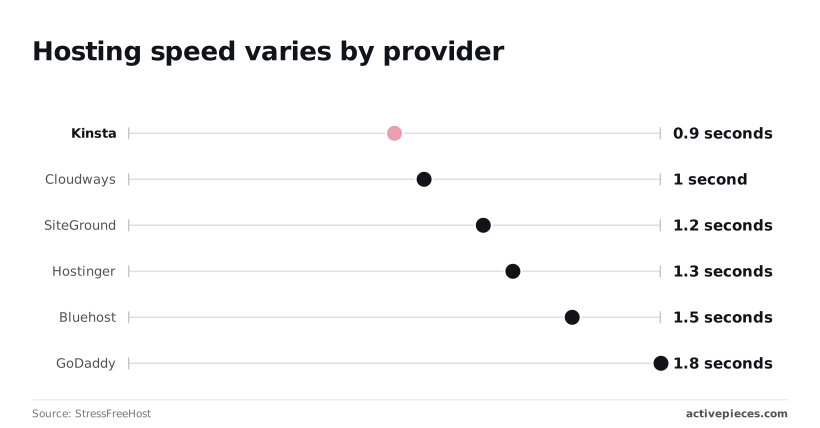 ### Premium WordPress themes and the hidden design tax While a WordPress.com Business plan is the platform, the "Invisible Annual Stack" is the real cost of a professional build. An agency-grade site typically requires a Premium Theme License ($59) to ensure mobile responsiveness. It also needs Yoast SEO Premium ($118.80) for advanced schema control, WP Rocket Performance ($59.95) to mitigate slow server response, and Elementor Pro Builder ($59) to allow non-technical clients to make updates. These recurring fees mean a "simple" site carries a $296.75 baseline before a single hour of labor is billed. ### WordPress security plugins and backup costs Choosing a lower-tier host often necessitates third-party security plugins. These add another $100 to $300 to the annual bill. Without managed backups, an agency is one corrupted update away from a total loss, forcing them to pay for external redundancy to protect their own labor. These hidden layers transform a $25/month hosting line item into a $100/month operational burden that the client rarely sees but the agency always pays. ## Scaling WordPress operations without plan upgrades The most effective way to maintain a lean WordPress budget is to offload the heavy lifting of plugin processing and complex logic to external automation environments. By shifting the execution layer away from the web server, an agency can keep a client on a foundational hosting tier while still delivering enterprise-grade functionality that would otherwise trigger a mandatory plan upgrade. ### Using webhooks to bypass WordPress plugin restrictions Users on the Personal and Premium tiers can bypass the plugin restriction by utilizing built-in Webhooks and Embed blocks. These features are available on all paid tiers and allow the site to send data to external tools without needing a dedicated connector plugin. By configuring a standard form to send data to a webhook URL, you can trigger complex logic in an external environment. This allows a $4/month site to perform like a $25/month site by moving the "intelligence" to a platform that doesn't charge a premium for basic connectivity. Where WordPress tiers tax the addition of new features, Activepieces uses a model where the run is the meter, not the individual steps inside it. This ensures that a sophisticated ten-step automation costs the same single credit as a basic two-step flow, removing the financial penalty for building more granular and reliable operations. By decoupling complexity from cost, builders can refine their workflows without watching a per-task meter, a structure verified by the published pricing page of 1 credit per flow run regardless of step count. ### Replacing heavy plugins with external API calls Directly installing resource-intensive plugins for tasks like image optimization, SEO auditing, or content translation forces the hosting environment to allocate more memory and CPU cycles to the WordPress core. When these functions are instead handled by external API calls to specialized models, the site remains fast and the hosting requirements stay minimal. You can route content to **Claude Sonnet 5.5** rather than using a local plugin that scans every new post for tone and clarity. This high-intelligence reasoning model from Anthropic processes the text externally and returns the metadata via a simple webhook. This architectural shift ensures the server only handles the final display of data, preventing the performance degradation that typically leads to a "Pro" or "Business" tier upsell just to keep the site responsive. ### Automating lead capture without a high-tier plan Sophisticated lead management often requires multi-step workflows that many hosting providers lock behind their highest-priced tiers. These include verifying email addresses, routing to specific sales teams, and logging data in a CRM. By using an external automation builder, an agency can capture a form submission and immediately pass the payload to a sequence involving **GPT-6 Luna**. This OpenAI model performs high-volume classification to qualify the lead before it ever hits the database. This method enables complex, agentic workflows that operate independently of the WordPress plan's limitations. The client receives a fully automated sales pipeline, yet the monthly hosting invoice reflects only the cost of basic site delivery. While many vendors gate governance features to force an upgrade to managed tiers, Activepieces provides the same SSO, SCIM, custom RBAC, audit logs, and release management in its air-gapped edition as it does in the cloud.   This ensures that agencies requiring maximum infrastructure control don't lose the security features of a premium plan. MoneyGram and Moneypenny run Activepieces in production today, demonstrating that the same enterprise-grade controls available in the managed cloud are fully functional in self-hosted, air-gapped environments. ## Monday morning WordPress budget audit Efficiency in agency operations requires a clear distinction between necessary infrastructure and the accumulation of legacy software that inflates client retainers. When a hosting invoice reflects the cost of an all-in-one suite while the site only utilizes basic delivery, the agency is effectively subsidizing the software vendor’s margin rather than the client’s growth. ### Auditing your WordPress plugin stack for redundancy A bloated plugin stack is often a sign of "feature creep." This occurs where individual tools were added to solve temporary problems but remained on the monthly bill long after their utility expired. Identifying these redundancies ensures that you aren't paying for overlapping functionality, such as two different SEO tools or multiple form builders that serve the same purpose. Many specialized plugins that handle basic data routing or content formatting become obsolete by centralizing operations around high-reasoning models like Claude Opus 5.5 for knowledge work or Gemini 3.8 Flash for agentic coding. This audit gives a transparent view of the "Active Plugins" list compared against the "Invoices" folder to highlight where costs can be trimmed without losing site performance. To perform the audit, export the 'Active Plugins' list and cross-reference it with the 'Invoices' folder. 1. Delete any plugin not updated in 6 months. 2. Finally, calculate the 'Self-Hosted' delta by subtracting the infrastructure cost from the current plan price. This process reveals the gap between what the client pays for a managed environment and what the agency could save by managing the infrastructure directly. ### Evaluating the move to self-hosted WordPress.org Moving to a self-hosted environment on WordPress.org is the primary method for reclaiming control over the software stack. This eliminates the "per-feature" tax imposed by managed hosting tiers. While managed platforms offer convenience, they often lock essential business tools (such as custom database access or specific API integrations) behind high-cost enterprise plans. An agency can deploy frontier-class intelligence by transitioning to a self-hosted model. This allows for the use of GPT-6 Astra for complex reasoning or Mistral Large 4 for general-purpose multimodal tasks, directly via server-side scripts rather than relying on expensive third-party connector plugins.  This shift transforms the hosting bill from an unpredictable variable into a fixed infrastructure cost, ensuring that increased site complexity doesn't lead to exponential price hikes. ## What Activepieces does about this Activepieces eliminates the "plugin tax" by providing an open-source automation layer that functions independently of WordPress tier restrictions. While WordPress.com gates essential business utility behind a $25 monthly floor, Activepieces allows users to build complex, multi-step workflows that connect to thousands of apps without requiring the high-tier Business plan for every site. Because the software is released under the MIT license, agencies can self-host the engine to maintain total data sovereignty and avoid the escalating per-feature costs that typically plague managed hosting environments. The platform addresses the hidden cost of complexity through a transparent, run-based pricing model where the credit is consumed by the execution, not the number of steps. This ensures that a sophisticated ten-step automation costs the same single credit as a basic two-step flow, removing the financial penalty for building more granular and reliable operations. By decoupling complexity from cost, builders can refine their workflows without watching a per-task meter, a structure verified by the published pricing page of 1 credit per flow run regardless of step count. While many vendors gate governance features to force an upgrade to managed tiers, Activepieces provides the same SSO, SCIM, custom RBAC, audit logs, and release management in its air-gapped edition as it does in the cloud. This ensures that agencies requiring maximum infrastructure control don't lose the security features of a premium plan. MoneyGram and Moneypenny run Activepieces in production today, demonstrating that the same enterprise-grade controls available in the managed cloud are fully functional in self-hosted, air-gapped environments. ## Frequently asked questions about WordPress pricing ### Is WordPress.com actually free forever? WordPress.com has a free tier that remains active indefinitely. It's a limited trial rather than a viable production environment for a growing business. When you choose this tier, your site is hosted on a branded subdomain, which signals a lack of professional investment to your visitors. Because the free plan prohibits the installation of third-party plugins, you can't add custom lead-capture forms or SEO optimization tools without upgrading to a paid subscription. ### What is the difference between WordPress.com and WordPress.org The primary difference lies in who manages the infrastructure and which limitations are placed on your software. WordPress.org is open-source software available for free. This allows you to choose any hosting provider and retain total control over your database and files. In contrast, WordPress.com is a managed service provider that bundles hosting with the software but restricts access to the underlying code and server settings unless you pay for their highest-tier plans. ### Can I change my WordPress plan at any time? You can upgrade your plan instantly through the dashboard. However, downgrading often requires manual intervention and may result in the immediate loss of premium features. If you move from a Business plan to a lower tier, the platform may deactivate your custom plugins. This can break critical site functionality like e-commerce checkouts or member portals. To avoid losing your domain name during a plan change, you must ensure the domain registration is renewed separately from the hosting subscription. Canceling a bundled plan can sometimes trigger a redemption fee to reclaim the URL. ### Do WordPress plans include a professional email address? Professional email addresses are typically not included as a permanent feature of the hosting plan. Instead, they are offered as a limited-time trial. Once the introductory period ends, the platform bills you per inbox, creating a recurring cost that scales as you add team members. For a predictable overhead, many agencies prefer to point their MX records (the settings that direct email traffic) to a dedicated mail provider rather than paying the per-user markup integrated into the hosting invoice. ## Related reading - [Best Supabase Alternatives in 2026 (Full Comparison)](https://www.activepieces.com/blog/best-supabase-alternatives-in-2026-full-comparison) - [Grok Pricing 2026: Every Plan, Rate, and Real Cost](https://www.activepieces.com/blog/grok-pricing-2026-vs-gpt-for-enterprise-teams) - [Jasper Pricing: Which Plan Is Worth Buying in 2026?](https://www.activepieces.com/blog/jasper-pricing-which-plan-is-worth-buying-in-2026) ## References - [PlatformZoo](https://www.platformzoo.com/pricing/wordpress/) - [StressFreeHost](https://stressfreehost.com/blog/hosting-benchmarks-2026)Hosting fees represent only the entry price for a live URL, while a functional, competitive site requires an additional $200 to $1,500 annually in premium licensing and security overhead.