# Workflow Automation for Higher Education Compared
By Ahmad Hassan · 2026-11-15 · Source: https://www.activepieces.com/blog/workflow-automation-for-higher-education-compared
---
**Start with the automation tool your central IT office already governs.** A tool that has passed security review, sits behind campus single sign-on, and has an owner on the hook **beats the one with the longest connector list**.

Put plainly, workflow automation is software that moves a record from one system to the next, and routes it for approval along the way, without someone retyping it, whether it's built in a tool like [Activepieces](https://www.activepieces.com) or coded by hand.
## Workflow automation for higher education: the short answer
### Why governance beats connector count
Look at the approval chain, not the feature sheet. Every flow that touches student records, grades, financial aid or payroll has to answer three questions an auditor will ask: who built it, who approved it, and what did it touch.

However many apps it connects, **a tool outside IT's control can't answer them**. Connector counts are a vendor's claim. An access log is evidence.
When a job fits no governed tool, or a new tool has to clear security review, [Activepieces](https://www.activepieces.com) ships an MIT-licensed core that central IT can read, and that can close the review faster than a vendor's written assurance. Self-hosting then runs under IT's own controls.
### Higher education workflow automation shortlist by IT setup
Sorted by who runs the tool, not by which one is "best", the picks below read as a map: find the line that describes your IT arrangement, and take that tool to your security office first.
- Power Automate, for campuses already standardized on Microsoft 365
- Workato, for large, IT-run integration across many campus systems
- Zapier or Make, for small offices and departments with light, low-risk flows
- n8n or Activepieces, for teams that need to self-host and keep data on their own servers
### How workflow automation prices and limits were verified
A stale number is worse than none, which is why this section carries no figures. Prices and limits were checked against each vendor's own published pricing and documentation pages, and this section was last checked on 2026-11-15.
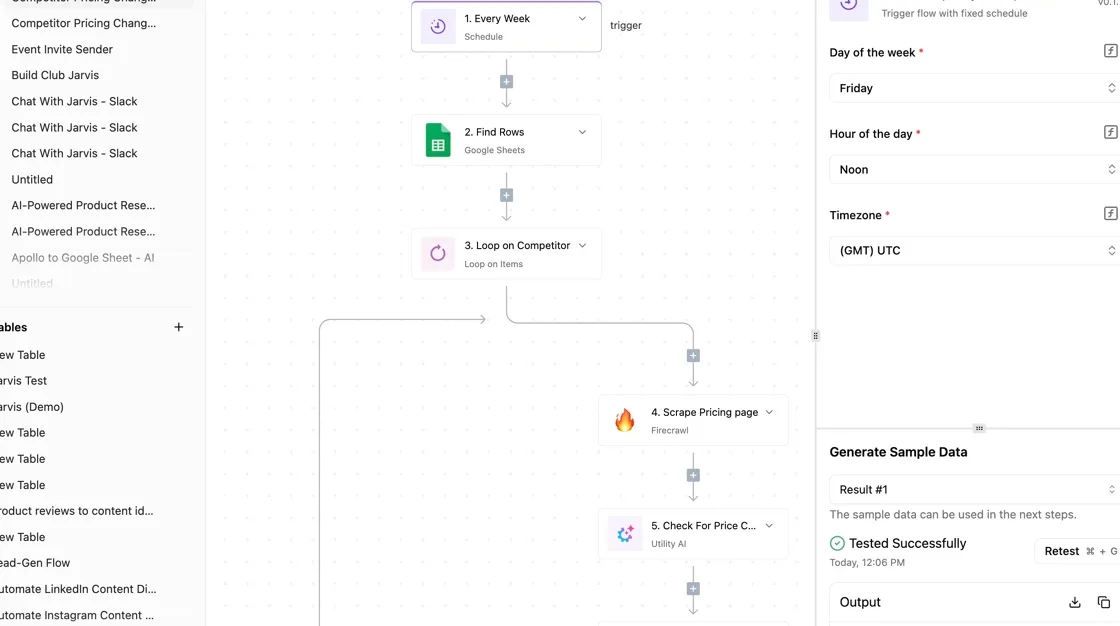
Before you budget, confirm the current plan, the per-task or per-user billing model, and any education discount directly with the vendor. Then ask each one for its audit-log and single sign-on terms in writing, since those two decide whether central IT will approve the tool.
## Seven criteria for judging university workflow automation tools
Asked of every tool in the same order, seven questions decide whether it survives central IT's review.
To put them to each vendor in writing, use the list below; what follows is how to read the answers.
- Does it connect to our student information system (SIS), learning management system (LMS) and CRM, or will we be writing custom API calls for each?
- Who builds the flows, and who is on the hook when one breaks?
- Can it run self-hosted, or does student data have to leave our environment, and what does that mean for FERPA?
- Does it support single sign-on, role-based access and exportable audit logs?
- Can a flow pause for a human approval before it writes to a record?
- When a step fails, does it retry, alert someone and show what failed?
- How is it priced, and what does that look like at our volume?
### Campus systems a workflow tool must connect to
Start with the registrar's system of record, the SIS, then the LMS where courses live, then the CRM that admissions and advancement use.
A tool with a ready connector for each saves a build; one without forces a custom HTTP call, which someone then owns forever.
Ask for the specific actions available, not the logo on the integrations page, because a connector that only reads is no use for enrollment updates.
### Who builds and maintains university workflows
When the one staff member who built a flow in one office leaves, it becomes everyone's problem. Decide up front whether central IT, a departmental analyst or a power user builds, and who answers the page at 2 a.m. during add/drop.
If a tool needs code, it suits IT teams; visual builders suit departments, but only if IT can see and review what they make.
### Data control, SSO and audit
Because student records carry FERPA obligations, where the flow runs matters. Cloud tools need a signed data agreement; self-hosting keeps the data under your own controls.
Either way, require single sign-on through your identity provider, roles that separate builders from approvers, and audit logs you can export to your own systems.
A flow that writes grades or aid status should wait for a person, and a failed run should alert someone rather than fail silently.
### Workflow automation pricing models at campus scale
Check what the vendor counts: tasks, operations, flows or seats. **Per-task pricing looks cheap in a pilot** and climbs once a flow runs against every student record on every term start.
Model your busiest week, not your average one. Ask what happens when you exceed the plan: a hard stop in the middle of registration is worse than a larger invoice.
## Comparison table: price, strength, limit and best fit
Read the limit column against your peak-week model.
| Tool | Vendor-page price | Strength | Limit that matters | Best campus use | Check date |
|---|---|---|---|---|---|
| Power Automate | Contact sales | Sits inside Microsoft 365 and the identity setup IT already governs | Premium connectors and licensing tiers complicate costing | Starting point for staff workflows on a Microsoft campus | Confirm on vendor page before quoting |
| Workato | Contact sales | Enterprise governance, roles and audit trails | Priced through a sales process, so no self-serve estimate | Cross-system integration owned by central IT | Confirm on vendor page before quoting |
| Zapier | Listed on vendor page; Enterprise by quote | Very wide app catalog; non-technical staff can build | Usage-based billing grows with volume | Departmental one-off automations | Confirm on vendor page before quoting |
| Make | Contact sales | Visual builder that handles branching logic well | Usage-based billing grows with volume | Offices with a power user who maintains scenarios | Confirm on vendor page before quoting |
| n8n | Contact sales | Can be self-hosted; flexible for technical builders | Needs engineering time to build and maintain | Research or IT teams that want code-level control | Confirm on vendor page before quoting |
| Activepieces | Free cloud plan; self-serve paid tiers; free self-hosted Community edition; enterprise through sales | Open source and self-hostable, so IT can read the code | Your team operates the deployment if you self-host | Tools that must pass security review or run under IT's controls | Confirm on vendor page before quoting |
Treat "contact sales" as an instruction. Before you shortlist, have finance pull the current vendor page for each tool, record the date, and price your registration-week volume against that page.
Expect the exercise to eliminate one or two tools on cost or on a hard cap, and that is the point.
## Tool-by-tool verdicts for universities
Start with Power Automate if your campus already runs Microsoft 365; every other tool here earns a place only where that one doesn't fit.
Each verdict below covers who the tool is for, where it wins, and the limit to put in front of the review.
### Microsoft Power Automate
It's the incumbent for most campuses, and central IT already governs its tenant, identity and data policies. That means the approval chain for a new flow is the one you already have.
Where it runs out is reach: connecting systems outside the Microsoft estate, such as a student information system, often pushes you into premium connectors and extra licensing. Confirm which connectors your flows need before you assume the existing license covers them.
### Workato
For a central integration team running enterprise-wide processes with formal change control, Workato is the fit. It wins on governance depth and support.
The limit is cost and ownership: it's priced by quote, so a departmental pilot needs a procurement conversation before anyone builds anything. Choose it when IT, not departments, will build and maintain the flows.
### Zapier and Make
Both cloud-only and quick for a department to start, Zapier and Make win on breadth of ready-made app connections and speed to a first working flow.
The limit is the review itself: you're relying on the vendor's security documentation, because you can't read the code. They fit low-risk workflows with no student records.
### n8n
Because n8n runs inside your own infrastructure, data stays where IT already controls it. It wins for technical teams comfortable maintaining a server.
Read its license terms with legal before you commit, since the limit is what you may do with it at institutional scale. Someone must own upgrades and patching.
### Activepieces
When nothing governed fits and a new tool has to pass security review, Activepieces answers the review with evidence rather than assurance, because a closed platform asks your reviewers to take its maturity on trust, and trust is where reviews stall before go-live.
Its core is MIT-licensed: a reviewer can clone the repository, read how the queue hands jobs to the workers, and load-test a self-hosted or fully air-gapped install before anyone signs. MoneyGram, Moneypenny, Alan and FundingSocieties run it in production.
The pricing is easy to explain. There is a free cloud plan for a pilot, and self-serve paid tiers above it for a department that outgrows the free one.
Self-hosting the Community edition is free, so a campus that wants the deployment under IT's own controls can start without a purchase order. Only the enterprise tier goes through a sales conversation. Activepieces isn't the best pick where Power Automate already covers the need.

## When an enterprise platform suits university workflow automation
That is the best argument for an enterprise integration platform, such as Workato: four conditions common to universities punish anything lighter. A vendor with a support contract absorbs the risk you'd otherwise carry.
Here's the case as its advocates make it, in four points:
- Fragmented legacy systems: the student information system, finance ledger, and learning platform were bought in different decades, and a vendor with prebuilt connectors and a support line beats a homegrown workaround.
- Audit pressure: every approval, payment, and grade change needs a trail an auditor can read, and a platform sold on compliance arrives with that trail already documented.
- Staff turnover: the person who built the flow leaves, so you want a vendor who keeps the documentation, training, and escalation path.
- Shadow IT from cheap tools: if central IT has nothing capable, departments sign up for low-cost automation on a purchasing card. About **56% of higher-ed staff already use unapproved SaaS** and AI tools, according to Usu, which means more than half of your campus is moving data through systems nobody has reviewed.

None of the four is solved by a price tier. Audit trails come from who may build, who must approve, and who can see run history. Those are role design, and you can specify them in any tool that supports roles and logs.
When the builder leaves, you have a documentation and ownership problem, solved by naming a second owner for every flow. Shadow IT happens when the sanctioned option is slow or missing, not when it's cheap.
So the real question is how much build capacity central IT has. A team that can staff, maintain, and review flows gets governance from a tool it already runs.
Shadow IT happens when the sanctioned option is slow or missing, not when it's cheap.
A team with no capacity to build is the case where paying for vendor services makes sense, and you should price that as labor, not as a license.
## Worked workflow: admissions inquiry to advisor follow-up
Five steps are all the inquiry-to-advisor flow takes to remove the retyping between a web form and an advisor's inbox, which is the labor you were just pricing, so by step five the form data reaches the advisor without manual re-entry.
### Why advisor caseload matters for automation
By size, [NACADA](https://nacada.ksu.edu/Resources/Clearinghouse/View-Articles/Advisor-Load) reports 233 students per advisor at small institutions, 333 at medium and 600 at large. A large-campus advisor carries about 2.6 times the small-campus load, so manual copying from inboxes into records is time they don't have.
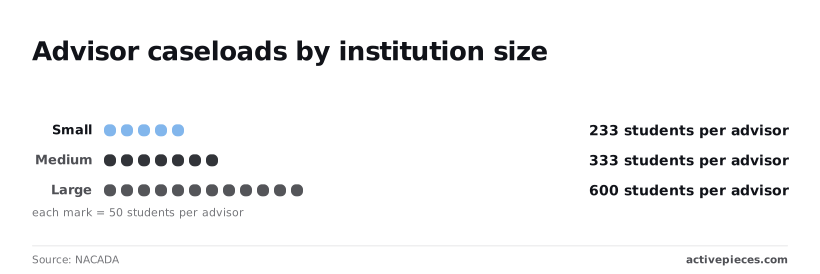
According to NACADA, by type, the students per advisor are:
- Private bachelor's: 100
- Private master's: 179
- Private doctorate: 200
- Proprietary: 225
- Public bachelor's: 260
- Public doctorate: 285
### Inquiry trigger and routing steps in the workflow
1. An inquiry form submission triggers the flow.
2. The flow creates a record in your CRM (the system where admissions tracks prospects), with the answers and the form's source.
3. A staff member approves or rejects the record.
4. On approval, the flow sends the advisor a message with a link to the record.
5. If any step fails, a failure branch alerts a named owner and logs the run.
Assign the record in step 2 by program or region, using fields the form already collects. That is where routing lives. At **600 students per advisor**, a vague "admissions team" recipient means nobody follows up.
Your auditors will ask about step 3. A person confirms the inquiry's real, not a duplicate or spam, before an advisor's time is spent.
Record who approved and when. That entry is your approval chain.
### Failure handling in the admissions inquiry workflow
At step 5, most pilots fall short. **A flow that fails silently loses a prospect**, and nobody learns of it until yield drops. Name one owner, not a shared inbox, and have the alert include the step that failed.
Log every run, successful or not, so you can count failures per month and show IT the error rate before it asks.
## Five steps before buying workflow automation software
Spend Monday on five steps, in this order, and you'll have a shortlist your security office can approve without a second round of questions, so you move forward that same week.
1. List five painful cross-office processes, each with an owner. Pick the ones where a request leaves one office and stalls in another: a new-hire account request, a purchase approval, a grade-change form, a records request.
2. Ask central IT which automation tools the university already governs and has under contract. If one of them covers a process on your list, you're done with that process, and you've skipped a security review entirely.
3. Take the process with the clearest approval chain and build it in both tools, using the same trigger, the same approver and the same data. The difference in build time, in how each handles a rejected approval, and in what the run log shows is the comparison a demo will never give you.
4. Before the pilot touches real records, ask each finalist whether it signs in through your single sign-on, how roles are assigned, and whether it keeps an audit log you can export. Bring those answers to IT in writing.
5. Plans and limits change, and a quote from a sales call isn't the page you'll be held to. Read each finalist's current pricing page on the day you decide, and note which limit you'd hit first at your volume.
If one of your finalists is open source and you want to see which apps it connects to before you build anything, the [Activepieces pieces library](https://www.activepieces.com/pieces) lists 750 integrations, roughly 60% of them community-contributed, and you can start free.
## Related reading
- [AI Automation Usecases in Education](https://www.activepieces.com/blog/ai-automation-usecases-in-education)
- [Activepieces vs IFTTT: Workflow Automation Compared](https://www.activepieces.com/blog/activepieces-vs-ifttt-workflow-automation-compared)
- [Workflow Templates: Free Options Compared (2026 Guide)](https://www.activepieces.com/blog/workflow-templates-free-options-compared-2026-guide)
## References
- [NACADA](https://nacada.ksu.edu/Resources/Clearinghouse/View-Articles/Advisor-Load)