Read it for the gap: once the first 429 lands, the script's line stays above the limit, because retrying without a wait adds load instead of relieving it. Since the line never dropped back under the limit, the script kept being refused, and nothing in it ever stopped. ### Duplicate Zendesk Tickets After Request Timeouts When a create call timed out after Zendesk had accepted it, the response never reached the script. The script saw a failure, retried, and created the ticket a second time. Nothing in the payload tied the retry to the original, so Zendesk had no basis to treat them as one ticket. Somebody has to open, recognise and merge or close each duplicate, because each is a real ticket. [MetricNet, via Onur Ergur](https://onurergur.medium.com/scaling-saas-support-with-agentic-ai-ee11cd57e05d), puts the cost of a ticket at $15.72 for chat, $16.13 for email and $17.19 for voice. Those are the channels this backlog resembles, so every duplicate is roughly a $16 ticket handled twice. 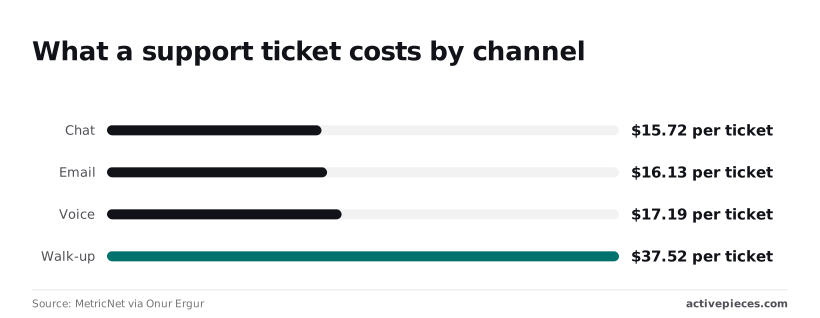 At $37.52 per ticket, walk-up support shows how quickly the figure climbs when handling is manual and in person. ### Counting Lost and Duplicate Zendesk Tickets **By 08:30 the morning count had two columns**. One was tickets that never arrived, because their requests exhausted every retry or the script died. The other was tickets that arrived twice or more. Customers in the first column had written in and heard nothing. Agents spent the first hours of the shift on the second column, merging records instead of answering anyone. Neither column showed up in a test run, and both were visible in the run trace. ## Why the Zendesk API Errors Compounded Nothing made a repeated write safe, and the job retried every failure instantly, including ones that could never succeed. **One bad night turned into duplicate tickets**. Anything marked "no" should stop the run and raise an alert. The table below separates the five status codes into those that deserve a retry and those that only repeat the damage. | Code | What triggers it | Retry? | Fix per Zendesk docs | |---|---|---|---| | 401 | Credentials rejected, or the wrong token type for the auth scheme | No | Correct the credential or token type | | 403 | Valid credentials, but the user lacks permission | No | Grant the role or access the call needs | | 422 | Payload fails validation | No | Correct the request body | | 429 | Request limit exceeded | Yes, after waiting | Wait the number of seconds in `Retry-After` | | 5xx | Zendesk-side failure | Yes, with backoff and a cap | Retry later; escalate if it persists | If you get a 401, Zendesk didn't accept who you are, and retrying sends the same bad credential again. A 403 means it knows you but refuses the action, so the fix is a permission change, not a loop. When the body is wrong, which is what a 422 means, resending it fails identically, and in a backlog run that's thousands of identical failures. Log the offending record and move on. ### Zendesk API 429 Rate Limits and Retry-After On a 429, read `Retry-After` and sleep that long. Plan limits are only part of it, because some endpoints cap well below the account limit. Assume the account-wide ceiling on a bulk update and you will hit 429s early, because [Zendesk](https://developer.zendesk.com/api-reference/ticketing/ticket-management/incremental_exports/) allows 100 requests per minute on update ticket. Deep ticket listing is held to 50 requests per minute, so paging through history runs at half that speed. Incremental export allows just 10 requests per minute, so a sync loop polling faster than one call every six seconds is throttled by design. 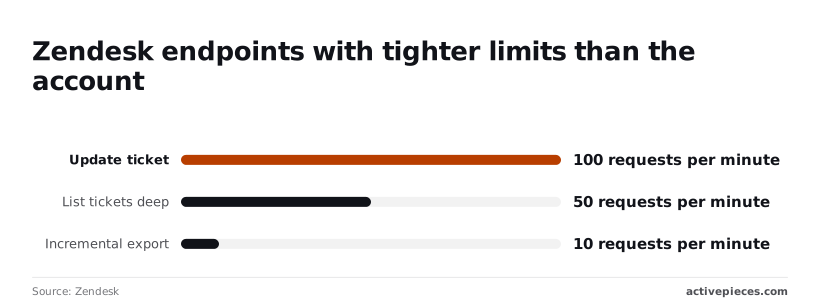 ### When to Retry Zendesk API 5xx Errors Retry 5xx errors, but with exponential backoff and a hard cap on attempts. The duplicates came from here. A create call can time out after Zendesk has already written the ticket, and an instant retry writes it again. **Send an idempotency key with every create, or look the record up before retrying.** Without one, a retry rule is a duplicate generator. ## The Rules That Now Guard the Ticket Integration Put six rules in before the first backlog night, not after the first failure; the duplicate check is only one of them. **Testing never produces the failures these rules answer**, because a quiet sandbox never pushes the Zendesk API (the ticketing system this integration writes to) hard enough to show them. The Monday checklist: - Honour Retry-After with backoff - Self-imposed cap below the tightest endpoint limit - Queue for the backlog - Duplicate check before create - Alert on every non-2xx run - Token in a secret manager, rotated Those six are the spec, whether you type the code or describe it to a tool. The rest of this section says what each one prevents. ### Zendesk API Backoff and Retry Limits When the API says you're going too fast, it returns a rate-limit response with a Retry-After header. Read the header and wait that long. A fixed sleep you guessed at will either hammer the endpoint while it's still refusing you or idle for no reason. Set your own cap below the tightest limit on any endpoint you call, not below the plan's headline limit. If you sit exactly at the limit, any other tool sharing the account tips you over. Put the backlog in a queue and drain it at the capped rate, so a night's worth of tickets becomes a longer run instead of a burst of refusals. ### Preventing Duplicate Zendesk Tickets on Retry Before creating a ticket, look for one that already carries the same external ID or requester and subject. Without that lookup, a retry after a timeout creates a second ticket for the same event, and the customer gets two replies from two agents.  Add backoff without a duplicate check and it gets worse, not better, because every retry of a timed-out create is another chance to write twice. The check is a read before the write, and it costs one extra call per create. Budget it inside your cap. ### Alerts and token hygiene Alert on every non-2xx result. A run that swallows an error and reports success is the worst outcome here, because nobody learns about it until a customer asks where their ticket went. Then open the run trace after the first real backlog and confirm the waits, the cap and the lookups actually happened. Keep the API token in a secret manager and rotate it. A token pasted into a workflow field is a credential in every export, screenshot and chat log. Rotation only works if the integration reads the secret at run time, so a new value never needs a code change. ## Calling Zendesk Without Code Using Activepieces To call Zendesk without code, Activepieces, whose MIT-licensed core ships with 750 integrations, moves the credential and the retry rule out of your script and into a settings panel on each step. 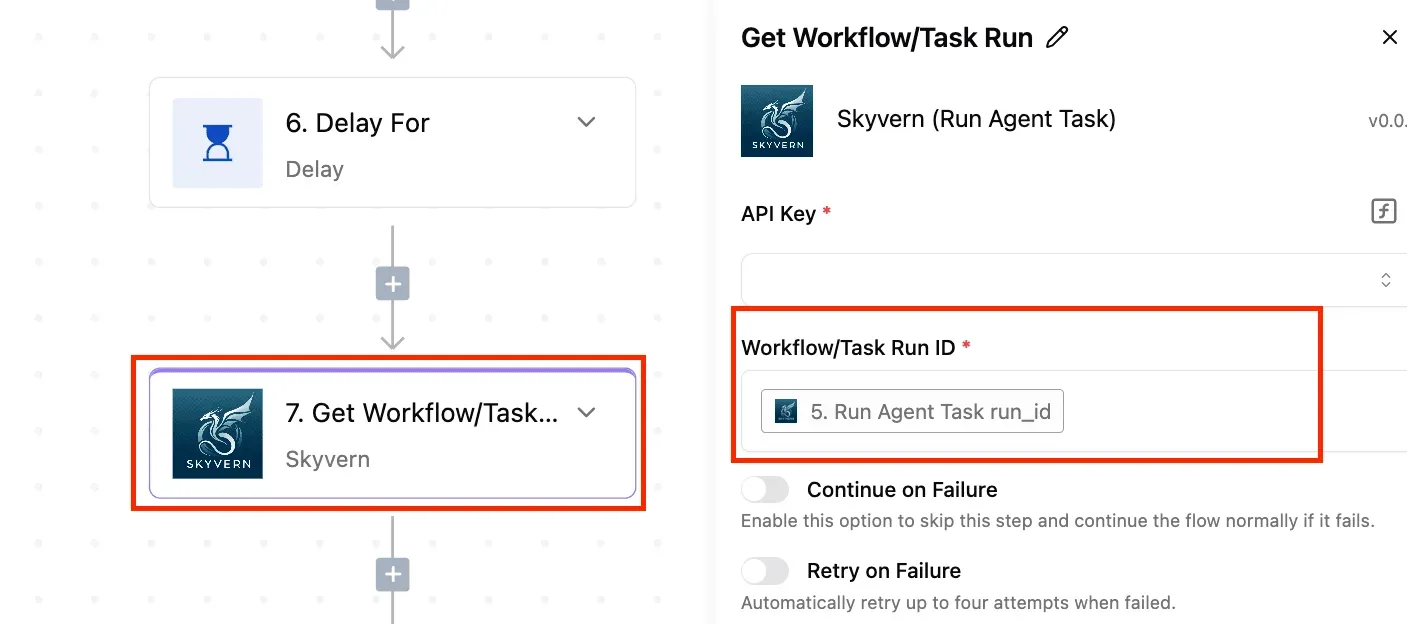 Activepieces addresses one part of this article. The secret lives in a connection you set once, and on the Ultimate plan or an enterprise self-hosted install that connection's secret can sit in your own secret manager, while a failing call can be retried by a toggle instead of a loop you have to write. ### What the Zendesk integration covers When the ticket starts somewhere else, the Zendesk integration (one of those 750, roughly 60% of which are community-contributed) handles the common case. A form submission, a chat message or a row in a spreadsheet triggers the flow, and a step creates the ticket in Zendesk. You enter authentication in the connection dialog rather than in code, so rotating a token means editing one connection and every flow that uses it picks up the new value. That's the run-time read the previous section asked for, supplied by the product. You set retries per step. The screenshot below shows the configuration panel of a different integration, Skyvern's Get Workflow/Task Run. The controls are the same ones you get on a Zendesk step: a "Continue on Failure" toggle and a "Retry on Failure" toggle.  Just above it sits step 6, a "Delay For" step, which is the pattern to copy for a backlog night: pause, then call, then retry only if the call fails. Take two things from this. The toggles are blunt: they switch retrying on or off, and the panel gives you no place to say "back off on a 429, stop on a 401."  And "Continue on Failure" lets the flow carry on past a dead step, which on a backlog night means silent gaps instead of a visible stop. ### Where the raw API is still needed If you need an endpoint the integration doesn't expose, such as a bulk operation or a specific search, you reach it through the HTTP step in the same flow, which sends a raw request to the Zendesk API. An integration covers only the actions its authors built. At that point you're back to specifying the endpoint, the token type and the error handling yourself, just inside a box instead of a file. Either way, the rule from earlier still holds. Decide your retry and cap behaviour before building, then open the run history after a real batch and check that the steps retried and stopped as you specified. A green test run with one ticket proves none of that. ## Frequently asked questions ### Is the Zendesk API free to use? There is no per-call charge. API access comes with your plan, so the cost of a heavy run is the rate limit, not a bill. When you exceed your plan's limit, Zendesk answers with a 429. Nothing is lost when the request was explicitly rejected (not half-processed), so you resend it after the wait in the `Retry-After` header; a timed-out create call is different. For your plan's exact limit, see Zendesk's rate-limit page for developers, and the response headers on live calls report what you have left. ### Can I use the Zendesk API on a trial account? Yes, a trial is a real Zendesk account, so you can create an API token and call the endpoints. Treat it as a prototype environment only. Whatever passes on a trial tells you nothing about a backlog night, and plan-dependent features and limits may differ from the account you'll run in production. Re-check rate behavior on the paid plan before you trust it. ### How do I create a ticket on behalf of a customer? Send a POST to the tickets endpoint with a `requester` object holding the customer's name and email. Zendesk matches an existing user by email or creates one, and the ticket belongs to that customer, not to whoever owns the credentials. Authenticate as an agent or admin. If you already hold the customer's user ID, pass `requester_id` instead, which avoids accidental duplicate users from mistyped addresses. ### Do Zendesk API tokens expire? No timer expires an API token. It works until someone deactivates or deletes it, so a forgotten token is a standing credential, and you should rotate it when staff leave. With OAuth it is different: access tokens are issued through an app you register and can be set to expire. Your integration then needs refresh logic or it'll start failing with authorization errors at an unpredictable hour. Check which type your integration holds before you debug anything else. ### Does Zendesk have a sandbox for testing the API? Confirm your plan includes one: Zendesk offers sandboxes, but not on every plan. A sandbox is a separate copy of your account with its own subdomain, which means you point the integration at that address and use credentials created inside it. It is the safe place to test retry and cap rules against realistic volume without touching live customers. Remember that sandbox data is a copy, so refresh it before a test that depends on current tickets. ## Related reading - [Automating Zendesk Ticket Routing by Chat Workflow](https://www.activepieces.com/blog/automating-zendesk-ticket-routing-by-chat-workflow) - [Ultimate Guide to Automating Zendesk Ticket Alerts on Slack](https://www.activepieces.com/blog/automating-zendesk-ticket-alerts-on-slack) - [Get Ntfy Notifications About New Zendesk Ticket (Step by Step)](https://www.activepieces.com/blog/ntfy-notifications-about-new-zendesk-tickets) ## References - [Zendesk](https://developer.zendesk.com/api-reference/ticketing/ticket-management/incremental_exports/) - [MetricNet via Onur Ergur](https://onurergur.medium.com/scaling-saas-support-with-agentic-ai-ee11cd57e05d) - [Tidio](https://www.tidio.com/blog/zendesk-review/)The script had no backoff rule and no cap on attempts, so each refusal produced an immediate retry. Retries are requests too, so the rejected traffic fed itself.