# Zendesk Automation: What It Does, Costs and Misses
By Nalani Reeves · 2026-10-16 · Source: https://www.activepieces.com/blog/zendesk-automation-what-it-does-costs-and-misses
---
## Zendesk automation is rules that act on tickets
### What Zendesk automation does and where it stops
Zendesk automation is a set of **rules that change tickets**:
- It's strong at ticket updates, routing and timed actions
- It stops at other apps, AI steps, approvals and schedules that span several tools
- Everything it does starts from a ticket and ends on a ticket
Build the first of these flows free in [Activepieces](https://www.activepieces.com) (https://cloud.activepieces.com/sign-up), the free plan is $0 with no card needed.
Start with where data actually moves, because that is why the boundary matters. A rule that tags a ticket keeps everything inside the helpdesk, so the controller's records stay in one system you have already assessed.
When a flow pushes customer details to a billing tool or a chat channel, **personal data crosses into a second processor**. That's a design decision with its own legal basis and retention terms.
Knowing where native rules end tells you where that decision begins. This reflects Zendesk's documentation as of 2026-10-16.
### What counts as automation inside Zendesk
Inside Zendesk, automation means the rule types that evaluate tickets and apply changes. Triggers fire when someone creates or updates a ticket, while **automations run on a time basis**, such as acting on a ticket that has sat untouched.
Routing and assignment rules decide which group or agent receives work.
Read the two sets below as a split: the first is the work you should finish natively, and the second is the signal that a job belongs outside the helpdesk.
- Ticket updates: set fields, add tags, change status or priority, and notify people when a ticket changes
- Routing: send tickets to the right group or agent based on ticket properties
- Timed actions: act on tickets after a period of inactivity or a pending status
Where native rules stop:
- Other apps: no native step writes into a CRM, a billing system or a project tracker
- AI steps: no step that sends ticket text to a model and uses the answer
- Approvals: no pause that waits for a manager to sign off
- Cross-tool schedules: no timed job that coordinates several systems

If your need appears in the first set, build it in Zendesk and keep the data where it is. If it appears in the second, you need an outside workflow tool, and the sections that follow cover how to choose and build it.
## How triggers, automations and macros differ in Zendesk
Ask when Zendesk should act, and the three answer differently: triggers fire when someone creates or updates a ticket, automations fire when time passes, and macros fire only when an agent clicks them. The three don't substitute for one another.
Choose the wrong type and the action you wanted arrives late or not at all, because only triggers react instantly. The table below compares the three on what starts them, when they run, who controls them and what limits them.
| | What starts them | When they run | Who controls them | Limits |
|---|---|---|---|---|
| Triggers | A ticket being created or updated | Immediately, in list order | Admins | Order matters; Zendesk caps active triggers |
| Automations | A time-based condition on a ticket | Once an hour | Admins | Must clear their own condition; Zendesk caps active automations |
| Macros | An agent choosing one | At the moment of the click | Admins for shared macros; agents for personal ones | Nothing happens unless a person acts |
Because the caps exist, consolidating overlapping rules is cheaper than adding new ones.
Each time a ticket changes, a trigger checks its conditions and runs its actions at once. Triggers run top to bottom, so an earlier trigger can change the ticket before a later one evaluates it. Reorder them with that in mind.
On an hourly pass, an automation looks for tickets that have met a time condition, such as hours since last update, and acts on them. **It must clear its own condition.**

Add an action that makes the condition false, such as changing the status or adding a tag the condition excludes. Otherwise the same ticket qualifies on every pass and the rule acts on it repeatedly.
Behind one click, a macro bundles actions, such as a reply, a tag and a status change. It has no trigger of its own, so it standardises what agents do without automating when they do it.
Use it where human judgment decides whether the action applies.
## Where Zendesk automation is used in support teams
[Support](https://support.zendesk.com/hc/en-us/articles/5555300573850-Zendesk-s-2023-Pricing-Update-What-You-Need-To-Know) teams use Zendesk automation for seven jobs, and the topics that fill a queue explain why routing and self-service come first.
The two charts below come from different samples, an e-commerce ticket mix and a wider inbox of messages, so compare their rankings rather than their percentages. In both, order status and returns lead.
- Routing, by topic or channel
- Prioritisation
- SLA nudges
- Auto-closing solved tickets (Zendesk closes them 28 days after they are solved)
- Satisfaction surveys
- Notifications
- AI-agent deflection
Plan SLA warnings around a lag of up to an hour: time-based automations run hourly, so a nudge can arrive that long after the condition becomes true.
In [Open.cx's e-commerce mix](https://www.open.cx/blog/ai-for-ecommerce), **order status is 35% of tickets** and returns and refunds are 20% of tickets, so over half the queue is two predictable topics that a trigger can send to a dedicated group.
Product questions are 15% of tickets, shipping is 10% of tickets and account or login is 8% of tickets, so the remaining categories account for two-thirds. Complex or fraud cases are 12% of tickets, the slice to prioritise and keep with trained agents.

Put surveys, reminders and closing in automations rather than triggers, since they are time-based. The 28-day close means a customer who replies after that window opens a new ticket, not a reopened one.
### Zendesk automation with self-service and AI agents
Across a wider sample, [Lapse AI's 2.4 million support messages](https://lapseai.framer.website/blog/what-2-4-million-support-messages-look-like), order status comes to 24% and returns to 14%. Together that's more than a third of support messages in just two categories.
Sizing and fit is 11%, billing 9% and delivery changes 7%. Order status is the largest topic in both samples, so it's the first candidate for an AI agent to deflect.

Billing needs account-level data, which means a stricter check on what the agent may see.
## What Zendesk automation plans cost
**$55 to $115 per agent per month**, on annual billing, is the range across Zendesk's Suite plans, and the tier you choose sets both your automation ceiling and your bill.

Each seat is also an access grant to customer data, so you pay for every person who can see it.
### Plan comparison on price and automation features
As checked on Zendesk's pricing page on 2026-10-16, each Suite tier costs the amounts in the table below per agent per month under annual and monthly billing.
Annual billing saves $14 per agent on Suite Team, $26 on Growth and $34 on Professional, meaning the per-agent discount grows with plan tier. A ten-agent Professional team therefore pays $340 more each month for the flexibility of cancelling, totalling $4,080 per year.
| Plan | Annual billing | Monthly billing |
|---|---|---|
| Suite Team | $55 | $69 |
| Growth | $89 | $115 |
| Professional | $115 | $149 |
Before moving up a plan, compare the automation features Zendesk's pricing page lists for each tier against the triggers, automations and routing you actually need.
The next tier costs $34 more per agent going from Suite Team to Growth and $26 more from Growth to Professional, making tier selection a significant budgeting decision.
### Zendesk add-on costs that raise the bill
Expect to pay for add-ons separately from the plan, per agent per month. According to [Richpanel], Copilot costs $50, Quality Assurance $35 and Workforce Management $25, so all three together add $110 monthly to per-agent costs.

Copilot alone lifts Suite Team from $55 to $105, nearly doubling the seat cost. On Professional it brings the total to $165.
Small as Quality Assurance and Workforce Management look, they add up. All three together cost $110 per agent, which is twice the price of a Suite Team seat. Decide which add-ons you need before you commit, because they multiply across every agent.
Re-verify every figure on Zendesk's pricing page before you budget, because Zendesk changes pricing. That page, not a third-party summary, is the authoritative source for what you'll be invoiced.
## Mistakes that make Zendesk automations misfire
Three causes account for most misfires: **a rule whose condition never clears**, two rules that both write to the customer, or a rule nobody owns. Each is cheap to prevent before release and expensive to untangle afterward.
### Rules that loop or double-fire
Because Zendesk automations run on a time basis against tickets that meet their conditions, an action that doesn't change the ticket so the condition stops matching leaves the rule matching again on the next pass.
A "remind the customer" automation without a tag that it also applies will send that reminder repeatedly. Add the tag as an action and require its absence as a condition.
Since triggers run in the order listed, later triggers see the ticket as earlier ones left it. A broad notification trigger placed above a specific one can send the customer a message, and the specific trigger then sends a second.

Reordering changes behavior, so read the whole list before adding to it.
### Rule sprawl with no owner
Nobody remembers why a rule exists or what it touches, because rules accumulate. Under GDPR Article 5(2), a controller must be able to demonstrate compliance, which is hard when an automatic customer email has no named person behind it.
Nobody remembers why a rule exists or what it touches, because rules accumulate.
Release each new rule in this order:
1. Write the condition that clears itself, so the rule can't match the same ticket twice.
2. Check trigger order for conflicts with rules that act on the same tickets.
3. Search existing triggers and automations for any that also email the customer.
4. Test in a sandbox, on plans that include one, before the rule touches live tickets.
5. Record an owner for the rule, with the reason it exists.
The first three steps cost minutes and catch most duplicate-email and loop incidents. Once a rule passes all five, you have a clear view of what Zendesk can handle natively. Whatever remains is work that crosses into other apps.
## Build five Zendesk workflows with other apps
Five flows cover that crossing, and only the Slack alert is one a native Zendesk integration may already handle. The table shows each flow's trigger, steps and connected app, so you can see where native tools stop.
| Flow | Trigger | Steps | Connected app | Native enough? |
|---|---|---|---|---|
| Slack urgent alert | Ticket set to urgent | Post to channel | [Slack](https://www.activepieces.com/pieces/slack) | Often |
| OpenAI note | New ticket | Summarize, add internal note | [OpenAI](https://www.activepieces.com/pieces/openai) | No |
| Refund approval | Ticket tagged refund | Request approval, then refund | [Stripe](https://www.activepieces.com/pieces/stripe) | No |
| Jira issue | Ticket tagged bug | Create issue, write link back | [Jira Cloud](https://www.activepieces.com/pieces/jira-cloud) | No |
| Sheets digest | Weekly schedule | Fetch tickets, append rows | [Google Sheets](https://www.activepieces.com/pieces/google-sheets) | No |
Build the Slack flow only if the native integration cannot route the alert where you need it.
When a ticket becomes urgent, post its subject and link to a Slack channel. Check the native Slack integration first, since it may cover this without any outside flow.
When a ticket arrives, send its text to OpenAI, then add the summary as an internal note. Customer text leaves Zendesk here, so confirm where your processing region sits before enabling it.
When a ticket is tagged refund, message an approver and wait for a decision. Only on approval does the flow issue the refund in Stripe and update the ticket. A rejection leaves the ticket untouched.
When a ticket is tagged bug, create a Jira issue from its details, then write the issue link back to the ticket. Agents and engineers then work from one reference.
On a weekly schedule, fetch recent tickets and append a summary row to a sheet. Zendesk's own rules don't run schedules across tools, which is why this one needs an outside flow.
## Add cross-app steps to Zendesk with Activepieces
Where Zendesk's rules stop, the next snag is a connector that doesn't exist, and with a closed catalogue you wait on the vendor's priorities rather than yours.
Activepieces lets you generate the missing integration with AI and add it privately to your own instance, with no release to wait for. It has 741 integrations, counted directly from the MIT-licensed open source monorepo, and roughly 60% of them were contributed by the community.
Build the first of these flows free in Activepieces (https://cloud.activepieces.com/sign-up); the free plan is $0 with no card needed.
### What it adds beside native rules
A flow begins with a trigger, such as a new ticket arriving, and then runs a chain of steps.
Each step is either an action in a connected app, an AI step, or a control step such as a router that sends the flow down different branches depending on a condition.
With that structure, the gaps the previous section described are covered. An AI step can read, rewrite or categorize a ticket, and the flow can send the result to a team chat channel, all without anyone copying text between tabs.
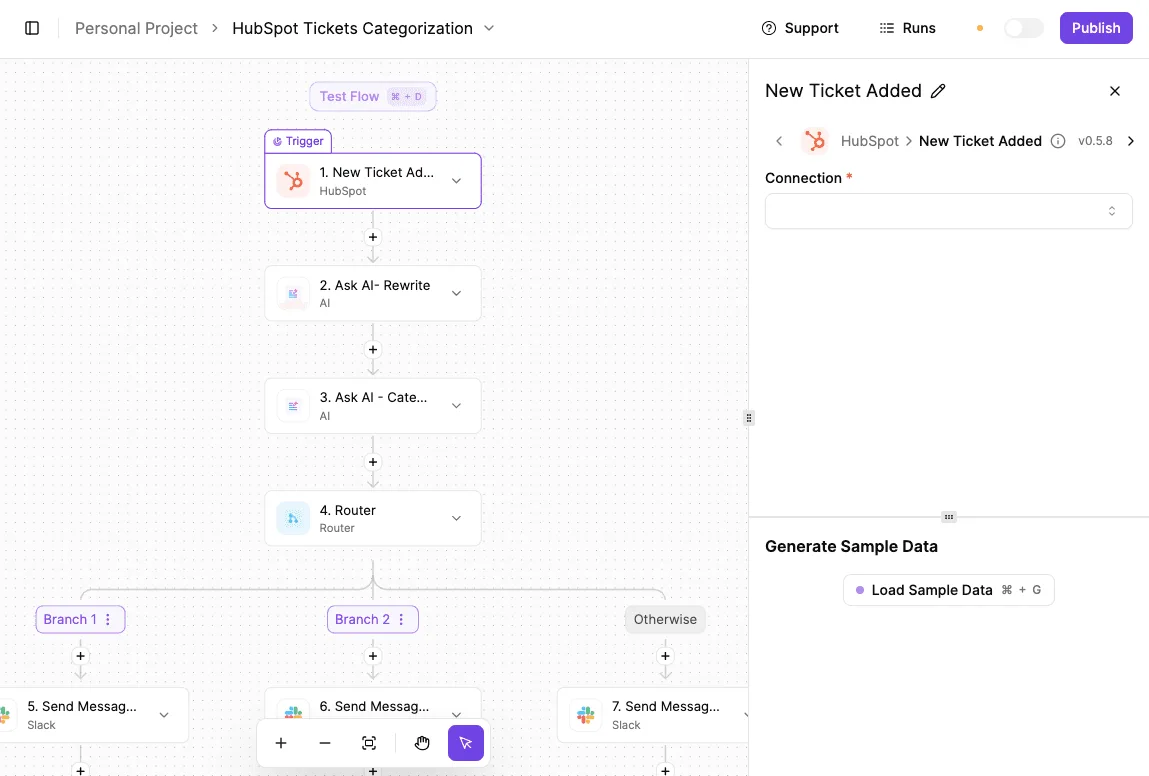
On a helpdesk-style intake, the flow below shows the pattern. The canvas starts with a "New Ticket Added" trigger, and two AI steps rewrite and categorize the content.
A Router splits the result into branches plus an Otherwise path, and Slack, the team chat tool, receives a message at the end of each.
Where routing logic outgrows a single Zendesk rule, it lives in the branching you see; the same shape works with Zendesk as the starting point.
Once the trigger is configured, the panel on the right lets you load sample data. That lets you check what the later steps will receive before anything runs against live tickets.
### When native Zendesk is enough
Stay with Zendesk's own triggers and automations when the whole job happens inside the helpdesk. That covers assigning, tagging, changing status, sending an email notification, or closing tickets after a period of inactivity.
Because native rules run where the ticket data already lives, there's no extra connection to maintain and no second place to debug when something misfires.
Reach for an outside flow only when a step needs to touch another app, call an AI model, wait for an approval, or run on a schedule spanning several tools.
If you can't name the second app or the AI step, the native rule is the right tool.
## Frequently asked questions
### Is Zendesk automation included in every plan?
Triggers, automations and macros are core Zendesk features. Limits and the more advanced capabilities vary by plan, so check your plan's feature list on Zendesk's pricing page before designing around one.
Confirm the edition you hold, not the one in a vendor comparison, because rule volume and add-on features are where plans diverge.
### Can Zendesk automate replies with AI?
Yes, Zendesk has AI features for drafting and automating responses, but some are sold as add-ons rather than bundled into every plan.
Fixed logic is all native triggers can apply: conditions in, actions out. If you want a model to read a ticket and decide something, either use Zendesk's own AI features or send the ticket text to an outside AI step.
The second route moves personal data to another processor, which under GDPR Article 28 needs a data processing agreement and a check on where that processor stores data.
### How often do Zendesk automations run?
Not at the instant something happens: automations are time-based and run in the background on a recurring cycle. Triggers fire when a ticket is created or updated.
If a reader needs an action to happen the moment a customer replies, use a trigger. If the action depends on elapsed time, such as a ticket sitting unanswered, use an automation and accept the delay.
### Can Zendesk connect to Slack or Jira without code?
Yes. Zendesk provides integrations for both, installed and configured through its admin settings without writing code. They cover the common cases, such as notifying a channel or linking a ticket to an issue.
Conditional logic that spans several apps, or that must pass only selected fields onward, is where a separate workflow earns its place. Each added connection is another recipient of ticket data, so confirm what leaves Zendesk before enabling it.
## Related reading
- [Zendesk Pricing Plans and Total Costs for 2026](https://www.activepieces.com/blog/zendesk-pricing-plans-and-total-costs-for-2026)
- [Salesforce Automation: Tools, Costs and Options (2026)](https://www.activepieces.com/blog/salesforce-automation-tools-costs-and-options-2026)
- [Monday.com Pricing 2026: Plans, Costs & Automation Limits](https://www.activepieces.com/blog/monday-com-pricing-2026-plans-costs-automation-limits)
## References
- [Open.cx](https://www.open.cx/blog/ai-for-ecommerce)
- [Lapse AI](https://lapseai.framer.website/blog/what-2-4-million-support-messages-look-like)
- [Richpanel](https://www.richpanel.com/learn/zendesk-pricing)