* Zoho CRM Enterprise: $7,200 annually, which represents a significant recurring commitment for a small business budget, requiring predictable revenue streams to justify the expense. * Zoho CRM Plus: $10,260 annually, a price point that demands a high return on investment through increased operational efficiency, meaning the software must actively generate significant revenue or cost savings to be considered a success. You must ensure the additional features provide a clear return on investment. * Zoho One (All-Employee): $6,660 annually. If you're willing to license every employee, the Zoho One bundle is the most cost-effective path to the Enterprise-grade CRM. This pricing structure penalizes you if you want to mix Zoho CRM with specialized external tools like Salesforce for high-end analytics or Zendesk for customer service. ### Zoho CRM storage and data enrichment add-on costs Zoho calculates data storage limits based on a fixed base plus a small allocation per user. This often forces you to purchase additional 5GB blocks to avoid system lockouts. Features like Zia Data Enrichment are a credit system where each successful update consumes a unit. Unlike using a model like Claude Haiku 5.5 to process data via an external API where you pay for tokens, Zoho’s internal credits are sold in fixed bundles. You'll often pay for more capacity than you exhaust.  ## Manage hidden Zoho CRM scaling costs Zoho CRM enforces hard technical ceilings on data processing and storage that require you to purchase higher-tier licenses or add-on credits to maintain operational continuity. ### API call limits and the cost of integrations A 24-hour rolling window restricts the total number of requests allowed between Zoho CRM and external tools. While Salesforce Starter has a fixed daily limit per org that scales with user count, Zoho’s shared pool often requires you to purchase additional 10-unit API packs to prevent integration failures. Every time a separate application polls Zoho for an update, it consumes a portion of a daily allowance. Once exhausted, integrations break until the next reset or a "top-up" is purchased.  Activepieces solves this by using a single Webhook. This is a real-time notification sent from Zoho to trigger a sequence of events across other platforms. If the specific connector you need to reduce these calls is missing, Activepieces allows you to generate the integration with AI and add it to your instance, contributing to a catalogue where roughly 60% of integrations are community-contributed. This architecture ensures that one outgoing signal from Zoho can update multiple destinations without requiring those apps to ping Zoho’s API repeatedly. You will face a recurring overhead if you're using Gemini 3.8 Flash to process high-volume customer sentiment data. Every analyzed record consumes a portion of a daily allowance. ### Zoho CRM workflow task credits and overage fees Automated actions within the system are governed by task credits. These are consumed every time a workflow rule triggers an update or sends a notification. Unlike HubSpot Sales Hub, which allows for broader automation triggers on its entry-level tiers, Zoho CRM restricts the number of "Connected Workflows" that can bridge different modules. When you rely on Zoho’s native workflow rules, a sudden marketing success can result in a massive bill for "overage" tasks. Activepieces manages these spikes through credit-based AI billing that includes cost caps per team, ensuring that high-volume data processing remains within a predictable budget. This allows builders to deploy complex logic without the risk of uncapped overage fees, as the platform meters usage through a transparent credit system. MoneyGram and Moneypenny run these high-volume environments in production without the tax on complexity that per-task billing models impose. Scaling past these constraints involves one of four technical triggers: 1. Exceeding 100,000 records, which triggers a mandatory upgrade to the enterprise pricing tier. 2. Requiring more than 2 ‘Connected Workflows’ to sync data between disparate departments. 3. Needing custom modules to track industry-specific data, a feature locked behind the Enterprise tier. 4. Hitting the 5GB base storage limit, so the system will automatically reject any incoming data uploads. ### Zoho CRM data storage and attachment limits The base storage allocation covers both the relational database and physical file attachments. A high volume of PDF contracts can prevent the creation of new lead records. Expanding this capacity requires purchasing additional gigabytes in monthly increments. This turns a one-time licensing cost into a variable monthly utility bill. Activepieces mitigates this by intercepting file uploads via the CRM's API and immediately routing them to more affordable cloud storage providers. Activepieces includes 739 integrations in its open-source monorepo, allowing you to connect Zoho to specialized storage providers that don't carry the same per-gigabyte premium as CRM native storage, effectively lowering the long-term cost of data retention. This keeps the CRM database light while ensuring files are stored in a high-capacity environment where the cost per gigabyte is significantly lower. ## Zoho CRM vs competitors on value for money Zoho CRM Enterprise is the lowest barrier to entry for full-stack automation, though its technical constraints often necessitate higher spending on third-party middleware to bypass native API caps. | CRM Platform | Base Seat Cost | Automation Depth | Implementation | | :--- | :--- | :--- | :--- | | Zoho CRM Enterprise | Lowest | High (Deluge-based) | High Complexity | | Salesforce Starter | Low | Moderate | Low Complexity | | HubSpot Sales Hub Pro | High | High (Visual UI) | Moderate Complexity | | Pipedrive Professional | Moderate | Focused (Sales-only) | Low Complexity | ### Zoho vs Salesforce for enterprise customization Salesforce is a more mature developer ecosystem through its Apex programming language. While Zoho Enterprise includes a sandbox for testing, it lacks the scratch org capabilities found in Salesforce that allow developers to spin up isolated environments for specific feature branches. ### Zoho vs HubSpot for ease of use and marketing alignment HubSpot maintains a unified codebase across its sales and marketing hubs. In Zoho, connecting the CRM to marketing tools requires configuring the Zoho Flow integration service, introducing additional failure points. Marketing teams using HubSpot can trigger automated follow-ups instantly based on web behavior. In Zoho, you'll often spend billable hours mapping fields between disparate apps. ### Zoho vs Pipedrive for pure sales pipeline management Pipedrive focuses exclusively on the visual sales funnel. It requires significantly less training time for new reps compared to Zoho’s feature-dense menus. For a small team, the administrative overhead of maintaining Zoho’s validation rules can outweigh the savings gained from its lower monthly per-user cost. ### Native strengths of the Zoho ecosystem Zoho CRM excels when your business seeks a single-vendor strategy to minimize integration friction between core departments. The platform provides a unified data model that allows information to flow seamlessly between sales, finance, and support without the need for custom API development.  The Deluge scripting language offers a powerful way to build custom functions directly within the CRM interface. While it requires specialized knowledge, it allows for deep internal customization that remains stable during platform updates. ## Reducing Zoho CRM costs with Activepieces automation Activepieces reduces your Zoho CRM operational costs by offloading complex automation logic to an external execution engine. This prevents high-volume workflows from triggering expensive overage fees. FundingSocieties runs Activepieces in production to handle these types of cross-departmental processes where native CRM task limits would otherwise become a cost bottleneck. By shifting the "intelligence" of a business process out of Zoho’s proprietary environment, you can maintain a lean CRM instance that is primarily a database rather than a costly application server.  By decoupling cost from the complexity of a workflow, Activepieces allows for the creation of sophisticated, multi-step Zoho CRM automations without the financial penalty of per-task or per-module billing. Activepieces is the better choice for organizations prioritizing cost predictability, as it bills only for the successful execution of a flow regardless of how many internal steps are required. This flat-rate approach to execution ensures that scaling business logic remains affordable compared to the granular metering found in Zapier or Make. ## Choose the right Zoho CRM plan Selecting a Zoho CRM tier requires balancing the immediate per-user cost against the technical ceilings that trigger expensive upgrades. The Professional tier serves small teams that need basic workflow automation, but it lacks the advanced customization required to map complex sales cycles. 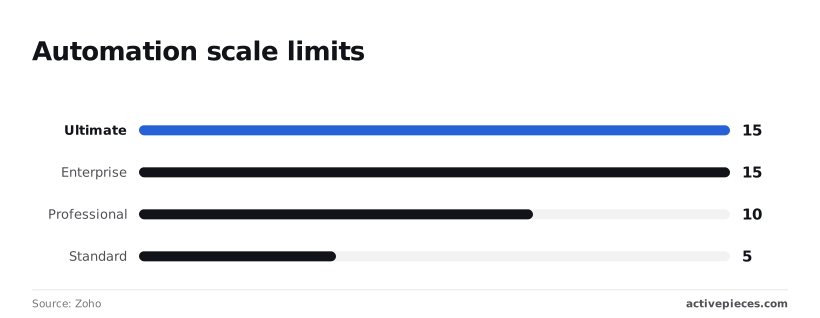 The Enterprise tier is the standard choice for mid-market firms. It unlocks the ability to build custom modules and use multi-page layouts. ### Tier selection by technical requirement If your operations require deep integration with external platforms or heavy data processing, the following framework determines the path forward: Professional: Best for you if you only need to sync standard leads and contacts with a single email marketing tool. Enterprise: Necessary for you if you're using specialized tools like Gemini 3.8 Flash for agentic coding or GPT-6 Astra for complex reasoning. These require the higher request limits and custom functions found only in this tier. Ultimate: Reserved for you if you must analyze massive datasets across multiple business units, providing the highest dedicated throughput for high-frequency data syncing. When technical requirements exceed these tiers, the cost of forcing Zoho to behave like a high-end enterprise platform often outweighs the subscription savings. If your developers are frequently hitting governor limits or writing extensive workarounds for Deluge, the hidden labor costs will eventually negate the lower entry price. The most cost-effective decision is to move to a platform designed for that level of architectural complexity. ## Frequently asked questions about Zoho CRM pricing ### Does Zoho CRM have a free version for life? Zoho CRM offers a free tier for a limited number of users. This means small teams can manage basic contact records without an initial capital outlay. This version excludes advanced features like mass emailing or custom reporting. A growing business will eventually hit a functional ceiling that necessitates a paid upgrade. ### Can I mix and match different Zoho CRM plans? Zoho requires every user in a single organization to be on the same subscription tier. This means you can't pay for the Enterprise level for your developers while keeping sales staff on the cheaper Professional plan. This all-or-nothing approach forces the total bill to reflect the highest feature requirement of any single team member. It effectively sets the price floor for the entire company. ### How much does Zoho CRM cost for a 5-person team? The total cost for a five-person team depends on the chosen tier and the billing cycle. Annual commitments offer a lower monthly rate than month-to-month billing. While the base price is predictable, the final invoice often increases once you add components like additional data storage, extra API call bundles, or premium support plans. ### What is the difference between Zoho CRM and Zoho One? Zoho CRM is a standalone product focused on sales pipeline management. Zoho One is a comprehensive suite that includes the CRM alongside dozens of other applications for accounting, human resources, and marketing. Choosing Zoho One simplifies vendor management by consolidating billing. It requires you to license every employee in the company for the suite. This can be more expensive than buying individual CRM seats for a small subset of your workforce. ## Related reading - [Trello Pricing 2026: Plans, Costs, and Hidden Fees](https://www.activepieces.com/blog/trello-pricing-2026-plans-costs-and-hidden-fees) - [Comparing GitHub Pricing 2026 Plans and Hidden Costs](https://www.activepieces.com/blog/comparing-github-pricing-2026-plans-and-hidden-costs) - [Calendly Pricing: 2026 Plans and Hidden Costs Compared](https://www.activepieces.com/blog/calendly-pricing-2026-plans-and-hidden-costs-compared) ## References - [Zoho](https://help.zoho.com/portal/en/kb/crm/using-crm-for-everyone/team-module/articles/connected-workflows)You must choose between overpaying for monthly agility or risking a sunk cost on a year of licenses.