# Zoho One Pricing 2026: Plans, Per-User Costs, Add-Ons
By Dario Espinoza-Blum · 2026-11-05 · Source: https://www.activepieces.com/blog/zoho-one-pricing-2026-plans-per-user-costs-add-ons
---
[Zoho](https://www.zoho.com/one/pricing/faq.html) One costs about **$9 to $11 per user per month** on Essentials and **$90 to $105 per user per month** on Flexible-User, according to [Elite Tech](https://elitetech-global.com/blog/zoho-one-pricing/). That's **a tenfold gap**, so the plan you pick matters more than the sticker price.
## Zoho One pricing in 2026, plan by plan
### What Zoho One is
Zoho One's a bundle of Zoho's business software (customer records, email, accounting, HR and more) sold under one login and one invoice.
Buying it as a bundle is simpler than subscribing app by app, but you pay for the plan's rules as well as the software.
Some teams now wire separate tools together with [Activepieces](https://www.activepieces.com), an MIT-licensed automation platform with **747 integrations**, instead, which is a different trade-off.
### Every current plan, price and limit
Zoho charges per user on the plans where we confirmed a figure, checked on 2026-11-05, so pricing verification is limited to these two plans. Read it as the floor and ceiling of what a seat can cost.
The lower number in each range is the yearly-billed price, which means committing for twelve months saves money per seat.

On Essentials you pay $9 per user per month billed yearly and $11 billed monthly. Flexible-User costs $90 billed yearly and $105 billed monthly. Both are charged on each user, each month.

Read the Essentials figure as a narrower, cheaper package, and the Flexible-User figure as the full one. [Beginefusion](https://www.beginefusion.com/post/zoho-one-business-operating-software)'s data shows a 20-seat company pays $180 to $220 a month on Essentials and $1,800 to $2,100 on Flexible-User.
The choice between them means **accepting a roughly tenfold increase in monthly spending**.
Roughly $1,600 a month, or about $19,000 a year, is the difference from the plan choice alone.
All-Employee pricing is a separate model of the Standard plan, at $37 per employee per month billed yearly and $45 billed monthly. Its pricing rule is the next thing to understand.
### Employee pricing versus all-employees pricing
Name the seats and a per-user plan charges for those. An all-employees plan charges for everyone on your payroll, whether or not they would ever open the software.
If only 8 of your 20 people need it, the per-user plan can come out cheaper. If everyone needs it, the all-employees plan can. **Count your real users, by name, before you compare any quotes.**
## Zoho One renewal invoice higher than the quote
That's how the renewal came in above a quote everyone had signed off: a 20-seat company budgeted for the headline per-user price and was billed for a different plan type and a larger count of people.

### Expected Zoho One cost for 20 seats
Nobody did anything careless. The team took the per-user rate from the pricing page, multiplied it by twenty seats and by twelve months, and sent that figure to finance. The number was correct for the plan and the headcount they had in mind.
The trouble's that those two assumptions were never written down next to the quote, so nobody could check them later.
### What the invoice said
When the invoice arrived, it priced a different plan type than the one the team had in mind, and it counted users, not just employees. Anyone who needed a login, such as a contractor or a part-time bookkeeper, landed on the bill.

With both the plan and the count off, you can't spot the problem from the total alone. You have to compare the plan name and the user count line by line.
### The gap in money and hours
Set the quote against the invoice on the same measures, so the difference is visible in one place. Read the dollar gap first, then the finance hours, because the hours are a cost the quote never included.
On paper, the quote was the rate of the plan the team assumed, times 20 seats, times twelve months, and it needed one finance approval.
The invoice was the rate of the plan actually billed, times every user counted (not only employees), times twelve months, and it needed finance to reconcile the invoice, the contract and the user list.
The dollar gap is the invoice's yearly total minus the quote's yearly total.
You pay the dollar gap every month of the term, not once. The hours come from someone in finance chasing down which plan and which users the invoice meant.
Both are cheaper to settle before signing than after the renewal lands, which is why the next step is knowing exactly where to look in the order form.
## Hidden Zoho One costs and limits to check
Before signing, you can read every one of the four reasons that pushed the 20-seat invoice above the headline price, because each sits on a line in the order form. They hit the bill in this order:
1. The licensing rule: all employees versus selected users.
2. The billing term: monthly versus yearly.
3. According to [Help](https://help.zoho.com/portal/en/community/topic/unlimited-users-plans-pricing-question), add-ons and caps, such as Zoho Creator's **$10 per 5,000 records** and $20 a month for 500 emails a day, so actual spending depends on your volume of records stored and emails sent.
4. Apps that were never inside the bundle.
Only the first two change the number you multiply by headcount. The last two add lines the per-user price never mentioned.
### Zoho One licensing rules that raise seat count
If a plan requires a seat for every employee, a 20-person company pays for 20 even when only eight people log in. Licensing selected users can cut the seat count, but the rate may differ.

So multiply each rule by your real headcount and compare the totals, not the rates.
Same logic for a yearly term: it lowers the monthly figure but commits you to the full year.
### Buying Zoho CRM on its own
For buying separately, standalone Zoho CRM is the benchmark. [Zoho's edition comparison](https://www.zoho.com/sites/zweb/images/crm/zohocrm-edition-comparison-usd.pdf) lists Standard at $14, Professional at $23, Enterprise at $40 and Ultimate at $52 per user per month.
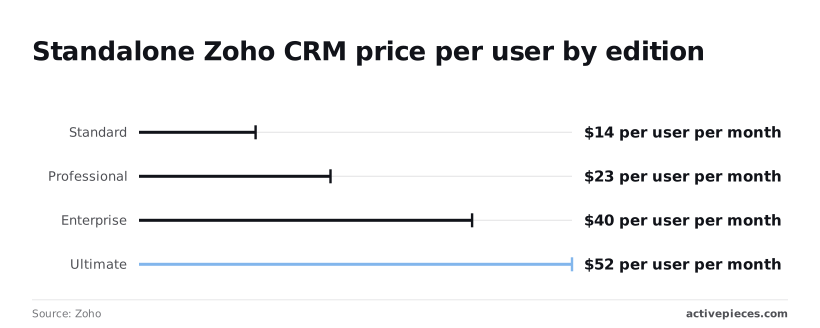
If only a five-person sales team needs CRM, Standard costs $70 a month and Enterprise $200. Any bundle that costs more than that for the same five people has to earn the difference with other apps you'll actually use.
### Zoho One app usage caps and overage fees
Once you hit a cap, a flat price turns into a metered one: Creator, Zoho's app builder, charges $10 for each extra 5,000 records, so a customer database that grows by 15,000 records adds $30 a month.
Grow past the daily email allowance and the same thing happens: $20 a month buys 500 emails a day, so a newsletter that outgrows its allowance becomes a permanent line on the invoice.
Check your current record count and daily send volume against each app's limits before you sign, because the renewal reflects the growth you didn't plan for.
### Zoho apps not included in Zoho One
Look to the order form for which apps sit outside the bundle, because it's the only place that tells you. Each one is a second subscription with its own seats and its own renewal date.

List every tool your team expects to use, then check each against the bundle's app list. Anything missing is a cost the headline price never included.
## Zoho One versus Microsoft 365 and Google
Only when your 20 people would otherwise pay for several separate tools is Zoho One the cheaper bill.
If you need email and documents, a plain Microsoft 365 or Google Workspace seat costs less than any bundle, and the headline price won't tell you which case you're in.
### Comparison table on price, scope and caps
Because their tiers are priced identically, Microsoft 365 and Google Workspace are the baseline, so the choice between them rests on features, not cost.
The table shows what 20 users pay per year at each tier, which is the number to hold Zoho One's quote against.
| Tier (both vendors) | USD per user per month | 20-user yearly cost |
|---|---|---|
| Entry | $7 | $1,680 |
| Standard | $14 | $3,360 |
| Top | $22 | $5,280 |
Pricing tiers include:
- The entry tier is [$7 per user per month](https://biz59.net/articles/google-workspace-vs-microsoft-365-small-business-price-2026), which is $1,680 a year for 20 seats
- The standard tier is [$14](https://biz59.net/articles/google-workspace-vs-microsoft-365-small-business-price-2026), so doubling the monthly price adds $1,680 a year
- The top tier is [$22](https://biz59.net/articles/google-workspace-vs-microsoft-365-small-business-price-2026), which lands at $5,280 a year, more than three times the entry tier
Pull Zoho One's and HubSpot's current numbers from their own pricing pages the day you sign, because the plan type and the employee-versus-all-users rule change those figures.
### When Zoho One is cheaper
It wins when the alternative is a suite plus a separate customer database, invoicing tool and project tracker, each billed per seat. Twenty people on a $14 suite is already $3,360 a year before you add any of those.
If Zoho One replaces three or four of them, one invoice beats four, and you stop paying for seats nobody uses.
### When Zoho One is not worth it
It loses when most of your staff only need email, calendar and shared documents. You'd be paying for a large bundle while using a small slice of it, and the $7 tier at $1,680 a year covers that need.
If the all-users licensing rule forces you to buy seats for people who would never log in, Zoho One loses there too.
A cheaper single-purpose tool wins whenever one job is the whole job, so count the apps your team will actually open before you compare totals.
## Syncing Zoho One with tools outside the suite using Activepieces
When data has to move between Zoho apps and tools Zoho doesn't make, Activepieces connects them through a flow, drawing on 747 integrations counted from its open source monorepo. It fixes the plumbing between them, not the license you pay for Zoho One.
That distinction matters once you've counted the apps your team will actually open and found one or two that live outside the suite.
### Where an outside workflow tool helps
Say your sales team lives in Zoho CRM, but support runs in a help desk Zoho doesn't make. Without a connection, someone copies customer details between them by hand, and every missed copy is a customer who gets asked the same question twice.
That chore goes away with a flow in Activepieces, and flows are unlimited on every plan, including the free one. A flow is a chain of steps: something happens in one tool (the trigger), and the following steps act on it.
In the screenshot below, the builder shows a small three-step flow: a webhook trigger that catches incoming data, a code step that reshapes it, and an end. The Version History panel on the right lists two saved versions, each with a timestamp.
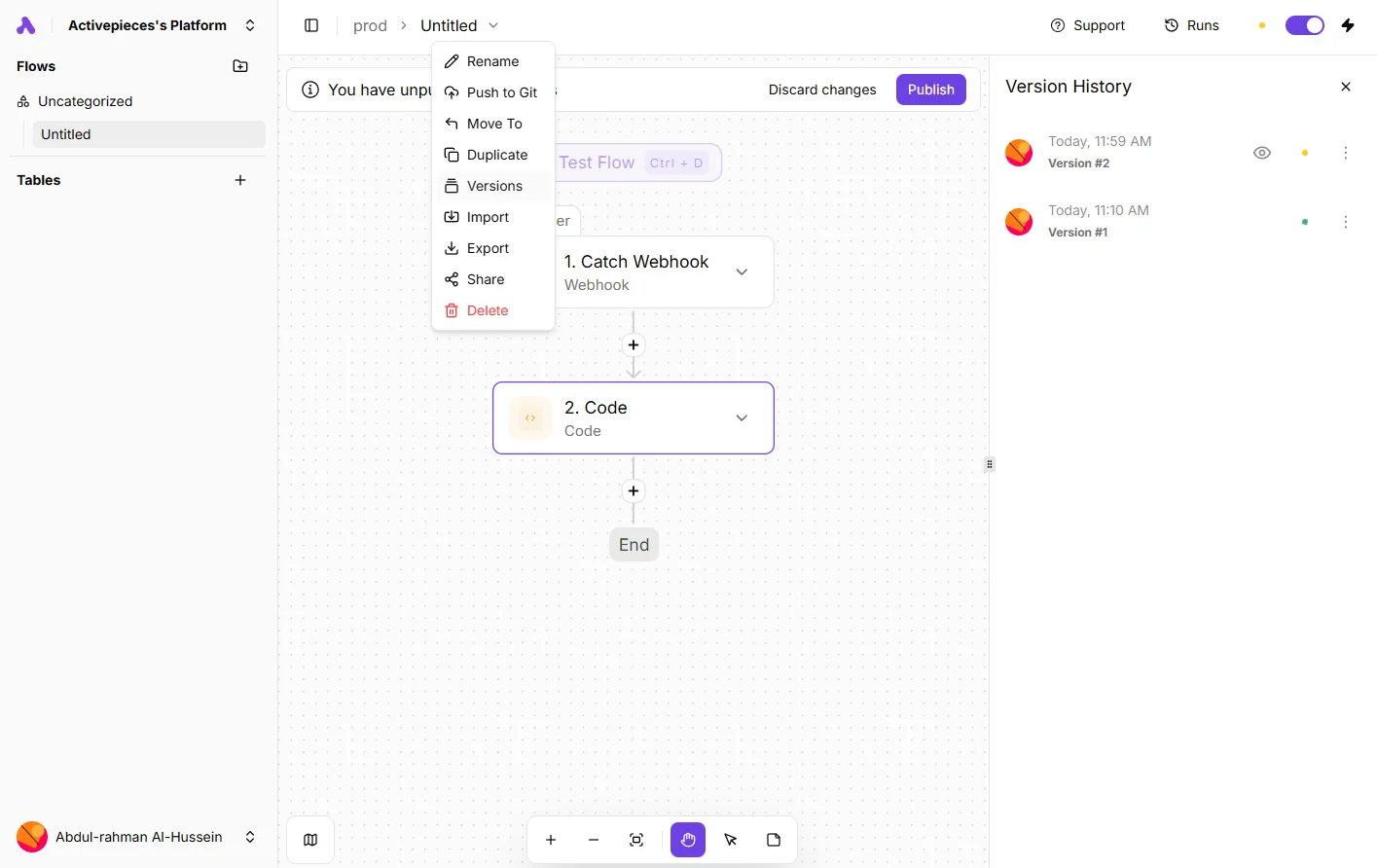
Take from it that you can change a flow, see what you changed, and go back if the change breaks something. That's the safety net a non-engineer needs, because a bad edit to a live sync otherwise means bad records until someone notices.
The 747 integrations in the open source monorepo are the pool a flow draws on, so a tool outside Zoho can receive the result of whatever happens in Zoho CRM.
Where no ready-made integration exists, the webhook trigger shown on the canvas lets almost any tool that can send a web request start a flow.
### Where it does not
Connecting Zoho One to Activepieces doesn't change what Zoho charges you, and Activepieces has its own free plan at $0 with 1,000 credits a month. Your plan type, whether you license employees or all users, and any add-ons are set inside Zoho.

A missing connector is the usual gap between Zoho and an outside tool, and with a closed catalogue you wait on the vendor's roadmap to fill it.
In Activepieces you can generate the missing integration with AI and add it privately to your own instance, with no release or ticket in a queue.
Roughly 60% of the 747 integrations counted in the open source monorepo came from the community, though anyone touching Zoho data still needs a Zoho seat.
So treat Activepieces, which MoneyGram, Moneypenny, Alan and FundingSocieties run in production, as a fix for the gaps between tools, not for the invoice. Check the licensing questions with Zoho in writing before you sign.
If nearly everything you run is a Zoho app, Zoho Flow, Zoho's own automation product, is the natural alternative. Compare the two on which tools you need to reach, not on the idea that either one trims the bill.
## Pricing checks before each renewal
Because neither plan choice trims the bill by itself, the company stopped trusting the headline price and now runs five checks before every Zoho One renewal.
The list below shows them in the order they happen, and the point is that each one catches a different surprise while there is still time to act.
Because neither plan choice trims the bill by itself, the company stopped trusting the headline price and now runs five checks before every Zoho One renewal.
1. Audit seats 60 days out.
2. Write down the licensing-type decision: employee-based or all-users.
3. Cap add-on spend, with a named person signing off.
4. Check the Zoho pricing page and record the date you looked.
5. Compare the quote to the invoice, line by line.
A rule with no owner is how the first surprise happened, so each check has an owner and a Monday to start it.
### Zoho One seat audit before renewal
On a Monday about two months before renewal, the office manager exports every active user and marks who has left, who's a contractor, and who never logged in.
Sixty days leaves room to remove seats or change the licensing type before the renewal locks. Skip the audit and you pay for departed staff for another full term.
The licensing decision then goes in writing: which licensing type, why, and who agreed. Next year's reader shouldn't have to guess.
### Zoho One add-on approval and spending ceiling
No one buys an add-on, or lifts an app limit, without the finance lead's signature. The signature comes with a monthly ceiling for add-on spend.
Without a ceiling, each small purchase looks harmless, and together they become a line on the invoice nobody planned. The approval takes a few minutes of the finance lead's time. Cleaning up afterward takes a renewal cycle.
### The recorded price check
Before signing, someone opens the Zoho pricing page, saves a screenshot, and writes the date on it. Prices and plan terms change, so an undated memory of "what it cost" proves nothing in a dispute.
When the invoice arrives, it goes next to the quote and the screenshot. Any line that appears on one and not the others gets a question to Zoho before payment, not after.
## Frequently asked questions
### Does Zoho One have a free trial?
Yes, Zoho has a trial of Zoho One, and you should use it as a test of your invoice, not only the software.
Set up the plan type and user type you intend to buy, then compare the trial's screens with the quote you are given. Anything that shows up on one and not the other is your question for Zoho.
### Can I pay for Zoho One monthly instead of yearly?
Yes, Zoho sells both billing cycles, and monthly costs more per user for the same service. That's the price of flexibility, so ask yourself honestly how long you'll stay.
If the answer is "at least a year," monthly billing is money spent on an option you won't use.
If you're still testing whether the bundle fits, paying the premium for a few months can be cheaper than being locked into a yearly term you regret.
### Is Zoho One cheaper than buying Zoho apps separately?
It depends on how many apps your team really opens each week. When several people use several apps, the bundle pays off.
It loses when you need two or three apps for a handful of people, because you pay for the whole set across every licensed seat.
List the apps each person uses, price those apps on their own, and set the total beside the bundle quote. If the gap is small, the separate route also lets you add and drop apps without touching everyone else's licenses.
### What happens to my data if I cancel Zoho One?
Your data stays yours, but Zoho doesn't keep it available forever once the subscription ends. Expect a limited window to export it, and then deletion.
Doing nothing here is the expensive choice: a company that waits until after cancellation can find its customer records, invoices and history gone or locked away.
Export everything you care about before you cancel, then open the files and confirm they're complete. Ask Zoho in writing how long the window lasts, since the length is Zoho's to confirm, not something to assume.
## Related reading
- [Zoho Books Pricing 2026: Plans, Tiers and Limits](https://www.activepieces.com/blog/zoho-books-pricing-2026-plans-tiers-and-limits)
- [Zoho Campaigns Pricing: Plans, Limits & Costs (2026)](https://www.activepieces.com/blog/zoho-campaigns-pricing-explained-in-5-numbers-2026)
- [Zoho Desk Pricing 2026: $7 to $50 per Agent, 4 Tiers](https://www.activepieces.com/blog/zoho-desk-pricing-2026-plans-tiers-and-real-costs)
## References
- [Zoho](https://www.zoho.com/sites/zweb/images/crm/zohocrm-edition-comparison-usd.pdf)
- [Biz59](https://biz59.net/articles/google-workspace-vs-microsoft-365-small-business-price-2026)
- [Elite Tech](https://elitetech-global.com/blog/zoho-one-pricing/)