# Zoom API Authentication and Rate Limits for Developers
By Kofi Mensah · 2026-11-01 · Source: https://www.activepieces.com/blog/zoom-api-authentication-and-rate-limits-for-developers
---
There is no key to paste into a script, much like the way [Activepieces](https://www.activepieces.com) handles connections for you.
Zoom's REST API is a set of HTTP endpoints for meetings, users, reports and phone, and you reach it by creating an app in the Zoom App Marketplace, where the app type you create decides how you authenticate.
## Zoom REST API for meetings and users
### What the API lets you do
Four resource areas cover most of what teams automate, and each has an obvious first call:
- Meetings: create a meeting
- Users: list users
- Reports: pull a usage report
- Phone: manage phone numbers
Compare them and the gap in size is obvious. According to the [Zoom skills repository](https://github.com/zoom/skills/blob/main/skills/rest-api/references/phone.md), **Phone has 391 endpoint operations**, Meetings has 184 and Users has 71.
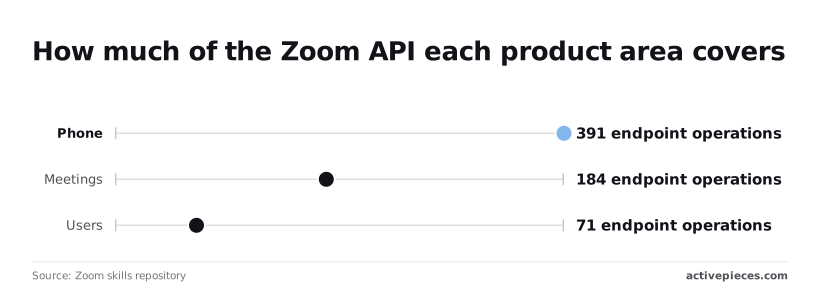
If you build on Phone, you read far more documentation and test more edge cases before you trust it, because Phone is more than twice the size of Meetings.
### Which Zoom plan you need for API access
I haven't verified a plan-by-plan matrix, so I won't give you one. Creating the app is where you find out what your account can do.
If a scope is missing, check with your account admin before you write any code.
### Sources and verification date for Zoom API figures
Treat the counts as a measure of relative size rather than a fixed total, because they will drift as Zoom adds operations. They come from the Zoom skills repository linked above, and the API behaviour and app setup come from Zoom's developer documentation at developers.zoom.us.
## Choose your Zoom app type first
**Pick the app type before you write any code.** It fixes how tokens are issued and whose data you can reach, and a wrong pick means rebuilding your auth layer rather than flipping a setting.
You create the app in the [Zoom App Marketplace](https://marketplace.zoom.us) under the developer menu, and the type is chosen at that first step.
| App type | Who authorises | Whose data it reaches | Best for | Current docs status |
|---|---|---|---|---|
| Server-to-Server OAuth | An account admin, once, when the app is created | Your own account only | Internal automation and back-office scripts | Current |
| User-authorised OAuth | Each user, through a consent screen | The accounts of whoever consents | Products that serve other people's Zoom accounts | Current |
| Legacy JWT | A static key and secret | Your own account | Nothing new | Deprecated, with Server-to-Server OAuth as the replacement in the [Zoom developer docs](https://developers.zoom.us/docs/) |
Follow a tutorial that still uses JWT and it will work less and less well, so treat it as a migration problem, not an option.
If the automation only touches your own account, use Server-to-Server OAuth. There's no consent screen and no redirect URL.
Your server exchanges the app's credentials for an access token directly. The catch is that tokens still expire, so you own the refresh logic, and the app can't see anyone else's account.

### User-authorized OAuth for Zoom API apps
If your product serves customers with their own Zoom accounts, you need user-authorised OAuth. Each user approves access, and you store tokens per user. That means a redirect endpoint, secure token storage and a refresh path for every connected account.
Before you add a scope, check the endpoint's reference page, which lists the scopes it needs. Add exactly those, nothing broader.
An under-scoped app fails with a permissions error, while an over-scoped one is harder to get approved and exposes more than it should if its credentials leak.
## Your first Zoom API request
To make the smallest working request you need a Server-to-Server OAuth app with a meeting-write scope, one call to get a token, and one call to create a meeting.
The sequence below shows the whole path, and the first time through it's worth running by hand so you know what a healthy response looks like.
1. Copy the account ID, client ID and client secret from your app's credentials page.
2. POST to `zoom.us/oauth/token` with `grant_type=account_credentials` and your account ID.
3. Read `access_token` from the JSON response.
4. POST to `api.zoom.us/v2/users/me/meetings` with an `Authorization: Bearer` header.
5. Check for a 201 status and a `join_url` in the body.
### Request an access token
Send the token request to `https://zoom.us/oauth/token`, not the API host. Authenticate with HTTP Basic, using the client ID as the username and the secret as the password, and pass the grant type and account ID as form parameters.
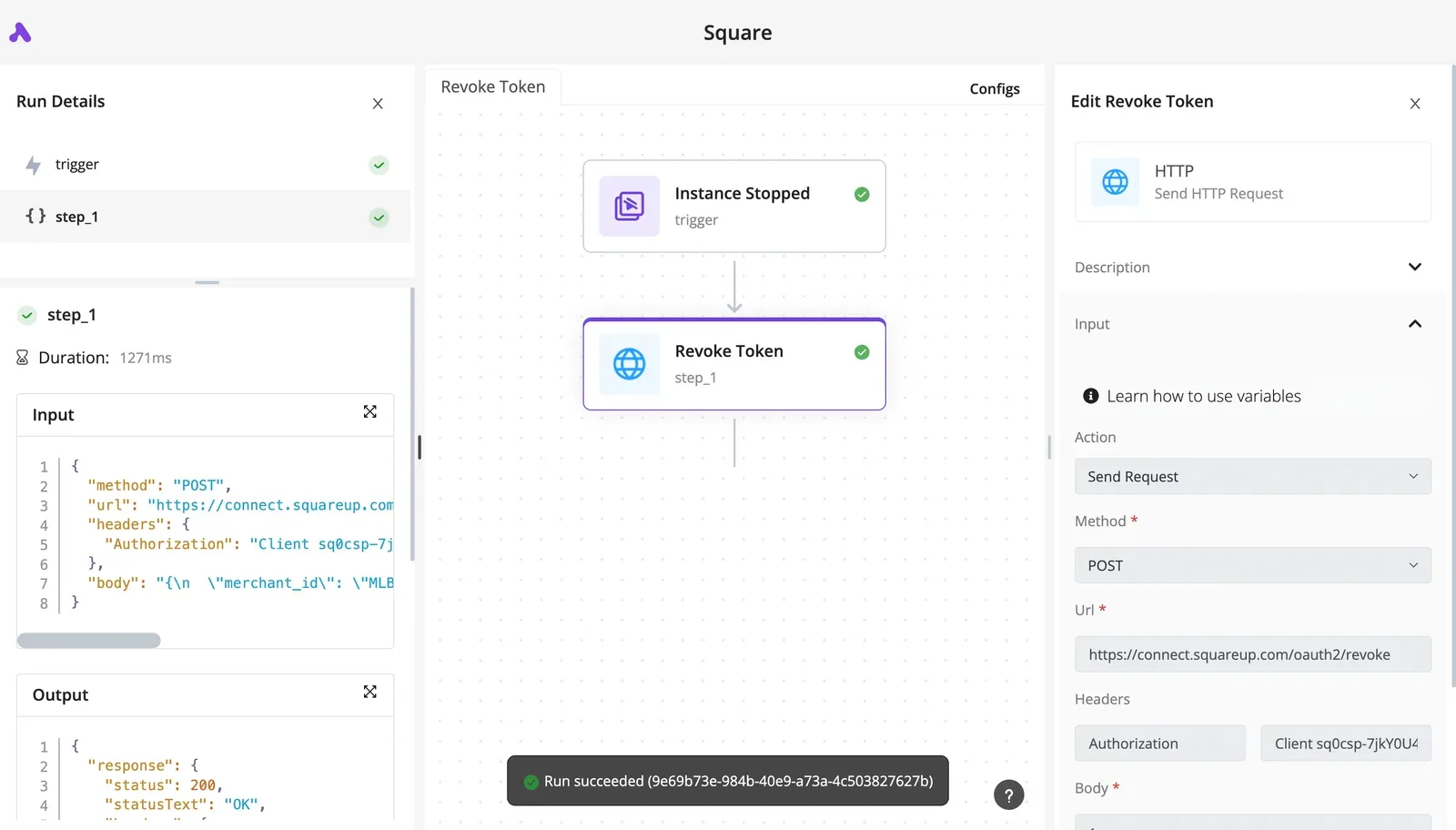
If you get a 401 here, it almost always means the wrong credential pair, or an app that hasn't been activated. The token is short-lived and this grant gives you no refresh token, so your code must request a new one when it expires.
### Create a Zoom meeting with the API
Post to `https://api.zoom.us/v2/users/me/meetings` with the bearer token and a JSON body. A `topic` is enough to start.
With this app type, `me` doesn't refer to a logged-in person, so if Zoom rejects it, put a real user ID or email in that path segment.
A scope error at this point means the app was never granted meeting-write access, and no token refresh will fix that.
### Read the Zoom API create meeting response
When the call succeeds you get a 201, which means the meeting now exists in the account rather than merely being accepted. The body carries the meeting `id` and a `join_url`.
Open that URL to confirm the meeting is real. A 401 now means the token expired between steps.
## Learn Zoom's rate limits and pricing
When a call fails, the cause is most often a per-second limit that varies by endpoint category and plan. API access itself is bundled into the plan, so you pay for seats, not requests.
### Limit categories and what falls in each
Every endpoint has a category, and Zoom sorts them into Light, [Medium](https://medium.com/zoom-developer-blog/new-api-rate-limiter-993bdfb79d32), Heavy or Resource-intensive; each endpoint's reference page names its category.
Check the category before you design a loop, because a script that polls a Heavy endpoint hits the ceiling long before one polling a Light endpoint.
I couldn't confirm the resource-intensive ceilings or any daily caps, so plan around the three tiers with published figures and treat the rest as unknown. Zoom signals an exceeded limit with an HTTP 429, so your client needs a backoff path.
### Limits by account plan
Across Free, Pro and Business+, the chart shows documented requests per second for each category. Light runs 4, 30 and 80, Medium runs 2, 20 and 60, and Heavy runs 1, 10 and 40.
One Heavy request per second is all a Free account gets, according to [Developers](https://developers.zoom.us/docs/api/rate-limits/), so anything that bulk-processes meetings will stall there. The jump to 10 on Pro is the first tier where batch work is realistic.
If you're rate-limited on Pro, the fix may be a plan change rather than better retry code.
### What API access costs: plan, not per call
**There is no per-call bill**. [Zoom](https://zoom.us/pricing) doesn't meter API calls. Access comes with the plan, so your cost is the seat price.
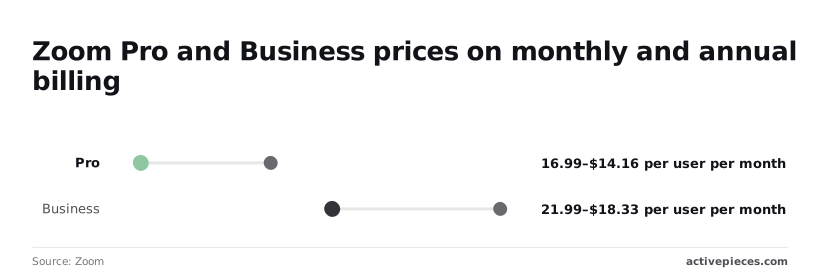
Zoom's pricing shows Pro is $16.99 per user per month billed monthly, or $14.16 on annual billing, which saves $2.83 a month, about $34 per user per year, for committing to twelve months.
Step up to Business and it is $21.99 monthly or $18.33 annual, a $3.66 difference, about $44 per user per year, which multiplies as your team grows, rendering the monthly option uneconomical past a certain scale.
Going from Pro to Business costs roughly $5 more per user per month on either billing cycle, and that buys the higher per-second ceilings above, which only matter if you approach Pro's limits.
For an integration that's the number to weigh against engineering time spent on throttling.
## The case against building on Zoom's API
Start with throttling, the first of four costs; together they make a serious case for buying a connector or leaning on Zoom's SDKs instead of building against the API yourself. Here are the four, with what each does to your schedule:
- **Rate limits vary by plan**, so an integration that behaves on your test account can be throttled on a customer's lower tier.
- Scope reviews examine the permissions you request, so an over-broad scope request can stall a release.
- Marketplace app approval puts Zoom's review between finished code and your first customer install, so **launch dates are partly out of your hands**.
- Auth changes such as the retirement of JWT apps force migrations on Zoom's schedule, so working code can become unsupported without you touching it.
None of these makes the API hard to call. They make it hard to keep calling, and a connector vendor absorbs that upkeep for you.
You don't hire for this, you describe it.
None of these makes the API hard to call. They make it hard to keep calling, and a connector vendor absorbs that upkeep for you.
In [Activepieces](https://www.activepieces.com), you tell the built-in chat that a form comes in, a Zoom meeting gets booked and the join link goes out by email, and what it publishes is a live flow in your account, identical to one a builder would have assembled step by step.
It sits under the same RBAC and audit logs as every flow a person built, and each run leaves a trace anyone on the team can read, so an expired token or a 429 is a failed step you can see rather than a stack trace someone has to decode.
At $2,934.1 million from Enterprise, according to [Zoom's SEC filing](https://www.sec.gov/Archives/edgar/data/1585521/000158552126000026/zm-20260225ex991.htm), the platform is oriented toward large organizations with IT and security teams, and your app will be judged by them.
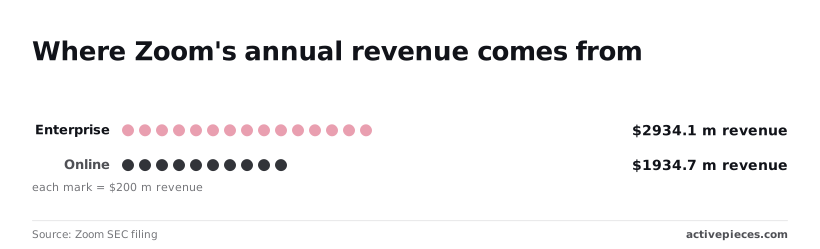
Then there is Online, at $1,934.7 million in the same filing, so you'll also meet many small accounts on lower plans, and those are the ones most likely to hit plan-based limits.
In three situations the opposing case still loses: custom logic, reporting, and multi-tenant products.
A packaged connector can't express your business rules or return the data shape your reports need. In a multi-tenant product, per-customer tokens and per-plan limits are your problem whichever route you take.
One condition decides it for the direct API: you own the failure modes. That means retrying rate-limited calls with backoff, refreshing tokens before they expire, and keeping a plan for the next auth change. If you won't build those, buy the connector.
## Handle common Zoom API errors
Expect four failures to cause most of the production pain with Zoom's API: an expired token, a rate limit, a missing scope, and a webhook you couldn't verify. Each is documented in Zoom's error definitions, and none fixes itself.
### Fix 401 expired or invalid Zoom access token
Once a job outlives its token, it fails, even if it worked in testing, because access tokens are short-lived. Refresh on a 401, retry the request once, then stop.
With user-authorized OAuth, each refresh hands back a new refresh token and invalidates the old one. If two workers refresh at the same time, one of them loses its credentials.
Serialize refreshes behind a single lock. Server-to-Server apps skip the refresh token and request a fresh access token with the account credentials.
**On a 429, Zoom doesn't queue your overflow**. It rejects it, and a tight retry loop makes things worse. Back off exponentially with jitter, and honor any retry-timing header the response carries.

### Scope and permission errors
When you hit a scope error, either the app type you picked can't do what you asked, or you never added the scope. Add it in the app's configuration, then reauthorize, since existing tokens keep the old grant.
If a user or meeting ID comes back not found, it usually means the ID is wrong, the meeting was deleted, or it belongs to an account your token can't see. Check the ID and the account before you suspect Zoom.
### Zoom webhook validation and missed events
Answer Zoom's validation challenge at your endpoint, and check each event's signature against your secret token before trusting the payload. Don't assume delivery is perfect. Reconcile against the API on a schedule so a dropped event becomes a late fix instead of lost data.
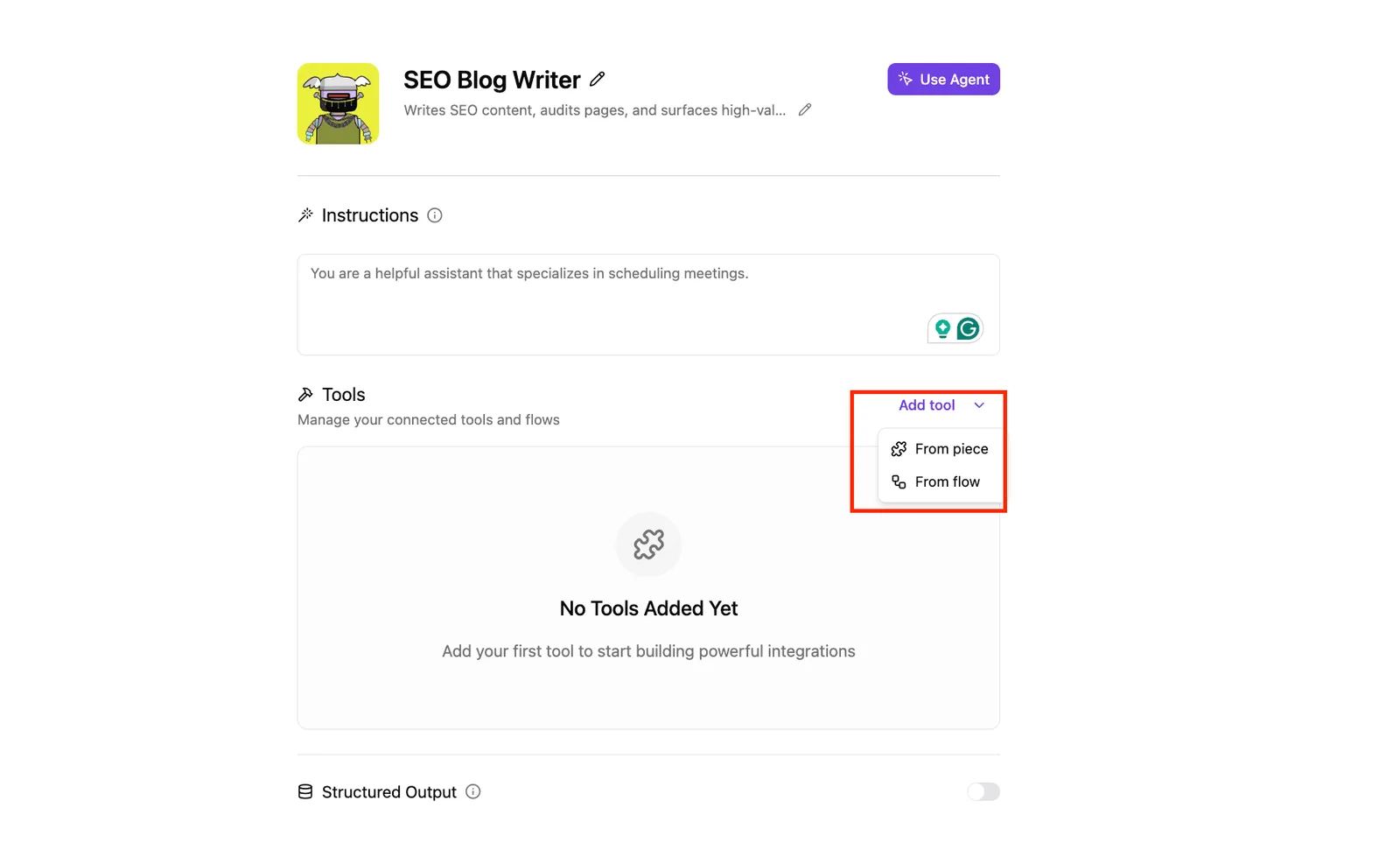
Token refresh and retries live in the platform instead of your code, and an agent configuration screen shows where this ends up. It has plain-language instructions, a menu for adding tools, and no tools attached yet.
## Call Zoom without code using Activepieces
You describe the process (a form comes in, a meeting gets created, an email goes out), and Activepieces builds it as a flow with a prebuilt Zoom step, so you aren't writing token-refresh and backoff code yourself.
It's not magic, and it doesn't cover every endpoint, which is where the limits start.
### What the Zoom integration covers
Activepieces has a Zoom integration, a prebuilt connector with triggers and actions, one of the 746 integrations counted in its MIT-licensed open source monorepo. You connect your Zoom account once, and the platform stores the credentials and renews tokens.
That removes the two chores that bite hardest in production: expiry you forgot to handle, and a request that fails on a rate limit and never retries.
Below is the common case in the flow: a form submission starts the run, a Zoom "Create Meeting" step books the call, and a confirmation email step sends the details. A separate HTTP step branches off toward an endpoint the integration doesn't offer.
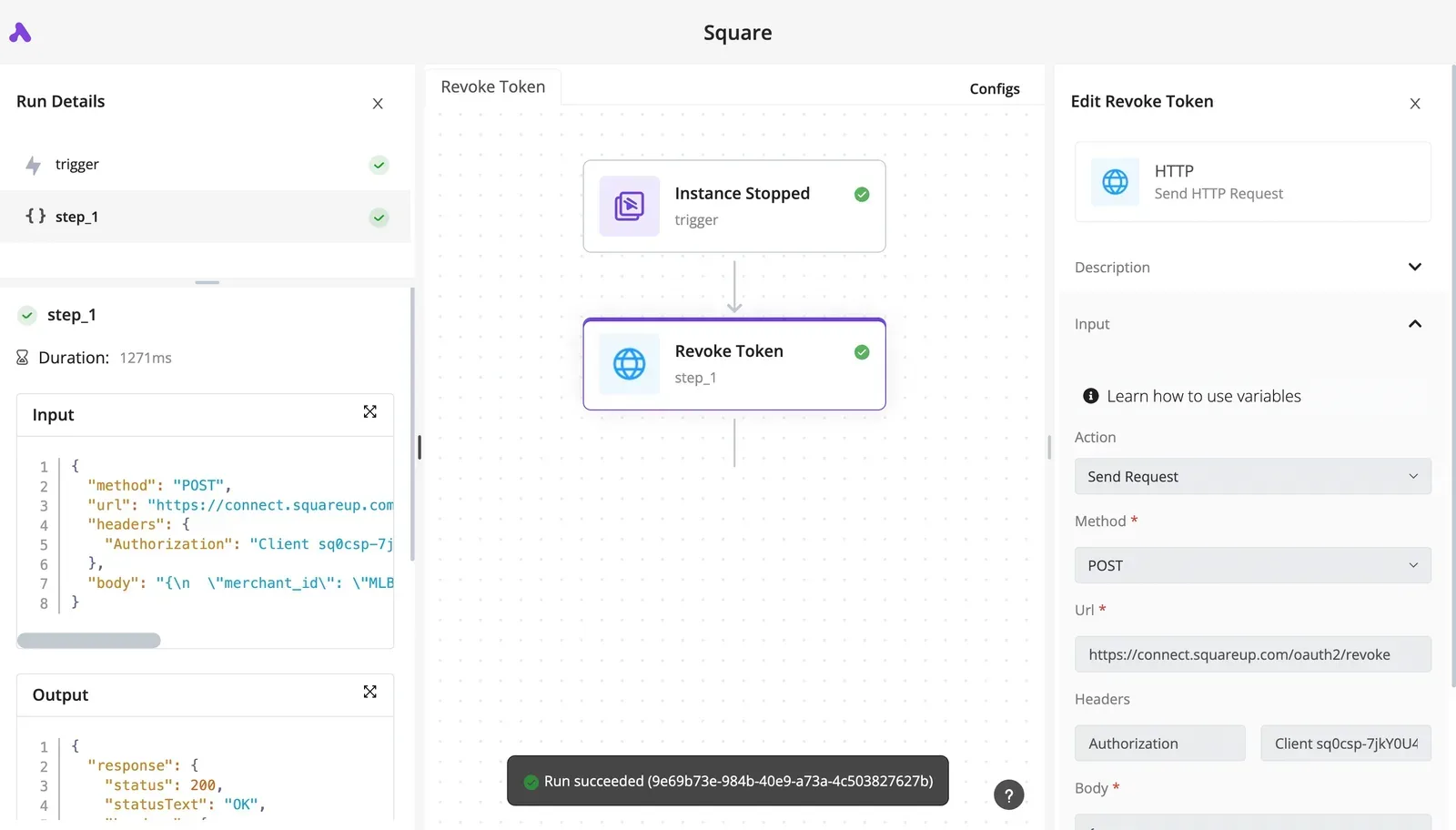
Take two things from it: the three-box path doesn't need API code at all, and the branch is the escape hatch for anything the integration lacks.
If your job is scheduling, notifying, or syncing meeting details into other tools, the integration is usually enough.
You still need direct API work when you must control behavior the integration doesn't expose, such as a specific scope, a webhook subscription setup, or unusual error handling.
Check what the integration lists before you assume it fits. I wouldn't trust a connector's coverage until I had run it against my own account.
### Calling other endpoints with the HTTP step
When the integration lacks an endpoint, an HTTP step lets you call the Zoom REST API yourself inside the same flow.
You supply the URL, method, and body, and you still have to get the authorization right, which means the app type and scopes you chose earlier matter here.
What you gain is that the surrounding flow, its triggers, branching, and error handling, stays in one place instead of becoming a separate service.
1. Pick the app type that matches how your users authorize: one account, or many accounts on behalf of others.
2. Read Zoom's current rate-limit documentation and note which of your calls fall under the tightest limits.
3. Build one request, such as creating a meeting, in Activepieces with retries turned on, and run it against a test account.
4. Only if that request can't be done with the integration, add an HTTP step and test its failure paths deliberately.
## Related reading
- [Xero API: Setup, Authentication and Limits (2026)](https://www.activepieces.com/blog/xero-api-setup-authentication-and-limits-2026)
- [JumpCloud API: Documentation, Rate Limits, Pricing](https://www.activepieces.com/blog/jumpcloud-api-documentation-rate-limits-pricing)
- [Cohere API Trial Key, Rate Limits and Pricing in 2026](https://www.activepieces.com/blog/cohere-api-a-2026-developer-guide)
## References
- [Zoom skills repository](https://github.com/zoom/skills/blob/main/skills/rest-api/references/phone.md)
- [Zoom SEC filing](https://www.sec.gov/Archives/edgar/data/1585521/000158552126000026/zm-20260225ex991.htm)
- [Zoom](https://zoom.us/pricing)