> ## Documentation Index
> Fetch the complete documentation index at: https://www.activepieces.com/docs/llms.txt
> Use this file to discover all available pages before exploring further.
# Predefined Connection
Use predefined connections to allow users to access your piece in the embedded app without re-entering authentication credentials.
The high-level steps are:
* Create a global connection for a project using the API in the platform admin. Only platform admins can edit or delete global connections.
* (Optional) Hide the connections dropdown in the piece settings.
### Prerequisites
* [Run the Enterprise Edition](/handbook/engineering/playbooks/run-ee)
* [Create your piece](/build-pieces/building-pieces/overview). Later we will customize the piece logic to use predefined connections.
### Create a Predefined Connection
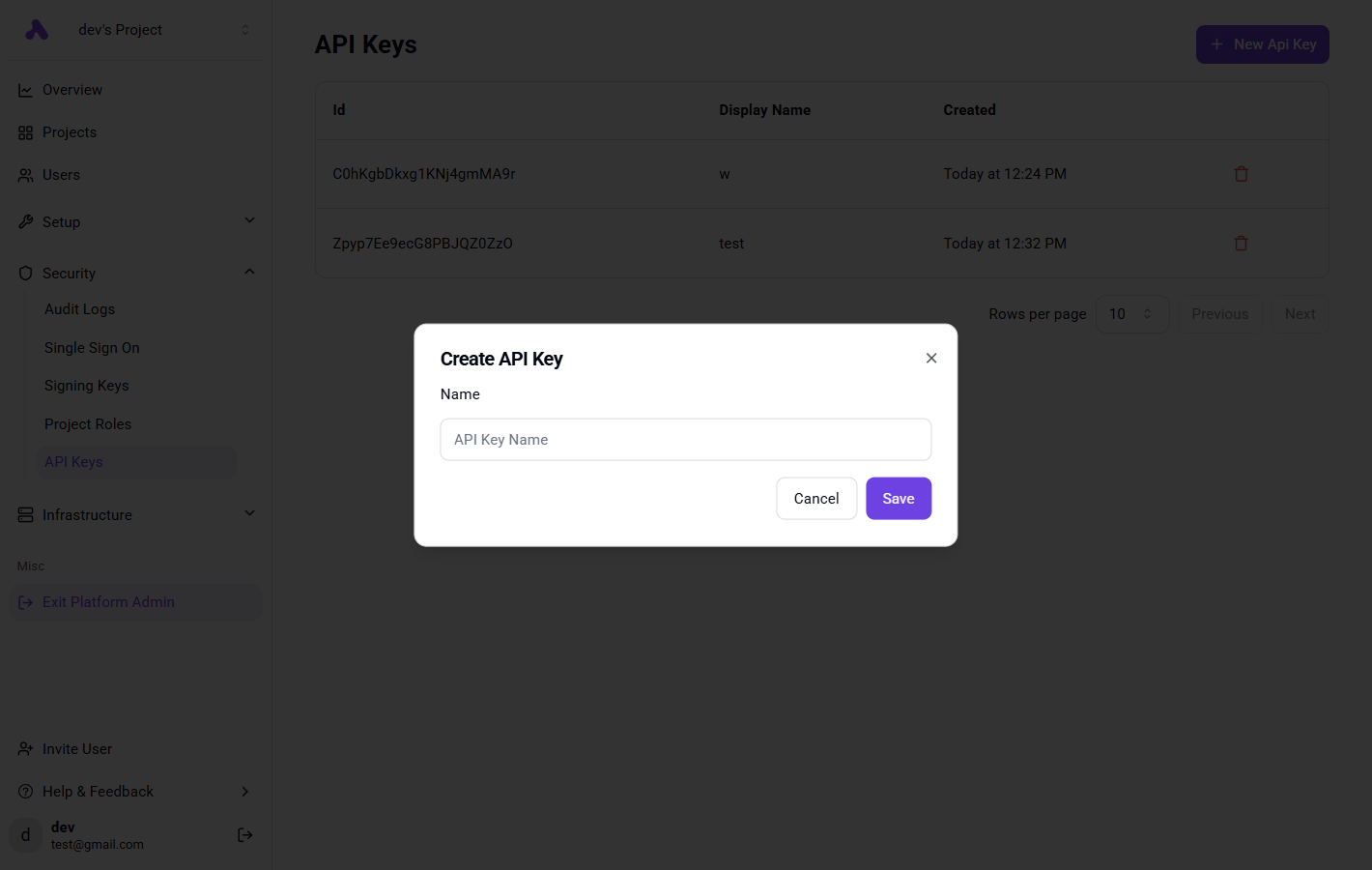
Go to **Platform Admin → Security → API Keys** and create an API key. Save it for use in the next step.
 Add the following snippet to your backend to create a global connection each time you generate the JWT token.
The snippet does the following:
* Create Project If it doesn't exist.
* Create a global connection for the project with certain naming convention.
```js theme={null}
const apiKey = 'YOUR_API_KEY';
const instanceUrl = 'https://cloud.activepieces.com';
// The name of the user / organization in your SAAS
const externalProjectId = 'org_1234';
const pieceName = '@activepieces/piece-gelato';
// This will depend on what your piece auth type is, can be one of this ['PLATFORM_OAUTH2','SECRET_TEXT','BASIC_AUTH','CUSTOM_AUTH']
const pieceAuthType = "CUSTOM_AUTH"
const connectionProps = {
// Fill in the props required by your piece's auth
}
const { id: projectId, externalId } = await getOrCreateProject({
projectExternalId: externalProjectId,
apiKey,
instanceUrl,
});
await createGlobalConnection({
projectId,
externalProjectId,
apiKey,
instanceUrl,
pieceName,
props,
pieceAuthType
});
```
Implementation:
```js theme={null}
async function getOrCreateProject({
projectExternalId,
apiKey,
instanceUrl,
}: {
projectExternalId: string,
apiKey: string,
instanceUrl: string
}): Promise<{ id: string, externalId: string }> {
const projects = await fetch(`${instanceUrl}/api/v1/projects?externalId=${projectExternalId}`, {
method: 'GET',
headers: {
'Authorization': `Bearer ${apiKey}`,
'Content-Type': 'application/json'
},
})
.then(response => response.json())
.then(data => data.data)
.catch(err => {
console.error('Error fetching projects:', err);
return [];
});
if (projects.length > 0) {
return {
id: projects[0].id,
externalId: projects[0].externalId
};
}
const newProject = await fetch(`${instanceUrl}/api/v1/projects`, {
method: 'POST',
headers: {
'Authorization': `Bearer ${apiKey}`,
'Content-Type': 'application/json'
},
body: JSON.stringify({
displayName: projectExternalId,
metadata: {},
externalId: projectExternalId
})
})
.then(response => response.json())
.catch(err => {
console.error('Error creating project:', err);
throw err;
});
return {
id: newProject.id,
externalId: newProject.externalId
};
}
async function createGlobalConnection({
projectId,
externalProjectId,
apiKey,
instanceUrl,
pieceName,
props,
pieceAuthType
}: {
projectId: string,
externalProjectId: string,
apiKey: string,
instanceUrl: string,
pieceName: string,
props: Record,
pieceAuthType
}) {
const displayName = 'Gelato Connection';
const connectionExternalId = 'gelato_' + externalProjectId;
return fetch(`${instanceUrl}/api/v1/global-connections`, {
method: 'POST',
headers: {
'Authorization': `Bearer ${apiKey}`,
'Content-Type': 'application/json'
},
body: JSON.stringify({
displayName,
pieceName,
metadata: {},
type: pieceAuthType,
value: {
type: pieceAuthType,
props
},
scope: 'PLATFORM',
projectIds: [projectId],
externalId: connectionExternalId
})
});
}
```
### Hide the Connections Dropdown (Optional)
Wherever you call `createTrigger` or `createAction` set `requireAuth` to `false`, this will hide the connections dropdown in the piece settings in the builder,
next we need to fetch it based on a naming convention.
Here is example how you can fetch the connection value based on naming convention, make sure this naming convention is followed when creating a global connection.
```js theme={null}
import {
ConnectionsManager,
Property,
TriggerStrategy
} from "@activepieces/pieces-framework";
import {
createTrigger
} from "@activepieces/pieces-framework";
import {
isNil
} from "@activepieces/shared";
// Add this import from the index.ts file, where it contains the definition of the auth object.
import { auth } from '../..';
const fetchConnection = async (
connections: ConnectionsManager,
projectExternalId: string | undefined,
): Promise> => {
if (isNil(projectExternalId)) {
throw new Error('This project is missing an external id');
}
// the naming convention here is gelato_projectExternalId
const connection = await connections.get(`gelato_${projectExternalId}`);
if (isNil(connection)) {
throw new Error(`Connection not found for project ${projectExternalId}`);
}
return connection as PiecePropValueSchema;
};
export const newFlavorCreated = createTrigger({
requireAuth: false,
name: 'newFlavorCreated',
displayName: 'new flavor created',
description: 'triggers when a new icecream flavor is created.',
props: {
dropdown: Property.Dropdown({
displayName: 'Dropdown',
required: true,
refreshers: [],
options: async (_, {
connections,
project
}) => {
const connection = await fetchConnection(connections, (await project.externalId()));
// your logic
return {
options: [{
label: 'test',
value: 'test'
}]
}
}
})
},
sampleData: {},
type: TriggerStrategy.POLLING,
async test({connections,project}) {
const connection = await fetchConnection(connections, (await project.externalId()));
// use the connection with your own logic
return []
},
async onEnable({connections,project}) {
const connection = await fetchConnection(connections, (await project.externalId()));
// use the connection with your own logic
},
async onDisable({connections,project}) {
const connection = await fetchConnection(connections, (await project.externalId()));
// use the connection with your own logic
},
async run({connections,project}) {
const connection = await fetchConnection(connections, (await project.externalId()));
// use the connection with your own logic
return []
},
});
```
Add the following snippet to your backend to create a global connection each time you generate the JWT token.
The snippet does the following:
* Create Project If it doesn't exist.
* Create a global connection for the project with certain naming convention.
```js theme={null}
const apiKey = 'YOUR_API_KEY';
const instanceUrl = 'https://cloud.activepieces.com';
// The name of the user / organization in your SAAS
const externalProjectId = 'org_1234';
const pieceName = '@activepieces/piece-gelato';
// This will depend on what your piece auth type is, can be one of this ['PLATFORM_OAUTH2','SECRET_TEXT','BASIC_AUTH','CUSTOM_AUTH']
const pieceAuthType = "CUSTOM_AUTH"
const connectionProps = {
// Fill in the props required by your piece's auth
}
const { id: projectId, externalId } = await getOrCreateProject({
projectExternalId: externalProjectId,
apiKey,
instanceUrl,
});
await createGlobalConnection({
projectId,
externalProjectId,
apiKey,
instanceUrl,
pieceName,
props,
pieceAuthType
});
```
Implementation:
```js theme={null}
async function getOrCreateProject({
projectExternalId,
apiKey,
instanceUrl,
}: {
projectExternalId: string,
apiKey: string,
instanceUrl: string
}): Promise<{ id: string, externalId: string }> {
const projects = await fetch(`${instanceUrl}/api/v1/projects?externalId=${projectExternalId}`, {
method: 'GET',
headers: {
'Authorization': `Bearer ${apiKey}`,
'Content-Type': 'application/json'
},
})
.then(response => response.json())
.then(data => data.data)
.catch(err => {
console.error('Error fetching projects:', err);
return [];
});
if (projects.length > 0) {
return {
id: projects[0].id,
externalId: projects[0].externalId
};
}
const newProject = await fetch(`${instanceUrl}/api/v1/projects`, {
method: 'POST',
headers: {
'Authorization': `Bearer ${apiKey}`,
'Content-Type': 'application/json'
},
body: JSON.stringify({
displayName: projectExternalId,
metadata: {},
externalId: projectExternalId
})
})
.then(response => response.json())
.catch(err => {
console.error('Error creating project:', err);
throw err;
});
return {
id: newProject.id,
externalId: newProject.externalId
};
}
async function createGlobalConnection({
projectId,
externalProjectId,
apiKey,
instanceUrl,
pieceName,
props,
pieceAuthType
}: {
projectId: string,
externalProjectId: string,
apiKey: string,
instanceUrl: string,
pieceName: string,
props: Record,
pieceAuthType
}) {
const displayName = 'Gelato Connection';
const connectionExternalId = 'gelato_' + externalProjectId;
return fetch(`${instanceUrl}/api/v1/global-connections`, {
method: 'POST',
headers: {
'Authorization': `Bearer ${apiKey}`,
'Content-Type': 'application/json'
},
body: JSON.stringify({
displayName,
pieceName,
metadata: {},
type: pieceAuthType,
value: {
type: pieceAuthType,
props
},
scope: 'PLATFORM',
projectIds: [projectId],
externalId: connectionExternalId
})
});
}
```
### Hide the Connections Dropdown (Optional)
Wherever you call `createTrigger` or `createAction` set `requireAuth` to `false`, this will hide the connections dropdown in the piece settings in the builder,
next we need to fetch it based on a naming convention.
Here is example how you can fetch the connection value based on naming convention, make sure this naming convention is followed when creating a global connection.
```js theme={null}
import {
ConnectionsManager,
Property,
TriggerStrategy
} from "@activepieces/pieces-framework";
import {
createTrigger
} from "@activepieces/pieces-framework";
import {
isNil
} from "@activepieces/shared";
// Add this import from the index.ts file, where it contains the definition of the auth object.
import { auth } from '../..';
const fetchConnection = async (
connections: ConnectionsManager,
projectExternalId: string | undefined,
): Promise> => {
if (isNil(projectExternalId)) {
throw new Error('This project is missing an external id');
}
// the naming convention here is gelato_projectExternalId
const connection = await connections.get(`gelato_${projectExternalId}`);
if (isNil(connection)) {
throw new Error(`Connection not found for project ${projectExternalId}`);
}
return connection as PiecePropValueSchema;
};
export const newFlavorCreated = createTrigger({
requireAuth: false,
name: 'newFlavorCreated',
displayName: 'new flavor created',
description: 'triggers when a new icecream flavor is created.',
props: {
dropdown: Property.Dropdown({
displayName: 'Dropdown',
required: true,
refreshers: [],
options: async (_, {
connections,
project
}) => {
const connection = await fetchConnection(connections, (await project.externalId()));
// your logic
return {
options: [{
label: 'test',
value: 'test'
}]
}
}
})
},
sampleData: {},
type: TriggerStrategy.POLLING,
async test({connections,project}) {
const connection = await fetchConnection(connections, (await project.externalId()));
// use the connection with your own logic
return []
},
async onEnable({connections,project}) {
const connection = await fetchConnection(connections, (await project.externalId()));
// use the connection with your own logic
},
async onDisable({connections,project}) {
const connection = await fetchConnection(connections, (await project.externalId()));
// use the connection with your own logic
},
async run({connections,project}) {
const connection = await fetchConnection(connections, (await project.externalId()));
// use the connection with your own logic
return []
},
});
```