> ## Documentation Index
> Fetch the complete documentation index at: https://www.activepieces.com/docs/llms.txt
> Use this file to discover all available pages before exploring further.
# Production Setup
> The one production shape we recommend: what to provision, the config to copy, and how it scales
This is the production setup we recommend. It is sized from a single number — your **peak concurrent flows** — and everything else follows from there.
## What it looks like
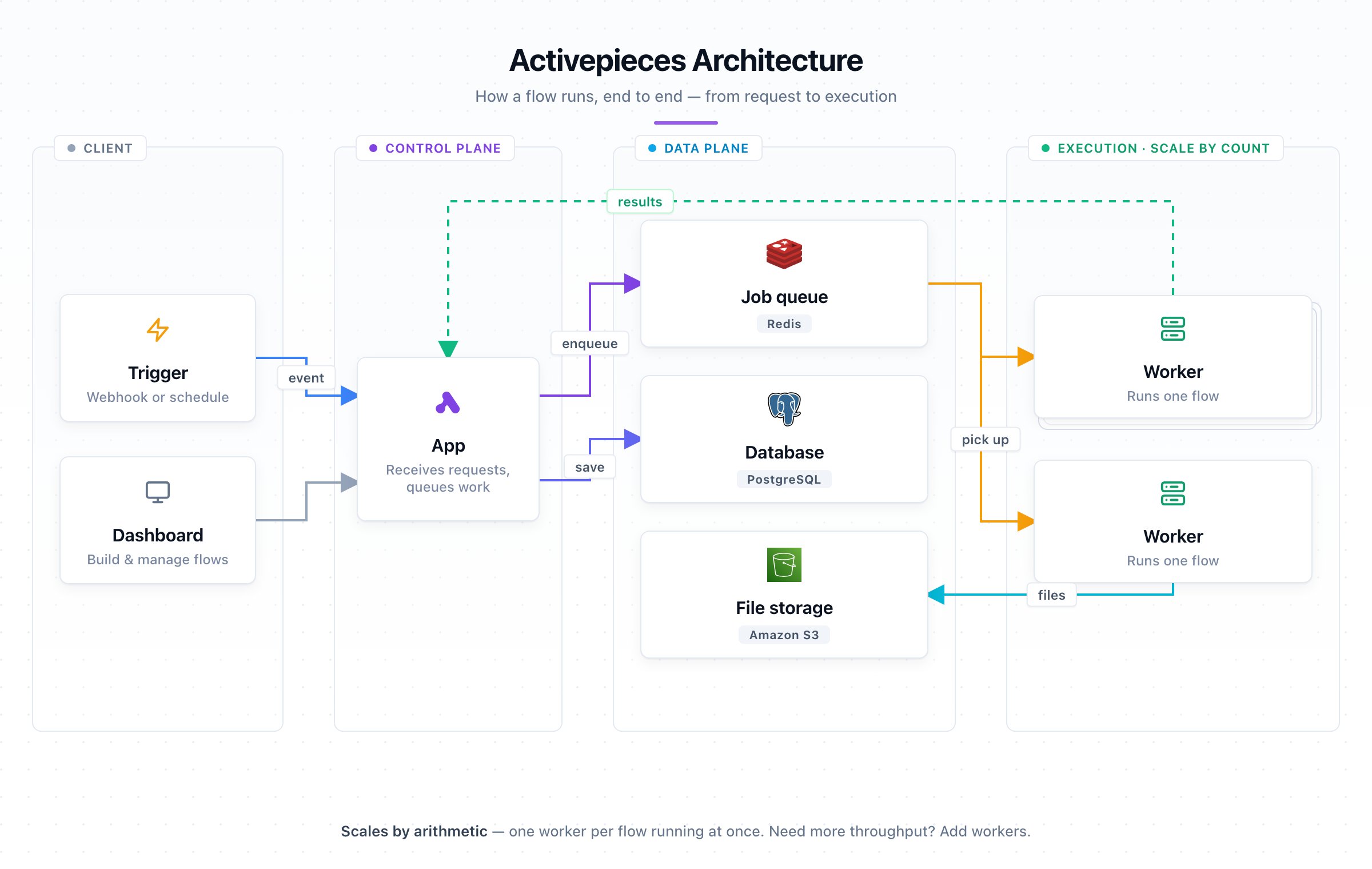
One flow per worker. A small fleet of those. A thin tier of apps in front. Managed Postgres, Redis, and S3 behind — all in the **same region**.
 | Component | Size each | How many |
| ----------------------- | ---------------------------------- | ------------------------- |
| **Worker** | 0.5 vCPU / 1 GB, concurrency **1** | one per concurrent flow |
| **App** | 1 vCPU / 1 GB | one per ten workers |
| **Postgres** | 2 vCPU / 4 GB, managed | one, grows with the fleet |
| **Redis** | 1 vCPU / 1 GB, managed | one |
| **Object storage (S3)** | same region, signed URLs on | required |
S3 is a hard requirement, not a nice-to-have: without it, every flow bundle and piece archive funnels through the app tier and the throughput numbers below no longer hold. (Walkthrough: [S3 Storage](./setup-s3).)
## Recommended config
Copy this — it's the exact configuration the benchmark below was measured on:
```bash theme={null}
AP_WORKER_CONCURRENCY=1
AP_REUSE_SANDBOX=true
AP_EXECUTION_MODE=SANDBOX_CODE_ONLY
AP_FILE_STORAGE_LOCATION=S3
AP_S3_USE_SIGNED_URLS=true
```
## Sizing
A concurrency-1 worker is busy for a flow's **whole duration** (up to 10 min), so size by **concurrent flows**, not trigger rate:
```
workers = peak concurrent flows
apps = ceil(workers / 10)
```
At 50 concurrent flows: **50 workers** (25 vCPU / 50 GB) + **5 apps** (5 vCPU / 5 GB). Overflow queues in Redis and drains as slots free.
Size **statically for peak** — autoscaling's boot and scheduling lag can't defend the 30 s sync-webhook budget. A pre-sized fleet keeps a slot warm and waiting.
And it scales with your fleet:
| Component | Size each | How many |
| ----------------------- | ---------------------------------- | ------------------------- |
| **Worker** | 0.5 vCPU / 1 GB, concurrency **1** | one per concurrent flow |
| **App** | 1 vCPU / 1 GB | one per ten workers |
| **Postgres** | 2 vCPU / 4 GB, managed | one, grows with the fleet |
| **Redis** | 1 vCPU / 1 GB, managed | one |
| **Object storage (S3)** | same region, signed URLs on | required |
S3 is a hard requirement, not a nice-to-have: without it, every flow bundle and piece archive funnels through the app tier and the throughput numbers below no longer hold. (Walkthrough: [S3 Storage](./setup-s3).)
## Recommended config
Copy this — it's the exact configuration the benchmark below was measured on:
```bash theme={null}
AP_WORKER_CONCURRENCY=1
AP_REUSE_SANDBOX=true
AP_EXECUTION_MODE=SANDBOX_CODE_ONLY
AP_FILE_STORAGE_LOCATION=S3
AP_S3_USE_SIGNED_URLS=true
```
## Sizing
A concurrency-1 worker is busy for a flow's **whole duration** (up to 10 min), so size by **concurrent flows**, not trigger rate:
```
workers = peak concurrent flows
apps = ceil(workers / 10)
```
At 50 concurrent flows: **50 workers** (25 vCPU / 50 GB) + **5 apps** (5 vCPU / 5 GB). Overflow queues in Redis and drains as slots free.
Size **statically for peak** — autoscaling's boot and scheduling lag can't defend the 30 s sync-webhook budget. A pre-sized fleet keeps a slot warm and waiting.
And it scales with your fleet:
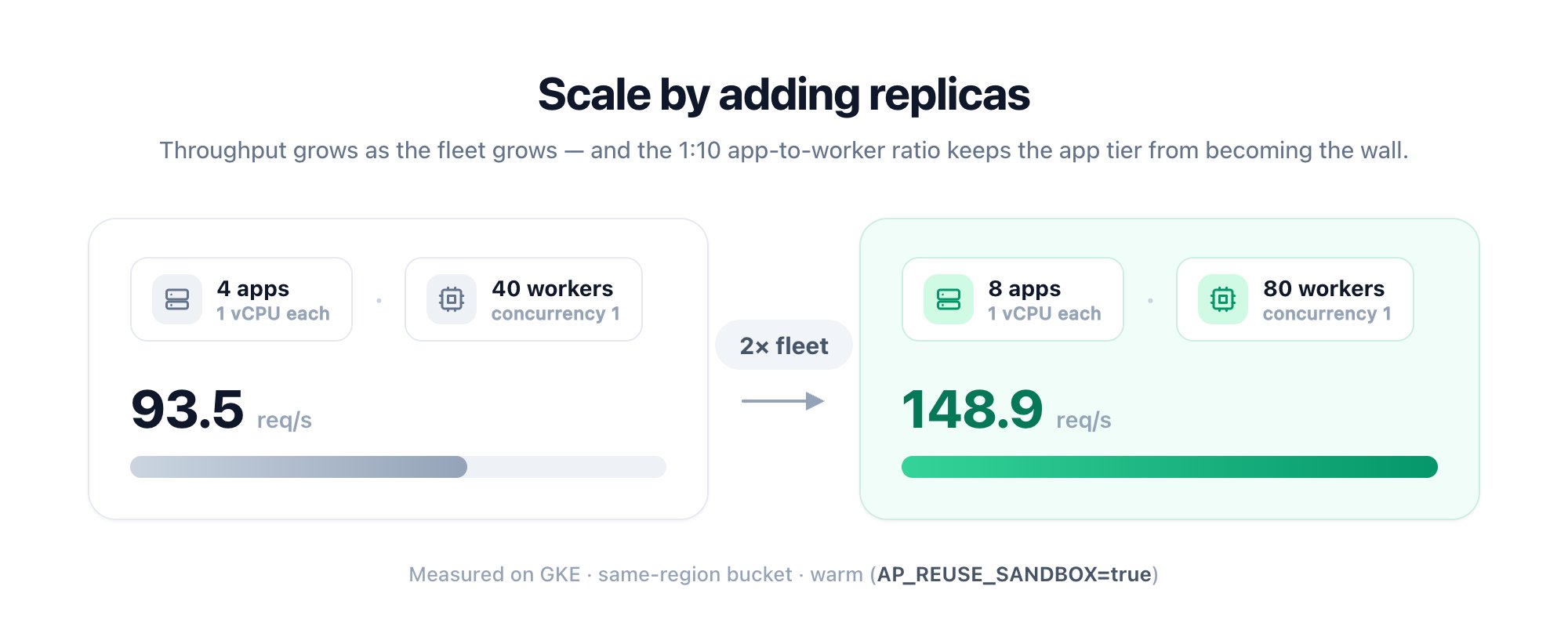 Full methodology and the ratio comparison: [Benchmark](../architecture/benchmark).
## Limits
| Limit | Default | Env var |
| --------------------- | ------- | -------------------------------- |
| Flow run timeout | 600 s | `AP_FLOW_TIMEOUT_SECONDS` |
| Sync webhook response | 30 s | `AP_WEBHOOK_TIMEOUT_SECONDS` |
| Max webhook payload | 25 MB | `AP_MAX_WEBHOOK_PAYLOAD_SIZE_MB` |
| Step file size | 25 MB | `AP_MAX_FILE_SIZE_MB` |
| Flow run log size | 50 MB | `AP_MAX_FLOW_RUN_LOG_SIZE_MB` |
The complete table lives in [Limits](/install/reference/limits).
Need to reserve dedicated capacity for specific tenants? See [Worker Groups](./worker-groups).
## Migrating from an earlier setup
Upgrading breaks nothing: the default `AP_WORKER_CONCURRENCY=5` keeps each container running five flows at once. Reshaping to one flow per worker is opt-in, at the same total capacity. Keep total slots constant: `slots = containers × concurrency`.
| | Before | After |
| ---------------- | -------------------------------- | ------------------------------ |
| **Per worker** | \~2.5 vCPU / 5 GB, concurrency 5 | 0.5 vCPU / 1 GB, concurrency 1 |
| **For 50 slots** | 10 workers | 50 workers |
```bash theme={null}
AP_WORKER_CONCURRENCY=1
AP_REUSE_SANDBOX=true
AP_EXECUTION_MODE=SANDBOX_CODE_ONLY
```
On [Worker Groups](./worker-groups), keep `AP_EXECUTION_MODE=SANDBOX_PROCESS`; code-only mode is rejected for grouped workers.
Drop each worker to 0.5 vCPU / 1 GB, then run one replica per slot.
```bash theme={null}
AP_FILE_STORAGE_LOCATION=S3
AP_S3_USE_SIGNED_URLS=true
```
Keep the bucket in the same region as your workers. See [S3 Storage](./setup-s3).
Remove `AP_PRE_WARM_CACHE`; it no longer does anything ([0.86.0](/install/reference/breaking-changes#0-86-0)).
Not ready to reshape? Leave concurrency at 5 and size each container \~5× (≈5 GB).
Full methodology and the ratio comparison: [Benchmark](../architecture/benchmark).
## Limits
| Limit | Default | Env var |
| --------------------- | ------- | -------------------------------- |
| Flow run timeout | 600 s | `AP_FLOW_TIMEOUT_SECONDS` |
| Sync webhook response | 30 s | `AP_WEBHOOK_TIMEOUT_SECONDS` |
| Max webhook payload | 25 MB | `AP_MAX_WEBHOOK_PAYLOAD_SIZE_MB` |
| Step file size | 25 MB | `AP_MAX_FILE_SIZE_MB` |
| Flow run log size | 50 MB | `AP_MAX_FLOW_RUN_LOG_SIZE_MB` |
The complete table lives in [Limits](/install/reference/limits).
Need to reserve dedicated capacity for specific tenants? See [Worker Groups](./worker-groups).
## Migrating from an earlier setup
Upgrading breaks nothing: the default `AP_WORKER_CONCURRENCY=5` keeps each container running five flows at once. Reshaping to one flow per worker is opt-in, at the same total capacity. Keep total slots constant: `slots = containers × concurrency`.
| | Before | After |
| ---------------- | -------------------------------- | ------------------------------ |
| **Per worker** | \~2.5 vCPU / 5 GB, concurrency 5 | 0.5 vCPU / 1 GB, concurrency 1 |
| **For 50 slots** | 10 workers | 50 workers |
```bash theme={null}
AP_WORKER_CONCURRENCY=1
AP_REUSE_SANDBOX=true
AP_EXECUTION_MODE=SANDBOX_CODE_ONLY
```
On [Worker Groups](./worker-groups), keep `AP_EXECUTION_MODE=SANDBOX_PROCESS`; code-only mode is rejected for grouped workers.
Drop each worker to 0.5 vCPU / 1 GB, then run one replica per slot.
```bash theme={null}
AP_FILE_STORAGE_LOCATION=S3
AP_S3_USE_SIGNED_URLS=true
```
Keep the bucket in the same region as your workers. See [S3 Storage](./setup-s3).
Remove `AP_PRE_WARM_CACHE`; it no longer does anything ([0.86.0](/install/reference/breaking-changes#0-86-0)).
Not ready to reshape? Leave concurrency at 5 and size each container \~5× (≈5 GB).