> ## Documentation Index
> Fetch the complete documentation index at: https://www.activepieces.com/docs/llms.txt
> Use this file to discover all available pages before exploring further.
# Worker Groups
> Reserve dedicated worker capacity for specific projects
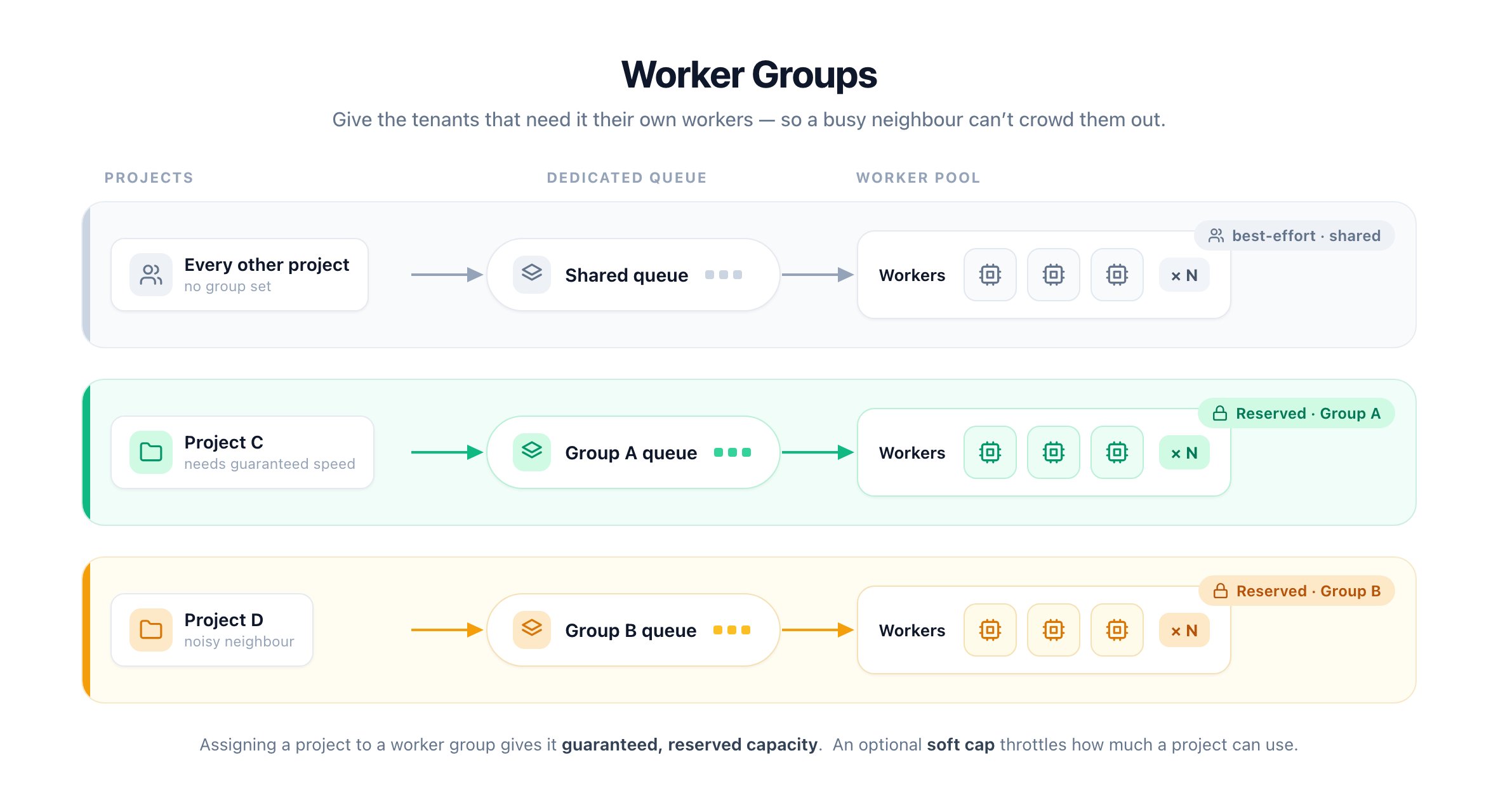
By default every worker serves every project from one shared queue. When one busy project floods it, everyone else waits.
**Worker groups** fix that. A group is a named pool of workers with its own dedicated queue. Assign a project to a group and its runs get reserved workers no other project can take.
 ## Floor vs. ceiling
* A **worker group** is a **floor**: capacity reserved for a project that nobody else can use.
* A **soft cap** is a **ceiling**: an optional per-project limit on how much a project can use. See [Manage Concurrency](/admin-guide/guides/manage-concurrency) for details.
Use both together to guarantee capacity for busy projects and cap the rest.
## How it works
A worker joins a group by setting its group ID at startup:
```bash theme={null}
AP_WORKER_GROUP_ID=
```
Grouped workers run in a process-isolated execution mode, so set:
```bash theme={null}
AP_EXECUTION_MODE=SANDBOX_PROCESS # or SANDBOX_CODE_AND_PROCESS
AP_REUSE_SANDBOX=true # or false, must be set explicitly
```
Once a project is assigned to a group, its runs are routed to that group's dedicated queue and picked up only by workers carrying the matching `AP_WORKER_GROUP_ID`. Projects without a group keep drawing from the shared queue.
## Floor vs. ceiling
* A **worker group** is a **floor**: capacity reserved for a project that nobody else can use.
* A **soft cap** is a **ceiling**: an optional per-project limit on how much a project can use. See [Manage Concurrency](/admin-guide/guides/manage-concurrency) for details.
Use both together to guarantee capacity for busy projects and cap the rest.
## How it works
A worker joins a group by setting its group ID at startup:
```bash theme={null}
AP_WORKER_GROUP_ID=
```
Grouped workers run in a process-isolated execution mode, so set:
```bash theme={null}
AP_EXECUTION_MODE=SANDBOX_PROCESS # or SANDBOX_CODE_AND_PROCESS
AP_REUSE_SANDBOX=true # or false, must be set explicitly
```
Once a project is assigned to a group, its runs are routed to that group's dedicated queue and picked up only by workers carrying the matching `AP_WORKER_GROUP_ID`. Projects without a group keep drawing from the shared queue.