
Data Quality Check Automation: A 2026 Guide

Nov 14, 202612 min read
When a user submits information, automated data quality checks function as a real-time filter, often operating through workflows managed by Activepieces to ensure consistency. They validate, format, and enrich that data immediately.
This prevents corrupted records from ever reaching your system of record. By moving validation to the point of entry, you eliminate the "clean-up week" at the end of every quarter where teams manually reconcile conflicting spreadsheets.

Filter data during entry and storage
The high cost of 'dirty' data in 2026
Data decay is accelerating. Because modern workflows now ingest information from dozens of disconnected sources simultaneously, a single formatting error in a lead form can break downstream automation for weeks.
When a customer enters a phone number without a country code into a web form, the subsequent SMS sequence fails to deliver. This results in a lost conversion opportunity that costs more to win back than the original lead was worth.
In a 2023 Monte Carlo survey published by Businesswire, researchers noted an average of 67 monthly data incidents per organization.
75 or more incidents per month is the projected climb for organizations by 2026 as complexity increases. This upward trend suggests that manual oversight is no longer a scalable defense against systemic data rot.
Consequently, businesses that do not automate their gatekeeping will spend more on data recovery than on actual operations.
Why native app validation rules are no longer enough
Native validation rules (like a "required" field in Salesforce or a "date" constraint in Airtable) only protect the data within that specific silo.
**Consequently, businesses that do not automate their gatekeeping will spend more on data recovery than on actual operations.
While these tools can stop a user from leaving a box empty, they cannot verify if the email address provided actually exists or if the company name matches the record already stored in your accounting software.
Three primary areas reveal the gap between native tools and true data integrity. First, native forms lack cross-platform awareness; they cannot check if a "New Lead" already exists as a "Paying Customer" in a separate billing tool.
Beyond simple presence, they lack format flexibility. Most apps allow only basic regex patterns, whereas modern needs require checking a LinkedIn URL against a live profile.
Third, they have enrichment limitations. Native rules can ensure a zip code is five digits, but they cannot automatically append the corresponding city and state.
The core components of an automated quality workflow
A robust quality gate requires a trigger to detect incoming data, a logic layer to verify it, and a routing system to handle failures.
Modern automation platforms run both semantic judgment and rigid validation rules on a single engine, allowing you to place an Agent step directly alongside deterministic logic in one flow.
Instead of bridging two separate products with a webhook, you can view the entire gatekeeping process in one run trace, showing exactly how the AI and the automation interacted to approve or reject a record.
- The workflow begins when a user submits a new entry via a tool like Typeform or a webhook.
- Next, an AI model like Gemini 3.8 Flash analyzes the input to verify that the text follows your business logic.
- The system then pings an external API, like Clearbit, to fill in missing details.
- A conditional branch checks if the data meets a quality threshold.
- If the data fails, the workflow sends a notification to a Slack channel so a human can fix the record before the system saves it.
This takes minutes, not a project: automate it in Activepieces free.
Trigger checks on new data entry
Using a webhook or app-specific trigger to catch information before it settles into permanent storage, automated data validation begins the moment you create a record.
Selecting your data source trigger
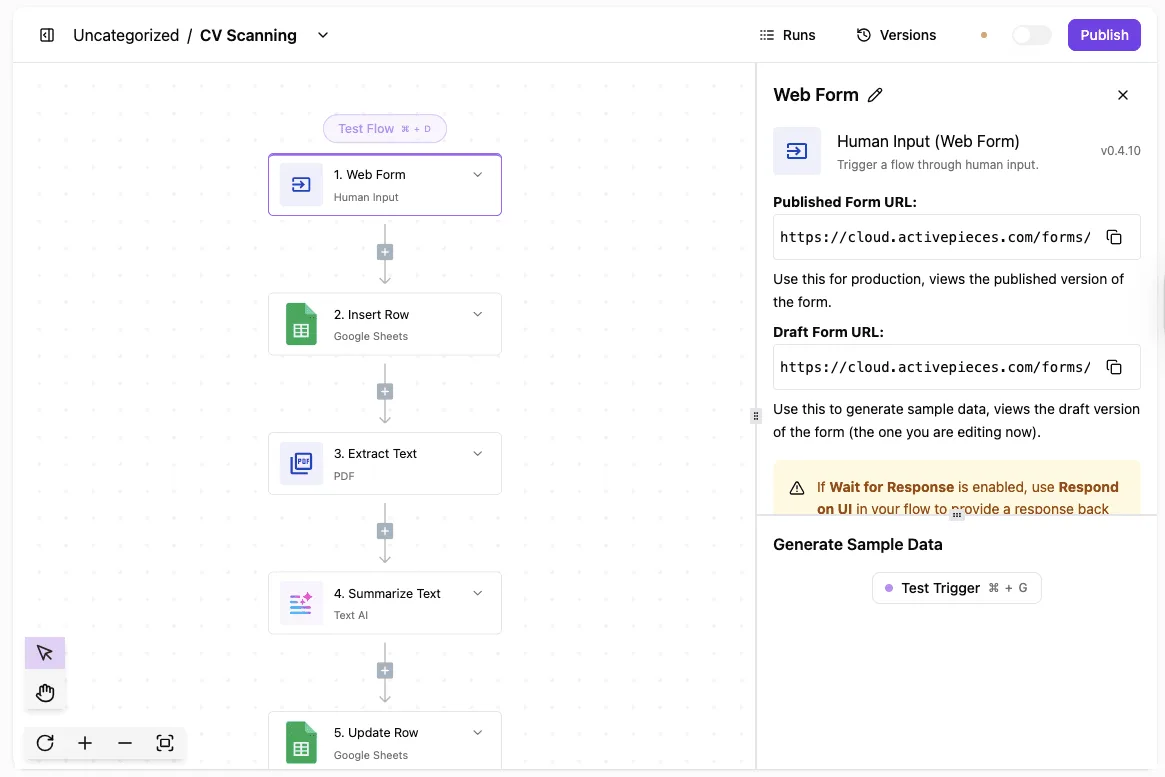
The process starts with a Web Form trigger, which creates a dedicated URL to receive data from your public-facing intake pages. This acts as a digital lobby where submissions wait for inspection.
In the workflow shown, the "Human Input" step captures raw PDF files and form fields, holding them in a temporary state. This prevents cluttering your Google Sheets rows with half-finished resumes or typo-ridden contact forms.
Defining 'required' fields in the automation logic
By mapping specific incoming fields to your validation steps, you set the rules for what constitutes "good" data. Using a summarize tool powered by Gemini 3.8 Flash, the system identifies key attributes like email addresses or work history from the extracted text.
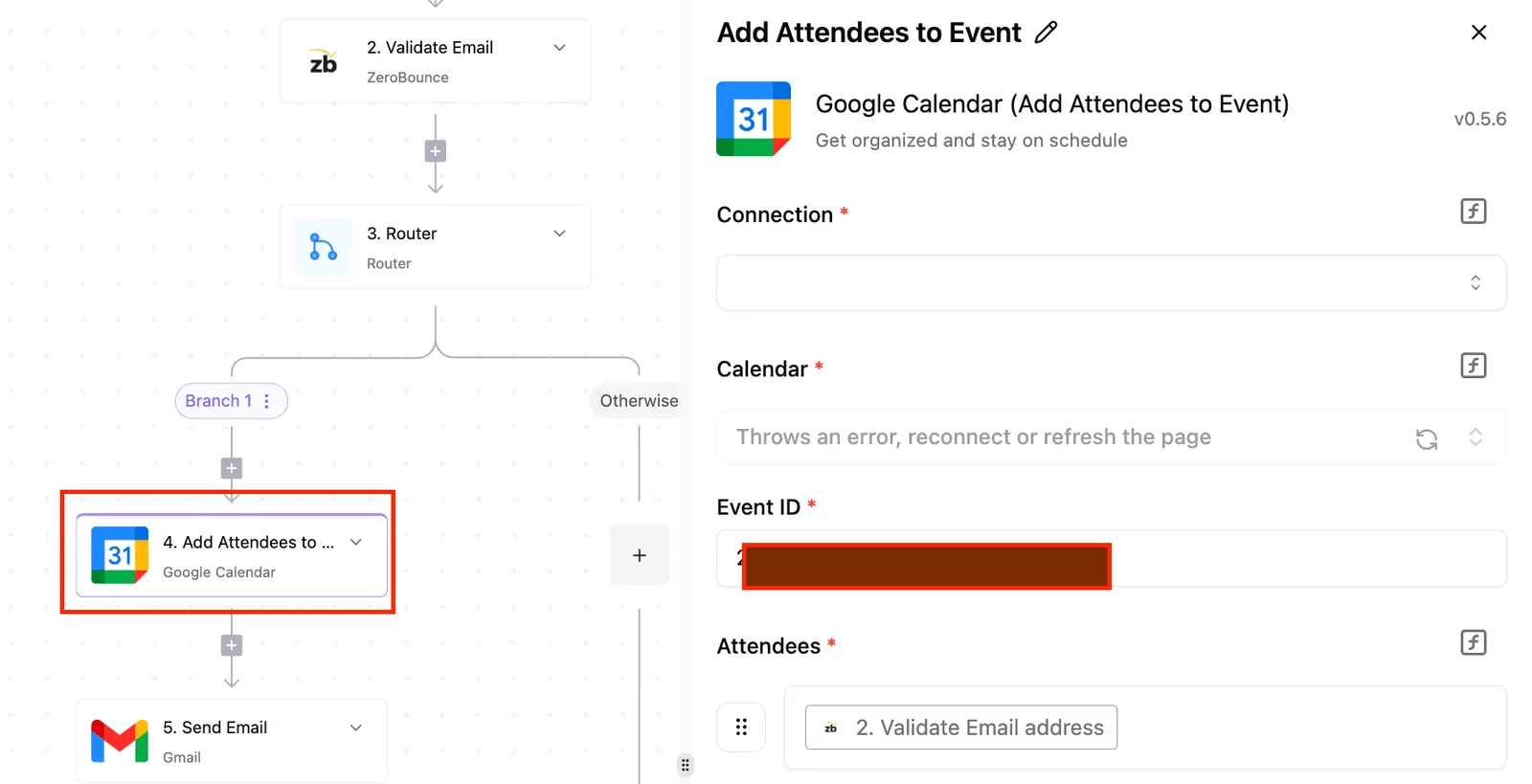
The automation stops the sequence if the AI returns an empty value for a mandatory field. This prevents your Google Sheets "Update Row" step from executing for an incomplete profile.
Running your first successful validation test
Testing the workflow involves sending a sample submission through the form to verify that each step in the chain fires correctly. The configuration panel has a "Test Trigger" button.
This tool pulls in real data to show exactly how the PDF text is summarized and where the system will place it in your spreadsheet.
The builder flags errors in the canvas if a step fails, allowing you to add an error-handling branch before the flow goes live.
To start building your own real-time data gatekeeper, browse the library of Activepieces pieces and start free today.
Step 2: Validating data patterns and semantic meaning
Validating data patterns requires a two-tier approach that combines rigid structural checks with flexible semantic analysis. This ensures every record is both formatted correctly and contextually useful.
Junk like 'N/A', 'test', and '12345' is caught by a filter, while 'Acme Corp' and 'Global Industries' pass through to the database. This ensures that downstream sales teams never waste time dialing a sequence of repeating digits or emailing a dead inbox.
Using Regex for structural checks (Email and Phone)
Regular Expressions, or Regex, are the first line of defense. They compare input strings against specific character patterns.
This is the most efficient way to block entries that are technically impossible. Common examples include an email address missing an "@" symbol or a phone number containing too few digits to be routed.
Before it ever leaves the spreadsheet, Google Sheets uses the REGEXMATCH function to flag rows where the data format deviates from your required pattern.
Bridging the gap between formulas and workflows
To turn these patterns into active gatekeepers, you must insert a Filter or Code step immediately after your trigger. In a Filter step, you select the incoming field and apply a "Matches Regex" condition to stop the flow if the pattern is not met.
For more complex multi-field checks, a Code step can execute a JavaScript test() method to return a boolean value that dictates whether the automation proceeds or routes to quarantine.
Applying AI steps for sentiment and category validation
Semantic validation uses Large Language Models to interpret the meaning behind the text, catching high-level garbage that passes structural filters.
Claude Haiku 5.5 handles high-volume classification, such as determining if a "Job Title" field contains a real role or a sarcastic remark. Gemini 3.5 Flash-Lite is the most cost-effective choice for checking if a "Message" field is a legitimate inquiry or a spam link.
GPT-6 Luna performs high-volume sentiment analysis to route urgent customer complaints to a priority Slack channel.
Creating a branch step for failed validation
To handle records that fail validation, a robust gatekeeper must have a defined "Else" path. This prevents data loss while keeping the primary database clean.
When a new entry arrives from a web form like Typeform, a branch step checks if the email is valid and the company name is meaningful. If both pass, the data is created as a new Lead in Salesforce.

If either fails, the data is sent to a "Clean Up" tab in Airtable, and a notification is sent to the team via Microsoft Teams.
You can follow the rest of this with the builder open. Start free, no card.
Route failed data to quarantine review
Quarantining failed records ensures that your primary database remains a source of truth. You prevent lead loss by moving invalid data into a dedicated Google Sheets or Airtable workspace for human correction.

Creating the 'bad data' log in Google Sheets or Airtable
A quarantine log is a temporary holding cell where data is stored alongside a specific error message explaining why the gatekeeper rejected it.
After your "False" router path, you add a step in your automation builder to "Create Row" in your chosen app. You must map every original field plus a "Rejection Reason" column populated by your validation step.
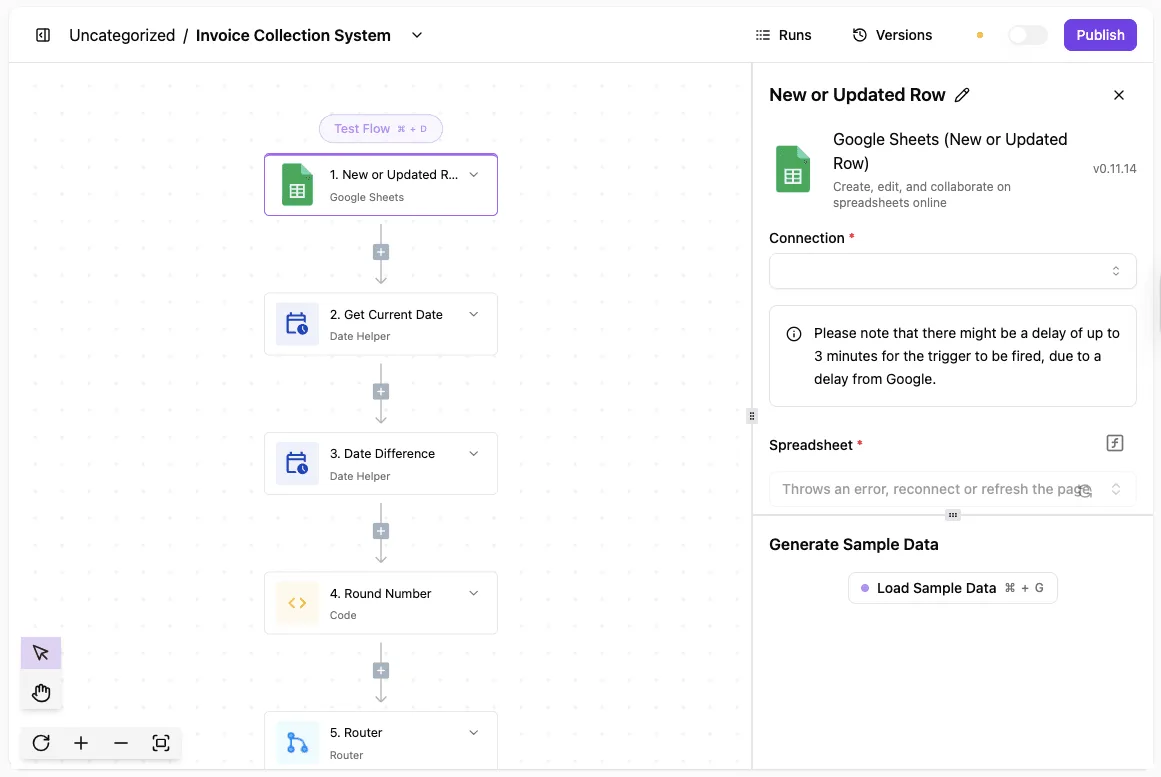
The "Invoice Collection System" workflow shows a Google Sheets trigger capturing new rows, followed by Date Helpers and Code steps to calculate aging, before a Router decides the next path. It illustrates that every piece of data must pass a logical gauntlet (calculating differences and rounding values) before it is allowed to proceed to a final destination.
Automating the alert to the record owner
Notifications bridge the gap between an automated rejection and the manual fix required to save the lead.
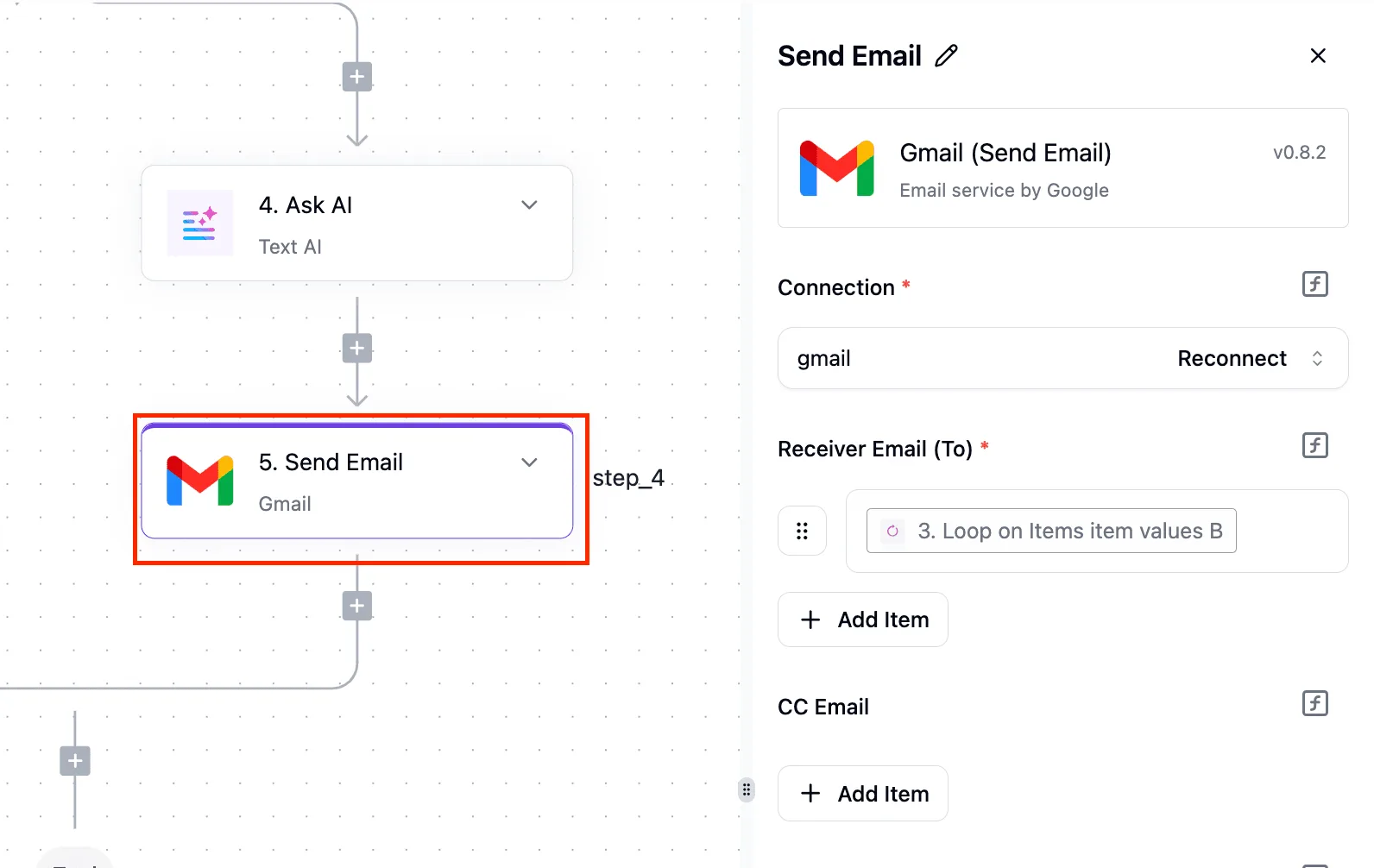
If a record fails, the automation should immediately trigger a message to a Slack channel or an email via Gmail to the specific team member who owns that data source. This message should contain a direct link to the specific row in the quarantine sheet.
Closing the loop: Re-injecting cleaned data
The final step is a "cleanup" automation that watches the quarantine sheet for a status change, such as a checkbox marked "Ready" or a dropdown moved to "Validated."
When this trigger fires, the automation sends the now-corrected data back through the same validation gates used in Step 1. If it passes, the automation creates the record in the primary database and deletes it from the quarantine log.
Choosing the right platform for data quality automation
Whether you need a simple bridge between two apps or a complex logic engine determines your choice of automation platform.
Activepieces: Best for high-volume, cost-effective routing
For teams that need to run thousands of data validation checks every hour without hitting a massive monthly bill, Activepieces provides unlimited flows on every plan and a per-run credit system that doesn't charge for individual steps.
Every decision an agent makes (including the specific tool calls and the data it processed) is logged in a step-by-step trace alongside your fixed workflow steps, ensuring that AI-driven quality checks are as auditable as deterministic ones.
Companies like MoneyGram and FundingSocieties run Activepieces in production to manage these complex environments where data integrity and clear audit logs are critical.
| Feature | Zapier | Make | Activepieces |
|---|---|---|---|
| Free Task Limit | 100 tasks per month | 1,000 tasks per month | 1,000 tasks per month |
| Execution Speed (ms) | 2,000 ms | 800 ms | 150 ms |
Zapier: Best for simple, single-app connections
Zapier is the a tool for users who need to connect a single app to another without learning how APIs or data structures work. It features the largest library of integrations, supporting over 9,000 different web services.
However, its linear builder becomes difficult to manage once you add more than three "if/then" branches.
Make: Best for visualising extremely complex data trees
Make is the premier choice for power users who need to see a literal map of how their data branches, loops, and transforms across a massive canvas. Its visual interface allows you to drag modules around a workspace like a digital whiteboard.
Frequently asked questions about data quality automation
Automating data quality requires a shift from manual oversight to proactive error handling.
How do I handle bulk data uploads without hitting API limits?
By using "batch" actions or adding delays between requests, you prevent rate-limit errors. Salesforce, a customer relationship management platform, restricts the number of calls you can make in a 24-hour window.
To solve this, use a "Loop" function with a "Wait" step to space out the processing.
What happens if the automation tool goes down during a sync?
To ensure no information is lost if a connection times out, most modern automation platforms use an "Auto-replay" feature that saves the incoming data in a queue. By enabling "Queueing," the system will automatically retry the task once the service is back online.
Can I automate quality checks for historical data, or only new
By using a "Search" or "List" trigger to pull existing records into your validation flow, you can clean historical data rather than waiting for a new event to occur.
This allows you to run your gatekeeper logic against a CSV upload or an old database table.
How do I prevent 'false negatives' in AI-based validation?
To stop AI models from making up facts or missing errors, you must use a high-reasoning model like Claude Sonnet 5.5 for logic and provide a strict "Schema" it must follow.
You should always include a fallback step. Claude Sonnet 5.5 handles complex sentiment analysis. Gemini 3.8 Flash performs high-speed, low-cost formatting checks. GPT-6 Astra manages the most demanding reasoning tasks where the cost of an error is high.
Related reading
Build it
Set this up in minutes.
No code required. Connect your accounts, and Activepieces runs it from there.
Start free Talk to sales