
DeepL API for Translation Automation (2026 Guide)

Nov 18, 202614 min read
DeepL automation means sending text to DeepL's API, directly or through a connector built on it (a workflow tool such as Activepieces can play that role), so translation runs without anyone pasting into the translator.
Done in under an hour, it leaves you with a working, repeatable translation step.
A DeepL translation workflow is a repeatable process in which your own systems, such as a script, app or no-code connector, authenticate with a DeepL API key, send text to the correct API endpoint for your plan, and receive the translation back automatically, within the API's documented limits.
Last checked 18 November 2026.
Set up DeepL automation quickly
Why automate DeepL
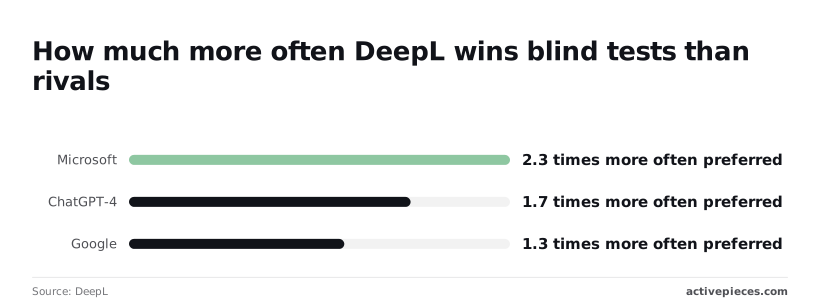
Of the blind-test groups DeepL reports, it won 66 and didn't win 8, so you're automating the engine that wins roughly nine comparisons in ten by its own count.
It's vendor-sourced, so treat it as a reason to test, not proof.
According to DeepL's analysis, evaluators preferred its output 2.3 times more often than Microsoft's, 1.7 times more than ChatGPT-4's (the version tested at the time) and 1.3 times more than Google's. The narrowest margin is Google, so if you already use Google, run your own sample before switching.
Choose between DeepL API, built-in tools, and connectors
If you want the direct route, use the API: your code posts text and receives a translation. Built-in features, meaning the desktop app, browser extension and Word add-in, are still manual, one document at a time.
No-code connectors call the API for you from a trigger you configure, and Activepieces is one of them, with 750 integrations counted from its open source monorepo and an MIT-licensed core, so you likely won't need to build custom integrations for most workflows.

Pick by how often the job repeats.
| Route | Setup time | Code needed | Best fit |
|---|---|---|---|
| DeepL API | Under an hour | Yes, one HTTP call | Translation inside your own product or pipeline |
| Built-in features (app, browser, Word add-in) | Minutes | None | One-off documents and individual users |
| No-code connectors | Under an hour | None | Moving text between tools on a trigger |
You need a plan that includes API access, an authentication key from your account, and the endpoint that matches that plan. A mismatch between key and endpoint is the usual cause of a failed first call, so the next section starts there.
This takes minutes, not a project: automate it in Activepieces free.
Stage 1: Get a DeepL API key and pick the endpoint
A DeepL key only works against the host that matches its plan: keys ending in :fx go to api-free.deepl.com, and every other key goes to api.deepl.com.
Create the account and copy the key
Sign up for DeepL API Free or API Pro, which are separate from a translator subscription, then open the account's API keys tab and copy the key.
Free allows 500,000 characters a month, so a 40-page manual can use the whole allowance before the month is half over.
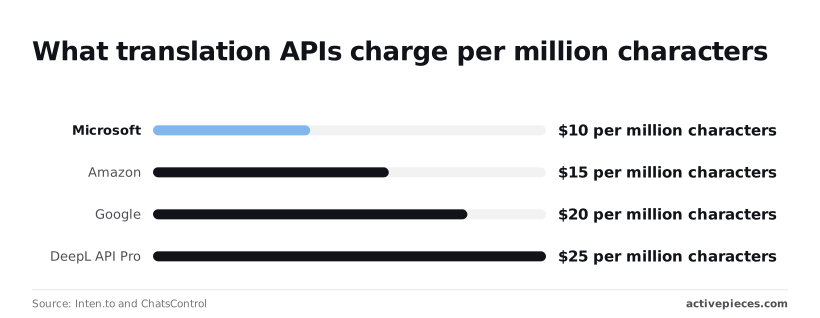
$25 per million characters is the Pro rate, against $20 for Google, $15 for Amazon and $10 for Microsoft in the same comparison. You pay the highest per-character rate of the four, and the case for it is output quality, not price.
DeepL API Free vs Pro base URL
| API Free (Developer) | API Pro (Growth) | |
|---|---|---|
| Key suffix | :fx |
none |
| Endpoint host | api-free.deepl.com |
api.deepl.com |
| Monthly price | $0 | €4.99 base |
| Character allowance | 500,000 | pay as you go |
| Overage rate | none; requests are refused at the cap | $25 per million |
On Free, hitting the cap means refused requests, not a bill. Pro keeps translating and bills the overage.
Call /v2/usage before you build anything else. It costs no characters and shows whether the key and host agree:
curl -H "Authorization: DeepL-Auth-Key YOUR_KEY:fx" \
 https://api-free.deepl.com/v2/usage
When the call works, it returns JSON with character_count and character_limit. A 403 means the key and host don't match. Swap the host, not the key.
Stage 2: Translate text with one API call
To translate text, you send a single authenticated POST to /v2/translate carrying text and target_lang, and the translation comes back in the JSON.
- Set the header
Authorization: DeepL-Auth-Key YOUR_KEY. - POST to
/v2/translateon the host that matches your key:api-free.deepl.comfor a Free key,api.deepl.comfor a Pro key. - Send
textandtarget_lang. - Optionally add
source_lang,formalityortag_handling. - Read
translations[0].textfrom the response.
curl -X POST https://api-free.deepl.com/v2/translate \
 -H "Authorization: DeepL-Auth-Key YOUR_KEY" \
 -d "text=The invoice is overdue." \
 -d "target_lang=DE"
{"translations":[{"detected_source_language":"EN","text":"Die Rechnung ist überfällig."}]}DeepL translate parameters worth setting
Leave source_lang off and DeepL detects the language, which is fine for clean prose and risky for short strings like product names. Set it when you know it.
Use formality where the target language distinguishes polite from casual address; on languages without the distinction the request can fail instead of being ignored, so check the response.
Set tag_handling to xml or html when the text carries markup, or the tags get translated as words. Pass glossary_id to pin terminology you created earlier.
Write codes in uppercase. Target codes for English and Portuguese have regional variants (EN-GB, EN-US, PT-BR, PT-PT); use them, because the bare form leaves the variant to DeepL.
Source codes take no regional suffix, so DeepL rejects EN-US sent as source_lang. Check the supported-languages list before shipping a language you haven't tested.
Stage 3: Translate documents and add a glossary
Translating a file takes one upload, a polling loop and one download. The target language must already have passed the supported-languages check above, because a document job won't tell you the output reads badly.
Upload, poll, and download translated documents
You hand DeepL the file, wait, then collect the result, because DeepL translates documents asynchronously.
- Send the file to
/v2/documentas a multipart upload, with the target language set. - Keep the
document_idanddocument_keyfrom the response. You need the key to download, and DeepL doesn't show it again, so a script that discards it has paid for a translation it can't retrieve. - Poll the document's status endpoint until it reports done. Treat an error status as a failed job and stop the loop, rather than polling forever.
- Download the translated file using the id and key.

Before running a batch, read DeepL's documentation for the accepted file types, the size cap per file and how DeepL bills document translation. Catch an oversized or unsupported file on one test document, not halfway through a folder.
Once the loop works, terminology still follows DeepL's defaults. A glossary fixes that.
Create and apply a DeepL glossary
You create a glossary once, through the glossary endpoint, as a stored list of source-and-target term pairs for one language pair, and the response gives you a glossary_id. Keep that id with your configuration, not in the code of a single job.

Then pass glossary_id on the translation request, along with the source and target languages the glossary was built for.
A mismatch between the glossary's language pair and the request is the usual reason a glossary appears to be ignored, so check that first when a product name still comes back translated.

You are done when the downloaded file is in the target language and your listed terms appear exactly as you defined them.
You can follow the rest of this with the builder open. Start free, no card.
Automate DeepL translation across your other apps
To retire the copy-paste step, a no-code flow is enough.
It watches for a new row, form entry or ticket, sends the text to DeepL with the same key you already use, and writes the translation back; it should still check that your glossary terms survive.
Zapier, Make, Activepieces or a script
Pick on two things: how much setup you'll tolerate, and what happens when DeepL says no.
| Option | Setup effort | Error handling |
|---|---|---|
| Zapier | Lowest. Pick a trigger, pick the DeepL action, paste the key. | Failed runs are logged and can be replayed, but the retry behavior is the tool's, not yours. |
| Make | Moderate. You wire modules on a canvas and map fields by hand. | Per-module error routes let you branch on a failure instead of stopping the whole run. |
| Activepieces | Moderate. Same trigger-and-action model, with a DeepL action among its 750 integrations. | Every run leaves a trace you can read step by step, and the free plan allows unlimited flows. |
| A script | Highest. You write the request, the loop and the scheduler. | Complete control. You also own every retry, delay and log line. |
Expect the documented limits to be what breaks these flows: a rate-limit response, a quota that runs out mid-month, a text too large for one request.
When a connector treats any error as "stop", rows stay untranslated and nobody is told. So read how each tool reports a failed step before you trust it, and send those failures somewhere a person will see them.

If nobody on your team wants to maintain code, choose a connector. The rest of this section builds the flow in Activepieces, where the free plan includes unlimited flows.
If you'd rather not wire the trigger by hand, Activepieces has a built-in chat: describe the job, for example "find rows with an empty translation column, send them to DeepL, write the result back", and what it publishes is a live flow in your account, the same flow you would have assembled by hand.
The DeepL action it uses is one of the 750 integrations counted from the open source monorepo, whose core is MIT-licensed, so the platform integrates with hundreds of other services.
The flow runs under the same RBAC and audit logs as any other flow, and its run trace lists what happened at each step, which is where a failed row gets noticed. MoneyGram, Moneypenny, Alan and FundingSocieties run Activepieces in production.
Build the workflow: trigger, translate, write back
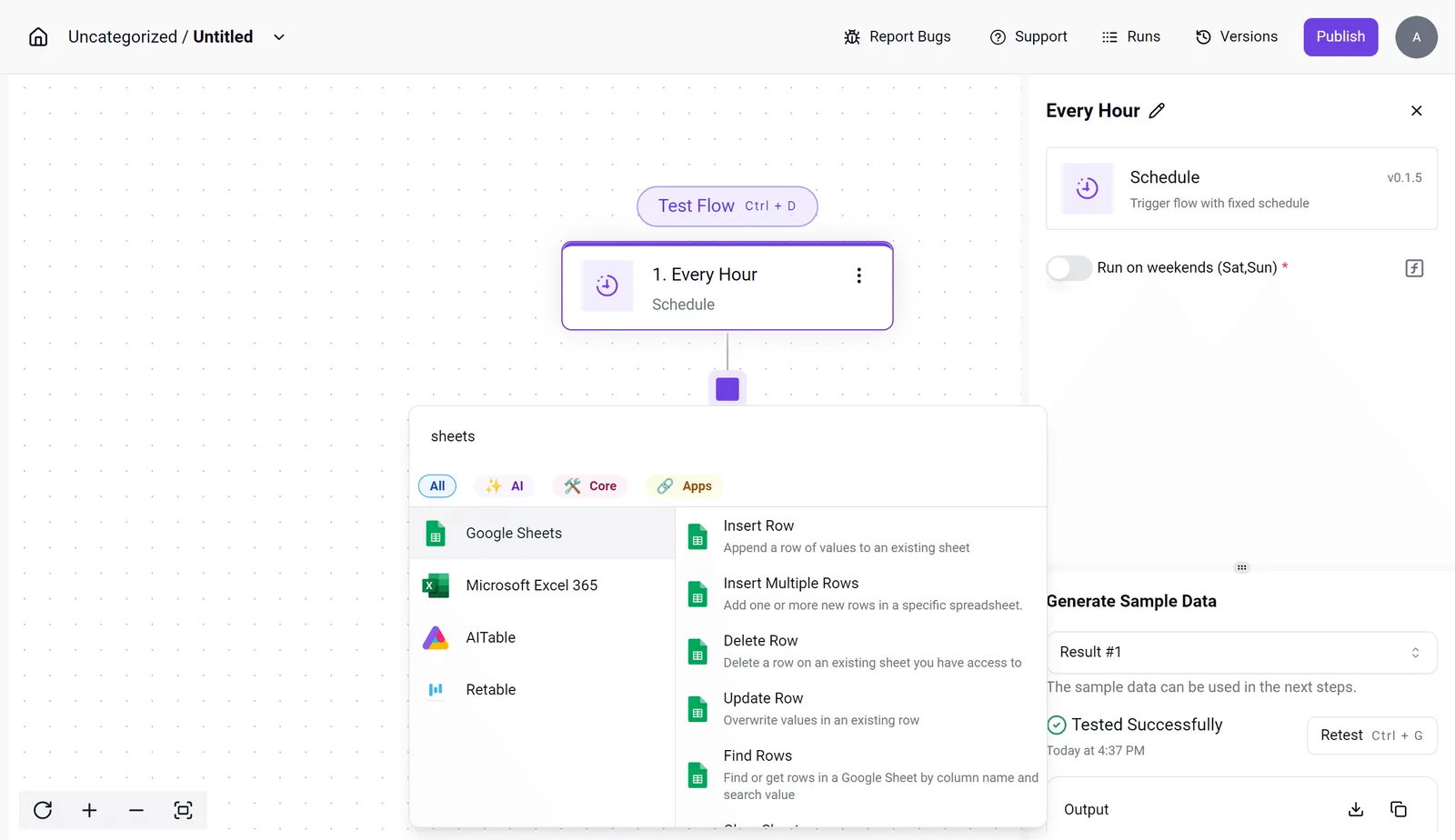
In the screenshot, the builder shows a schedule trigger set to run every hour selected.
The spreadsheet integrations are listed in the picker, and a successful sample-data test is in the settings panel.
That passing test matters: it proves the trigger returns real rows before you spend any translation quota on them.
- Add the Schedule trigger, set the interval, and decide whether it runs on weekends. Run the sample-data test.
- Add the spreadsheet integration and choose Find Rows, filtering for rows whose translation column is empty.
- Add the DeepL action. Paste the same API key and choose the target language from your source column.
- Add Update Row, mapping DeepL's output into the empty translation column.
- Publish, then check one row against your glossary terms.
Filtering on the empty column keeps the flow from translating the same row twice.
Handle API limits and error codes
DeepL API error codes and fixes
When the allowance runs out on a capped plan, the API stops returning translations and starts returning one of six status codes, each with a usual cause and a fix.
| Code | Meaning | Cause | Fix |
|---|---|---|---|
| 403 | Forbidden | Wrong key, or a key sent to the wrong endpoint | Check that the key matches its plan's endpoint, free or paid |
| 456 | Quota exceeded | Monthly character allowance used up on a capped plan | Wait for the reset, raise the plan, or stop duplicate translations |
| 429 | Too many requests | Calls arriving faster than the account allows | Slow the loop and retry with growing delays |
| 413 | Payload too large | Request body over the size cap | Split the batch into smaller requests |
| 400 | Bad request | Malformed parameter, unsupported language code, or empty text | Read the error message and correct the field it names |
| 503 | Service unavailable | Temporary fault on DeepL's side | Retry later; do not treat it as a bug in your flow |
Retry 429 and 503, because they pass on their own. Don't retry 403, 456, 413 or 400 unchanged, because the same request will fail the same way every time.
DeepL API request size and quota limits
Two ceilings sit on each request: a cap on total body size and a cap on how many texts you may send at once.
Exceed either and you get 413 or 400, so a flow that works on ten rows can fail on a full sheet.
Separate from the request limits, the quota is counted in characters and resets monthly. A flow can be perfectly sized and still hit 456 midway through the month. Check your usage figure in the account page before you schedule a large backlog.
- Confirm the key belongs to the plan you're paying for and points at that plan's endpoint.
- Check remaining characters against the week's expected volume.
- Split any batch near the body or text-count caps.
- Add retries with delays for 429 and 503 only.
- Alert on 456 and 403, since neither fixes itself.
Frequently asked questions
You just checked the usage figure, and it is also the quickest answer to the first question people ask.
Is DeepL automation free? Yes, up to a cap. The Free API plan lets you build and test a workflow without paying, but it stops at a monthly character allowance.
A backlog bigger than that allowance will halt mid-run with a quota error, not slow down. Keep Free for prototypes, and move to a paid API plan before anything runs unattended.
Can I use a Translator Pro login for the API? No. A Translator Pro subscription covers the web and app translator. API access is a separate plan with its own authentication key.
Your password won't work in a connector, and a Pro subscription doesn't give you API credits. Create the key from the API plan's account page and paste that.
Does DeepL store text sent through the API?
It depends on the plan. DeepL's paid API plans are documented as not retaining submitted text for training. The Free plan has different terms, and its text can be used to improve the service.
If the content is confidential, read the data terms for your plan before you send anything, and choose the paid plan if the terms for Free don't fit.
Which languages can the API translate?
Fewer than the web translator lists in some cases, and the set changes. The API has a languages endpoint that returns what your key can use as source and target. Query it instead of hard-coding a list.
The formality setting, which switches between formal and informal address, only works for some target languages. Where it's unsupported, the request can fail instead of being ignored, so check the response before you rely on it.
Can I automate DeepL Write too? Yes, there is a separate Write API for rewriting and improving text in the same language.
It's a different endpoint from translation, and its language coverage is narrower. Treat it as its own integration: confirm your plan includes it, then test with a short sample before wiring it into a pipeline.
Related reading
References
Build it
Set this up in minutes.
No code required. Connect your accounts, and Activepieces runs it from there.
Start free Talk to sales