
Kilo Code Pricing 2026: Plans and Token Costs

Nov 10, 202616 min read
Kilo Code Pricing Plans Compared in One Table
The short answer on what Kilo Code costs
You will pay little for Kilo Code itself, an AI coding agent that runs inside your editor, much as you would for any tool that sits alongside Activepieces in a developer's stack. Your bill's mostly the model tokens the agent consumes, and the plan you choose only decides how you pay for them.

For any run, the arithmetic's the same: input tokens times the input rate, plus output tokens times the output rate.
An agent that rereads your repository on every step multiplies the first term, so a long session on a large codebase can cost more than the tool's fee for the month.
Check the current numbers on kilo.ai before you budget; I haven't reproduced prices here that I can't confirm.
Plan table: price, inclusions, usage limits
Sorted by how tokens are paid for, Kilo's options fall along the dimension that decides your bill. Read the pricing page for the exact monthly amounts and the date you checked them, since rates change.
| How you pay for tokens | What the Kilo side covers | What decides your bill |
|---|---|---|
| Prepaid credits | Access to models through Kilo, billed as you use them | Tokens burned per task, and the model you pick |
| Subscription | A recurring fee with usage included | The included allowance, and what happens when you pass it |
| Your own API keys | The extension itself, with model costs billed by the provider | Your provider's rates and your own usage |
Whichever row you take, ask the same question: what happens at the limit? A cap you can see is a budget.
A limit explained only on a sales call is a risk, and I distrust any pricing page that makes you book one to learn it.
Even a tool I use for automations shows why.
When a tier caps one dimension and puts the top end behind a contact-sales call, you have to estimate your own usage before you can trust the sticker price.
Look at the screenshot below: a pricing page of that kind, with a free entry tier, a highlighted middle plan and an enterprise tier behind a sales call.
Check each tier's cap against your workload and ignore the headline price. The same habit applies to Kilo's table above.
Once you know the limit that binds you, the next question is which cost dominates.
What the extension charges versus what models charge
Because it scales with every request, the model line dominates, while the extension's fee, if there's one, stays flat.
Put two developers on the same plan and their bills can still differ widely. One uses a small, fast model for edits and spends little.
The other sends large contexts to a flagship model, such as Claude Opus 5.5 or GPT-6 Astra, and spends many times more for the same number of tasks. The plan didn't change; the tokens did.
So choose the plan by who bills the tokens, then control the spend directly:
- Pick the cheapest model that does the job
- Keep context small
- Watch usage as it accrues rather than at month-end
If you are running this arithmetic for your own team, see what the same workload costs on Activepieces.
Kilo Code Model List With Per-Token Costs
$0.10 to $2 per million tokens is the range of input prices across the models Kilo routes to, according to Sovyron's Kilo listing., so your model choice moves the bill more than any line Kilo itself adds.
viz type=stripplot title="Input token prices across models Kilo Gateway routes to" unit="$ per 1M input tokens" source="Sovyron - https://sovyron.com/providers/kilo/"5 per million tokens, so the model you pick moves the bill far more than the plan does." Claude Haiku 5.5: 0.1 GLM 5.3 FlashX: 0.37 GPT-6.1 Terra: 1 GPT Latest: 2
Gateway credits versus your own API keys
With gateway credits, you prepay Kilo and each request draws down the balance at the listed per-token rate.
With your own API keys, the model provider invoices you directly and Kilo's list is only a guide to what you'll owe them. Either way, the arithmetic's the same: tokens times rate.
Take one run that sends 200,000 input tokens:
- On Claude Haiku 5.5 at Narev's $0.10 per million, that's $0.02
- On GPT Latest at $2 per million, it's $0.40
- Run it 100 times a day and the gap's $2 versus $40 in input cost alone, before any output tokens
- The cheaper option deserves serious consideration

Model table with input and output rates
Before you set a default model and forget it, see where it sits: six models have confirmed input prices, and the table orders them cheapest first.
| Model | Input $ per 1M tokens |
|---|---|
| Claude Haiku 5.5 | $0.10 |
| GLM 5.3 FlashX | $0.37 |
| GPT-6.1 Terra | $1.00 |
| GLM-5.2 | $1.40 |
| Gemini Omni Flash | $1.50 |
| GPT Latest | $2.00 |
At $0.10 in and $0.50 out per million, Haiku 5.5 is the floor, which makes it the sensible choice for classification, extraction and routing. Sovyron calculates that GLM 5.3 FlashX at $0.37 costs 3.7 times as much as Haiku for the same input.
According to Sovyron, GPT-6.1 Terra at $1 is ten times Haiku's rate, so reserve it for work that needs its visual reasoning or computer use.
Sovyron observes that GLM-5.2 at $1.40 and Gemini Omni Flash at $1.50 sit close together, so a switch between them barely changes your bill.
At $2, GPT Latest is the most expensive on this list, so a long-context agent loop on it adds up fastest.
I have no confirmed context windows or Kilo markup figures for these rows.
Check each on the provider's page before you budget on them, because output tokens usually cost more than input and an agent that writes a lot of code leans on them.
Free and promotional models: what to rely on
Budget every one of the six models above at its listed rate, because none is flagged free in the source. If Kilo's picker shows a free or promotional model, treat it as a trial, not a plan.
When a promotion ends, a workflow built on a zero price turns into a line item that same day.
Test the free model if you like, but price the same job on Haiku 5.5 first, so you know what the bill becomes when the promotion stops.
Small team pricing and cost drivers
Priced that way, the bill's almost all tokens. That's about $7 a month for a solo developer, $25 for three people, and $413 for five running agents all day, on the assumptions below.
Each row assumes 97.5% of input tokens are cache reads, that output's 11% of cost, and a $0 plan fee because you bring your own API keys.
| Workload | Input tokens per month | Model | Token cost | Plan or seat fee | Total monthly bill |
|---|---|---|---|---|---|
| Solo part-time | 40M | Claude Sonnet 5.5 | $6.63 | $0 | $6.63 |
| Three-person daily team | 150M | Claude Sonnet 5.5 | $24.86 | $0 | $24.86 |
| Five-person heavy agent | 600M | GPT-5.6 | $412.92 | $0 | $412.92 |
Because the fee column's zero by assumption, any credit, subscription or seat price you pay is added on top.
, so each new hire becomes a budget decision. Token volume and model choice still move the bill by orders of magnitude.
At a blended input rate of about $0.15 per 1M, the solo developer's 40M input tokens on Sonnet 5.5 come to $6.63, which is input-only, so input usage can scale without cost constraints.
Output brings it to $6.63, leaving total costs under $7 monthly, so cost is immaterial to deployment decisions. A part-time user's bill's small enough that any fixed fee matters more than the model.
For the three-person team at 150M tokens, the bill's $24.86 on Sonnet 5.5 alone. Moving some sessions to a cheaper model lowers it in proportion to the rate gap, so route routine edits down and keep the expensive model for hard problems.
It costs $5 per 1M uncached input tokens and $0.50 cached, against $2 and $0.10 for Claude Sonnet 5.5.
Per token, that's 2.5 to 5 times Sonnet's price.
, demonstrating that model choice is as important as usage volume.
Hidden costs: context growth, expiry, rate limits
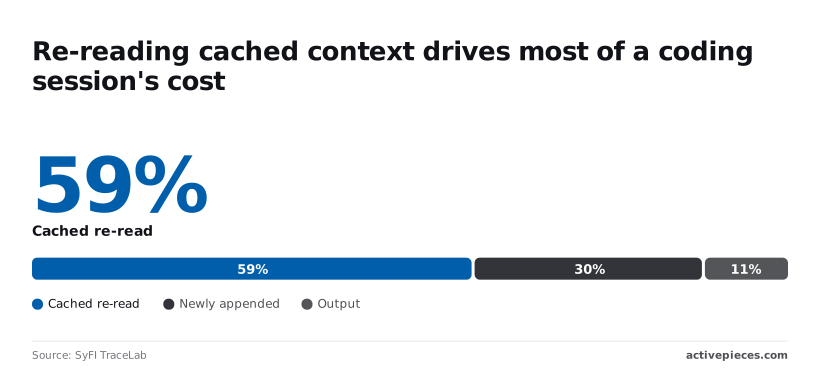
Across a session, most of the cost is re-reading cached context, 58.6%, while newly appended text's 30.5% and output only 11%. Long sessions therefore get more expensive per turn, so start a fresh session when the task changes.

Miss the cache and the same read costs 10 to 20 times more, because cached reads cost 5% to 10% of the uncached price.
Anything that breaks the cache, such as editing early in the conversation or switching models mid-session, shows up immediately on the bill.
Before you top up, check whether prepaid credits expire, whether your plan caps requests, and what overage costs. A rate limit that stalls five people's a cost too.
Worth checking against a plan that does not meter every step: one credit covers a whole run on Activepieces.
Kilo Code vs. competing AI editors
Across these five tools, the difference lies less in editor features than in who pays the model provider and how. That decides whether a stalled teammate or a runaway invoice's your problem.
The table shows the billing mechanism and the limit that pushes you off each plan.
It leaves out list prices, because those change often enough that you should read them off each vendor's pricing page on the day you buy.
| Tool | How model usage is billed | Limit that forces a change |
|---|---|---|
| Kilo Code | Prepaid credits spent at model rates, or your own provider keys | Credit balance running out, or your own key's spend |
| Cline | Your own provider keys, billed by the provider | Provider rate limits and your own budget |
| Roo Code | Your own provider keys, billed by the provider | Provider rate limits and your own budget |
| Cursor | Subscription with included model usage, then metered | The included usage allowance |
| GitHub Copilot | Subscription with an allowance of premium model requests | The premium request allowance |
Look at the pattern: the first three bill you for tokens as you burn them, and the last two sell you an allowance up front. Everything below follows from that split.
Bring-your-own-key tools: Cline and Roo Code
You paste a key from a model provider into Cline or Roo Code, open-source extensions that charge nothing for the tool itself, and every token lands on that provider's invoice at its own rate.
That makes the cost honest and fully visible, and it also means nothing caps it.
When an agent gets stuck in a loop on a large codebase, it spends real money until someone notices. Kilo Code can run the same way when you supply your own keys, so the comparison here's really about what else it has around that mode.
When an agent gets stuck in a loop on a large codebase, it spends real money until someone notices.
Subscription tools: Cursor and GitHub Copilot
With Cursor and GitHub Copilot, the arrangement inverts. You pay a predictable seat fee and get a bundle of model usage inside it. The bill's easy to forecast, and finance will like it.
Once a heavy user exhausts the allowance, they're throttled, moved to a cheaper model or billed for metered usage, depending on the plan. That's the catch. Read the overage terms before you commit a team to either one.
Which billing model suits which usage pattern
When usage is steady and moderate across the team, a flat subscription wins, because the seat fee averages out and nobody has to watch a meter.
Per-token billing wins when usage is lumpy: a few heavy days a month, some people barely touching the tool, or a preference for a premium model on hard tasks only.
If one developer runs long agentic sessions while the rest do light edits, the subscription's allowance's a poor fit for the heavy user and wasted on everyone else.
Whichever you choose, check the first month's spend per person before you settle.
Kilo Code Spend Alerts With Activepieces on Monday
Once you have a month of per-person spend in hand, four steps on Monday turn it into a ceiling you can enforce. The fourth's a small automation that tells you when someone nears it.
Monday checklist for choosing and capping a plan
Set the plan and the budget by the spread between your heaviest and lightest users, not by the average; the chart of spend per developer shows how far apart they sit.

An average hides the one person whose agent loops overnight. Work through these in order:
- Confirm your plan against the table earlier in this article. Match how you pay for tokens (credits, subscription or your own API keys) to what last month's per-person figures showed. If one developer's usage would break the plan's limit while the others sit far below it, the problem's that one person's habits, not the plan.
- Set a monthly budget for each developer. Base it on last month's real figure plus modest headroom, not on a round number you picked in a meeting. A budget with no relation to observed usage gets ignored or raised the first time someone hits it.
- Cap the models each developer may use. Model choice moves the bill more than any seat fee, so restrict the allowed list to a small set and keep the most expensive reasoning models for work that needs them. A cap on spend without a cap on models only tells you how fast the money went.
- Build the scheduled Activepieces flow below, so the budget from step 2 produces a message before it produces an invoice.
Tell nobody about a budget and it's just a number in a settings page. The last step's what makes the first three visible.
Alert when spending exceeds budget threshold
For this job, Activepieces, an automation tool that connects services through triggers and steps, does one narrow thing: on a schedule, it reads your usage figures and posts to Slack when a developer crosses a share of their budget.
The Slack step is one of the 747 integrations counted directly from the packages/integrations/community directory of the open source monorepo on GitHub, and the core is MIT-licensed, with only the packages/ee/ directories under a separate commercial licence, so adoption is free while commercial features remain proprietary.
It doesn't stop any spending itself. It only tells a person.
Four parts make up the flow. A schedule trigger runs it once a day. An HTTP or usage step pulls each developer's spend so far this month.
A condition compares that against the budget you set in step 2, with a threshold such as the point where a developer has used most of it. A Slack step posts the developer's name, spend and budget to a channel your team watches.
Where this breaks is the usage read. The flow's only as good as the data it can fetch, and I wouldn't assume your plan exposes per-developer figures in a form an HTTP step can call.
Check what Kilo Code or your provider actually returns before you build anything around it.
If you use your own API keys, the provider's usage reporting may be the better source. If no source gives per-person numbers, the alert can't be built, and the budget and model cap from steps 2 and 3 are your only controls.
Frequently asked questions
Five billing questions remain after the wrap-up, and each has a short answer.
Yes, the extension itself is open source and costs nothing to install. What you pay for's the model usage behind it, so a free install with a heavy agent loop can still produce a real bill by the end of the month.
Measure cost per task before you call anything free.
You can use your own API keys and pay nothing to Kilo: bring your own keys from a model provider and pay that provider directly. Kilo then sits outside your invoice, and the provider's bill's the entire bill.
The catch is that you lose any single-invoice convenience, so someone has to watch spend on each provider account separately, because no one else will.
I couldn't confirm whether unused Kilo Code credits expire, so don't assume a balance sits forever.
Buy credits in the amount you expect to burn within a billing cycle rather than stockpiling them, and read the terms on the billing page before a large top-up. A prepaid balance you can't spend's a cost you paid for nothing.
Does Kilo Code charge more than the provider's own rates?
On Kilo's own account, credits pass model rates through rather than adding a markup on tokens. Don't take that on faith, since it's cheap to test.
Run one identical task through credits and through your own key, then compare the two charges against the provider's published price per token. If the gap's small, the argument of this article holds: token volume, not the platform fee, drives your cost.
Is there a discount for teams or annual billing?
I have no confirmed discount figures for either, so I won't quote any. Check the current pricing page for what a team or annual plan changes, and compare it against your actual monthly token spend rather than the headline rate.
If a tier makes you book a sales call just to learn its price, be suspicious. Ask for the rate in writing before you commit a team to it.
Related reading
References
Running the numbers
See what the same workload costs here.
Free forever plan, and every paid plan self-hosts at no extra cost.
See pricing Talk to sales