Napkin AI Pricing 2026: Free, Plus and Pro Plans

Nov 18, 202614 min read
According to Napkin AI, Napkin AI is worth judging by its credit limits, not its price.
The free plan covers occasional visuals, and Plus at $9 to $12 a month only pays off once credits or exports slow you down, which means you're betting on future usage patterns, much as you would when deciding whether a workflow tool like Activepieces is worth moving beyond its free tier.
Napkin AI pricing is the set of subscription tiers, from a free plan to paid plans such as Plus, that determine how many credits, exports and watermark-free visuals you get when turning text into diagrams and graphics with Napkin AI.
Paste text in, get a diagram or visual out. That is what Napkin AI does, and the bootstrap version is to stay on free until you hit a wall, then move up one tier at a time.
The plan table, checked 18 November 2026
Read the credits and prices first, since those decide which plan you land on. The table below sets out each plan on Napkin AI's pricing page. Cells the page does not state read "not listed".
| Plan | Monthly price | Annual price | Usage limits | Exports | Watermark | Sharing | Commercial use |
|---|---|---|---|---|---|---|---|
| Free | $0 | not listed | 2,000 AI credits (4-week period) | not listed | not listed | not listed | not listed |
| Plus | $12 per person | $9 per person a month | 10,000 AI credits a month | not listed | not listed | not listed | not listed |
| Pro | $30 per person | $22 per person a month | 30,000 AI credits a month | not listed | not listed | not listed | not listed |
The plans:
- Free gives you 2,000 credits, so you can test whether the tool fits your workflow before paying anything.
- Plus gives five times that, which should suit a weekly habit rather than an occasional one, once you know what a visual costs in credits.
- Pro's 30,000 credits are three times Plus, so it only makes sense for heavy daily use or a small team sharing the load.

Because exports, watermark and commercial-use terms aren't confirmed here, check them on the pricing page before you rely on a diagram in client work.
What a credit costs is not listed
An AI credit is the unit Napkin AI meters generation with, so the allowance is a budget you spend as you work.
The pricing page gives the totals but, as far as I could confirm, not how many credits one visual, one regeneration or one export uses. Without that, 2,000, 10,000 and 30,000 can't honestly be turned into visuals per month.
What the numbers do tell you is the ratio. Plus holds five times the free allowance and Pro fifteen times.
Purely as an illustration, not a Napkin figure: if one visual with a couple of regenerations burned 100 credits, free would give about 20 visuals, Plus about 100 and Pro about 300.
So measure it yourself. Note your credit balance, make one visual, regenerate it once, export it, and note the balance again. Divide the plan's credits by that figure, and you have a visuals-per-month number you can compare with your real count.
If the pricing page does state a cost per action, use that instead of my arithmetic.
If your volume is large enough that you're pushing text through automation, Activepieces has unlimited flows on every plan, including free, so the number of workflows you build is never what you pay for.
For the per-person prices, the source is WhatTheTech's Napkin AI listing.
On yearly billing Plus runs $9 against $12 month to month, per Napkin AI via WhatTheTech, so annual saves $3 a month, or $36 across the year.
Pro runs $22 against $30, a gap of $8 a month, or $96 a year, making the annual cost difference worth your attention.
That makes annual billing a bet on your own usage. Pay yearly only after a few monthly cycles show you reliably using the credits. Otherwise, the monthly premium is cheap insurance.
What Napkin AI Costs at Realistic Usage
At realistic usage, Napkin AI costs nothing for a founder who builds a deck weekly, and one paid seat per person only for those making client visuals every day.

The table shows which limit forces the upgrade for each of three users, so you can match yourself to a row.
| User | Plan that is enough | Cost per person per month | Deciding limit | Break-even to upgrade |
|---|---|---|---|---|
| Founder, weekly deck diagrams | Free | Nothing | Export quality and watermarks | When cleaning up exports costs more time than the subscription is worth |
| Consultant, daily client visuals | Paid | One seat at the listed monthly rate | Volume and export options | Almost at once, if one billable hour a month goes on workarounds |
| Team of three | Paid, one seat each | Listed rate times three | Seats and shared styles | When visuals start to look inconsistent across people |
Check the current plans on napkin.ai before you commit, because limits change. The sections below explain each row.
If you only make a handful of diagrams before each deck, you will rarely run into a volume cap. The bootstrap version is to generate on the free plan, export once, and fix any leftover branding in your slide tool.
Upgrade only when that cleanup becomes a recurring chore.
When visuals go to clients every day, you pay for the same fixes repeatedly: re-generating, re-exporting and hiding watermarks. If the paid seat saves even one hour of billable time a month, it has paid for itself, so upgrade early.
Put three people on three free accounts and you get three sets of styles and no consistency. A paid seat each fixes that. Before buying all three, test with one seat for a month and see whether the other two actually generate visuals weekly.
If the paid seat saves even one hour of billable time a month, it has paid for itself, so upgrade early.
You will most likely hit export restrictions and watermarks before anything else, because those show up in the finished work a client sees. Generation caps come next, and only for heavy users.
Check the annual option last: it's cheaper per month, but it locks you in before you know your real usage, so start monthly.
If you are running this arithmetic for your own team, see what the same workload costs on Activepieces.
Napkin AI Versus Its Closest Alternatives on Price
Unless a tool you already pay for covers the job, stay put: Napkin AI's Plus plan at $9 a month is cheaper than the dedicated alternatives.
The table shows how the five routes differ, so you can see which limit you would actually hit (as of November 2026).
| Tool | Entry paid price | Free-plan limits | Text-to-diagram | Exports | Best job |
|---|---|---|---|---|---|
| Napkin AI | $9/month Plus (Nov 2026) | Capped generations (Nov 2026) | Core feature | Image, PDF, PPT | Quick visuals from text |
| Canva | Pro plan, per person (Nov 2026) | Limited AI use (Nov 2026) | Partial, via its AI tools | Wide range | Branded design |
| Gamma | Plus plan (Nov 2026) | Starter credits (Nov 2026) | Whole decks, not single diagrams | PDF, PPT | Generated presentations |
| Whimsical | Pro plan (Nov 2026) | Limited boards (Nov 2026) | Flowcharts from prompts | Image, PDF | Flowcharts, wireframes |
| PowerPoint/Slides | $0 if already installed | None | None | Full | Total control |

For the general-purpose tools, AI diagramming is a side feature, so a founder making two visuals a month should stay on the free tier of whatever they already have. The bootstrap version is to exhaust that plan first.
Neither of the next two undercuts Napkin Plus: Piktochart Pro costs $10 a month and Visme Starter $29, which removes price as a switching reason. Choose them only for template libraries or brand kits you'd otherwise build by hand.
Upgrade to Pro only when watermarks or export limits cost you real editing time each week, because at $22 a month it is more than double Plus.
Draw it yourself in PowerPoint or Slides when you need one or two diagrams a month, or exact control over layout. The cost is your time, so a visual that takes twenty minutes by hand and appears once a quarter never justifies $9 a month.
Where Activepieces Fits Around Napkin AI Work
Don't expect Activepieces to lower what Napkin AI charges you.
It's an automation tool that chains apps into flows, and its free plan ($0, 1,000 credits a month, up to 5 users) can take over the repetitive steps around your visuals so the work you do pay for goes faster.
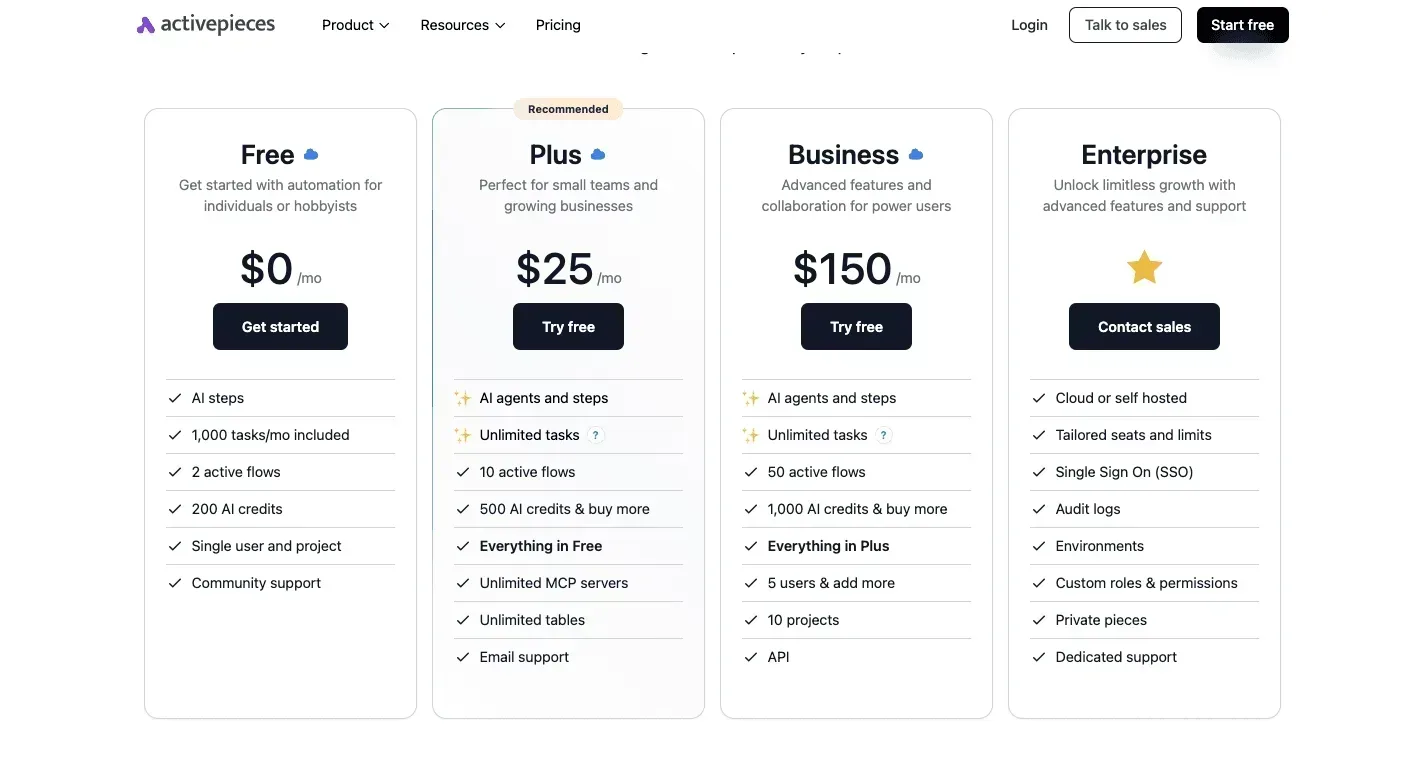
If a visual is quick to make but slow to prepare for, that's the cost worth attacking before you pay for a bigger plan.
The repeatable steps around the visuals
When a visual recurs, most of the time goes into gathering and cleaning the source text, not into the diagram.
An Activepieces flow can watch a document or a form submission, pull out the text, tidy it, and hand it to you in a ready state, and a run is 1 credit however many steps it has.

Once the visual is finished, a second flow can post the result to a team channel and log a row in a spreadsheet, so you keep a record of what was made and who asked for it.
Picture the arrangement below: a document and a form feed one flow, which delivers text to a person, and a second flow handles the posting and logging afterward.
Napkin AI sits outside both flows. The takeaway is that automation covers the edges of the job, and the middle stays with you.
For the bootstrap version, you need nothing more than a free automation plan and a shared spreadsheet. The paid route only makes sense if you run enough flows that the tool's own limits start to bite, and that's a separate decision from Napkin AI's plan.

What Napkin AI still does by hand
The steps around the visual (reading the document, cleaning the text, posting the result, logging the row) all run in one Activepieces product, so when a row goes missing there is one set of audit logs to open rather than one per tool.
The same product holds the agents, the 750+ integrations under an MIT-licensed core, and the controls (custom RBAC, SSO, SCIM, environments, git sync) that govern all of it.
Integration those together from separate point tools and you carry several vendors, several bills and several places to prove what happened. Generation, styling and export remain manual steps.
That matters for how you judge the plan. Automation won't remove export time or the effort of choosing between visual options, so those costs stay with you.
If exports, watermarks or volume limits are what slow you down, the answer is still a Napkin AI plan decision, not a flow.
Activepieces earns its place only when the preparation and distribution around the visual are what eat your hours, and even then Plus, at $12 a month for 10,000 credits, is the step up only if the free allowance runs out.
Napkin AI plan selection and testing
Run the free plan on your own work first, and pay only when a limit costs you time. That is the test Napkin AI has to pass to earn a paid plan.
The walkthrough below turns it into one short sitting, and its last step is the decision, so you leave with a plan rather than a vague intention.
- Read napkin.ai/pricing and note the date you read it.
- Make three visuals on the free plan from text you actually need.
- Export each one and check the watermark and any limit messages.
- Count how many visuals you need in a typical month.
- Pick a paid plan or skip it.
- Set a renewal reminder.

Open napkin.ai/pricing and read the limits on each plan before the prices. Write down the date, because plan terms change and your notes should say how old they are.
The bootstrap version is to stay on the free plan and pay nothing until the limits show up in real work.
Napkin AI free plan test with real visuals
Use text from this week's work, such as a process in a client proposal, a summary for a newsletter, or a slide you were going to draw by hand. Invented samples hide the problems you'll meet later.
Check your credit balance before and after each visual, and again after each regeneration and export. That gives you the credits-per-visual figure the pricing page doesn't, and it turns step four into a real number.
Then export each visual in the format you'd actually send and look for a watermark, a missing format or a limit warning. Any one of these costing you a retry is the signal you're testing for.
Choosing a Napkin AI plan and renewal reminder
Compare your monthly count from step four with the limits you noted. If the free plan covered all three visuals cleanly and your monthly need is occasional, skip the upgrade.
If the watermark forced rework or a limit stopped you mid-task, a paid plan is justified, because it saves time you were already spending. Choose the cheapest plan whose limits cover your count.
Either way, set a calendar reminder for the renewal date, or for a review date if you stayed free. If you paid, that reminder prompts you to ask whether you used the plan enough to keep it.

Frequently asked questions
Where I couldn't confirm an answer from napkin.ai itself, I say so rather than guess.
Is Napkin AI free to use?
Yes, Napkin AI has a free plan, and for occasional visuals it's the right place to start. Use it for a few weeks before paying anything. If you never hit a limit or resent a watermark, you have your answer.
Read napkin.ai's pricing page for the current allowances, because they can change, and don't rely on a screenshot of it.
Can I use Napkin AI visuals commercially on the free plan?
Check napkin.ai's terms of service before putting free-plan visuals in client work, because I couldn't confirm the licensing rules for each plan. If a visual carries a watermark, that alone makes it a poor fit for a client deck.
Test one real visual end to end, from generation through export, and see what you actually get. That is the bootstrap version. Pay only if the result isn't usable as it stands.
I couldn't find a published student or nonprofit discount to point you to.
Look at the pricing page for any education or nonprofit wording, and if there's none, email Napkin AI's support and ask before paying full price. The worst outcome is a no, and it costs you one email.
Can I cancel Napkin AI mid-year and get a refund?
Read the refund policy before you buy, because cancelling is one question and refunds are another. I couldn't confirm whether annual plans are refundable or prorated after you cancel.
If you're unsure you'll use the plan, take the monthly option first. You'll pay a little more per month, but you can stop without losing the rest of a year's payment.
I couldn't confirm a public API or a list of integrations from napkin.ai, so don't build a workflow around one.
If you need diagrams generated automatically inside another tool, ask Napkin AI directly. Otherwise, plan on generating visuals in the app and exporting them by hand.
Related reading
References
Running the numbers
See what the same workload costs here.
Free forever plan, and every paid plan self-hosts at no extra cost.
See pricing Talk to sales