
OpenAI Embeddings MCP Explained: What It Is in 2026

Nov 12, 202614 min read
An "OpenAI embeddings MCP" is an MCP server that lets an AI client call OpenAI's embeddings API, or a search built on it, as a tool, and some teams wire the same call into automation platforms such as Activepieces instead.
As of 2026-11-12, OpenAI's docs list an embeddings API and no product with that name.
The version worth building exposes search, not raw vectors.
Understand OpenAI embeddings MCP as a pattern
What embeddings and MCP each are
An embedding is a list of numbers that represents a piece of text so that similar meanings land near each other. OpenAI's embeddings endpoint takes text in and returns that list.

MCP, the Model Context Protocol, is the interface an AI client uses to discover and call tools on a server. Neither knows about the other, and the pattern is the glue between them.
Two meanings of OpenAI embeddings MCP
In one reading it is a thin wrapper: one tool, embed(text), returning a vector. In the other it is a search tool: search(query), returning ranked passages.
The first hands the model a few thousand floats it can't read, and it still needs somewhere to store and compare them. The second keeps the vectors on the server and returns text the model can use.

How one tool call flows from client to vectors
Follow a single search call through the diagram. The query goes in from the client, the server embeds it through OpenAI, compares it against a vector store, and sends ranked passages back. The client never sees a vector.
Between "query in" and "passages back", it is all your code, so the boundary is yours to choose. Chunking, filtering, the store's index and the top-k cutoff all sit behind one tool signature.

If you expose embed instead, every one of those decisions leaks into the model's prompt.
Where teams use OpenAI embeddings MCP
When a client has to answer from private documents (internal docs, tickets, a codebase), that is the common case.
Teams write the server by hand, or connect the sources in Activepieces, where a integration in packages/pieces is registered once and serves two callers: it runs as a flow step and also appears as a tool on the project's MCP server, so none of the 747 integrations needs a second wiring for your agent.

Do not expect MCP to decide who is allowed to see which passages. Per-user permissions still have to be enforced inside the server, before results go back.
Everything below works on Activepieces' free plan. Start without code or a credit card.
Which OpenAI embeddings plan fits you
You pay OpenAI per token, with no seats. The plan that fits you is a model and a rate, and your team size only changes how many tokens you burn.
The table below uses my own usage assumptions with rates from embeddingcost.com, checked 2026-11-12. Read the last column first, because the cost is rarely what pushes you to change.
| Situation | Model | Rate per million tokens | Example monthly cost | The catch |
|---|---|---|---|---|
| Solo | text-embedding-3-small | $0.02 | 5M tokens: $0.10 | Re-embedding after every edit |
| Team of 5 | 3-small | $0.02 | 50M tokens: $1.00 | Shared index, no per-user filtering |
| Team of 25, admin controls | 3-small | $0.02 | 500M tokens: $10 | No admin console in the price |
| Bulk | text-embedding-3-large | $0.13 standard, $0.065 Batch | 2B tokens: $260 or $130 | Batch isn't interactive |
Prices and plan limits checked against docs.claude.com and claude.com and openai.com and gemini.google on November 11, 2026.
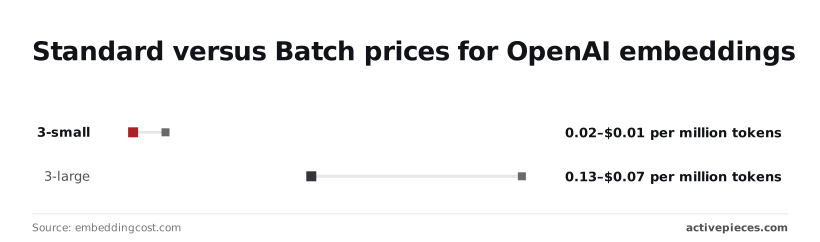
For a solo user, 3-small at $0.02 per million tokens means 5 million tokens costs ten cents. Your real expense is re-embedding files you keep editing, so hash content and skip unchanged chunks.
For a team of 5 at 50 million tokens, $1.00 a month is noise, so developers stop optimizing for consumption costs. The risk is a single shared index that returns one person's documents to another, which is the permissions problem from above.
Nothing about the $0.02 rate changes at 25 people, so 500 million tokens is still only $10.
Roles, audit and per-user filtering have to live in your MCP server, because the embeddings rate has no tier that includes them.
For bulk volume, 3-large costs $0.13 standard and $0.065 through Batch, so batch processing cuts your costs in half. A 2-billion-token backfill therefore drops from $260 to $130.
Use Batch for backfills and keep the standard rate for live queries, since you can't wait on a batch job mid-search. 3-small halves too, from $0.02 to $0.01, which makes the same backfill $20.
Raw embeddings for focused, lasting access
Text in, vector out: that is the best argument for a raw embed tool, since it does one job and so stays useful to callers you haven't met yet.
If the access controls end up in your server anyway, the thin version at least costs little to maintain. Its defenders give four reasons:
- MCP is a standard that any client can call
- the tool is a composable primitive
- there's no vector-store lock-in
- per-call cost is tiny at published prices
A primitive any client can compose
Whatever the caller does next, a tool that returns a vector makes no assumptions about it. One agent may cluster support tickets, another may dedupe a changelog, and a third may feed a store you've never heard of.
Low per-call cost of OpenAI embeddings
Nobody will page you because a single call got expensive, since embedding a query means sending a few dozen tokens and paying per token.
If a loop re-embeds the same corpus on every run, a tiny rate turns into a real bill, though at this price a runaway job is an annoyance rather than an incident.
Avoiding vector store lock-in with raw embeddings
Because a raw tool never touches your store, you can swap stores without changing the server. That would matter more if stores differed much in cost, and at a million embeddings they barely do.
According to GetAICost, Supabase pgvector runs about $25.15 a month and Qdrant Cloud $35.02, which means you can pick based on features, not cost. Weaviate Cloud costs $45, and Pinecone $50.
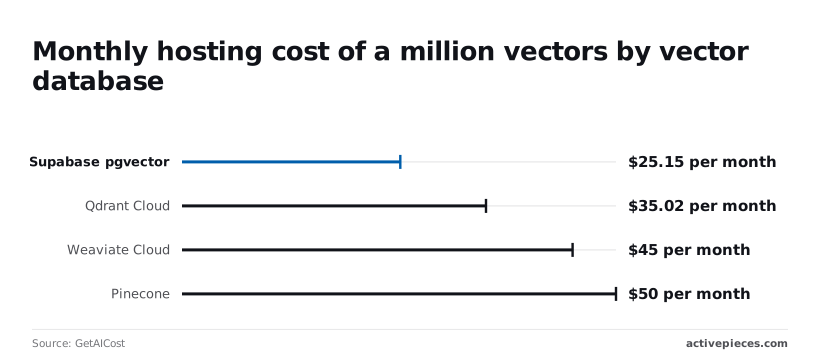
The gap from cheapest to dearest is under $25 a month, so price alone won't justify a migration.
Once price stops driving the choice, the question becomes where the retrieval logic lives, and a raw tool gives that to every caller.
Easier to see it running than to read about it: set it up free, no card.
Why search tools outperform raw embedding tools
Hand the model a list of numbers it can't read and every caller has to carry the retrieval logic itself.
Per the Zilliz OpenAI guide, text-embedding-3-small returns 1,536 floats and text-embedding-3-large returns 3,072.
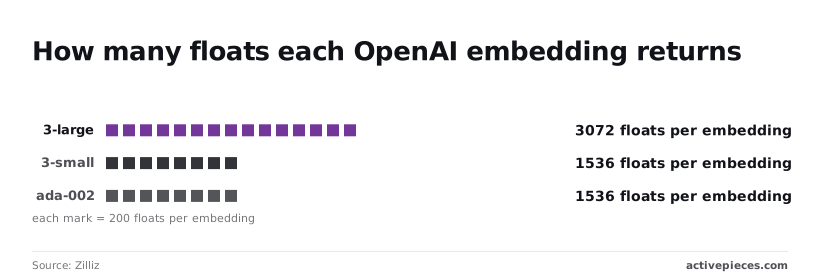
Both land on the same side of the line: one result costs far more context than a whole tool definition.
Put a 3,072-float vector in the context window and the model learns nothing. It can't compare it, rank it, or quote it.
You pay context for a payload only a vector database can use, and a search tool does that comparison server-side and returns text.
Put a 3,072-float vector in the context window and the model learns nothing. It can't compare it, rank it, or quote it.
Mistake: mixing models in one index
Index with 3-large and query with 3-small and you get a dimension mismatch error. The dimensions are 3,072 against 1,536. Worse is ada-002, which also returns 1,536 floats: query a 3-small index with it and nothing errors, the results are just wrong.
Even when dimensions match, that proves nothing about matching vector spaces. A search tool pins the model in one place, so callers can't pick the wrong one.
Re-embed a file that didn't change and you are billed for nothing; that is a second mistake. Hash the content, store the hash beside the vector, and skip on a match.
Mistake: no key scoping or spend limit
If the server holds your general-purpose API key, a looping agent spends against it freely. Give the server its own project key with a hard monthly cap, so a runaway loop hits a wall instead of your invoice.
When the caller is a pipeline, not a model, the objection wins. A batch job writing vectors straight into your own database needs the numbers, and a raw embed endpoint serves it fine. For anything a model calls mid-conversation, search is the tool.
Keeping the Index Fresh with Activepieces
Because a search tool is only as good as what was indexed, Activepieces can run the ingestion workflow so your MCP server doesn't have to, and since its core is MIT-licensed, that workflow can run on your own infrastructure.
Left alone, the index goes stale: someone edits a doc, the server keeps returning the old chunk, and nothing errors.
What the workflow does
Start with a trigger on a new or changed document, followed by three steps, and every change runs all three steps automatically.
One splits it into chunks, one calls OpenAI's embeddings API for each chunk, and one upserts into your vector store.
Each stage is a step on the Activepieces canvas, with the integrations behind those steps living in packages/pieces/community under the MIT-licensed core, and a conditional branch, the same kind the example below uses, can route a document that fails somewhere other than the upsert.
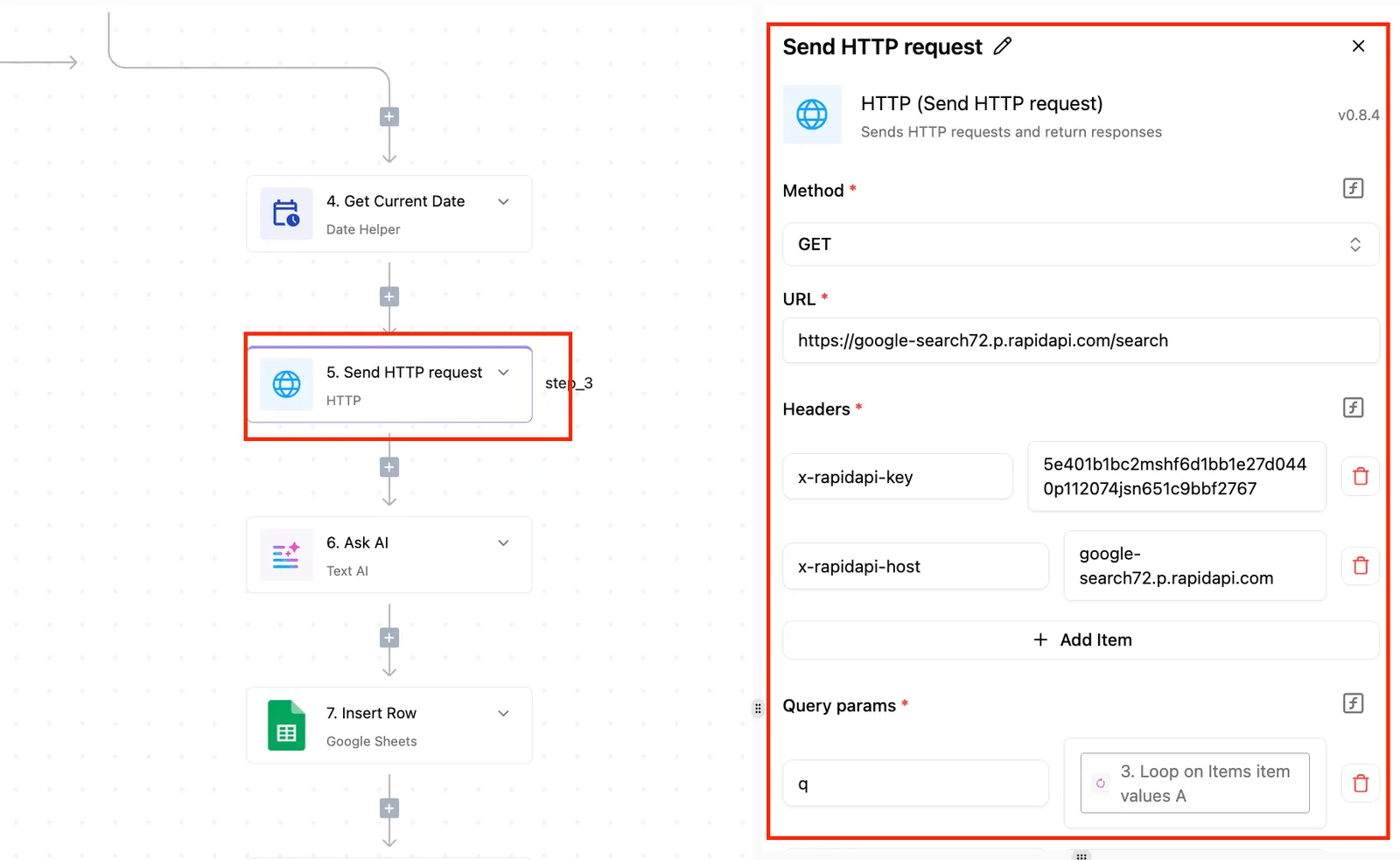
Don't mistake the example workflow below for an embedding pipeline. It takes a web form submission, extracts structured data from it with an AI step, creates a human approval task, and then routes on the answer.
Accepted creates a customer record in Stripe, the payments service. Rejected sends an email through Gmail.
What carries over is the structure: a trigger, a transform, an optional human gate, and a conditional branch. Swap the form for a document trigger, the extraction for chunking, and the Stripe and Gmail steps for the embeddings call and the upsert.

Because a integration in the MIT-licensed core is the same action whether it runs in a flow or is called as a tool on the project's MCP server, a model in Claude or Cursor could call the embeddings or vector-store step directly.
For search, I'd still keep the query path in your own server. Ingestion belongs in the workflow.
Look for your vector store among the 747 integrations in packages/pieces/community in the open source repo before committing, so you don't build what's already there.
If it isn't there, you'll be writing the upsert as a raw HTTP call, which is fine but not the low-code story.
When you don't need an embeddings MCP
If your server only answers queries against an index that already exists and rarely changes, skip this. A one-off script that embeds the corpus and loads the store does the job, and it's one fewer system to monitor.
The same goes if your documents change only when you deploy, since the deploy pipeline can rebuild the index.
Reach for Activepieces when content changes on its own schedule, when people outside engineering edit it, or when you want an approval step before something reaches the index.
Flows are unlimited on every plan, including the free one with 1,000 credits a month, so giving each content source its own ingestion flow costs nothing extra.
Steps to set up an OpenAI embeddings pipeline
If none of that describes your content, the pipeline is yours to run, and Monday's work is seven steps, in this order.
- Open the pricing page and the embeddings docs, and write down the date you read them. Prices and model lines change, and that date tells you later whether your cost estimate is stale or just wrong.
- Pick one embedding model and record its name in both the server config and the index metadata. Vectors from different models aren't comparable, so a quiet model swap gives you search that returns confident nonsense with no error.
- Count the tokens in your corpus and multiply by the per-token price. That's the cost of the first full index, known before you spend it rather than discovered on the invoice.
- Expose one search tool that takes a question and returns ranked passages with their sources. Don't ship a raw embed tool: the calling model would then have to carry vectors around and do the similarity math itself, which is exactly the job the server exists to hide.
- Create a key that can only call embeddings, and set a spend limit on the account. A leaked key or a runaway loop then ends in an
organization_spend_limit_exceedederror instead of a surprise charge. - Hash each chunk and re-embed only the ones whose hash changed. Without this, every typo fix pays for the whole corpus again.
- Write twenty real questions, taken from people who'll use the thing, and check by hand whether the right passage comes back. Twenty is small enough to finish in an afternoon and large enough to show whether your chunking is broken.
Frequently asked questions
Does OpenAI offer an official embeddings MCP server?
No, not as a product this article can point to. "OpenAI embeddings MCP" names a pattern: a server you or a community author writes that wraps OpenAI's embeddings API.
Check the author and the source before you install one, because you are handing it your API key and your documents.
Can I use an OpenAI embeddings MCP server with Claude or Cursor?
Yes, with any client that speaks MCP. The server doesn't care which model sits on the other end, and the client only sees the tools you expose.
That's why the search tool matters more than the client: a raw embed tool makes the model shuttle vectors around, which it is bad at.
Is an MCP server the same as a vector database?
No. MCP is the protocol the client uses to call your tools. A vector database stores and ranks vectors.
Your search tool sits between them: it embeds the query, asks the store for neighbours, and returns text. MCP gives you none of the storage, indexing, or ranking for free.
How many tokens can one embeddings request hold?
The limit is set per model and published on OpenAI's model pages, and this article doesn't quote one.
Look it up before you build, and make the server chunk and batch inputs itself. Otherwise the first oversized document fails with an error the client can't act on.
Do I need to re-embed everything if OpenAI releases a new model?
Only if you want to switch to it. Vectors from different models aren't comparable, so a mixed index returns garbage or a dimension mismatch error from your store. Your existing index keeps working on the old model until OpenAI retires it.
Record the model name and dimensions alongside the index, and have the search tool embed queries with exactly those. A migration then means building a second index and swapping it in, not editing the first.