
OpenAI Whisper API Pricing: Per-Minute Rates (2026)

Nov 4, 202613 min read
OpenAI Whisper API Pricing: $0.006 a Minute, and Cheaper
If you are running this arithmetic for your own team, see what the same workload costs on Activepieces.
OpenAI Whisper API pricing table, checked November 2026
You pay for audio duration, not for the compute you use, and the per-file caps matter as much as the rate.
What the Whisper API is
It's hosted, pay-per-minute speech-to-text: you upload an audio file over HTTPS and get text back, with no GPU, model server or queue to run yourself. The constraint that bites first is the per-file cap, not the price.
When a recording runs over the cap, it has to be split, sent as separate requests and stitched back together before it counts as one transcript. That means the rate you read on the pricing page prices audio minutes, not finished transcripts.
Every current model, price and limit
Read the limit columns before the price columns, because a file cap or rate limit forces engineering work that a lower rate never offsets.
The table lists the three models this article compares, with the columns that decide a budget: rate, billing basis and the three limits that shape how you build around it.
Before you settle on one of these three, check the same pricing page for GPT-Transcribe, a newer OpenAI model for high-accuracy speech-to-text.
| Model | Price per minute | Price per hour | Billing basis | Per-file cap | Duration limit | Rate limit |
|---|---|---|---|---|---|---|
| whisper-1 | $0.0060 | $0.36 | ||||
| gpt-4o-transcribe | unverified | unverified | unverified | unverified | unverified | unverified |
| gpt-4o-mini-transcribe | unverified | unverified | unverified | unverified | unverified | unverified |
Fill each cell from OpenAI's pricing page and model docs on the day you budget, and note the date.
Until the billing basis is confirmed for each row, don't assume the three models meter audio the same way, because per-minute and token-based billing scale differently once you add retries.
What the price does not include
One successful request is all the rate covers. It doesn't cover:
- failed uploads that you re-send
- long recordings split to fit the file cap
- the compute and storage you spend converting formats first
It also leaves out the glue around the call:
- queueing
- backoff when you hit the rate limit
- moving text into whatever consumes it
Those steps run on every file and belong in the cost of a transcript, though on Activepieces a ten-step version of that glue costs the same 1 credit per run as a two-step shortcut, because the run is the meter, where Zapier's per-task billing charges for each step inside it.

What realistic monthly transcription volumes cost
At 1,000 audio hours a month you pay $360 on whisper-1 or gpt-4o-transcribe and $180 on gpt-4o-mini-transcribe. Volume alone rarely makes a transcription bill large, but model choice halves it at every volume.
Cost per audio hour
Start from the rates in Cartesia's pricing breakdown. whisper-1 is $0.36 per audio hour (the familiar $0.006 a minute). gpt-4o-transcribe lands at roughly the same $0.36, and gpt-4o-mini-transcribe at roughly $0.18.
So gpt-4o-transcribe, at the same rate, buys you no discount over Whisper; OpenAI's current GPT-Transcribe is the model to price against. The only saving is in the mini tier, and it's a flat 50%.
That flat ratio is the useful property. The bill scales linearly with hours, with no volume discount to model and no step change to plan around. You can project any month by multiplying hours by the rate.

Before trusting that projection, check whether the cheaper model's accuracy holds on your audio, because a 50% saving that triggers manual correction isn't a saving.
At 10 hours a month, the bill is $3.60 on the first two models and $1.80 on the mini. At 100 hours it is $36 against $18. At 1,000 hours it is $360 against $180.
The takeaway is that the bars grow with volume, but the gap between models only becomes worth arguing about at the right-hand group.
A podcast, a call centre and a solo consultant
Say you are a solo consultant recording client calls, perhaps 10 hours a month. That's $3.60 or $1.80, so the model choice is a rounding error and you should pick on accuracy alone.
At 100 hours, which a podcast network publishing several weekly shows can plausibly reach, $36 versus $18 is still less than most teams spend on a single software seat. Neither profile justifies engineering time spent on rate optimisation.
A call centre is different. At 1,000 hours, the $180 monthly difference is $2,160 a year, enough to justify a side-by-side accuracy test on a sample of real calls. Even then, $360 a month is small beside the agent salaries the recordings describe.
That's the point where the per-minute rate stops being the interesting number. Once the model line item is this small, the costs around it, such as splitting oversized files, retrying failures and fixing errors by hand, can easily exceed it.
Hidden costs and limits that raise the Whisper bill
Look in four places for the extra cost: the per-file upload cap, tier-based rate limits, features you must buy elsewhere, and the retries and engineering hours that absorb whatever those leave broken.
About $397 over 2,333,349 seconds of audio works out to roughly $0.0102 per minute, against the listed $0.006. That one user's invoice shows how far a bill can drift from the list price.
[chart]
That's a single anecdotal report, not a documented charge, so it proves nothing about your account.
It does mean you should compare your own invoice with the rate card before you forecast anything. The limits below are the ones OpenAI documents or that follow directly from how the API works.
Whisper API file-size limit and chunking costs
Because the API enforces a maximum size per uploaded file, long recordings must be split before they are sent.
Each time you split, you add a place to fail: a cut that lands mid-word garbles that word in the transcript, and timestamps restart at zero in each chunk unless you offset them.

You then need code to stitch the integrations back together, which is engineering work that never shows up on the usage page.
Rate limits and usage tiers
Expect a ceiling, because your account tier caps throughput and the caps rise as your spend history grows. A new account running a backlog import hits it quickly, and the job either slows to the tier's pace or you build a queue to feed it.
Check your current limits in the account dashboard before you promise a delivery date, because the tier, not your code, sets the maximum speed.
Extra transcription features Whisper charges separately for
Without speaker labels, a transcript is often not a finished deliverable. If your workflow needs diarization, redaction, or a cleaned-up summary, that work goes to another model or service with its own line item.
Newer OpenAI speech-to-text options such as GPT-Transcribe may cover some of this, but each added step is another call to price and another failure to handle.
Whisper API retries and engineering time costs
When requests fail, time out or get rejected at the rate limit, they get retried, and you pay for the attempts that do succeed after a partial failure upstream.
The larger expense is the person-hours spent writing the splitter, the queue, the stitcher, and the error handling, then maintaining them. Those hours are why the useful metric is cost per finished transcript, not cost per audio minute.
Worth checking against a plan that does not meter every step: one credit covers a whole run on Activepieces.
Whisper API versus the closest transcription alternatives
On price per audio hour, several hosted rivals, and OpenAI's own newer model, undercut whisper-1, and self-hosting undercuts all of them, provided you can keep a GPU busy.
Below, audio-hour prices from Cekura and iadecider are converted into per-minute rates. The spread between the cheapest and dearest hosted option is nearly 2x, not an order of magnitude.
| Route | List price per minute | List price per audio hour |
|---|---|---|
| OpenAI whisper-1 | $0.0060 | $0.36 |
| OpenAI gpt-4o-transcribe | $0.0060 | $0.36 |
| OpenAI gpt-4o-mini | $0.0030 | $0.18 |
| Deepgram Nova-3 | $0.0043 | $0.258 |
| AssemblyAI Universal-2 | $0.0025 | $0.15 |
| Google Cloud STT v2 | $0.0030 | $0.18 |
| Self-hosted Whisper (GPU) | $0.0005 | $0.03 |
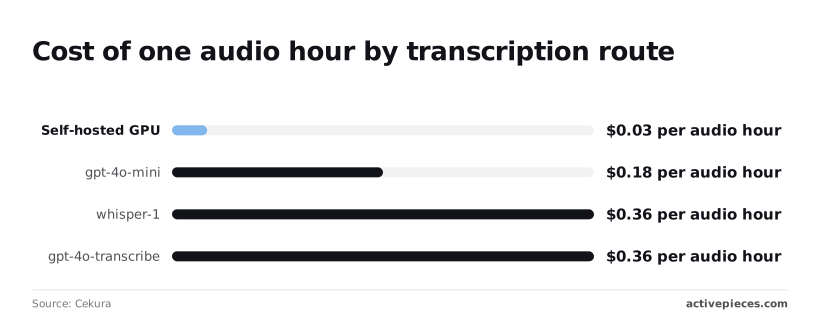
Divide the hourly figures by 60 and round, and you get the per-minute rates. The ranking is the useful part: price alone won't decide this, and the sections below cover what else does.
Hosted API rivals
At $0.15 per audio hour, AssemblyAI is the cheapest hosted option here, so a 1,000-hour backlog costs $150 against $360 on whisper-1. Google and OpenAI's gpt-4o-mini tie at $0.18, which means gpt-4o-mini halved the whisper-1 bill without leaving the vendor, though GPT-Transcribe is now OpenAI's current option to price.

Deepgram sits at $0.258, still about 28% under whisper-1, but the premium over AssemblyAI only pays off if its streaming or latency matters to you. Note that gpt-4o-transcribe costs the same $0.36 as whisper-1, so upgrading for accuracy doesn't change the bill.
Self-hosting open-source Whisper
At $0.03 per audio hour, a self-hosted GPU costs a twelfth of whisper-1. That figure assumes the card is saturated with batch work. An idle GPU still bills by the hour, so bursty traffic erodes the saving quickly.

Add the engineering you take on, which the rate also leaves out: queueing, retries, chunking long files, and capacity when a backlog lands all at once. Those costs belong in the cost per finished transcript.
Which transcription option to pick for each job
For steady, high-volume batch work with an on-call team, self-host. For a small team that wants no infrastructure, take GPT-Transcribe (check its current rate), Google at $0.18, or AssemblyAI at $0.15, which means cost alone won't be the deciding factor.
Pick Deepgram when its extra $0.108 per hour buys latency you can measure. If latency isn't your constraint, save the $0.108.
Keep whisper-1 only where existing code makes switching dearer than the $0.18 per hour you would save. A migration taking just hours is already money-positive.
Automating Whisper transcription with Activepieces
To carry the migrated model into production, you can use Activepieces, an open-source workflow tool. It triggers on a new recording, sends the file to OpenAI transcription and files the text in Docs, Notion or Slack.
It automates the plumbing around transcription and does nothing to change what transcription costs.
What the workflow looks like
Build it in this order and you get a transcript delivered without anyone touching the file; the file-size check sits before the paid call so that oversized files never reach OpenAI.
- Trigger on a new recording landing in your storage.
- Check that the file is under 25 MB, the transcription endpoint's upload limit. Anything larger would be rejected, so branch it to a splitting or compression step instead of letting it fail silently.
- Send the file to OpenAI transcription, with the model set to whichever one your cost-per-transcript measurement favors.
- Wait for the text to come back.
- File the result in Docs, Notion or Slack, wherever your team actually reads it.
- Log failures to a place someone checks, so a rejected upload shows up as a line in a log, not a missing transcript discovered a week later.
None of these steps is code you maintain; each is a configured block. That's the real saving: the hours you would spend on trigger handling, retries and delivery.
Your transcription spend stays on your own OpenAI account, because Activepieces calls the API with your key. Check Activepieces' pricing page before you budget for the workflow tool itself; I'm not quoting plan terms I can't point to.
Limits of automating Whisper transcription
It doesn't shrink the transcription bill. If you run the flow on an older, dearer model, you'll automate the overspend faithfully.
It also doesn't remove the size ceiling. The check in step 2 only routes oversized files somewhere; the splitting or compression that follows is still work you must design, and long meeting recordings will hit it often.
Finally, a workflow tool is another system to operate. If you self-host it, uptime, upgrades and run capacity are yours, and I have no tested throughput figures to give you. Run your real recordings through it before trusting it with a backlog.
Frequently asked questions
Recheck OpenAI's documentation and pricing page before you commit a budget; these answers rest on both as read on 2026-11-04.
Is the OpenAI Whisper API free?
No. The hosted API is billed per use, and you shouldn't plan around free trial credits, which OpenAI has changed over time.
You can download the Whisper model weights for free, but that only moves the cost to your own compute and engineering time. Whatever you pick, price it as cost per finished transcript, not as a free tier you'll outgrow.
Does OpenAI charge for silence in audio?
For whisper-1, yes, because it bills by audio duration and a quiet minute counts the same as a busy one. Per-minute estimates for models such as gpt-4o-transcribe are what the pricing page lists, so the flat rate is the figure to budget with. Don't assume silence is free there either.
Either way, you save money by trimming long gaps before upload, for example with ffmpeg's silence-removal filters. The catch is that removing silence shifts your timestamps, so keep a mapping if you need them to line up with the original recording.
How do I transcribe a file larger than 25 MB?
Shrink the file or split it. Re-encoding to mono at a lower bitrate often brings a long recording under the limit with little loss for speech. If that isn't enough, cut the audio into chunks, send each one, and join the results.
Cut at detected pauses, not at fixed intervals, or you'll slice words in half and pay to transcribe the damage.
Add the chunk's start offset to every timestamp when you stitch, and expect to write retry logic for a chunk that fails halfway through a long job. That glue code is workflow cost, and it belongs in your per-transcript figure.
Should I pay for the API or run Whisper myself?
Pay for the API unless you have steady, high volume or a data-residency rule that forbids sending audio out.
Self-hosting has scaling limits the per-minute rate hides. A GPU sits idle between jobs and is overloaded during bursts, and you own queueing, model upgrades and failures at 3 a.m.
Only when the hardware stays busy enough to beat the API's price, once you count the engineer's time, does self-hosting win.
Before you decide, price the newer hosted options too, such as GPT-Transcribe, because they may undercut both the old per-minute rate and your own servers.
Running the numbers
See what the same workload costs here.
Free forever plan, and every paid plan self-hosts at no extra cost.
See pricing Talk to sales