
Tailscale Pricing: Plans, Costs and Features (2026)

Nov 5, 202614 min read
Tailscale's Personal plan is free, and the paid plans bill per active user.
Your cost is set by who connects, whether that's a small team or a group wiring up automations with tools like Activepieces, and the plan you need is set by features like access groups, single sign-on and support.
Tailscale is a WireGuard-based mesh VPN: instead of routing traffic through one central server, it links each laptop, server and phone directly to the others over encrypted connections.
Tailscale pricing today: every plan, rate and limit
The plan table, checked 5 November 2026
Those limits, more than the headcount, are where small teams outgrow a tier. The table below, taken from Tailscale's pricing page, shows the access-group allowance on each plan.
| Plan | Unit billed | ACL groups |
|---|---|---|
| Personal | Active user (free) | 3 |
| Standard (formerly Starter) | Active user | 10 |
| Premium | Active user | 300 |
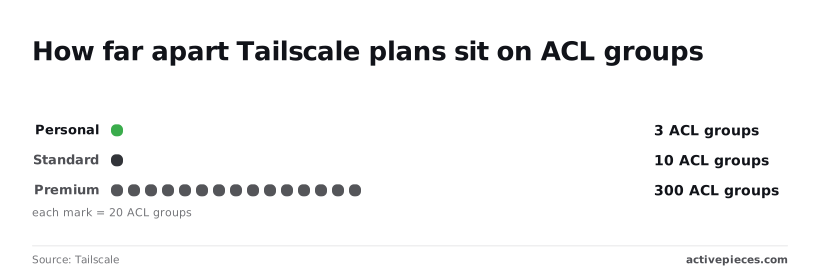
Think of "engineering" or "contractors": an ACL group is a named bucket of people that you grant access to certain machines. Three groups means three buckets.
Ten groups covers most small companies. Premium's 300 is built for organizations with many teams. Enterprise sits above these and is arranged with Tailscale directly.
Free tier limits
The one Personal limit I can state with confidence is the table's: 3 ACL groups, alongside the full mesh network. I could not verify the current user cap or any device allowance, so I won't print a number I can't source.
Read both off the pricing page before you put a business on this plan.
The plan leaves out the features that decide a tier: SSO tied to your company login, log streaming, device posture checks and faster support. I couldn't confirm the exact exclusion list either, so treat that as the thing to check line by line.

Past the cap, I couldn't confirm what Tailscale does, so assume the practical answer is a move to a paid plan. A small business with a handful of staff, one team and no audit requirements can plausibly live on Personal.
The moment someone asks for SSO or logs, the tier changes, and device count never enters into it.
What counts as a billable user
You pay for people who actually connect, not for every device on the network. A person with a laptop, phone and home server is one user, so device count is a poor guide to your bill.

On Personal you get the full mesh network and three ACL groups, which is plenty for a household or a solo builder with a few machines.
If you are running this arithmetic for your own team, see what the same workload costs on Activepieces.
A real monthly bill for a ten-person team
At $8 a user, a ten-person team on Standard pays $80 a month, per the Tailscale pricing page, so each additional team member costs $8 per month.
The table shows three real setups, and the takeaway is that the tier changes the bill more than headcount does.
| Setup | Plan | Rate per user | Seats | Monthly total (USD) | Annual discount note |
|---|---|---|---|---|---|
| Solo homelab | Personal | $0 | 1 | $0 | Nothing to discount |
| 10 people, 30 devices | Standard | $8 | 10 | $80 | |
| 25 people, subnet routers and SSO | Premium | $18 | 25 | $450 | Billed per seat each month |
A subnet router is a machine that shares a whole office or cloud network with your Tailscale users, so devices that can't run Tailscale themselves stay reachable.
On the free plan you pay nothing, and for one person with a few machines that's the right answer.
Tailscale pricing for ten people on Standard
At $8 a seat, ten seats come to $80 a month, and the 30 devices add nothing to that.
Put the same ten people on Premium and it would cost $180, so choosing the wrong tier costs you $100 a month, more than adding another ten Standard users.
Self-hosting beats both on price: a $5-a-month Headscale server, the open-source self-hosted alternative, means teams with limited budgets can afford it. You become the person who patches it, though, and that's the real bill.

Tailscale pricing for 25 people on Premium
Run the same 25 people on Standard and it would be $200. On Premium, 25 seats at the $18 rate is $450 a month, so the $250 gap is what you pay for the features this team needs.
At 50 people the bill is $400 on Standard and $900 on Premium, so tier selection is a consequential choice at that scale. A hundred people cost $800 and $1,800, which means vendor selection becomes a material cost factor at this scale.
At every size the Headscale server stays at $5, so you don't pay a scaling premium as your team grows.
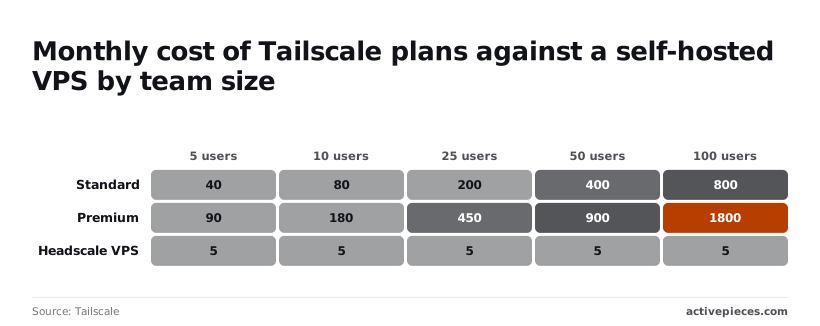
That flat line is tempting, but you're trading a monthly invoice for your own staff time and for being the one on call when it breaks.
Fees and limits that change a Tailscale bill
Five kinds of charge move the total. They're the tier that gates a feature you need, how many tagged resources you run, optional add-ons, traffic leaving your cloud, and how support and seats are packaged.
These are the items that shift the number:
- Tier gating of single sign-on (SSO), access-rule tags, log streaming and device posture checks
- Support tiers
- A per-resource charge on tagged resources once you pass the included allowance
- The Mullvad VPN add-on, sold in blocks of devices
- Exit-node egress, billed by your cloud provider
- Inactive users, who may still count toward your seats
Features locked to higher tiers
When someone leaves, SSO is what makes removing them from your directory also remove their network access. It lets people sign in with your company login. Without it, offboarding is a manual chore, and a forgotten account stays live.

Tags let you give servers rules of their own instead of tying them to a person, and past the included allowance each tagged resource is billed.
Log streaming sends network records to your security tooling, and posture checks block devices that fail your standards. If an insurer or customer asks for any of these, the tier is decided for you.
Cloud egress costs for Tailscale exit nodes
Send a person's internet traffic through a machine you run and you have an exit node. If that machine sits in a cloud account, the provider bills for data leaving it, and Tailscale never sees that charge.
On the free tier, help comes from documentation and community forums. Faster, named support is bundled with higher plans, so decide what an outage during a workday costs you.
Worth checking against a plan that does not meter every step: one credit covers a whole run on Activepieces.
Tailscale against WireGuard, Cloudflare Zero Trust and NetBird
On paper, Tailscale is rarely the cheapest option. The alternatives mostly swap the seat fee for your own hours, so the comparison is about who does the upkeep, not who charges least.
The table shows what each option bills for and what it asks of you. Read the last two columns together: the cheapest rows are the ones that hand you the work.
| Unit billed | Free allowance | Cost at 10 users | Self-host option | Admin effort | |
|---|---|---|---|---|---|
| Tailscale | Per user | Personal plan for a few users | Paid plan, per user | No (Headscale is a separate project) | Low |
| Self-hosted WireGuard or Headscale | Server rental | Software is free | $2 to $7.99 a month | Yes, that's the point | High |
| Cloudflare Zero Trust | Per user | Free up to 50 users | Free, if you stay under that line | No | Medium |
| NetBird | Per user | Free tier for small teams | Paid plan, per user | Yes | Medium |
Self-hosted WireGuard or Headscale: free but your time
The software costs nothing; the server does. VPNSmith lists IONOS at $2 a month, OVHcloud at $4.54, Hostinger at $6.49 and BuyVPS at $7.99. Even the dearest is under $8, so a ten-person team spends less than one Tailscale seat.
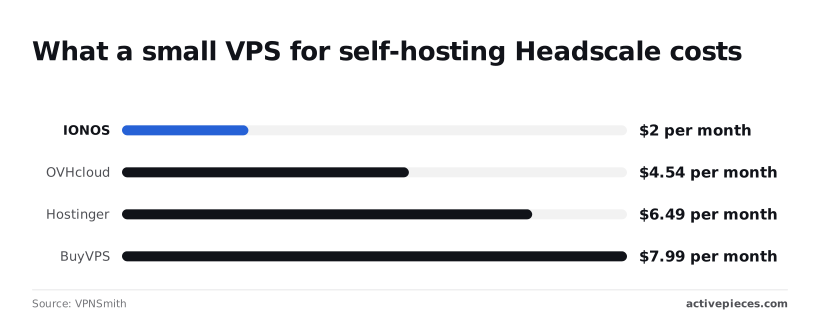
Once you run it yourself, you patch the server, rotate keys and answer when it goes down. If nobody on the team can do that, the saving is an illusion.
With Cloudflare's free allowance reaching 50 users, a ten-person team may pay nothing, but you take on its wider setup.
NetBird bills per user like Tailscale, and it can also be self-hosted, which gives you a fallback if prices rise. For any of them, the plan you need depends on SSO, access rules and logging, not headcount.
Hidden costs of Tailscale pricing
Once your team needs the higher-tier features and nobody wants to pay per head for them, Tailscale is no longer the cheaper option. Per-user pricing grows with every hire while the alternatives barely move.
Headscale is a free community-built server that stands in for Tailscale's own coordination service and runs on a basic rented virtual server.
With each person added, the two paid lines climb and the Headscale line stays flat, so the distance between them is what you pay for not running the thing yourself.
Features, not people, are usually what limit a growing team. Single sign-on, finer access rules and longer-kept logs tend to sit on the upper plans.
So one requirement from your security questionnaire can move everyone, including people who only need basic access, onto the pricier per-seat rate.
Budgeting on the entry price means budgeting for a plan you'll probably leave.
If you route traffic through a machine you run in a cloud provider, that provider's data-out charges apply, and Tailscale's fee never shows them.
**Budgeting on the entry price means budgeting for a plan you'll probably leave.
Support tiers and minimum seats
Beyond community forums, help is typically bought through higher plans, and some tiers may carry a minimum seat count.
If you need a human to answer during an outage, price that tier for the whole team, not for the two people who would ever file a ticket.
Headscale answers the cost question and replaces it with another: someone on your side now owns updates, backups and uptime. Where that person is already on payroll, self-hosting wins. Where they are not, you're paying in weekends.
If you automate that upkeep, say a flow that checks the user list and key expiry, the meter matters as much as the seat does.
Activepieces charges 1 credit per flow run however many steps it has, where Zapier bills per task and Make per module, so a ten-step check costs the same as the two-step shortcut and nobody pays extra for splitting the work up properly.
Steps before choosing a Tailscale plan
Work through these steps in order; each one narrows which plan you need and keeps the bill from surprising you later.
- Count the people who actually sign in, not the devices they own.
- Write down the features you need: single sign-on, access rules, activity logs, support.
- Test the setup on the free plan.
- Set key expiry and clear out old users.
- Re-check the vendor's pricing page on the day you buy.
Skip the first two and you end up on a tier you didn't need, or on one that lacks what an auditor asks for.
Count users and list required features
Billing follows people, so a laptop, phone and home server belonging to one person is still one person. Count staff and regular contractors who log in, then ask which of your needs the free plan can't meet.
If your company login system must control who gets in, or someone outside the team needs to read connection logs, that requirement picks your tier.
Test it on the free plan first, so you learn what breaks before you pay for anything. Then confirm current prices and limits on Tailscale's own pricing page, since tiers and allowances change.
Audit inactive users monthly
A seat you pay for and a door you forgot to lock: that is every departed employee who still has an account.
Put a monthly reminder on someone's calendar to review the user list, remove people who have left, and check that device keys expire on a schedule instead of lasting forever.
If the monthly review keeps slipping, a workflow tool can forward Tailscale events into your team chat or ticket queue. Examples are a device nearing key expiry or a new user joining.
It's optional. A calendar reminder does the same job for a small team, and it costs nothing to set up.
What Activepieces does about this
The budgeting trap here is paying for a tier before you know which features decide it.
Activepieces helps with the chores that make a plan cost more than it should, such as the monthly user review and key-expiry checks, and it doesn't add a second per-seat bill.
It charges 1 credit per flow run however many steps the flow has, so a ten-step audit costs the same as a two-step one.
The core is open source under the MIT licence, so you can self-host it, as you might Headscale, and decide whether upkeep is worth your time.
Build the audit flow on the free plan first, as you would with Tailscale.
Frequently asked questions
On commercial use, yes: a small business can run on the free Personal plan, as long as it stays inside that plan's user limits.
Check the current terms before relying on it, because a team that outgrows the limit finds out at the worst time, mid-project.
Does Tailscale charge per device or per user?
Per user. Adding a laptop or a server to your network isn't what moves your bill. Adding a person, or needing a feature the cheaper tier lacks, is. Four things the pricing page left me unable to settle:

- whether paying annually is discounted against monthly
- whether any plan caps the number of devices
- what happens when a Personal account grows past its user limit
- how negotiated Enterprise deals compare to list price
Can I self-host Tailscale to avoid paying?
Partly. Headscale is an independent open-source project that stands in for Tailscale's coordination server, the integration that decides which machines may talk to each other.
In license fees you pay nothing, and you take on the work yourself: updates, backups, and fixing it when it breaks.
It isn't Tailscale's own product, so official support won't cover it. If nobody on your team enjoys that kind of upkeep, the "free" option costs more than a paid seat.
As for a nonprofit or education discount, I couldn't confirm a standing one, so I won't promise one. Ask their sales team directly before paying list price. The worst answer is no, and you'll have lost an email.
What happens if I downgrade from a paid plan?
Anything that lives only on the higher tier stops being available. Typically that means single sign-on, finer access rules, and log retention.
Before you downgrade, write down which of those your team relies on today. Export any logs you may need for an audit, since you may not be able to get them afterward.
Then test the lower plan with a single machine before switching everyone, so a lockout doesn't find you first.
Related reading
Running the numbers
See what the same workload costs here.
Free forever plan, and every paid plan self-hosts at no extra cost.
See pricing Talk to sales