
Adobe Creative Cloud Pricing 2026: Plans and Costs

Nov 1, 202614 min read
Adobe Creative Cloud is sold as a monthly subscription, a model that suits teams who, like those using tools such as Activepieces to automate routine work, prefer predictable recurring costs.
The price depends on whether you buy the All Apps bundle or a single app, and whether you commit to a year or pay month to month.
The All Apps plan costs the most per month but covers the whole catalog, while a single-app plan looks cheap until you need a second app.
Adobe Creative Cloud pricing in plain terms
What Creative Cloud is
Creative Cloud is Adobe's subscription bundle of creative apps and cloud services. The apps include Photoshop for images, Illustrator for drawn graphics, and Premiere for video.
The cloud services include file storage, shared libraries and generative AI tools that run on Adobe's servers and draw on a monthly allowance of credits.
Activepieces automates file handoffs across 746 integrations, but a team still pays Adobe separately for the software itself, because Adobe sells the apps, not the plumbing between them.
When Creative Cloud prices were last checked
Every price in this article was checked against Adobe's own pricing page on 2026-11-01. Adobe changes plans, bundles and credit allowances often, so treat that date as the edge of what's confirmed.
Look at the number on the front of Adobe's page and you are looking at the cheapest billing option, which comes with a year-long commitment.
Read it for the gap between the two billing styles, because that gap is what you pay for flexibility.
If you are running this arithmetic for your own team, see what the same workload costs on Activepieces.
Every current Creative Cloud plan and its price
Across individuals, students and teams, Adobe sells seven plan types. The price you see on each is only one of four numbers that decide what you actually pay.
To show which gaps you'd have to ask about before buying, the table below lays out the price basis, apps, storage and monthly generative credits for each, with "not listed" wherever Adobe doesn't state a figure.
| Plan | Price per billing term | Apps | Storage | Monthly credits |
|---|---|---|---|---|
| Single app | Differs for monthly and annual billing | One app of your choice | not listed | not listed |
| Photography | Differs for monthly and annual billing | Photoshop and Lightroom | not listed | not listed |
| Standard | Differs for monthly and annual billing | A broad selection | not listed | not listed |
| Pro | Differs for monthly and annual billing | The fullest set | not listed | not listed |
| Student and teacher | Discounted, billing term varies | Full set | not listed | not listed |
| Teams single app | Per user, by billing term | One app per seat | not listed | not listed |
| Teams Pro | Per user, by billing term | Full set per seat | not listed | not listed |
Do not skip over the blanks. A plan whose credit allowance isn't stated up front is a plan where you find the limit by hitting it, which is the costliest way to learn it.
Think of single app, Photography, Standard and Pro as a ladder, with the app list as the gap between rungs. If you open only one program, the single app plan is the honest fit.
If you move between several, price the ladder against the apps you really launch, not the ones you might.
Prove eligibility and the student and teacher plan bundles a large app set at a discount. The teams plans bill per seat, so a five-person studio pays five times over, and the price multiplies before any credit limit applies.

If you want to test before paying, Adobe offers free trials and limited free versions of some tools. Treat them as a way to test your own workload against the credit limits, because that's where the sticker price stops being the whole story.
What the plans cost at realistic usage
Over a year, realistic usage swings the bill by hundreds of dollars. Billing term alone moves it between $144 and $2,100 depending on who's paying, which means how you're billed matters more to your cost than how much you actually use.
In the table, three buyers each sit on the plan that fits them, with the annual-commitment price against the month-to-month price.
| Buyer | Plan | Monthly price | Annual cost | Month-to-month vs annual |
|---|---|---|---|---|
| Freelance photographer | Standard | $54.99 – $82.49 | $54.99 x 12 = $659.88; $82.49 x 12 = $989.88 | $330.00 more |
| Video editor | Pro | $69.99 – $104.99 | $69.99 x 12 = $839.88; $104.99 x 12 = $1,259.88 | $420.00 more |
| Five-person design team | Pro | $69.99 – $104.99 | $839.88 x 5 = $4,199.40; $1,259.88 x 5 = $6,299.40 | $2,100.00 more |
For a photographer who needs a few apps, Standard works, listed by Pixelsucht at $54.99 to $82.49 a month. Staying month-to-month costs $330 extra a year, which is the price of flexibility you may never use.
At $69.99 to $104.99 a month, Pro comes to $839.88 to $1,259.88 a year. If the editor lives in Premiere alone, the single app at $22.99 to $34.99 is $275.88 to $419.88 a year.
That's far cheaper, but only until a second app becomes routine.
Creative Cloud cost for a five-person team
Only choose the monthly option if you might need to cancel within the year: five Pro seats cost $4,199.40 on annual terms and $6,299.40 month-to-month.
viz type=dumbbell title="Creative Cloud monthly price by billing term" unit="$ per month" source="Pixelsucht - https://configurator.pixelsucht.net/blog/adobe-creative-cloud-prices-us/" before="Annual, billed monthly" after="Month-to-month"04.99 month to month, and the other plans carry similar premiums." Pro: 69.99 -> 104.99 Standard: 54.99 -> 82.49 Premiere single: 22.99 -> 34.99
Paying the flexible rate for a team that works year-round throws away $2,100.
Hidden costs and limits Creative Cloud users hit
To see where the sticker price and your bill part ways, look at five charges and limits.
- Leaving an annual plan billed monthly early costs 50% of the remaining contract.
- Generative credits are capped at 25 on Standard and single-app plans.
- Photography's 20GB of storage rises to 1TB for $10/month.
- The renewal price can change from what you signed up at.
- Some extras are billed separately from the plan.
Cancel an annual plan billed monthly partway through and Adobe charges 50% of what remains on the contract. Leave with six months to go on a $60 plan and you owe about $180, so "monthly" billing is still a year's commitment.

Twenty-five credits disappear in one afternoon of experimenting. That is all Standard and single apps give you, against 4,000 on Pro.
After that the premium generative tools stall until credits refresh or you upgrade.
Once raw files fill Photography's 20GB, the jump to 1TB costs $10/month, or $120 a year, which erodes the plan's low price. Any extra billed separately adds to it.
In January 2022 All Apps cost $52.99 a month, according to Submo. It then rose to $54.99 in April 2022, $59.99 in November 2023 and $69.99 in June 2025.
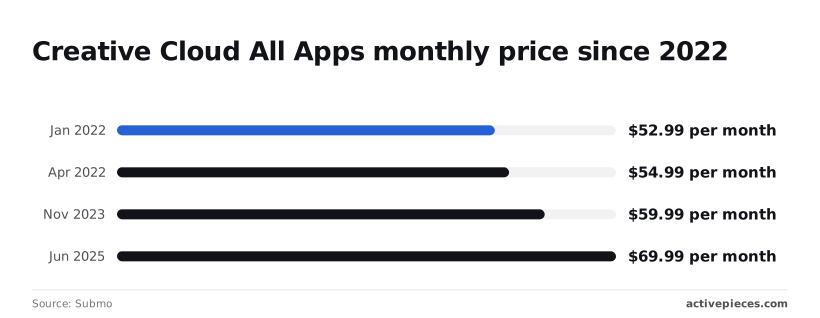
That's $17 more a month in under four years, so budget for the next renewal, not the price you signed.
Adobe's allowance is spent action by action inside the work, so the finer you slice your use, the sooner the 25 credits are gone.
Activepieces meters the other way: a flow run is 1 credit, and the steps inside it are not counted, so a ten-step handoff costs what the two-step workaround did.
That is the opposite of Zapier's per-task billing, which charges more as you split work into smaller, safer integrations, and the free plan's 1,000 credits a month cover unlimited flows.
Worth checking against a plan that does not meter every step: one credit covers a whole run on Activepieces.
Creative Cloud against Affinity, Canva and Figma
Of these four, Adobe costs the most by a wide margin. It's also the one that opens its own files without translation, so the question is whether you need that.
In the table, per-seat monthly cost shows the gap is largest where Adobe's price and the alternatives' limits meet. Read the last two columns first: they decide whether the cheaper tool is a saving or a detour.
| Tool | Monthly price | Included | AI limits | Adobe file compatibility | Best for |
|---|---|---|---|---|---|
| Adobe Creative Cloud Pro | About $70 per seat | The full Adobe app set | Metered generative credits | Native | Print, photo and video studios |
| Affinity | $0 | Design, photo and layout apps | No generative credit system | Opens PSD, imports AI and PDF | Freelancers on a budget |
| Canva Pro | $18 ($144/year) | Templates, brand kit, editor | Capped AI tools | Imports with some loss | Marketing and social posts |
| Figma Professional | $16 per seat ($960/year for 5) | Interface and collaborative design | Capped AI features | No native PSD or AI editing | Product and web teams |
If clients send you layered PSDs or Illustrator files and expect the same back, a translation step means lost effects and fixed-up files. That labor costs more than the subscription. Video work and print production are where no alternative here matches Adobe's range.
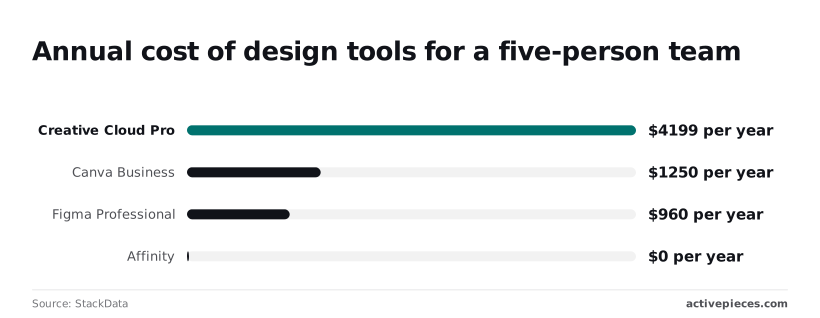
For a five-person team, according to StackData:
- Creative Cloud Pro runs $4,199 a year
- Canva Business is $1,250, so a team making social graphics keeps nearly $2,950 a year
- Figma Professional is $960, which saves over $3,200 for a team designing screens
- Affinity is $0, so a team of freelancers that rarely trades layered files pays nothing
They mean the Adobe premium is only worth paying where the file format forces it.
Choose the cheapest Creative Cloud plan that fits
For most solo users, the cheapest plan is a single-app or Photography plan. The full All Apps bundle only pays off when you open several of its programs every week.
To reach the right plan, work through five steps in this order:
- List the apps you open weekly.
- Check how many generative credits you need each month.
- Pick a billing term.
- Test whether you qualify as a student or a business.
- Revisit the choice at renewal.
Match apps to a plan
Write down only what you opened in the past few weeks, not what you might want someday. If that's one program, a single-app plan covers it. If it's photo editing plus a catalogue tool, Photography is built for exactly that pair.
Then check your credit habits: generative features draw on a monthly allowance, and heavy users can run out mid-project, which turns a cheap plan into a pricier one.
Finally, test eligibility. Student and teacher pricing, or a business plan with admin controls, can undercut the standard individual rate for the same apps.
Choosing monthly or annual Creative Cloud billing
Look at annual billing and it seems cheaper per month, but the commitment is the catch. Cancel early and you may owe a fee, so a plan you drop in month four can cost more than paying month to month would have.
Choose annual only when your app list has stayed steady for a long stretch. Otherwise, pay the monthly premium as the price of keeping the exit open.
At renewal you can change plans without penalty, so put it in your calendar. Repeat steps one and two with fresh habits.
If an app went untouched, drop it. If credits ran short, move up. Doing nothing means you quietly renew whatever you chose last year.
Automate Creative Cloud file handoffs with Activepieces
Do not expect Activepieces to lower your Adobe bill or tell you which plan to buy. It automates the paperwork around the seats you already pay for, such as filing exports, pinging reviewers and logging approvals, and its free self-hosted Community Edition is MIT-licensed.
Pick the plan first, using the checks above. Then ask whether your people are burning paid hours on copying and chasing.
Creative Cloud is Adobe's subscription bundle of design, photo, video and document apps. Everything it produces is a file that someone must name, store, send for sign-off and record.
An example workflow
To see the idea, take Activepieces' own example, which runs as a single flow run at 1 credit however many steps it has. A new contact arrives in HubSpot, a customer-tracking tool, and an AI step judges whether the lead is worth pursuing.
A condition then routes it: qualified leads go to Salesforce, a sales database, with a Slack message to the team, while the rest get a loop of follow-up emails through Gmail.
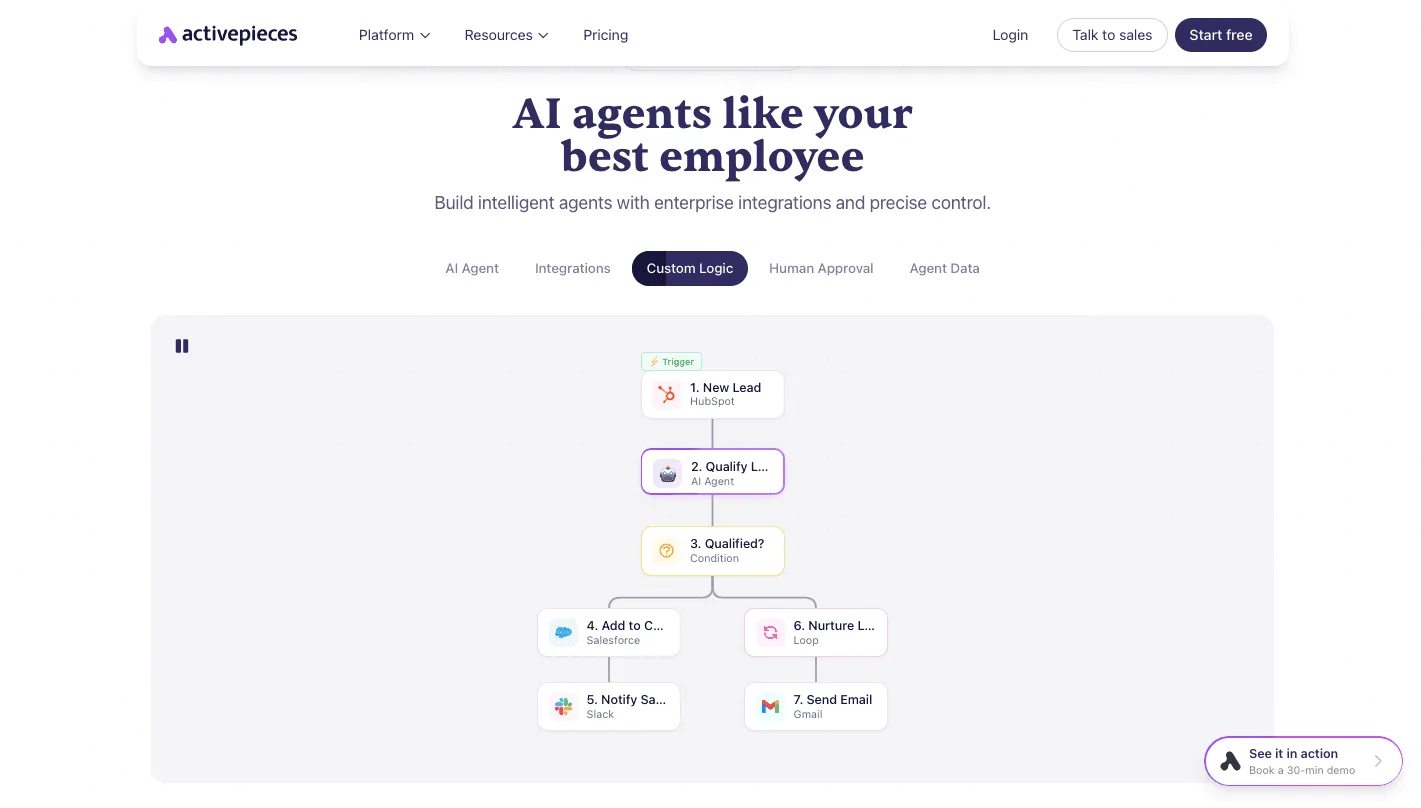
Swap the lead for a finished export and the same shape works: a file lands, a reviewer is notified, the approval gets written down. The sequence is the point, and a design team can borrow it.
Because this section quotes no Adobe prices, none were checked for it. Activepieces has no say in them, and its own Plus plan is a separate flat $20 a month for 10,000 credits.
Before you renew, read the current figures on Adobe's own plan page, because they're the only ones that count.
Nobody sees the staff time spent hand-filing exports and chasing approvals on the invoice, but you pay it every month. Automating it won't change the plan's cost; it just stops the seat's real cost from creeping up unseen.
Nobody sees the staff time spent hand-filing exports and chasing approvals on the invoice, but you pay it every month.
Frequently asked questions
These answers describe Adobe's terms as checked on 2026-11-01. Each is worth confirming on Adobe's plans page before you pay.
Doing nothing about a changed term is how an unwanted charge starts.
Is there a free version of Creative Cloud?
Not of the full suite: Adobe offers a time-limited free trial of its paid plans, and a few lighter tools, such as Photoshop Express, have free tiers.
Expect the trial to ask for a card and convert to a paid plan automatically, so set a reminder to cancel before it ends, or you're paying for something you only meant to test.
Sometimes, you can cancel without a fee. A new annual plan can generally be cancelled for a full refund within an initial window, but after that, cancelling an annual plan billed monthly typically costs a share of the remaining contract.
Check which billing term you're on before you click cancel, because that term, not the headline price, decides what leaving costs.
Yes, Creative Cloud includes Firefly credits. Paid plans include a monthly allowance of generative credits for Adobe's Firefly image tools, and the allowance differs by plan.
A light month doesn't bank anything for a heavy one, because credits generally reset each billing cycle rather than carrying over. If you generate a lot, price a plan on credits as well as apps.
Student pricing and buying Photoshop alone
For eligible students and teachers, the discount is usually worth it, because it gives access to a large app bundle at a much lower monthly cost than the standard rate.
The catch is that pricing can change when the discounted period ends, so read the renewal terms and decide beforehand whether you'll keep paying.
You can't buy Photoshop alone as a new purchase of the current version. Adobe sells Photoshop only by subscription, either as a single-app plan or inside a bundle. If you need only Photoshop, the single-app plan is the one to compare against the full suite.
Related reading
References
Running the numbers
See what the same workload costs here.
Free forever plan, and every paid plan self-hosts at no extra cost.
See pricing Talk to sales