Amazon OpenSearch Service Pricing: A 2026 Guide

Nov 21, 202615 min read
Amazon OpenSearch Service is billed on four models, and teams that wire its usage alerts into their ops tooling, whether through a workflow builder like Activepieces or a plain script, tend to learn them quickly:
- On-Demand instance-hours
- Reserved commitments
- Serverless capacity units
- a limited free tier
Amazon OpenSearch Service pricing is the set of charges AWS applies to managed OpenSearch domains and serverless collections, combining compute (instance-hours or capacity units) with storage, replica copies, data transfer and other usage-based line items into a single monthly bill.
Storage, not the instance rate, is billed on top of all but the last.
Amazon OpenSearch Service is AWS's managed search and analytics engine. It runs OpenSearch clusters you size yourself, or a serverless variant AWS sizes for you.
Rates are regional, so a cluster pinned to a particular region by data residency obligations is priced by that region's list, not the cheapest one.
OpenSearch Service billing models
Activepieces can pipe logs into it from any of its 750+ integrations, but the rates stay the same, because the bill comes from the cluster, not from what feeds it.
Read the minimum column first: a floor is a cost you pay whether or not anyone searches. The table below sets out each pricing model by what it charges for, what you pay at minimum, and what storage comes with it.
| Model | Rate Unit | Minimum Usage | Included Storage | Best For |
|---|---|---|---|---|
| On-Demand | Instance-hour | None; pay while the node runs | None; EBS billed separately | Unpredictable or short-lived workloads |
| Reserved (RI) | Discounted instance-hour | One- or three-year commitment | None; EBS billed separately | Steady clusters that run all year |
| Serverless | OCU-hour | A baseline of OCUs always running | Billed per GB stored | Variable load without capacity planning |
| Dev/Test (Free Tier) | Free hours, capped | Small instance only | A small EBS allowance | Evaluation, not production |
The sections below take each in turn.
Provisioned domains bill:
- per node per hour
- EBS volumes
- UltraWarm for older, rarely queried data
You might expect newer generations to be cheaper. They aren't. Per Instances Usage AI, a large memory-optimised R6g node costs $0.167 per hour, while R7g is $0.178, R5 is $0.186 and R8g is $0.196.
Moving from R6g to R8g therefore adds about 17% per node, which across a multi-node cluster compounds quickly. Choose by tested performance, not by generation number.
When a collection sits idle, a baseline of OCUs stays on and still produces a daily charge. Serverless charges per OCU-hour, a unit of compute. That makes it poor value for sporadic workloads.
The free tier will not hold production data for long. Volumes exceed it almost at once: it covers only small instances and a small EBS allowance, and it expires after a fixed period.
So treat it as a test bench, then check your first invoice after it lapses.
If you are running this arithmetic for your own team, see what the same workload costs on Activepieces.
OpenSearch Service reindex tripled monthly cost
Skipping the alert on one reindex tripled the monthly bill. A three-node log domain went from $15 a day to $45 a day at 02:10 on Day 10 and stayed there, because nothing was set to notice.
The job was routine. A mapping change forced a reindex. Someone raised the replica count so the cluster would stay resilient while it ran, the kind of availability measure GDPR Article 32 expects of a system holding personal data in logs.
Because each extra replica is another full copy of the data on disk, and storage is billed for every copy, the bill follows the replica count rather than the instance price.
A step is a different signal from a spike: nothing ends the cost, so every later day pays it again.
Without a budget alert, nobody was paged, and the instance count never changed.
Day 9: the Cost Explorer line nobody read
Nine days after the jump, the daily line in Cost Explorer showed the new level plainly. It was there the whole time, but nobody opens that view without a reason. Billing data also lags, so even a diligent reader sees yesterday's cost, not this morning's.
The reindex finished within hours. Yet the extra copy stayed, because no step in the runbook reduced it, so the replica setting had outlived its purpose. A person had to remember, and nobody did.

Within a day or two of the step, a budget alert on daily spend would've fired. A scheduled task that resets the replica count after a reindex would've removed the cause.
OpenSearch Service pricing at three domain sizes
Treat the shape as the lesson rather than the dollar amounts: this is a composite case priced from published rates. The multiplier is set by the replica count and the data volume, not by node count.
On a small domain the extra copy is cheap per day, so the cost of being wrong is a few awkward invoices, and the habit is what is worth building.
On a mid-size domain the extra copy forces more storage and can push the domain toward larger nodes, so each unnoticed day costs noticeably more.
On a large domain the extra copy is a serious line item, and a week of silence becomes a finance conversation.
At every size, the days between the change and the first alert decide the damage, and a daily budget alert shortens that gap more cheaply than any resizing exercise.
Hidden OpenSearch charges and limits behind the overrun
When the bill overruns, the cause is usually one of five charges that sit outside the instance rate, which is why a budget alert catches them sooner than a resizing exercise does:
- Cross-AZ data transfer at $0.01/GB: - Dedicated master nodes, three at minimum
- gp3 IOPS and throughput above the baseline
- UltraWarm managed storage
- Snapshot egress
A sizing sheet built from instance prices misses all five, because none of these appears on the instance line. The subsections below show how each compounds.
OpenSearch replicas and storage multiply costs
One replica doubles storage and two triple it, because every replica is a full copy of the primary data on its own EBS volume. Raise gp3 IOPS or throughput past the baseline and you pay again for each volume.

Before ingest begins, a small cluster already carries a fixed overhead: three dedicated masters add three more instances that hold no data and serve no queries.
UltraWarm cuts the cost of older data, but its managed storage is billed per GB on top of the warm nodes that serve it.
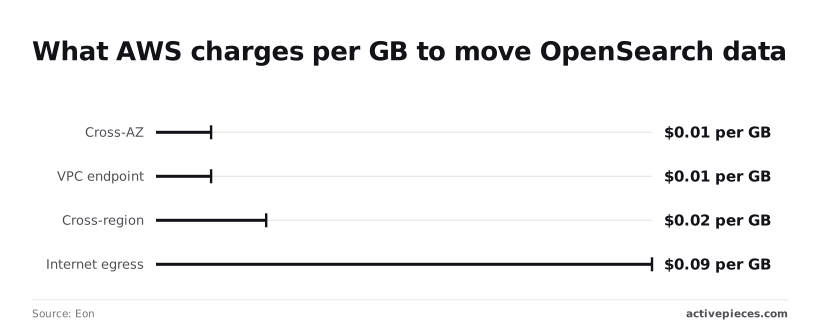
Per-GB rates depend on the path:
- A VPC endpoint is also $0.01 per GB, which means private access still carries a meter
- Cross-region copies cost $0.02 per GB, so 1 TB sent to a disaster-recovery region adds $20 each time
- Internet egress is $0.09 per GB, nine times the cross-AZ rate, so 1 TB of results leaving AWS costs $90
- Snapshots copied out of region or to the internet take these same rates, which is how backups turn into a line item
Leave a dev collection running overnight and it costs the same as a busy one. OpenSearch Serverless bills in OpenSearch Compute Units (OCUs), and each collection holds a minimum of them even with no traffic, so the charge follows capacity, not queries.
Delete idle collections instead of leaving them standing.
When data outgrows the EBS volume size an instance type allows, the only fix is a larger instance, and you pay for CPU and memory you never needed. Checking storage per node against that cap before launch is cheaper than discovering it during a resize.
OpenSearch Service against Elastic Cloud and Aiven pricing
Do not assume AWS is the cheapest home for this workload. The four options differ less in headline compute rate than in what they bundle, and storage per node, egress and support are where the bills diverge.
Read the table below as a map of billing units, not a quote, and check each vendor's pricing page on the day you buy. It sets out how each option meters the same 1TB, three-node cluster.
| Monthly Cost (1TB/3-node) | Egress Fees | Support Level | Managed Upgrades | |
|---|---|---|---|---|
| AWS Managed | Instance hours for three data nodes plus storage for 1TB and its replicas | Standard AWS data-transfer-out rates | Follows your AWS Support plan | Service-managed, you schedule them |
| AWS Serverless | Compute units plus storage, with a minimum footprint even when idle | Standard AWS data-transfer-out rates | Follows your AWS Support plan | Handled by the service |
| Elastic Cloud | Subscription tier plus deployment size | Data transfer billed separately | Included, scaled by subscription tier | Version upgrades from the console |
| Aiven | Plan-based price that bundles nodes and storage | Plans are generally priced without separate traffic charges; confirm for your plan | Tiered support plans | Applied in maintenance windows |

AWS meters each resource separately. Aiven leans toward a bundled plan, so a storage-heavy workload is easier to forecast on a plan than on per-GB billing.
If you move to Elastic Cloud, expect a migration with client and query compatibility checks, not a billing change, because it runs Elasticsearch, not OpenSearch.
Its subscription tiers decide which features and support you get, and data transfer is a separate line, which matters if your dashboards or applications pull large result sets out of the cluster.
Aiven runs OpenSearch itself, so your existing clients and queries carry over. Pinning a cluster to a region and cloud provider is also straightforward.
That matters because GDPR Article 44 conditions transfers of personal data outside the EEA, so region choice constrains price-shopping before cost does. Confirm which regions your plan offers before comparing totals.
Run OpenSearch on EC2 and the managed-service premium disappears, but you take on patching, upgrades, snapshots, node replacement and on-call. Storage, replicas and cross-zone traffic still bill as before.
It can undercut every managed option on paper, and it only wins if the staff hours you spend on operations are cheaper than the premium you stop paying.
Worth checking against a plan that does not meter every step: one credit covers a whole run on Activepieces.
Activepieces spend alerts for an OpenSearch domain
Activepieces doesn't replace OpenSearch Service. It carries a cost signal from AWS to a named person, so the overrun is caught in the first hour rather than on the invoice.
Its core is MIT-licensed, so the same flow runs on Activepieces Cloud or on your own servers, which matters if the cost data has to stay inside your own AWS account.
Activepieces is a workflow automation platform, and its role here is narrow: receive an event, add context, and deliver it where someone will act.
Its pricing page lists 1 credit per flow run, any number of steps, where Zapier's pricing page bills per task and Make's per module.
So the webhook, the tag lookup, the spend pull and the Slack post below cost one credit together, and the Free plan includes 1,000 credits a month with unlimited flows.
Alarm to Slack with an owner
When an AWS Budgets threshold or a CloudWatch alarm fires, Activepieces receives it through a webhook trigger. The workflow looks up the domain's owner tag, pulls current and projected spend, and posts one Slack message.

Each alert is one run and one credit, so the Free plan's 1,000 monthly credits cover 1,000 of them.
(diagram)
Without the owner, an alert is noise that everyone sees and nobody owns. With it, the replica setting, the storage growth or the idle capacity gets a question put to the one team that created it.
If a domain has no owner tag, the workflow can say so in the message, which is itself a finding worth acting on.
Instead of, or alongside, the Slack post, Activepieces can open a ticket, so the alert has a trail that survives a scrolled-away chat. The destination can be chosen from the 750 integrations counted in its open source monorepo.
Daily cost digest from Cost Explorer
Once a day, a scheduled flow queries Cost Explorer, filters to the OpenSearch domain's tags, and posts a short summary: yesterday's spend, the month so far, and the projection.
Because the digest arrives every day, a slow climb from growing storage or added replicas shows up as a trend long before it crosses a budget line. Budget alarms catch the jump; the digest catches the drift.
Be clear about the limits. Cost Explorer data isn't instant, so the digest describes yesterday, not this minute.
Budget alarms catch the jump; the digest catches the drift.
The workflow reports spend and doesn't reduce it; it won't delete an index or shrink a cluster. It also adds a second system to run, with its own credentials and upkeep, so the same hour-one discipline applies to it.
If all you need is a cap, AWS Budgets actions can apply a response on their own, and email or SNS notifications cover a small team. Add Activepieces when the missing integration is routing: an owner, a ticket and a daily habit.
The Free plan is $0 with no card needed, so trying that costs nothing.
Caps and checks for surprise bills
Four settings catch most surprise bills: cap Serverless capacity, alert on spend, move ageing data off hot storage, and commit to reserved pricing for nodes that never go away.
Do them in this order, because the first two protect you while the last two take effect:
- Set Serverless Max OCU to 2.
- Create an AWS Budget at 110% of expected spend, so you'll absorb the first 10 percentage points of overage silently.
- Enable Index State Management (ISM) for UltraWarm.
- Purchase Reserved Instances (RIs) for baseline nodes.
The subsections below give the thresholds behind each step.
OpenSearch budget and CloudWatch alarm settings
With a 2-OCU ceiling on Serverless, a runaway query load slows searches instead of raising the bill. With the budget at 110%, a ten percent overrun reaches a named person before the invoice does.
Add CloudWatch alarms on free storage space and on node count. A shrinking storage margin is the early warning for an expensive resize, and an unexpected node count means someone scaled without asking.
OpenSearch ISM lifecycle and replica rules
Write an ISM policy that moves indices to UltraWarm after a fixed age, then deletes them.
Deletion is also a compliance control: GDPR Article 5(1)(e) requires personal data to be kept no longer than necessary, so an index that never expires is a liability as well as a cost.
Require approval before any reindex or added replica. Each replica stores a full copy of the data, so one casual change can double the storage line, and a reindex briefly holds two copies of the index.
Reserved Instances versus on-demand
Review reservations once the baseline is stable. According to AWS pricing, Standard RIs discount 31, 33 or 35% on a 1-year term, rising with the share paid upfront.
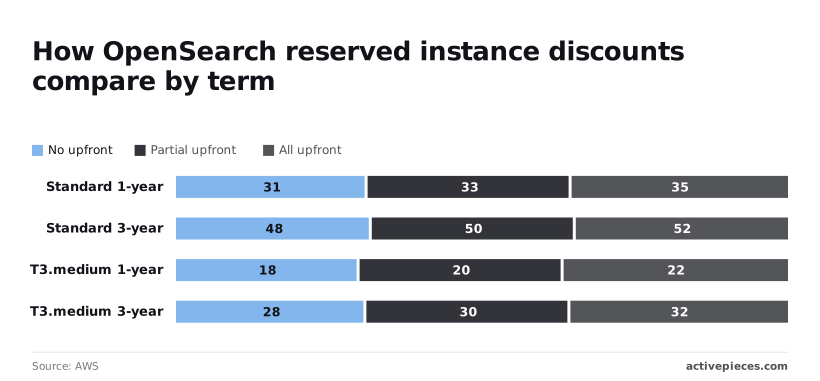
A 3-year term reaches 48, 50 or 52%, so committing for three years roughly halves the cost of nodes you'd run anyway.
On small T3.medium nodes the discounts are smaller: 18, 20 or 22% over one year and 28, 30 or 32% over three. On small nodes, a long commitment buys little flexibility-adjusted value, so reserve the larger, steady nodes first and leave burst capacity on-demand.
Frequently asked questions
Is Amazon OpenSearch Service free? Not beyond a limited free tier. Eligible accounts get a small allowance of instance hours and storage for a trial period, so a proof of concept can cost nothing while a production domain won't.
Check the pricing page for current terms before relying on it, because usage outside the allowance bills at standard rates.
Is OpenSearch Serverless cheaper than a provisioned domain? Only for some workloads. Serverless suits spiky or unpredictable traffic, but it keeps a minimum amount of compute running and bills for it whether or not queries arrive.
For a steady workload, right-sized, reserved provisioned nodes are often cheaper. Compare both against your real traffic pattern, using the Serverless overview for how capacity is metered.
Does OpenSearch Service charge for cross-AZ data transfer?
Replication between nodes inside a domain's Availability Zones isn't billed as separate transfer, but traffic between your own clients and the domain can be. That includes client traffic that crosses zones and anything leaving AWS. Multi-AZ guidance explains the layout.
For data-residency purposes, note that multi-AZ stays within one Region. Copying snapshots to another Region doesn't, and that copy carries both a transfer cost and a jurisdictional consequence.
Can I stop a domain to avoid charges?
No. A provisioned domain has no stop or pause state, so instances and storage bill for as long as it exists. To halt charges, take a manual snapshot, delete the domain, and restore later.
The snapshot sits in Amazon S3 and is billed as storage there. The snapshot documentation covers the procedure. Restoring takes time, so this suits a domain you won't need for a while, not an overnight pause.
Do Reserved Instances apply to OpenSearch Service? Yes, for provisioned domains. Reservations discount instance hours for a matching instance type in a Region, in exchange for a commitment.
They don't discount storage or transfer, and they don't apply to Serverless capacity. See the Reserved Instances page for how matching works.
Related reading
References
Running the numbers
See what the same workload costs here.
Free forever plan, and every paid plan self-hosts at no extra cost.
See pricing Talk to sales