
Amazon Lambda Pricing: Cost Breakdown for 2026

Oct 22, 202614 min read
Lambda bills for requests, duration in GB-seconds, and optional extras, which means the cost of a workload depends on how often functions run and how long they take, much like the per-task logic behind automation tools such as Activepieces.

Hard limits that matter as much as any rate:
- memory
- runtime
- payload
- concurrency
AWS Lambda pricing: every charge in one table
| Dimension | Value | Check date |
|---|---|---|
| Requests | Billed per invocation | AWS pricing page, on the day you model |
| Duration x86 | Billed per GB-second, rounded to the millisecond | AWS pricing page, on the day you model |
| Duration Arm | Billed per GB-second, at a lower rate than x86 | AWS pricing page, on the day you model |
| Free tier requests | Monthly allowance, applied across the account | AWS pricing page, on the day you model |
| Free tier GB-seconds | Monthly allowance, shared by x86 and Arm | AWS pricing page, on the day you model |
| Memory range | Configurable between a floor and a ceiling; CPU scales with it | Lambda quotas docs, on the day you model |
| Timeout | Hard ceiling per invocation | Lambda quotas docs, on the day you model |
| Ephemeral storage | Configurable beyond the default; extra is billed | Lambda quotas docs, on the day you model |
| Payload | Separate caps for synchronous and asynchronous calls | Lambda quotas docs, on the day you model |
| Concurrency | Regional account limit, raisable by request | Lambda quotas docs, on the day you model |
Duration is memory multiplied by execution time, so the lever is the memory setting.
Arm (Graviton) bills the same way at a lower rate, which makes it the first change to test on any function whose dependencies compile for it.
Idle environments still bill: provisioned concurrency bills for the time environments are held, even when idle. Ephemeral storage above the default adds a charge.
The timeout and payload caps are fixed ceilings. Concurrency is an account-level limit in each region, and one noisy function can starve the others sharing it.
If you are running this arithmetic for your own team, see what the same workload costs on Activepieces.
Lambda costs at 1M, 50M and 1B requests
At 512 MB and 200 ms in us-east-1, Lambda costs $0 a month at 1M requests, $86.47 at 50M and $1,859.80 at 1B on x86.
The table uses $0.20 per million requests and $0.0000166667 per GB-second on x86, with Arm about 20% cheaper on duration.
| Requests | Request charge | GB-seconds | Duration x86 | Duration Arm | Free-tier deduction (x86 / Arm) | Monthly total (x86 / Arm) |
|---|---|---|---|---|---|---|
| 1M | $0.20 | 100,000 | $1.67 | $1.33 | $1.87 / $1.53 | $0 / $0 |
| 50M | $10.00 | 5,000,000 | $83.33 | $66.67 | $6.87 / $5.53 | $86.47 / $71.13 |
| 1B | $200.00 | 100,000,000 | $1,666.67 | $1,333.34 | $6.87 / $5.53 | $1,859.80 / $1,527.81 |
Past the small end, the free tier is noise: it is fixed at 1M requests and 400,000 GB-seconds a month, so it matters only at low volume.
Small API: 1M requests at 128 MB
At 128 MB and 200 ms, each request uses 0.025 GB-seconds, so 1M requests consume 25,000 GB-seconds. That's about 6% of the 400,000 free allowance, and the bill is $0.
Mid-size backend: 50M requests at 512 MB
Per the CloudBurn calculator, the request charge is $10 a month and duration is $83.33, for a compute total of $93.33 before the free tier.
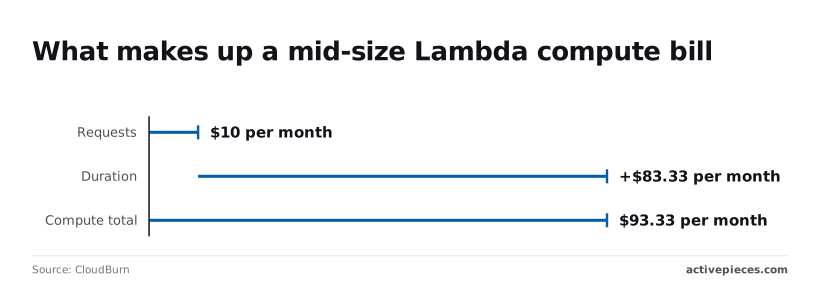
Duration is about 89% of that, which means cutting request count by a tenth saves $1, while cutting average runtime by a tenth saves over $8.
After the free-tier deduction, the bill is $86.47 on x86 and $71.13 on Arm. Moving to Arm saves $15.34 a month here, provided your dependencies ship Arm builds.
High volume: 1B requests and where it stops being cheap
At 1B requests the request charge is $200, but duration is $1,666.67 on x86, so the total is $1,859.80. Arm brings it, per Infoq, to $1,527.81, saving about $332 a month.

The table above leaves out API Gateway, data transfer and logging, which often add more than the compute does. Past roughly 400 requests a second sustained, price the alternatives before committing, because cost differences scale with volume.
Memory size and Lambda costs
Memory is the one setting that changes both how long a function runs and what each millisecond costs.
Why more memory can cost less
Lambda bills memory multiplied by duration. If a function is CPU-bound, giving it more memory gives it more CPU, and it finishes sooner.
When the runtime drops by at least as much as the price per millisecond rises, the invoice stays flat or falls, and you get lower latency on top.
In Cloudburn's chart below, a CPU-bound function runs at 128, 256, 512 and 1024 MB, with duration on one axis and cost per million invocations on the other.
Read it for the shape rather than the exact values: cost drops, flattens, then climbs once the extra CPU stops shortening the run.
Where the curve flattens depends on your code. A function that spends its time waiting on a database or a downstream API gains nothing from more CPU, so higher memory only raises the price.

Cold-start init time is now billed
Cold starts used to be a latency problem you could mostly ignore. Now they're a cost problem too, because the initialisation phase, where the runtime starts and your code runs its top-level setup, is billed in the same way as invocation time.
The practical response is to trim what runs at import time, lazy-load what isn't always needed, and keep packages small.
Lambda Graviton and Compute Savings Plans discounts
If your code is pure interpreted-language logic with no native binaries, moving to Arm is often a configuration change plus a test run.
In exchange for a committed hourly spend, compute savings plans offer a discount. They only pay off when usage is steady enough that you'll reliably consume the commitment, so size the commitment to your floor of traffic, not your peak.
Worth checking against a plan that does not meter every step: one credit covers a whole run on Activepieces.
Hidden Lambda costs and limits people hit
Logging, API Gateway and NAT gateway
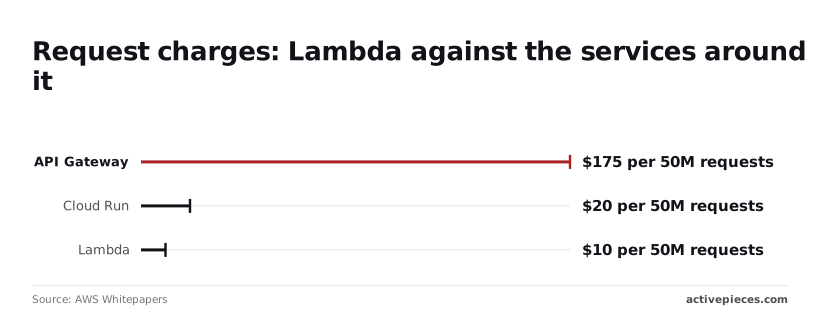
At 50 million requests, AWS's cost guidance puts API Gateway at $175, against $10 for Lambda's own request charge, making REST API 17.5 times more expensive at scale.
Cloud Run comes to $20 and Azure Functions to $8.50 for the same volume, so the gap is in the gateway layer, not in serverless pricing generally.
Five charges sit outside the Lambda line; the list below gives each with its rate and the usual workaround.
- API Gateway REST at $3.50 per million requests: use an HTTP API or a Lambda function URL if you don't need REST-only features, which means this cost is easily avoidable. CloudWatch Logs at $0.50 per GB ingested: log at warn level in production and sample verbose output, and uncontrolled verbosity rapidly becomes expensive, meaning it's a lurking cost risk in every production service.
- NAT gateway data processing, billed per GB on top of an hourly charge: use VPC endpoints for AWS services, or keep the function out of the VPC if it needs nothing private.
- Data transfer out, billed per GB beyond the free allowance: put a CDN in front of large responses and keep callers in the same region.
- Idle provisioned concurrency, billed for every hour it's configured whether or not requests arrive: schedule it down outside peak hours.
A setting added for a launch-day latency problem keeps billing months later, and nothing in the Lambda duration figures will show it.
Where the job is only wiring SaaS apps together, say a webhook into a CRM and then a Slack message, Activepieces can stand in for the custom Lambda, and flows are unlimited on every plan, including free, with credits metering AI usage.
**A setting added for a launch-day latency problem keeps billing months later, and nothing in the Lambda duration figures will show it.
That means splitting the flow into ten small, individually testable steps doesn't change how many flows you're allowed to run. MoneyGram, Moneypenny, Alan and FundingSocieties run it in production.
Timeout, payload and concurrency limits
Memory tops out at 10,240 MB and /tmp at 10,240 MB, per Lambda's documented limits, meaning any workload exceeding these thresholds cannot run on Lambda.
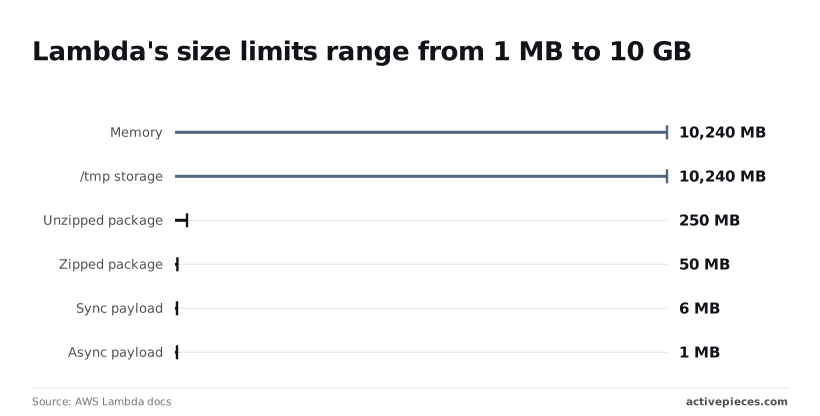
Packages are limited to 50 MB zipped and 250 MB unzipped, so large frameworks or compiled dependencies don't fit.
Payloads are tighter. Synchronous invocations take 6 MB and asynchronous ones 1 MB, so large documents should go through S3 with only a reference passed to the function.
Execution is also capped at 15 minutes, which means long batch work has to be split into chunks.
Lambda versus Cloud Run and alternatives
Though Lambda's 15-minute ceiling isn't unusual, each rival bills a different thing and limits duration differently, so chunking long work costs different amounts on each platform.
Price and limits side by side
I've left the rates out of the table because they change and differ by region and plan. What to take from it is the unit being metered: memory-seconds, vCPU-seconds or CPU time, because that unit decides which workloads get cheap.
| Platform | Request price | Compute price | Free tier | Max duration | Billing model |
|---|---|---|---|---|---|
| Lambda | Per invocation | GB-seconds, shaped by memory size and architecture | Monthly allowance | Hard cap, so long jobs are split | Pay per use, wall-clock duration |
| Cloud Run functions | Per request | vCPU-seconds and GiB-seconds | Monthly allowance | Configurable timeout | Pay per use, with an option to bill by instance |
| Azure Functions | Per execution | GB-seconds of observed memory | Monthly allowance | Depends on hosting plan | Consumption, or reserved capacity on other plans |
| Cloudflare Workers | Per request | CPU time | Free plan with daily limits | Bounded by CPU time, not by waiting | Pay per use, idle waiting not billed as compute |
If your function spends its life waiting on a database or an API, Cloudflare's CPU-time model matters most. Lambda bills that waiting as duration, while Workers don't. For CPU-heavy work the gap narrows, and the other platforms' extra configuration options start to matter more.
When an always-on server beats Lambda pricing
Once traffic is high and steady, a small server running continuously beats any of these platforms. At that point you'd be paying per-invocation rates around the clock for work that keeps a machine busy.
A container on reserved capacity then does the same job with one predictable line on the bill, and you accept the scaling limit that comes with fixed capacity.
When traffic is spiky, idle for long stretches, or unpredictable, functions win. For simple app-to-app automations, such as copying a form entry into a spreadsheet, a hosted workflow tool may cost less than writing and maintaining any function at all.
What Activepieces does about this
The charges that surprise people on Lambda are mostly not the function. They are API Gateway, log ingestion, NAT data processing and idle provisioned concurrency, and none of them shrink when you tune memory or move to Arm.
A good share of the functions that generate them exist only to wire one SaaS app to another: a webhook into a CRM, a form entry into a sheet, a Slack message when a deal moves.
For that kind of job, Activepieces replaces the function, the gateway in front of it and the log pipeline behind it with a flow you build and test in a visual editor.
The pricing model is easier to forecast than GB-seconds. Flows are unlimited on every plan, including free, and credits meter only AI usage.
You don't need to know average duration, memory setting or architecture to predict the bill for a flow that never calls an AI step. Splitting an automation into ten small, individually testable steps doesn't add a metered dimension the way ten chained Lambda invocations would.
The core is open source under the MIT licence, so you can self-host it and run it on infrastructure you already pay for.
That is the same always-on-server trade the article describes for steady traffic, but you get a workflow engine rather than a container you have to write. MoneyGram, Moneypenny, Alan and FundingSocieties run it in production.
It won't replace Lambda for CPU-heavy work, custom runtimes or anything that needs a 10 GB memory ceiling, so you can't migrate these workloads to Arm. Keep those on Lambda and model them as above.
But if you list your functions and find several that only move data between apps, price those as flows instead. Then run the Lambda model on what remains, which is the part where memory, duration and architecture decide the bill.
Frequently asked questions
Is AWS Lambda free?
Not beyond a monthly allowance, and that allowance covers only Lambda's own requests and compute time.
Historically it hasn't expired after the first year the way many AWS free tiers do, but AWS has changed free-tier terms for newer accounts, so confirm what your account actually gets.
Elsewhere the trap is bigger: API Gateway, log ingestion, data transfer and NAT gateways are billed separately, and at scale they often outweigh the function itself.
Treat the allowance as a way to run a prototype for nothing, not as a reason to skip the model.
Does Lambda charge for failed invocations?
Yes, if the function actually ran. You pay for the duration up to the failure, and a timeout bills for the full configured limit, so a generous timeout on a hanging dependency is an expensive mistake. Throttled requests that never start aren't billed as executions.
Retries are the quiet multiplier: asynchronous invocations and event-source retries each run again and each bill again. A poison message that fails repeatedly can cost real money before anyone notices. Set sensible timeouts, cap retries, and route repeated failures to a dead-letter queue.
How do I estimate my Lambda bill before launch?
Multiply expected monthly requests by average duration and by memory in gigabytes, then add the request charge, and price every service in the request path alongside it.
Pull duration and memory from a load test, not a guess, because duration shifts with memory and a larger allocation sometimes finishes fast enough to cost less.
Include peak concurrency, since your account's concurrency limit decides whether traffic gets throttled before cost becomes the problem.
If you're considering a Savings Plan, model the baseline you'd commit to separately. It's a discount on committed spend, so it rewards steady load and does little for spiky workloads.
Check the current pricing page on the day you run the numbers, because rates and plan terms change.
Is Arm cheaper than x86 on Lambda?
Usually, on paper: Arm functions are billed at a lower rate per unit of compute time, and many workloads run as fast or faster there. The rate only matters if duration holds, so benchmark both architectures with your real code.
Build native dependencies, compiled extensions and container images for arm64 first, because a package without an Arm build can cost more in migration effort than it saves.
Switch one function, compare billed duration under identical load, and expand only when the measurement agrees with the rate card.
References
Running the numbers
See what the same workload costs here.
Free forever plan, and every paid plan self-hosts at no extra cost.
See pricing Talk to sales