
Langchain MCP Server (2026 Guide)

Oct 19, 202613 min read
A LangChain MCP server is a standard MCP server built with the official mcp SDK, much like the servers that Activepieces and other tools expose to agents. It exposes your Python functions as tools, and langchain-mcp-adapters hands those tools to a LangChain agent.
LangChain ships no server class of its own, so most breakage you'll hit is in transport, schema or session handling.
If you've ever pasted a ClosedResourceError or Connection closed into a Slack thread at 1am, the cause was almost certainly a stdio server that printed to stdout. The other likely cause is a session closed before the agent finished. LangChain was fine both times.

Understand LangChain MCP servers
Two directions: serving tools versus consuming MCP tools
Serving and consuming
Split the setup in two. The serving half is where you write functions, wrap them in FastMCP, and let any MCP client call them. The consuming half is the adapter, which loads tools from a running server and turns them into LangChain tools.

Because search results blur the two, people mix these up. Serving needs only the mcp package. Consuming needs langchain-mcp-adapters. You can do either alone, and the server works with clients that have nothing to do with LangChain.
Follow the path in the illustration below: three plain Python functions inside a FastMCP server, MCP carrying them to the adapter, and the adapter handing them to a LangChain agent.
Take from it that the only LangChain-specific integration sits at the far right, so everything to its left can be tested without an agent.
Why LangChain MCP adapters are widely used
In the Stack Overflow Developer Survey 2026, 1,329 developers reported using LangChain, ahead of 1,048 for the OpenAI Agents SDK, 825 for LangGraph and 242 for CrewAI.
Since LangChain is the framework the largest share of surveyed developers already have in their stack, an MCP server it can consume reaches a share of them.
The gap to CrewAI, at roughly 5.5 times, means a tool written for one framework's private format reaches far fewer people than the same tool written once as MCP.
Note that LangGraph's 825 is counted separately from LangChain's figure here, so don't add them and assume the totals describe unique developers.
What the LangChain MCP server tutorial builds
In about 20 minutes you'll have a FastMCP server with three tools, started over stdio and then over streamable HTTP, so you can verify it locally before enabling remote access.
You'll also have a LangChain agent that loads those tools through the adapter and calls them.
You'll get the fixes for the schema and session errors that usually stop people halfway, too. Stdio and HTTP are both covered because the same server fails differently on each.
Requirements and tested LangChain MCP versions
You need Python 3.10 or newer, the mcp package, langchain-mcp-adapters, and langchain with a chat model provider key. Install them in a fresh virtual environment so an old mcp release doesn't shadow the one you want.
I verified the examples against the docs as they stood on 19 October 2026. Check the pinned versions in each package's release notes before copying them into a project.
MCP transport names have changed between SDK releases, and a mismatch looks exactly like a server bug.
This takes minutes, not a project: automate it in Activepieces free.
Install and write a working server
Work through three stages and you have a working MCP server: a clean environment with two packages, one server.py with a single typed tool, and a check in the Inspector before any LangChain code exists. The stages run in this order:
MCP transport names have changed between SDK releases, and a mismatch looks exactly like a server bug.
- Create a virtualenv.
- Run
pip install mcp langchain-mcp-adapters. - Write
server.pywith FastMCP and one typed, documented@mcp.tool(). - Run it over stdio.
- Open it in the MCP Inspector.
When something fails in stage 5, it is never a mystery about stage 2, because each step leaves something you can verify.
Install the MCP and LangChain adapter packages
python -m venv .venv
source .venv/bin/activate
pip install mcp langchain-mcp-adapters
Of the two packages, mcp is the official Python SDK, and FastMCP lives inside it. langchain-mcp-adapters is the bridge you'll use later, and installing it now means the client and server share one environment.

If you skip the activate line, you'll meet ModuleNotFoundError: No module named 'mcp' the moment you run the server. That's a shell problem, not an MCP one.
Stage 2: Write server.py with one @MCP.tool()
from mcp.server.fastmcp import FastMCP

mcp = FastMCP("demo")

@mcp.tool()
def add(a: int, b: int) -> int:
 """Add two integers and return the sum."""
 return a + b

if __name__ == "__main__":
 mcp.run(transport="stdio")
Don't treat the type hints and the docstring as decoration. FastMCP builds the tool's input schema from the hints and sends the docstring as its description.
Because a model choosing between tools reads that description and nothing else, an untyped argument or a missing docstring produces a tool that's hard to call correctly.
Keep this first tool boring on purpose, so any later failure points at transport or schema and not at your logic.
Stage 3: Test it with the MCP Inspector
npx @modelcontextprotocol/inspector python server.pyYou don't start the server yourself, since the Inspector launches server.py as a subprocess over stdio. It needs Node installed, and it should be pointed at the Python from your virtualenv.
In its UI, connect, open the Tools tab, list tools, and call add with two integers. If add appears with both parameters typed and the description you wrote, the server is correct.
Anything that breaks afterward lives in the client wiring, which the next section covers.
Connect your server to LangChain agents
Once MultiServerMCPClient loads your server's tools through get_tools(), you pass the result to an agent exactly as you would any other LangChain tools. The only things that change between stdio and HTTP are the connection fields.
Stage 4: Load MCP tools with MultiServerMCPClient
For stdio, the client launches your server as a subprocess, so it needs transport, command and args:
from langchain_mcp_adapters.client import MultiServerMCPClient

client = MultiServerMCPClient({
 "tools": {
 "transport": "stdio",
 "command": "python",
 "args": ["/abs/path/to/server.py"],
 }
})
tools = await client.get_tools()
Use an absolute path in args. The subprocess inherits the client's working directory, not your editor's, so a relative path fails with the server dying on startup and the client reporting a closed connection. That error points at the client but it's a path mistake.

Stage 5: Run an agent that calls your tool
It takes only a few lines:
from langchain.agents import create_agent

agent = create_agent("anthropic:claude-sonnet-5-5", tools)
result = await agent.ainvoke(
 {"messages": [{"role": "user", "content": "Use your tool to ..."}]}
)
Use ainvoke, not invoke. The adapter's tools are async, and a sync call raises a NotImplementedError saying the tool doesn't support sync invocation.
Then read the message list in result and confirm there's a tool call and a tool result in it. If the model answered from its own knowledge, your tool description isn't convincing it to call anything.
Switch the MCP server to streamable HTTP
Start the server with mcp.run(transport="streamable-http"), then change only the client entry:
client = MultiServerMCPClient({
 "tools": {
 "transport": "streamable_http",
 "url": "http://localhost:8000/mcp",
 }
})
Note the underscore on the client side and the hyphen on the server side. The client's url must include the path your server mounts, /mcp by default in the official SDK. Pointing at the bare host gives a 404 that looks like a network problem.
Now that the server is its own process, it keeps running when the agent exits. A stale server from an earlier run can answer your requests with old tool schemas.
You can follow the rest of this with the builder open. Start free, no card.
Run this in Activepieces
Activepieces has a mirror-image answer to the server.py you just wrote: every one of its 741 integrations, once connected, is also a tool on the project's MCP server, so Claude, ChatGPT, Cursor or an agent of your own can call it with no second server to write.
The same integration action runs as a flow step and as that tool, which you can confirm under packages/pieces in the open source repo.
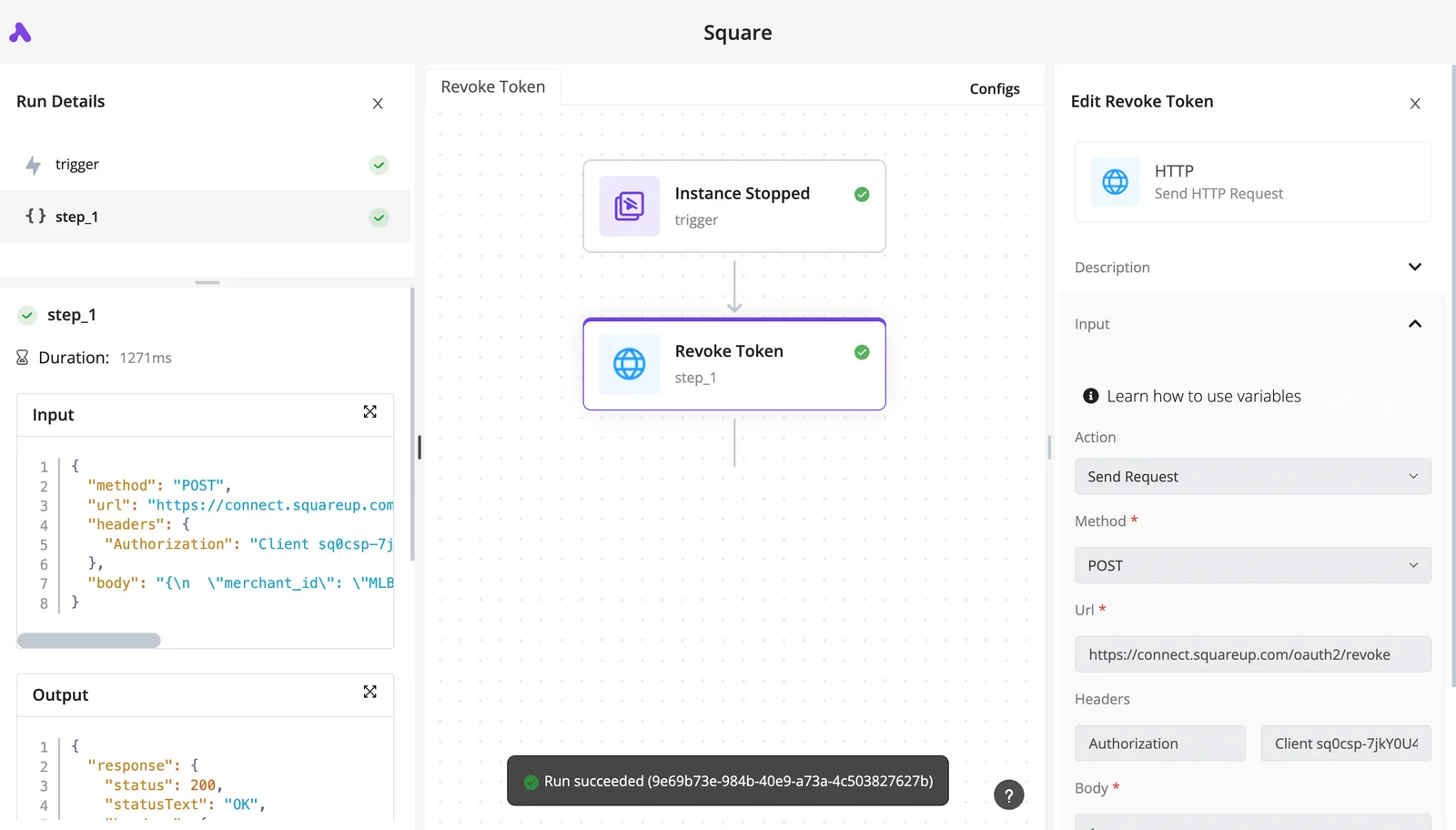
Read the flow below for the order. The HTTP request in step 2 is how Activepieces, with its 741 integrations, reaches your endpoint as a plain client, which means you probably won't need to build custom integration code yourself.
- A Schedule or a Webhook trigger starts the run.
- An HTTP request calls the server's streamable HTTP endpoint. This is a plain request, so you send the JSON-RPC messages yourself (initialize, then the tool call) and carry the session ID header between them.
- An AI step takes the response and summarizes it or decides what to do next.
- An app action sends the result through whichever app you want to notify, such as email or chat.
For long conversations the fit is weak. Step 2 doesn't manage MCP sessions for you, so the transport and schema mistakes covered below still land on you.
You can build this flow on the free plan of Activepieces Cloud, which includes unlimited flows, 1,000 credits a month and up to 5 users, with no card needed, so you can evaluate the platform without financial commitment.
Fix LangChain MCP errors and limits
Expect most of these failures to be transport, schema or session mistakes in your own setup rather than LangChain bugs. Each has a short fix, and the stale server above is only one of eight.
Read the table for symptom, cause and fix, and whether the docs cover it, so you know which ones a search will answer and which you will only find by testing.
| Item | Symptom | Cause | Fix | Documented? |
|---|---|---|---|---|
| Transport mismatch | Hang or connect error | Client says stdio, server runs HTTP | Match the transport on both sides | Yes |
| Async-only calls | Sync invoke raises an error | Adapter tools are async | Use ainvoke |
Partly |
| Missing type hints | Empty or vague schema | No hints or docstring | Annotate every argument | Yes |
| Stateless sessions | Server state lost between calls | New session per call | Open an explicit session | Yes |
| Stdout logging | Parse errors on stdio | Prints corrupt the protocol stream | Log to stderr | Yes |
| Timeouts | Slow tool dies mid-call | Client-side defaults | Raise them in the connection config | No |
| HTTP auth | 401 on connect | No credentials sent | Pass headers in the config | Partly |
| Name collisions | Wrong tool runs | Two servers expose one name | Rename or prefix tools | No |
Test the two "No" rows yourself before production.
When a client is pointed at stdio while the server listens over HTTP, it fails at connect, so check the transport first.
For stdio servers, one stray print() writes into the same stream as the JSON-RPC messages and the client dies with a parse error. That means every debug line goes to stderr.
Schema and tool-calling errors
When the hints and docstrings are missing, the model sees a tool with no usable arguments and guesses, because schemas are generated from them. Adapter tools are async, so call ainvoke, not invoke.
That's not the only price: schemas also cost context. In the mcp-token-benchmark, a five-server setup consumed 26,224 tokens per request, so tool definitions are paid for on every call before the user says anything.

Load only the servers an agent needs. Duplicate tool names across servers make this worse, since the model can pick the wrong one.
MCP session, timeout and authentication limits
By the next call, anything the server remembers is gone, because each call opens a fresh session by default. Hold one session open if your tools depend on state. Pass auth headers in the connection config rather than hoping the server is open.
You're running someone else's server, so security matters here. A scan of 50 MCP servers found command injection in 43% of them, so never pass tool arguments to a shell.
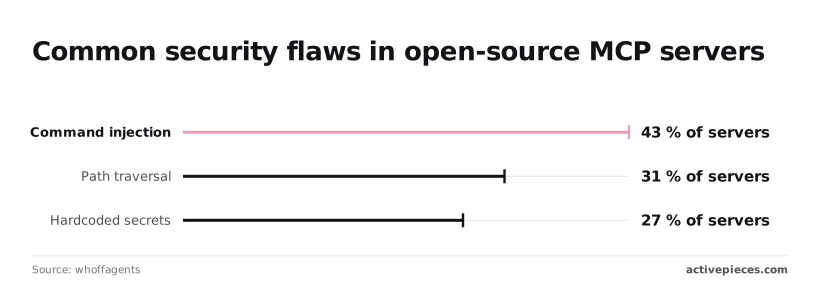
31% showed path traversal, so restrict file tools to a fixed directory. Hardcoded secrets turned up in 27%, so read credentials from environment variables and grep third-party code for keys before you run it.
Frequently asked questions
Do I need LangChain to build an MCP server?
No. An MCP server is built with the official MCP SDK, and it knows nothing about LangChain. You write the tools, expose them over a transport, and any compliant client can call them.
On the client side, and only there, langchain-mcp-adapters converts the server's tools into LangChain tools your agent can use. If you catch yourself importing LangChain inside the server file, you have mixed two layers that fail for different reasons, and debugging gets harder.
Does LangChain support MCP in JavaScript as well as Python?
Yes. There's an adapters package for LangChain.js alongside the Python one, and the official MCP SDK has TypeScript and Python versions.
Pick the language your tools already live in. The protocol is the same either way, so a Python server works with a JavaScript client and the reverse.
Before you blame the agent, check that your tool's input schema survives the round trip. The mismatches that bite are in schema handling.
Can one agent use several MCP servers at once?
Yes. The adapters' multi-server client takes a named map of connections, each with its own transport, and merges all their tools into one list for the agent.
Two things go wrong in practice. First, two servers can expose tools with the same name, so the agent calls the wrong one or the load fails. Prefix or rename them.
Second, every extra server adds tool descriptions to the prompt, so connect only what the task needs.
Is SSE still supported for MCP in 2026?
Mostly as a legacy path. The spec replaced the standalone SSE transport with Streamable HTTP, and new remote servers should use that. Some clients and SDKs still accept SSE so older servers keep working, but I wouldn't start a new project on it.
When a connection hangs or returns a 404 on the wrong endpoint, check first that the client's transport setting matches what the server actually serves. That mismatch is behind most "it connects locally but not remotely" reports.
To secure a remote MCP server, put authentication in front of it, because MCP doesn't do that for you. The spec points to OAuth for HTTP transports, and a server that skips it is open to anyone who finds the URL. Beyond that:
- Serve it over TLS only.
- Validate the Origin header and bind to localhost when the server is meant to be local.
- Scope tokens to the tools a client needs.
- Never forward a client's token to a downstream API.
- Treat every tool argument as untrusted input, since a model produced it.
Related reading
Build it
Set this up in minutes.
No code required. Connect your accounts, and Activepieces runs it from there.
Start free Talk to sales