14 Best Airtable Alternatives in 2026

Sep 30, 202615 min read
14 Best Airtable Alternatives for Scalable Data Management in 2026
The case for staying with Airtable
Airtable remains the industry standard for a reason, and for many teams, it is still the most logical choice.
Its primary advantage is the sheer speed of deployment; a non-technical manager can transform a static spreadsheet into a relational database with functional interfaces in under an hour.
The platform’s native Interface Designer has evolved into a sophisticated front-end builder that requires zero external tools to share data with internal stakeholders.
While competitors often require third-party connectors to build a dashboard, Airtable keeps the data and the display in a single, tightly integrated environment.
Why Airtable's user experience wins
Airtable’s interface is widely considered the most intuitive in the category, mimicking the familiarity of a spreadsheet while hiding the complexity of a relational backend. This reduces the "change management" friction that occurs when a company tries to force employees into more rigid database software.
The template gallery is also the most mature in the market, offering thousands of pre-configured bases for everything from content calendars to product roadmaps.
For a small team that needs to start tracking work immediately, the time saved by using a proven Airtable template often outweighs the long-term cost of seat-based pricing.
Airtable's native integration ecosystem
Because Airtable is a market leader, it enjoys the most robust first-party integration ecosystem. Most SaaS tools, from Slack to Salesforce, offer native Airtable blocks that work out of the box without requiring an automation middleman.
The platform also maintains a high standard for uptime and API stability, which is critical for businesses that rely on their database as a live production tool.
For organizations where the cost of a developer's time is higher than the cost of a software subscription, Airtable’s "it just works" nature remains a compelling value proposition.
The fastest way to settle a shortlist is to try one. Activepieces is free to try, no credit card.
Database-first alternatives for complex data relationships
Specialized database alternatives prioritize structural integrity and data sovereignty, offering a scalable escape for teams hitting Airtable’s rigid record caps or high-tier pricing walls.
While Airtable restricts its most granular permissioning to Enterprise scales, these alternatives provide dedicated environments for high-volume data processing without the overhead of per-seat licensing bloat.
SmartSuite as an Airtable alternative
SmartSuite functions as a unified work management platform with the following capabilities:
- Teams can consolidate project management and relational data in one interface because every record is a task-database hybrid.
- Its Permission Sets allow for field-level visibility control on the Professional tier, meaning a manager can hide a "Salary" column from a contractor while keeping the rest of the record editable.
- The run is the meter, not the steps inside it; Activepieces ensures that a ten-step lead enrichment flow costs the same single credit as a two-step sync, as shown on its published pricing page.
- To handle the logic required for these deep dependencies, users often integrate Claude Fable 5.1 for reasoning. This prevents automated status changes from breaking downstream reporting.
Baserow for open-source and self-hosted needs
When organizations require complete data residency, Baserow becomes the primary choice. Its open-source architecture allows for self-hosting on private servers, which removes the risks associated with third-party cloud storage.
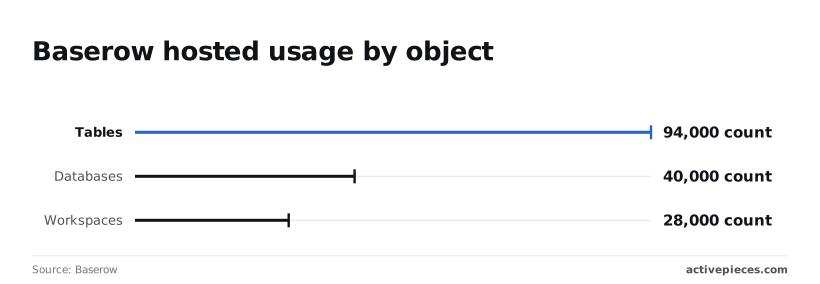
The platform supports over 28,000 workspaces, indicating a stable ecosystem for long-term deployment. The platform manages 40,000 databases containing over 94,000 tables. This capacity allows even fragmented enterprise data silos to be centralized into a single, self-managed instance.
NocoDB for turning SQL databases into smart grids
By sitting directly on top of existing production databases like PostgreSQL or MySQL, NocoDB turns raw tables into interactive spreadsheets without moving the data.
This "bring your own database" model ensures that the IT department retains control over the underlying schema while business users gain a familiar UI for data entry. The following table compares how these and other market alternatives stack up against Airtable’s baseline.
| Alternative | Entry Price (USD) | Core Strength | Primary Limitation |
|---|---|---|---|
| SmartSuite | $10/user | Workflow Depth | Steep Learning Curve |
| Baserow | $0 (Self-hosted) | Data Sovereignty | Limited Native Charts |
| NocoDB | $0 (Self-hosted) | SQL Integration | UI Rigidity |
| Grist | $0 (Open Source) | Relational Logic | Small Template Library |
| SeaTable | $0 | Data Processing | Complex Permissioning |
| AppSheet | $5/user | Mobile Deployment | Restricted UI Design |
| Tadabase | $59/mo | High Record Volume | Higher Entry Price |
| Retool | $0 | Custom Internal Apps | Requires Basic SQL |
| Glide | $25/mo | Mobile Experience | Data Row Limits |
| Ninox | $12/user | Offline Capability | Dated Interface |
| Tables | $0 | Google Workspace Sync | Limited Integrations |
| Basewell | $15/user | Knowledge Management | Niche Focus |
| Rowy | $0 | Low-code Backend | Requires Cloud Setup |
| Smartsheet | $7/user | Enterprise Reporting | Weak Relational Links |
Prices and plan limits checked against docs.claude.com and claude.com and openai.com and gemini.google on September 29, 2026.
The best alternative depends on where your current stack fails, such as a lack of data control or a prohibitive cost per record. Moving to a database-first model shifts the focus from simple list-making to building resilient business infrastructure.
Project management alternatives for team execution
Specialized project management tools prioritize the flow of work over the structure of a database. They include native features for task execution that Airtable requires manual configuration to mimic.
Moving to a database-first model shifts the focus from simple list-making to building resilient business infrastructure.
While a database-first approach excels at maintaining a single source of truth for assets, it often lacks the built-in urgency and resource visibility required for high-velocity teams.
- You spend more time in 'Gantt' than 'Grid' view.
- You need native workload and resource balancing.
- Your team requires automated reminders for overdue tasks without building custom scripts.
- You need to track time directly against line items.
- Your workflows rely on pre-built project templates rather than custom schema design.
This shift toward action-oriented interfaces ensures that the focus remains on meeting deadlines rather than maintaining table relationships.
Monday.com for visual project tracking
Monday.com replaces the abstract nature of a relational database with a highly visual, status-driven interface designed for immediate clarity. Its primary strength lies in its ability to surface bottlenecks through color-coded status columns and built-in automation recipes that trigger based on timeline shifts.
While Airtable users often have to build their own dashboards to see project health, this platform is built around the dashboard as the primary entry point. It shows team progress without requiring the user to understand the underlying data architecture.
ClickUp as an all-in-one Airtable alternative
By combining task management with document collaboration in a single environment, ClickUp consolidates fragmented workflows. This reduces the "toggle tax" experienced by teams who previously had to link Airtable records to external Google Docs or Miro boards.
The platform allows users to toggle between fifteen different views, including Mind Maps and Workload. This allows the same set of tasks to be viewed by different roles without changing the core data.
Wrike for resource management and planning
Wrike addresses the complexities of large-scale execution with resource management and time-tracking features. These tools are often missing from general-purpose database tools.
It includes detailed effort allocation views so managers can see exactly how much bandwidth each team member has across multiple concurrent projects.
For organizations using AI for planning, Wrike integrates with models like Claude Sonnet 5.5 to summarize project risks and automate status reporting. This helps enterprise-level oversight scale alongside the increasing volume of tasks.
Reading a table only gets you so far. Build the same workflow in Activepieces and compare it yourself.
Ecosystem alternatives for IT-governed environments
IT departments prioritize existing software suites because these tools inherit established security protocols and compliance certifications without requiring new vendor risk assessments. Using the database-spreadsheet hybrids already included in an organization's licensing reduces the risk of employees storing sensitive data in unmanaged third-party accounts.

Microsoft Lists for SharePoint-integrated teams landscape
Microsoft Lists is a direct extension of the SharePoint environment. This means every record inherits the same permission structures and data residency guarantees as the rest of the company’s files.
Because it is included in most Microsoft 365 business subscriptions, teams can build tracking systems without requesting additional budget or going through a new procurement cycle.
The platform uses Power Automate for logic, which allows data to move between Excel and Teams without exposing API keys to the open web.
Google Sheets and AppSheet for rapid mobile deployment
For organizations running on Google Workspace, AppSheet converts spreadsheet data into functional mobile applications without requiring the user to write code.
This integration allows a field worker to update a row in Google Sheets via a mobile-native interface that supports offline data entry and GPS capture.
Since AppSheet is governed through the Google Admin Console, IT managers can restrict app creation to specific domains and monitor data egress. This keeps internal project data within the corporate ecosystem.
Zoho Creator for custom business apps
Zoho Creator is a middle ground for companies already using the Zoho One suite who find standard spreadsheets too limited for complex relational workflows.
It is a low-code environment where users build dedicated interfaces for specific business tasks, such as inventory management, rather than working inside a grid.
The following logic helps IT managers determine which path fits their current infrastructure:
Choosing the tool that matches the existing suite ensures that user authentication remains tied to the primary corporate directory. This alignment prevents the fragmentation of data that occurs when departments independently adopt specialized tools for small-scale tracking needs.
App builders for custom Airtable interfaces
Specialized app builders provide the granular permissioning and UI flexibility that Airtable’s native Interface Designer lacks when serving users outside of a primary workspace.
While Airtable restricts interface access primarily to collaborators within a base, these alternatives allow for distinct front-end experiences that connect to multiple data sources without exposing the underlying database structure.
Softr for client portals and web apps
Softr is a presentation layer that converts data into functional web applications like member directories or client dashboards. It distinguishes itself by offering a dedicated authentication system.
Nobody pays for additional seats in the backend database just to grant login credentials to external customers. This separation ensures that a client viewing their project status cannot accidentally modify the schema or view records belonging to other accounts.

The builder uses pre-configured blocks for lists and forms. It prioritizes speed of deployment over deep UI customization, which suits teams that need a professional interface without hiring a designer.
Glide for data-driven mobile applications
By focusing on creating adaptive interfaces that prioritize a mobile-first experience, Glide automatically generates layouts that feel like native phone applications.
It utilizes a computed column system to handle logic on the front end, which reduces the number of sync cycles required from the primary data source.
This architecture is particularly effective for field operations, such as inventory tracking or site inspections, where users need to interact with data through a handheld device.
Because Glide can sync with various spreadsheets and databases simultaneously, it allows a company to aggregate information from disparate sources into a single, cohesive mobile view.
Retool for high-logic internal business software
Retool is designed for complex internal operations that require sophisticated logic and deep integration with existing technical infrastructure. Unlike simpler builders, it allows users to write custom JavaScript and SQL queries directly within the interface components.
This gives users the control necessary for intricate workflows like refund processing or database administration. It supports a wide array of professional integrations, such as the version control platform GitHub for managing code changes and the customer relationship manager Salesforce for syncing sales data.
Retool is a primary choice for engineering-adjacent teams who need to build tools that interact securely with production APIs and legacy systems.
Activepieces for automating your chosen database alternative
Activepieces is an MIT-licensed AI automation platform that runs a company's chosen models across its own apps and data, providing a scalable way to replicate Airtable's native suite for teams using cost-effective database alternatives.
Every catalogue is a ceiling, but the Activepieces MIT-licensed core acts as a floor; users can generate missing integrations with AI and add them privately, rather than waiting on a vendor's roadmap.
Roughly 60% of the 735+ integrations in the monorepo are community-contributed, ensuring that niche database connectors remain available without being limited by a single vendor's release priorities, which means the platform's utility scales far beyond the core development team's immediate roadmap.
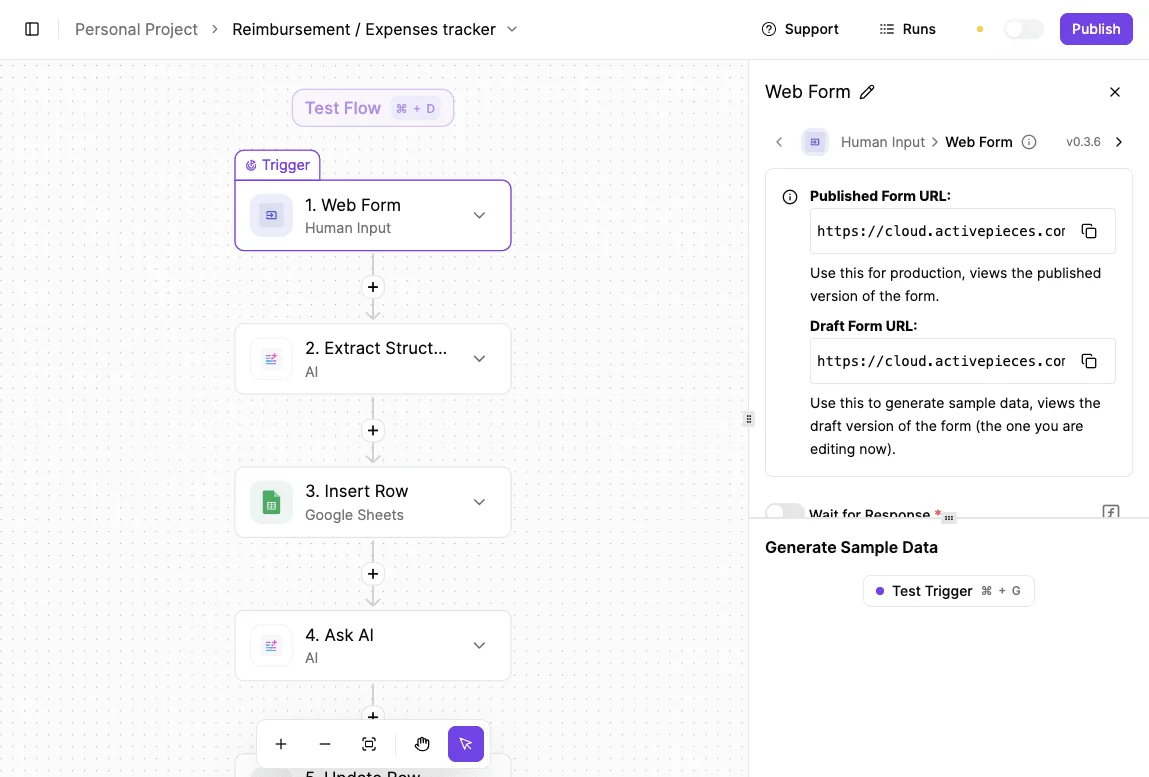
The platform relies on a visual flow builder to eliminate the need for custom Python scripts when connecting disparate tools.
Activepieces provides unlimited flows on every plan, including free, so a business can pair a high-performance database like Baserow with their existing stack to achieve enterprise-level automation without the per-seat tax associated with all-in-one platforms.
Model selection in Activepieces
Activepieces lets you bring your own provider key for any major model, so model spend lands on your bill rather than being marked up by the automation vendor.
Docs notes that this orchestrator lets users swap between different providers based on the specific requirements of the task.
When latency is the primary bottleneck, users can select Gemini 3.8 Flash for high-speed, high-volume agentic workflows.
They can use Claude Opus 5.5 for long-running, complex knowledge work that requires deep reasoning and a large context window.
Finally, GPT-6 Sol is available for advanced coding tasks and autonomous agentic workflows that require the latest frontier reasoning capabilities.
By decoupling the automation layer from the database itself, businesses avoid the "feature creep" pricing that occurs when a database provider tries to be an all-in-one productivity suite. This separation ensures that as your data grows, your ability to automate it remains flexible and cost-controlled.
By shifting the billing metric from individual actions to the flow run itself, Activepieces eliminates the financial penalty typically associated with building complex, multi-step database workflows.
Activepieces is the better choice for organizations scaling high-volume data operations that require predictable costs regardless of how many steps or modules a process contains.
While competitors charge for every task or module executed, this platform allows users to build sophisticated integrations without the overhead of per-step pricing.
How to migrate away from Airtable
A successful migration begins with a rigorous audit of your current record consumption to identify whether your limitations are structural or financial.
Because Airtable scales its pricing based on the total number of records across all bases in a workspace, a single high-volume project can force an entire organization into a higher tier.

To determine if a move is necessary, follow these steps:
- Compare your current record counts against your plan’s hard ceiling to see how much "headroom" remains before service is interrupted or costs spike.
- Categorize your bottlenecks into "data storage" issues, where you are hitting record limits, or "interface design" issues, where the platform's front-end cannot display the complexity your team requires.
- Select one high-traffic base, ideally one with active external integrations, to serve as a pilot for a new environment.
- Map your existing automation logic to ensure that triggers from external services, such as payment processors or communication tools, transition without data loss.
Effective automation requires high-uptime monitoring to ensure that mission-critical signals, like a failed customer payment, are handled immediately. MoneyGram and FundingSocieties run Activepieces in production to manage these complex environments where reliability is the priority.
The workflow above demonstrates a successful execution where a payment failure trigger from Stripe initiates a Slack notification in under 600 milliseconds. By isolating this logic into a dedicated automation canvas, you remove the processing load from your primary database.
Once your logic is mapped, you must evaluate the intelligence layer powering your new workflows. If your migration involves summarizing records or generating automated responses, the cost of the underlying AI model becomes a recurring line item.
Google is a Free plan for $0/month with a Google Account, so users can access basic services without any upfront financial commitment.
The Google AI Plus tier at $4.99/month provides 2x higher usage access for models like Gemini 3.8 Flash, allowing power users to perform more complex tasks before hitting rate limits, so subscribers can maintain deeper workflows without the frustration of frequent service interruptions.
Openai previously provided a 27K context window for GPT Instant on the Free plan. That context window doubled to 54K on the Go plan for users who needed more capacity for processing large datasets.
Related reading
References
Still comparing
The fastest way to settle it is to build something.
Open source under MIT, so you can self-host the same thing later.
Start free Talk to sales