
AWS WAF Pricing: How Each Charge Adds Up (2026)

Nov 19, 202616 min read
AWS WAF has no flat monthly price.
You pay per metered unit: for web ACLs, for rules, for requests inspected, and separately for paid add-ons such as bot and fraud rule groups, which is why teams that wire WAF alerts into automations built with Activepieces often track the bill line by line.

AWS WAF pricing is a usage-based billing model in which Amazon charges separately for each web ACL, each rule, every million requests inspected, and any paid managed rule groups, such as Bot Control and Fraud Control, so the monthly total rises and falls with traffic.
Small as the headline rates look, the bill follows your traffic, so a surge multiplies it.
AWS WAF Pricing and the 02:14 Cost Alert
What AWS WAF is
AWS WAF is Amazon's web application firewall, a rule engine that inspects each HTTP request and allows, blocks, or challenges it before it reaches your site.
You attach it to a web ACL, the container that holds your rules, and then attach that ACL to a resource such as a CloudFront distribution, Amazon's content delivery network.
Every request that reaches that resource gets inspected, which is the unit the meter counts.
How AWS WAF pricing works in 2026
Read AWS's WAF pricing page and the rates run along three lines: the web ACL, each rule, and each request inspected. The managed add-ons, bot control and fraud prevention among them, carry their own subscription and per-request charges.
Only the request line moves. A quiet month and a flooded month can use the same ACL and the same rules, and the second will still cost far more because there were more requests to inspect.
A paid add-on inspects each of those requests again, so the surge hits twice.
The shop and AWS WAF setup involved
Take a small team running an online shop behind CloudFront, with one web ACL covering the storefront and a bot rule group switched on. They weren't careless about money.
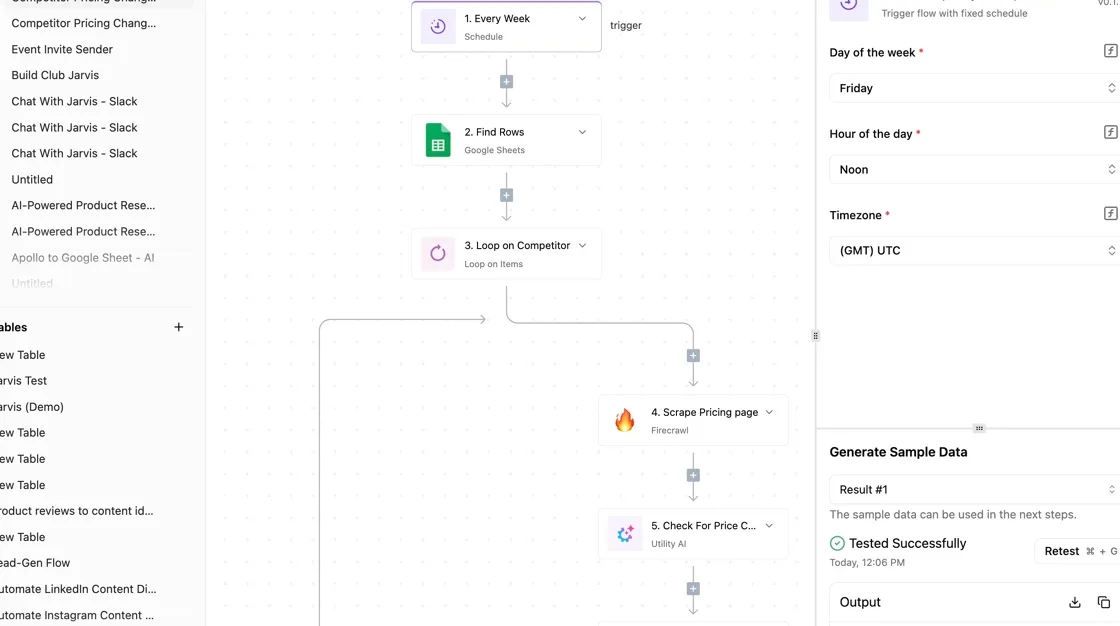
For watching competitors' prices, the shop owner already ran an Activepieces workflow, shown in the screenshot below: a spreadsheet feeding a loop, a scrape, an AI check and a router.
If a connector for their own AWS charges had been missing, nobody would have waited on a vendor's release: Activepieces generates the integration with AI and adds it privately to your instance, and roughly 60% of its 750 integrations came from the community, countable in the open source monorepo.
At 02:14, a bot flood hit the storefront and a spend alert fired. This team had built alerting for other people's prices and none for their own AWS charges.
What it cost them, and what they could have set beforehand, is where the rest of the article goes.
If you are running this arithmetic for your own team, see what the same workload costs on Activepieces.
Every AWS WAF Price Line
Four meters run on every AWS WAF bill: each web ACL, each rule, each request inspected, and each call to a paid add-on.
The table lists every line from the AWS WAF pricing page, and I didn't confirm any of the dollar rates in this check, so I marked each unverified.
Take the unit from each row now and fill in the rate before you size anything.
| Line | Price | What it includes | Limits such as WCU | Verified status |
|---|---|---|---|---|
| Web ACL | Monthly charge per web ACL; rate unverified | The container that holds your rules | Each web ACL has a WCU ceiling | Unverified |
| Rule | Monthly charge per rule; rate unverified | One rule or rule group reference inside a web ACL | Each rule consumes WCU | Unverified |
| Requests | Charge per million requests inspected; rate unverified | Every request a web ACL evaluates | None on volume | Unverified |
| Bot Control, Common | Monthly fee plus per-request charge; rates unverified | Detection of self-identifying bots | Uses WCU | Unverified |
| Bot Control, Targeted | Higher monthly fee plus per-request charge; rates unverified | Detection of evasive bots | Uses WCU | Unverified |
| Fraud Control ATP | Monthly fee plus per-attempt charge; rates unverified | Account takeover prevention on login endpoints | Uses WCU | Unverified |
| Fraud Control ACFP | Monthly fee plus per-attempt charge; rates unverified | Fake account creation prevention on signup endpoints | Uses WCU | Unverified |
| CAPTCHA | Charge per challenge attempt; rate unverified | Puzzle challenges served to clients | Counts attempts, not requests | Unverified |
| Flat-rate plans | Unverified | Unverified | Unverified | Unverified |
| Free tier | Unverified | Unverified | Unverified | Unverified |
Look at the pattern: only the first three rows are fixed-cost plumbing. The add-ons all carry a per-request or per-attempt meter, so a surge multiplies them.
When traffic rises, the requests row rises with it, and the Bot Control and Fraud Control rows add a second per-request meter on top.
AWS bills a request that reaches an add-on rule group twice: once as an inspected request, once as an add-on call. The web ACL and rule rows stay flat during a surge.
I couldn't confirm what, if anything, the pricing page lists as a flat-rate plan on this date, so the row stays unverified.
Read the page for the plan's included request volume, and for whether Bot Control and Fraud Control are inside it or still billed separately.
I didn't confirm a free tier, so assume none until the page says otherwise. The same applies to any limit that would cap spend automatically.
Next come the caps and alerts that would have contained the surge.
What That Night Cost at Three Traffic Sizes
$24 to $2,400 is what the surge added to the bill without Bot Control, and $84 to $7,400 with it.
Which figure applies depends on whether the site serves 10M, 100M or 1B requests in a normal month.
Normal month at 10M, 100M and 1B requests
I assume one web ACL and five rules. The ACL costs $5 a month, each rule $1, and requests $0.60 per million, so the fixed part is $10 a month.
A normal month then costs $16 at 10M requests, $70 at 100M and $610 at 1B. Past 100M, requests are nearly all of the bill, so volume is the number to watch.
The flood: requests and add-on charges
More than half of it is not human. Statista puts humans at 47 requests per 100, bad bots at 40 and good bots at 13.

That leaves 53 of every 100 requests non-human, so a surge is more likely automated than a campaign win. WAF bills for all of it.
Assume the flood adds four times a normal month's requests in 8 hours. Bot Control Common costs $10 a month plus $1 per million requests, and the extra column is the with-Bot-Control flood month minus a normal month.
It shows that the add-on can cost more than the requests it inspects.
| Requests per normal month | Normal month | Flood month, no Bot Control | Flood month, Bot Control Common | Surge hours | Extra dollars |
|---|---|---|---|---|---|
| 10M | $16 | $40 | $100 | 8 | $84 |
| 100M | $70 | $310 | $820 | 8 | $750 |
| 1B | $610 | $3,010 | $8,010 | 8 | $7,400 |
Eight hours of traffic produced the whole increase. At 1B, switching on Bot Control raised the flood bill from $3,010 to $8,010, because AWS inspects every request, including attack traffic, at $1 per million on top of the base rate.
Pay-as-you-go versus flat-rate AWS WAF pricing
At 10M, where the whole normal month is $16, per-request billing is cheapest. The gap that matters is the flood. A flat monthly price would have stayed the same through the 8 hours, while metered billing rose fivefold or more at every size.
Whatever plan you choose, the ceiling on a bad night should be known before the night arrives.
Worth checking against a plan that does not meter every step: one credit covers a whole run on Activepieces.
Hidden Charges and Limits Behind the Spike
Six separate charges stack on one web ACL, and AWS enforces a ceiling on none of them, which is why a bad night costs more than expected.
The list runs in the order we found them, each one documented by AWS, so you can check your own ACLs before the next surge.
- Bot Control bills per request it inspects, on top of the base request fee (AWS WAF pricing page).
- A web ACL whose rules exceed 1,500 capacity units (WCU) pays an extra request fee (AWS WAF developer guide).
- Logging is billed per GB at whichever destination receives the logs (AWS WAF pricing page).
- CloudFront and data transfer appear as their own lines, outside WAF (CloudFront and EC2 pricing pages).
- Each web ACL, and each region it is deployed in, is billed separately (AWS WAF pricing page).
- AWS WAF has no built-in spend cap (AWS WAF pricing page).

Read the first and last together: the first is a multiplier on traffic, and the last means nothing stops it.
When a surge doubles traffic, a paid rule group doubles with it, because it meters every request, on top of the base request fee. The cheap headline rate applies only to the base.
Once Bot Control or a fraud rule group sits on the ACL, the attack traffic you're blocking is billed at the add-on rate too.
Logging and data transfer outside the WAF line
When requests grow, logs grow with them, and the destination sets the price. Classmethod puts CloudWatch Standard at $0.50 per GB, so 100 GB of surge logs costs $50.
CloudWatch IA and S3 are both $0.25 per GB, which halves that to $25. Data Firehose is $0.029 per GB, or $2.90 for the same 100 GB.
Pick the destination before the surge: the difference between the dearest and cheapest option is roughly seventeen-fold.
Read only the WAF section and the total looks smaller than it is, because CloudFront and data transfer never show on the WAF line. A surge raises them on separate lines of the bill.
WAF capacity limits and no spending cap
You will not see the WCU pile up as rule sets accumulate. Past 1,500, every request through that ACL pays the higher fee, so adding one more managed group can reprice all your traffic, not just the new rule's share.

Multiplication across ACLs and regions follows the same logic: ten ACLs bill ten times the per-ACL charges.
Because AWS WAF has no built-in spend cap, the only limit is one you build with alerts and budgets.
AWS WAF versus Cloudflare and others
On Cloudflare's Free, Pro and Business plans, the bill is a flat monthly price.

A surge costs the most on the usage-billed three: AWS WAF, Azure Web Application Firewall and Google Cloud Armor all add meters that rise with traffic. Details below reflect vendor pages as of 19 November 2026.
Pricing model and entry cost
On Cloudflare's plans page, Free is listed at $0 per month, Pro at $20 per month and Business at $200 per month.
The unit is the plan, not the request, so those prices hold whether a site serves a thousand requests or a hundred million. That means the monthly bill can be forecast before traffic arrives.
AWS WAF meters differently. It charges for each web ACL, each rule inside it and each request inspected, and bot and fraud rule groups add their own fees on top.
Google Cloud Armor and Azure follow the same pattern of policy or gateway charges plus usage-scaled units. The entry cost is low, but the total depends on traffic you don't control.
Below, two diagrams put a per-request meter on a request stream entering a web ACL beside a fixed-price plan holding the same stream. Only the first box changes size when the stream grows. That's why the attack scenario matters more than the entry price.

Cost during an attack
Under a flood, a metered WAF bills for every request it inspects, including the ones it blocks. A Cloudflare plan, at $20 or $200 per month, doesn't change for the same flood.
A usage-billed WAF turns an attack into a line item, and AWS WAF has no built-in cap to stop it, as covered above.
Don't assume the flat price covers everything. Its three listed tiers set the price, but features such as advanced bot handling sit in higher or custom plans, so check what your tier actually includes before assuming the flat price covers it.
If your origin already sits behind CloudFront, an Application Load Balancer or API Gateway, AWS WAF remains the sensible pick. It attaches directly to those resources and uses the same IAM and logging.
If your traffic is modest and predictable, the metered cost stays small. Choose it with alerts and budgets in place, not as a fixed-price product.
Guardrails Added After the Incident, With Activepieces Alerting
Four guardrails are now in place: a budget alert, rate-based rules, narrower Bot Control scope and filtered logging.
Activepieces has one job, which is getting the budget alert to a person who can act on it, and its free plan, at $0 with 1,000 credits a month and unlimited flows, is enough to run that job.
Rules, caps and scope changes
Every fix targets one of two units, because AWS WAF meters requests per web ACL and charges extra for each paid rule group. We made four changes.
First, an AWS Budget and a Cost Anomaly Detection alert, each with a threshold set below the level that would hurt. The budget catches slow growth. The anomaly alert catches a spike within days instead of at month end.
Second, rate-based rules placed ahead of the paid rule groups. A flood from one source gets blocked at the cheap rule, so it never reaches the add-on that bills per request inspected.

Third, Bot Control now covers only the paths that need it, such as login and checkout. Static assets and public pages no longer pass through it, which cuts the metered volume at the source.
Fourth, logging is filtered. We keep blocked and counted requests and drop routine allowed traffic, so log storage stops growing with every surge.
None of these is a hard cap. AWS WAF has no built-in spending limit, so the alert is the only brake, and it works only if a person sees it.
Route alerts to decision makers
The warning has to land with someone who can change a rule instead of sitting in a shared inbox, and that is what Activepieces does with its Google Sheets integration, one of the 750 counted in the open source monorepo: it takes the budget alert and sends it to the on-call owner.
It doesn't enforce anything here.
The screenshot shows a weekly Activepieces flow with a Find Rows step selected. Its Search Value is filled with {{step_2['output']}}, the reference that passes the previous step's output into the next one.

For us that means the on-call name is looked up from a Google Sheets rota, so changing the owner means editing a row, not rebuilding the flow.
Activepieces meters usage in credits, and a run is 1 credit however many steps it has, so a short alert flow with no AI steps costs 1 credit a run; past a plan's allowance, Plus charges $0.007 a credit.
Next, the work that remains for Monday.
- Create the AWS Budget and the Cost Anomaly Detection alert, with thresholds you chose in advance.
- Add rate-based rules ahead of any paid rule group on each web ACL.
- Scope Bot Control to the paths that need it.
- Filter logging to blocked and counted requests.
- Review your WAF pricing plan against current traffic, using AWS's own pricing page.
- Connect the budget alert to the on-call owner through Activepieces, then trigger a test alert to confirm it arrives.
Frequently asked questions
Once the price table is in front of you, four questions come up, and none of them is answered by the rates alone.
Does AWS WAF have a free tier?
Not as a standing allowance on WAF itself, as far as the pricing page shows. The metering starts with the first web ACL, the first rule and the first request.
Check the current AWS pricing page and your account's credit terms before assuming any of it is free. Any credit you do have is a one-time offset and won't hold up under a traffic surge.
Is AWS WAF charged per rule or per request?
Both, plus more. You pay for each web ACL, for each rule inside it, and for each request the ACL inspects. Paid add-ons such as the bot and fraud rule groups carry their own charges, and they're usually metered on request volume as well.
In whatever service receives the logs, logging adds a separate line item. So a surge raises the request charge and the add-on charge together, and the log charge rises with it.
Can I set a hard spending limit on AWS WAF?
No. AWS gives you budgets and alerts, not a switch that stops WAF at a dollar amount. A budget with an alert tells you the bill is climbing. A budget action can respond automatically, but you have to design and test it yourself.
If the rule you would be switching off is the one protecting the site, you have to decide in advance which is worse: the overage or the exposure. Make that decision before the surge, not during it.
Is AWS WAF worth it for a small site?
It's worth it if the site has something an attacker wants, such as logins, checkout or an API, and you can keep the rule set lean.
For a static brochure site behind a CDN, the fixed per-ACL and per-rule charges may cost more than the risk they cover.
Start with the managed rules you need. Leave the paid bot and fraud groups off until you can name the threat they address, and put an alert on request volume before anything else.
References
Running the numbers
See what the same workload costs here.
Free forever plan, and every paid plan self-hosts at no extra cost.
See pricing Talk to sales