
Google Antigravity MCP: How to Add Servers (2026)

Nov 16, 202617 min read
Antigravity MCP is Google's agent-based IDE acting as a Model Context Protocol client: the agent inside the editor connects to outside tools and data through MCP servers you choose, whether that's a server you wrote yourself or one exposed by a workflow platform like Activepieces.
It's not a separate product or a Google-only protocol. The agent gets exactly what the servers you attach expose to it, and no more.
Google Antigravity MCP defined in plain terms
What MCP adds to an agent
When an AI agent has to talk to an external system, MCP is the open protocol that standardizes how. A server wraps a system and publishes a list of tools, and the client, here Antigravity's agent panel, discovers those tools and calls them.

Without MCP, the agent can read your code and little else. With it, the agent can query a database, read an issue, pull a design file, search documentation or touch cloud resources, depending on which servers you connect.
Antigravity MCP servers and agent permissions
The picture below shows the layout: the Antigravity window on the left with its agent panel acting as the MCP client, and arrows running to five servers on the right:
- one for a database
- one for an issue tracker
- one for a design tool
- one for docs
- one for a cloud account
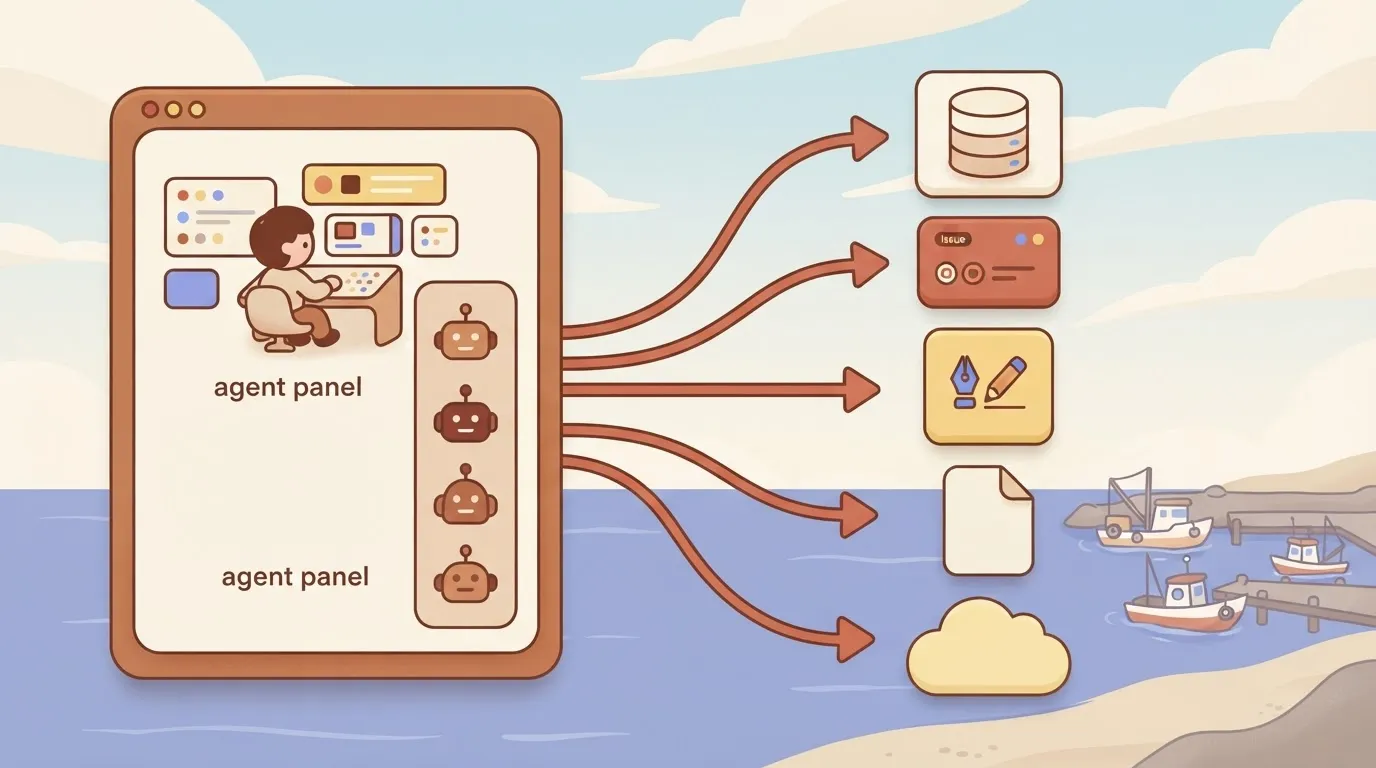
Read it as a permissions map. Every arrow is a door, and each server decides what sits behind it: read-only queries or writes, a single project or a whole account.
The obvious thing to read is the catalogue of servers. It tells you what could be connected, but says nothing about what a given server lets the agent do, and that's the part to read before you wire anything in.
Treat each of those five slots as a decision, not a default. That is the next step.
Antigravity MCP documentation sources and check date
Check Google's own Antigravity documentation; it is the authority here, and the checks were made on 2026-11-16.
Statements about how Antigravity handles MCP, including how servers are added and what the agent is permitted to do, should be confirmed there, because the product changes and third-party write-ups lag behind it.
Nothing here depends on a number that could have moved since that date, because this section states no figures, limits or prices.
This takes minutes, not a project: automate it in Activepieces free.
How Antigravity connects to MCP servers
There are two ways to connect Antigravity to MCP servers. One is its built-in MCP store, the other is hand-editing a JSON configuration file, and both end up in the same server list the agent reads.

The store is the low-effort path. You browse the listed servers from the agent panel and install one, and Antigravity writes the entry for you. The catch is that you accept whatever the listing configures, so read what it grants before you click.
To see what's underneath, open the config from the same panel, a JSON file with one entry per server. Use it for anything the store doesn't list, or when you want to see exactly what command or address the agent will run.

Every store install lands here too, so this file is your audit trail.
Local versus remote servers
When a server is local, Antigravity launches it as a process on your machine, so the entry names a command and its arguments. A remote server is one you reach by address, so the entry names a URL instead.

The practical difference is where the code runs: local means it runs with your user's access, remote means your requests leave the machine.
Authentication follows the same split. Local servers typically take credentials through environment variables in the entry, and remote ones through whatever the server demands, such as a header or token.
That puts secrets in a file on disk, so keep that file out of version control.
Confirm the exact field names in Google's current docs, since I'm not quoting them from memory.
How the agent chooses and calls tools
Once a server is connected, it advertises its tools and the agent sees them alongside its built-in ones. It picks a tool by matching your task against those descriptions, then calls it with arguments it fills in itself.
So a vague tool description invites wrong calls, and a server exposing write actions lets the agent write. Start with read-only servers and check what each call did.
Where teams typically use Antigravity MCP
Teams connect five kinds of servers: database, issue tracker, design tool, docs and cloud service.
The risk climbs with how much each one is allowed to change, not with how useful it is. Read-only first, as the last section said, is the rule that sorts them.
The risk climbs with how much each one is allowed to change, not with how useful it is.
The table below compares the five on the task each usually does, its default access, setup effort and what goes wrong when misused.
Treat the access column as a starting point: defaults vary by server and by how you configure it, so check each server's own documentation before trusting it.
| Server type | Typical task | Read or write by default | Setup effort | Risk if misused |
|---|---|---|---|---|
| Database | Inspect schema, run queries | Read, if you issue a read-only credential | Medium | Destructive writes, leaked rows |
| Issue tracker | Pull tickets, draft updates | Often both | Low | Noisy or wrong edits to shared tickets |
| Design tool | Read frames, tokens, specs | Read | Low | Mostly misread context |
| Docs | Fetch reference pages | Read | Low | Stale or poisoned instructions |
| Cloud service | Inspect resources, deploy | Depends on the credential | High | Cost, outages, exposed infrastructure |
Prices and plan limits checked against docs.claude.com and claude.com and openai.com and gemini.google on November 16, 2026.
Read down the table and effort and risk both rise, so the bottom is where to move slowest.
To write queries and migrations that match what actually exists, the agent reads schema and sample rows. Setup is medium because the safety lives in the database credential, not the server. Give it a read-only role; the agent's good behavior is not a permission.
Issue tracker and design MCP servers
These are the cheapest servers to connect and the safest place to start. The agent reads the ticket, the spec and the design tokens before writing code.
The catch is trust: text in a ticket or page is input the agent may follow, so a careless or hostile note can steer it. Keep issue trackers read-only until you've watched what a drafted update looks like.
With cloud services, a wrong call costs money or takes something down.
Scope the credential to one project or environment, start with inspection only, and require your approval on any deploy. Nothing else in the table has a worse failure mode, which is why it comes last.
What Antigravity MCP costs and needs
You pay nothing for MCP itself: you pay for the plan you run the agent on, and any server you connect may bill you separately. Since the failure modes above all start with a connected server, the plan is the smaller cost.
Antigravity plans and quotas
Read the table below as the price of the agent's headroom, because a tighter plan means the agent stops sooner in a long, tool-heavy session. It sets out the four tiers in Google's plan announcement.

| Plan | Price per month |
|---|---|
| Free | $0 |
| Google AI Pro | $19.99 |
| Google AI Ultra 5x | $99.99 |
| Google AI Ultra 20x | $199.99 |
MCP adds no fee on any tier.
Free costs $0, and its quota refreshes weekly, so a heavy session can use up the week's allowance. That makes it the right place to test one narrow server.
Pro is $19.99, Ultra 5x is $99.99 and Ultra 20x is $199.99, cutting per-unit cost in half at the highest tier. Move up only after the free tier's limit has actually stopped your work.
I'm not listing operating system versions or account conditions here, because I have no figure from Google's docs I can stand behind. Check Google's current documentation before you install, especially if you plan to sign in with a managed work account.
Costs charged by the servers you connect
One server may sit behind an API key with metered usage, another may require a paid seat in the service it fronts. Each is its own product with its own billing.
Before connecting a server, read its pricing page and find what a single tool call costs. An agent that loops on a metered server spends your money without asking, so start with servers that are free or capped, and watch the first few runs.
You can follow the rest of this with the builder open. Start free, no card.
Prevent five setup mistakes in Antigravity MCP
When a setup goes wrong, runaway spend is one of five ways. The others are too many servers, credentials that reach too far, writes nobody reviews, and config errors that fail quietly.
The table pairs each mistake with the symptom you'll see and the fix, so find the symptom you already have.
| Mistake | Symptom you'll see | Fix |
|---|---|---|
| Too many servers | Tools missing or ignored; the agent picks the wrong one | Keep only servers the current task needs |
| Broad credentials in config | A token in a repo; the agent touches things you never mentioned | Scoped, read-only tokens kept out of the file |
| Auto-approved writes | Changes you don't remember approving | Approve writes manually until a server has earned trust |
| Untrusted servers or prompt injection | The agent follows instructions found in fetched content | Vet the source; keep such servers away from write tools |
| Silent config errors | Server never appears and nothing says why | Check the JSON, then confirm the tool list after every edit |
The four mistakes that need more than a row follow.
A setup copied from VS Code can overflow Antigravity. It allows 100 tools, Nodeflare's comparison reports, against 40 in Cursor and 128 in VS Code, and one multi-tool server can eat much of the budget. Count tools, not servers.

Whatever token sits in the config, the agent can use. A full-access token means any bad instruction runs with full access, so issue read-only, single-project tokens.
Reads are cheap to get wrong; writes are not. Keep approval on for anything that sends, deletes or pays.
Before you install a community server, remember it is code you run plus text your agent reads. Content it fetches can carry instructions, which is prompt injection, so read the source first.
Connect business workflows with Activepieces
Only when the agent has to touch business apps does Activepieces earn a place, with 750 integrations in an MIT-licensed core to reach them.
Activepieces lets you publish workflows as an MCP server that Antigravity connects to, and MCP access is included on the Free plan, which also carries unlimited flows and 1,000 credits a month, while the credentials stay in the platform, not in your IDE config.
That matters after the injection warning above: a fetched page can steer the agent, and the less the agent holds, the less a hijacked session can spend.
When to add a workflow MCP server
If you only use Antigravity for coding, skip it. A repository server and a docs server cover that job, and a workflow layer is one more moving part to audit.
It starts to pay when the agent needs to reach a CRM, a ticketing queue, a spreadsheet or a mail tool. Otherwise you'd paste a separate token into each direct server.
Once a integration is connected in Activepieces, the agent can call it.
The same integration action runs as a step in a flow and as a tool schema on the per-project MCP server that Antigravity's server entry points at, so there is no second catalogue to publish to and no export step before the agent can use it.
Of the 750 integrations in the MIT-licensed open source repo, roughly 60% are community-contributed, and the code under packages/integrations/community is where you can confirm that the action a flow runs is the one the agent calls.
Because each workflow you expose is a fixed set of steps with the field mappings already decided, the agent calls the workflow and doesn't improvise against a raw API. That narrows what a bad instruction can do, which is the whole argument for starting narrow.
Be skeptical of catalogue counts, though. A long list of connectors says nothing about whether the trigger or action you need exists, or whether it exposes the field you need to map. Open the specific integration and read its actions before you commit.
The table compares the two routes on the three things that decide the choice. Read it as a trade: the workflow route centralises secrets and logging at the cost of building each workflow, while direct servers are quicker to wire but scatter both.
| Activepieces workflows as an MCP server | Direct vendor MCP servers | |
|---|---|---|
| Where credentials live | In the Activepieces platform's connections | In each server's config or auth flow on your machine |
| Breadth of business apps | 750 integrations, but only the apps you build workflows for | Only vendors that ship their own server |
| Audit trail | Run history in one place, per workflow | Whatever each vendor logs, in separate places |
What follows is how this looks from inside Antigravity.
How the connection looks from Antigravity
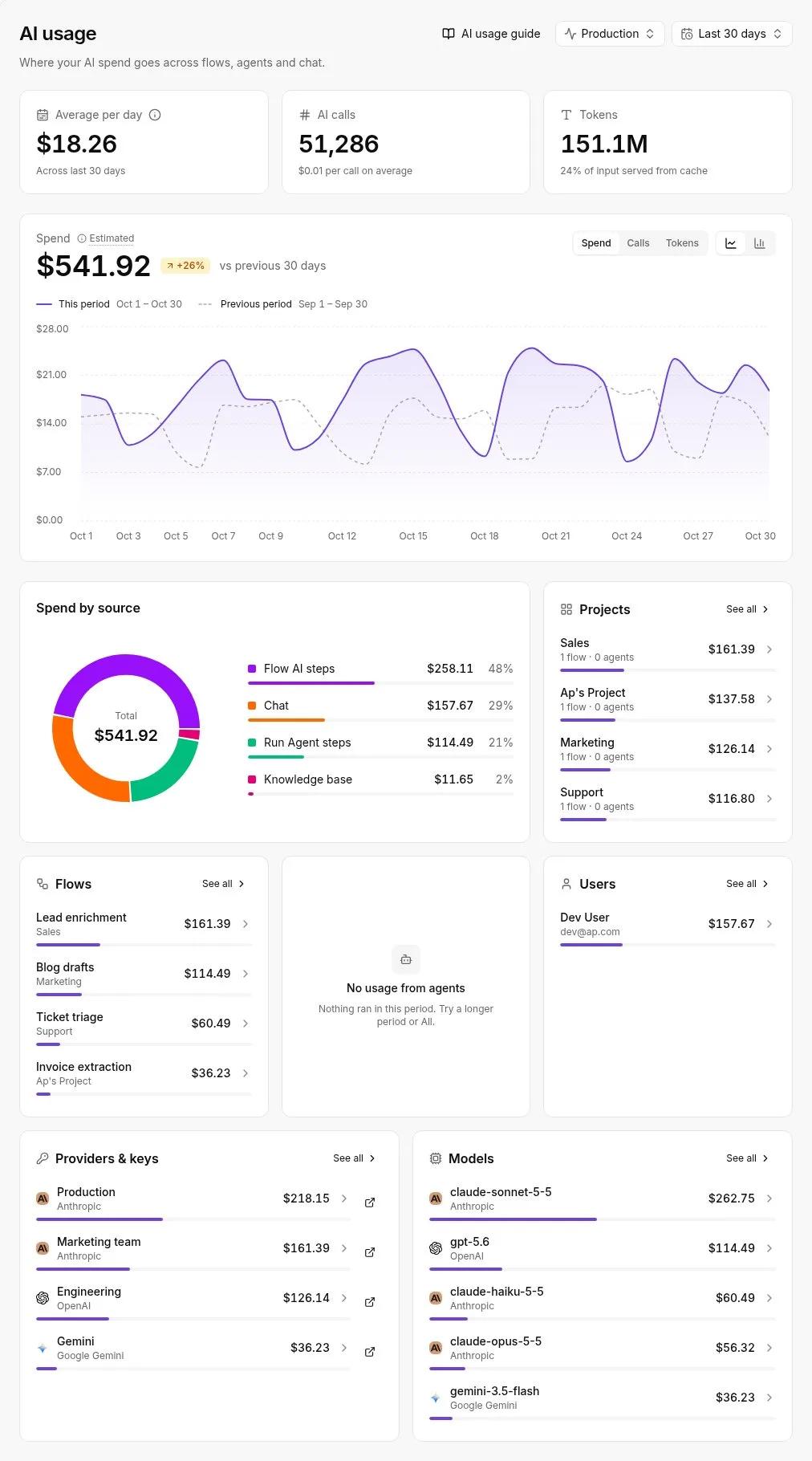
From Antigravity's side, Activepieces, which MoneyGram, Moneypenny, Alan and FundingSocieties run in production, is just another MCP server entry. You add the server address and its authentication the same way as any other, and the exposed workflows appear as tools. Nothing about the agent changes.
Confirm the exact steps for adding a custom server in Google's Antigravity documentation and in the Activepieces MCP Server documentation, since both interfaces change; the 2026-11-16 check date above applies to this section too.
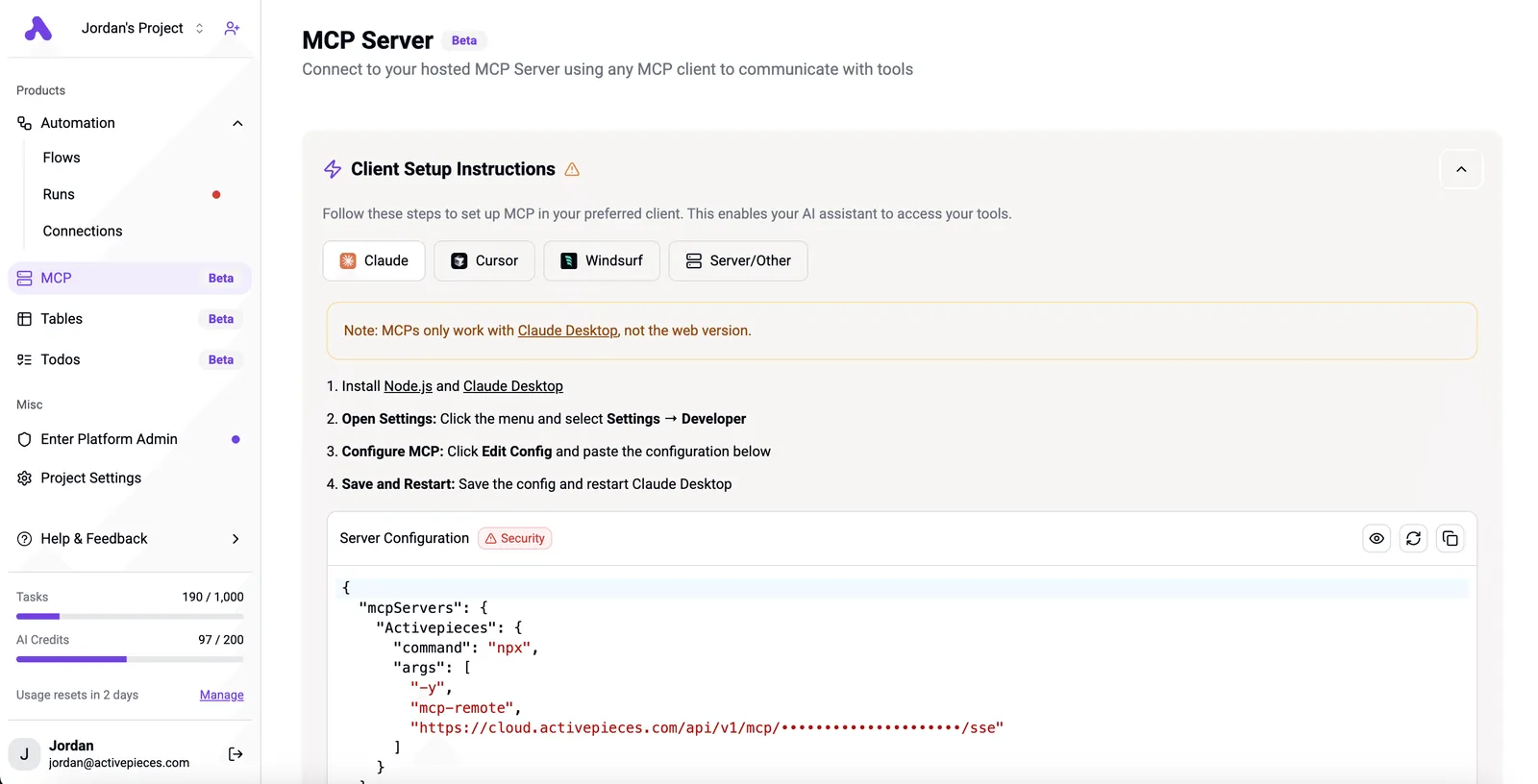
Start with one read-only workflow, such as looking up a record. Run it, then check the run history on the Activepieces side to confirm the inputs match what you expected.
A run counts as 1 credit however many steps it has (AI steps cost more), so the test barely touches the Free plan's 1,000 credits a month.
Add write actions only after that check passes, and keep each one a separate workflow so you can switch it off alone.
Your first week with Antigravity MCP
Start with one read-only server on a throwaway project, and widen access only after you've read what the agent actually did with it. The order below keeps every mistake small enough to undo.
The sequence for the first day, with the reason each step sits where it does:
- Recheck Google's Antigravity docs and pricing page before you install anything. MCP support, plan terms and the setup screens change, and a guide written months ago, this one included, can be wrong on the details.
- Install one server that only reads. A documentation search or a read-only database connection is enough. If it can't write, the worst outcome of day one is a wrong answer.
- Point the agent at a throwaway project with no real code, no real customer data and nothing you would mind losing. Ask it to use the server and watch which tools it calls.
- Scope the credentials. Give the server a token limited to the one resource it needs, never your personal admin login. A narrow token caps the damage no matter what the agent decides to do.
The checkpoint is simple: can you say, for each tool call, why the agent made it? If not, stop here.
Once day one holds up, the remaining steps repeat as a loop:
- Require approval on every write action. Leave the agent's autonomy settings strict, so a human clicks before anything is created, changed or deleted.
- Add servers singly. One new server, one round of testing, then the next. If you connect three at once and something misbehaves, you won't know which one to blame.
- Review the calls. Read the agent's tool-call history at the end of each day, looking for calls you didn't expect and for requests that reached further than the task needed.
Treat the connection list like a permissions audit, not a feature shelf. A server you added and never reviewed is access you granted and stopped watching.
Frequently asked questions
Where Google's pages are silent, the answer says so; otherwise these answers stay inside what they state as of 2026-11-16.
Is it free to use?
Is Google Antigravity MCP free to use? Google's docs treat MCP as a protocol built into the IDE, not a product you buy, so the cost question splits in two. Antigravity's own plan terms are on Google's pricing page and can change.
Whatever a connected server charges, whether per call, per seat or per API key, is billed by that server's maker and not by Google.
Can it use servers built for other tools?
Can Antigravity use MCP servers built for other tools? Generally yes, because MCP is an open protocol and a server written to the spec doesn't care which client calls it.
Where it fails is in the details: which transport the server uses, how it authenticates, and whether it expects a client feature Antigravity doesn't implement. Test one server with one tool call before you wire up a dozen.
How does it differ from Gemini CLI?
Is Antigravity MCP the same as Gemini CLI MCP support? Both speak the same protocol, but they are separate products from the same company.
Don't assume a server entry, an approval setting or a credential you configured in one carries over to the other. Read each product's own MCP page and configure each on its own terms.
Is a production database safe to connect?
Is it safe to give Antigravity access to a production database? Not by default. A server that can write to production lets the agent write to production, and that's a decision, not a convenience setting.
Start with a read-only credential against a replica or staging copy, keep approval on for every tool call, and widen access only after you've watched what the agent actually does with it.
Related reading
References
Build it
Set this up in minutes.
No code required. Connect your accounts, and Activepieces runs it from there.
Start free Talk to sales