
Google Antigravity Integration: Setup Guide (2026)

Nov 15, 202614 min read
To set up Google Antigravity integration, you connect the tools its agent can reach: one MCP server or extension first, then one business app, all under the Google account you signed in with. There's no single switch to flip.
Set up Google Antigravity integration
What Google Antigravity is
Google Antigravity is Google's agent platform, and its Antigravity Agent is a general-purpose managed agent that runs in a sandbox.
If an integration seems to do nothing, the agent was usually never given access; it isn't broken. The agent can only touch what you have deliberately connected.
What counts as an integration here
Three things count: an MCP server the agent can call, an extension, and a business app.
A business app counts only when the agent can call it and you can see the result, and Activepieces meets the first half by exposing each of its 750 integrations as a tool on a project's MCP server, so your agents can reach hundreds of business systems.
MCP stands for Model Context Protocol, an open protocol that lets an AI agent call external tools in a standard way.
An MCP server is a small program or hosted endpoint that exposes a set of tools to the agent, such as "list records" or "open a page", and the agent discovers them by name.

That differs from an extension, which adds a capability inside the app or browser itself, and from a plain API script, which does one fixed job with whatever key you hand it.
An MCP server sits between the two: the agent chooses when to call its tools, and the server defines what each tool can do.
When something breaks, it breaks in one of three places: the account you signed in with, the quota attached to it, or the permissions the connected tool grants.
What you will have working in about 20 minutes
Expect a working path in that time, not a finished deployment.
The path runs in this order, and each stage ends with a result you can see:
- Install and sign in. You're done when the agent responds to a plain prompt under your Google account.
- Connect one MCP server or the extension. You're done when the agent calls it and returns real output from that tool.
- Connect one business app. You're done when the agent reads one record from it and shows you the same record you see in the app itself.
Stop at each result before moving on. If stage two returns nothing, stage three will fail for the same reason, and you'll have two unknowns instead of one.
This takes minutes, not a project: automate it in Activepieces free.
Install Antigravity and sign in with Google
Install Antigravity from Google's official download page, sign in with a Google account the product accepts, and you're done when the editor opens and the agent answers a prompt. Everything else in this guide builds on that result.
Download Google Antigravity and supported operating systems
Get the installer from Google's own Antigravity download page, not from a mirror or a search-result lookalike. The page offers the builds Google currently ships, and its list of supported operating systems is the only one that counts.
Launch the app once the installer finishes. Don't move on to extensions or tool connections yet. A first launch that never reaches the sign-in screen is an install problem, and nothing later will fix it.
Sign in to Antigravity and check account eligibility
Expect trouble at sign-in first, because that is where most first-day failures happen.
Antigravity authenticates through a Google account, and the account decides what you can use. A personal account, a Workspace account managed by an administrator, and an account in a region the service doesn't cover can behave differently.
When it fails, work through these in order:
- Confirm that Google's current Antigravity documentation lists your account type as eligible.
- If the account belongs to an organization, ask the administrator whether they've enabled the service for it.
- Try a personal account to separate an account restriction from a local problem.
- Note the exact wording of the error. Support will ask for it, and the docs index their messages by it.
Antigravity first-run settings and what they change
After sign-in, the editor presents setup choices. Read the labels on screen and compare them with the docs, since the wording changes between releases and I won't guess at it.
Ask three things of each choice: what the agent may do without asking you, which files and terminals it can reach, and whether anything you type is shared with Google for product improvement.
Pick the cautious option wherever a choice controls autonomy or access. You can loosen it later, and tightening it after the agent has already acted is too late.
Connect tools through MCP servers and extension
Three moves connect one external tool: register an MCP server in the agent's configuration, authenticate it, and optionally add the browser extension. The working result is a single tool the agent can call and you can verify.
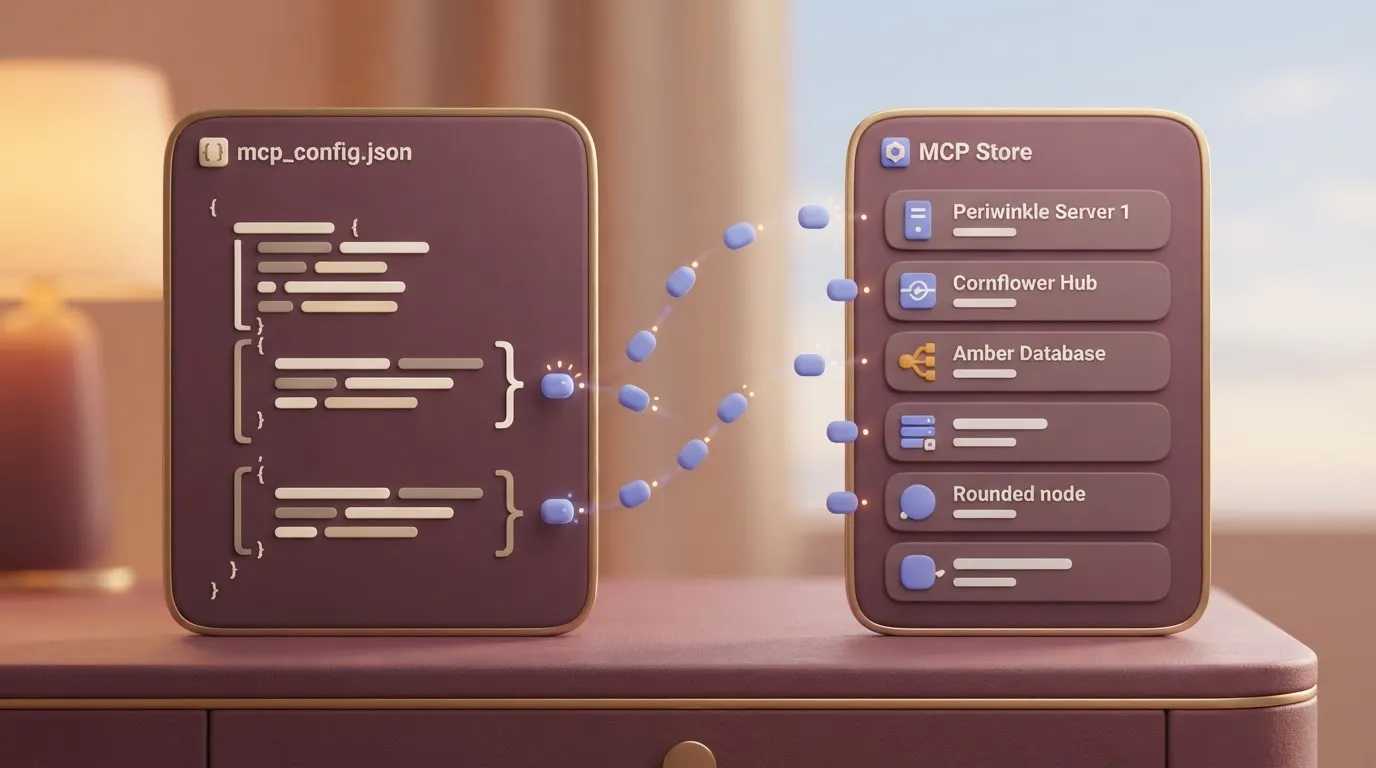
From the agent panel's menu, open the MCP store. Its raw-config option opens mcp_config.json, the file that holds every server the agent can reach. Servers installed from the store write themselves into that file, so you can read exactly what was added.
Add a server and authenticate
Start with the store. The MCP Census counts 64,473 servers in the official registry and 2,169 from all other sources.
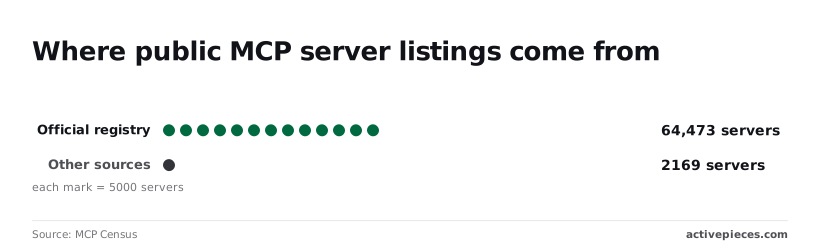
That puts about 97 percent of public servers in one place, so a server you can't find there deserves extra scrutiny before it goes into your config.
For anything the store lacks, add an entry to mcp_config.json yourself. A hosted server's setup page typically ends in a JSON block under mcpServers, with a launch command and an endpoint URL.

Copy it verbatim and keep the existing entries intact, because a stray comma invalidates the whole file.
After saving, authenticate when prompted. A server that loads but shows no tools has usually failed here, on a missing token or a scope you didn't grant.
A token is the secret string that proves the server may act on your behalf, and a scope is the limit on what that token may do, such as read-only access to records.

| Route | Setup effort | Reach | Permission prompts |
|---|---|---|---|
| MCP store | Lowest; one click, then sign-in | Servers listed in the store | Per server, at sign-in |
| Custom config | Highest; hand-edited JSON | Any server you can address | Whatever the server enforces |
| Browser extension | Moderate; install and pair | Pages open in your browser | Per browser action |
Install the extension from the browser's own extension store and pair it with your signed-in Google account. It gives the agent reach into web pages that no MCP server covers, such as an internal dashboard with no API.
The cost is more permission prompts, since each browser action asks for approval.
Check that the agent can use the tool
Ask the agent to perform one small, read-only task through the new tool, such as listing items or opening a page. Confirm that the tool appears in the agent's own record of the call, not just in its answer.

If the call is refused, check the account's permissions and quota in Google's documentation before editing the config again. Most refusals trace back to those limits rather than to the JSON.
You can follow the rest of this with the builder open. Start free, no card.
Stage 3: Connect Antigravity to your business apps
Pick the route to a business app by what that app's account and permissions allow, because the same limits that blocked your config will block the connection. The working result here is one agent task that reads from, or writes to, a real app.
There are four routes, and each fits a different situation:
- The app's official MCP server fits when the vendor publishes one. It carries the vendor's own permission model, so what the agent can do matches what your account can do, and the vendor's docs tell you which plan unlocks it.
- A third-party vendor server fits when the app has no official one but someone maintains a server for it. Read who maintains it and what scopes it asks for before you hand it a token, since you're trusting that maintainer with the app.
- A script the agent runs fits when the app has an API but no server. It's the most flexible route and the least guarded: the agent holds whatever key the script holds, so give it a key restricted to the task.
- A workflow tool exposed as an MCP server fits when the job spans several apps or needs fixed steps the agent should not improvise. The workflow defines what is possible, and the agent only triggers it.
Prefer the earliest route in that list that exists for your app. Each step down trades vendor-enforced limits for limits you must enforce yourself.
Use the Activepieces route only if you already use the workflow tool or need one flow to touch several apps; for a single app with an official server, skip it.
Activepieces registers each of its 750 integrations, counted from packages/pieces/community in the MIT-licensed open source repo, once, and that one registration serves two callers: it is a step in a flow and a tool on the project's MCP server, so Antigravity, Claude, ChatGPT or Cursor can call the same action.
Slack, Sheets or a CRM therefore reach Antigravity with no export step and no second integration to maintain, and the Integrations Framework and MCP Server documentation describe the mechanism.
- In the workflow tool, build or open the flow you want the agent to run and enable it as an MCP tool.
- Copy the server address and access token the tool gives you.
- Add the server to Antigravity's MCP configuration using those two values. Field names change between releases, so follow the current Antigravity docs.
- Refresh the agent's tool list and confirm the new tool appears by name.
If the tool is missing at step 4, check the token and your account's access first, not the config syntax.
Test the MCP connection with a read-only action
Before the agent can write anything, give it a task that only reads, such as listing recent records or fetching one item by name.
A read proves the token, the scopes and the connection in one move, and it can't damage data if the agent misreads the request.
If the read fails, the error message names the limit you hit, and the vendor's docs say how to lift it. Only after one clean read should you allow a write.
Fix limits, quotas, and errors
After that first write, most failures come from the account, quota or permission behind the agent, not from your configuration, and each can be checked against Google's own pages.
Plan tiers and quota limits as published
Four plans carry Antigravity quota, according to Google Gemini:
| Plan | Price per month |
|---|---|
| Free | $0 |
| AI Pro | $19.99 |
| Ultra 5x | $99.99 |
| Ultra 20x | $199.99 |
If an agent stalls mid-task on Free, it is usually spending the smallest allowance; the plan costs nothing.
Read 5x and 20x as the multiple of quota over the base tier. The exact refresh window is worth confirming on the plan page before you budget a workday around it.
MCP and extension errors
Use the table for what to try first with each symptom. "Not found" means I found no explicit statement in the docs I read, so test it yourself.
| Error | Likely cause | Fix | Google's docs cover it? |
|---|---|---|---|
| Sign-in fails | Wrong or ineligible account | Sign in with the account that holds the plan | Partly |
| Quota exhausted | Tier allowance used up | Wait for refresh or move up a tier | Tiers yes, refresh timing check |
| MCP server not listed | Config not reloaded or malformed | Fix the config, restart the agent | Not found |
| MCP auth failed | Expired or under-scoped token | Reissue the token with the needed scope | Not found |
| Extension not connecting | Version mismatch | Update the app and extension together | Changelog only |
Update first. The changelog shows how much moves per release. v1.12.4 had 3 improvements and 0 fixes, v1.14.2 had 3 and 2, v1.22.2 had 1 and 0, v1.23.2 had 0 and 2. v2.0.1 had 0 and 3.
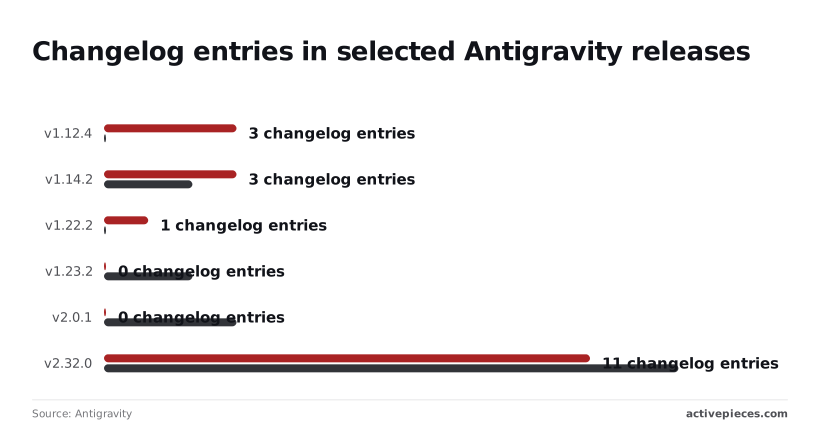
Then v2.32.0 landed 11 improvements and 13 fixes, so an error you hit on an older build may already be gone. Read the current release notes before you file a ticket.
Set terminal and permission policies to ask before running commands, and keep write access off until a read has come back clean.
Google's docs describe these policies, but I found no guidance on what a looser setting exposes, so assume it exposes everything the account can reach.
Frequently asked questions
Is Google Antigravity free to use?
What matters is how much agent work the individual plan allows before it stops you, and Google's docs describe that plan with usage limits. I'm not quoting the limits here, because they're set per plan and can change.
Check the plans page for your account type before you build a workflow around it. A quota you hit mid-task looks like the agent failing, not like billing.
Can Antigravity connect to Gemini CLI or Firebase tools?
Firebase, yes, through its MCP server. You add that server to Antigravity's MCP configuration like any other, and the agent can then call whatever tools the server exposes.
Treat Gemini CLI as a separate agent, not a tool Antigravity plugs into. The two can sit under the same Google account, but each keeps its own configuration, so a server added in one doesn't appear in the other.
Does Antigravity work with a Google Workspace account?
It can, but the decision may not be yours. Sign-in with a Workspace account depends on what your administrator has allowed for the domain, and the same applies to the services the agent reaches through that account.
If sign-in is refused or a connection fails only on the work account, ask the admin before debugging anything on your machine. The same setup on a personal account is the quickest test of whether policy is the cause.
How do I remove an MCP server from Antigravity?
- Open the agent's MCP server management in settings.
- Find the server in the list and remove it, or delete its entry from the raw configuration if you added it by hand.
- Reload or restart the agent session.
Go by what the settings panel shows, since menu labels move between releases. Removing the entry stops the agent from calling the server. Any credentials you gave it stay valid at the other end until you revoke them there.
Where does Antigravity store its settings and logs?
On your own machine, per user, in locations that differ by operating system. The docs checked on 15 November 2026 give no path I can vouch for, so I'm not giving one.
Open the settings inside the app first, then look for a logs or diagnostics entry in its Help menu. For a support request, attach the log from there, not a copy from a folder you had to guess at.
Related reading
References
Build it
Set this up in minutes.
No code required. Connect your accounts, and Activepieces runs it from there.
Start free Talk to sales