
Connect Google Workspace to Gemini for Automation
These extensions enable the AI to retrieve and process your private information directly from your Google Workspace account.

Covers replacing WhatsApp and spreadsheet chaos with chat-based automation for resource-constrained small businesses, and why the fixes actually stick.
ContributorSeptember 23, 202614 min read
This article was researched and fact-checked by an advanced research system.
Connect Gemini to live data
The difference between training data and real-time extensions
Gemini Connected Apps shift the LLM from a static knowledge base into a functional agent. They provide a live window into your current files rather than relying on historical training data.
When you ask a model to summarize a strategy document, a standard LLM relies on patterns learned months ago. A Connected App pulls the specific version sitting in your folder today.
This eliminates the "hallucination lag" where an AI confidently describes a project scope that was deprecated last Tuesday.
By using Activepieces to bridge these Google-native insights with external project management tools, you ensure the AI isn't just reciting facts, but it's acting on the most recent iteration of your work.
How Gemini interacts with Google Workspace APIs
Instead of writing complex scripts, the system translates natural language prompts into structured API calls that navigate permissions. The model identifies which tool holds the relevant information to fulfill the request.
| AI Environment | File Upload Limit (MB) | Operational Consequence |
|---|---|---|
| Gemini (Workspace) | 100 MB | Supports standard spreadsheets but rejects large database exports. |
| ChatGPT (Plus) | 512 MB | Allows for massive raw datasets but lacks native Google permission sync. |
| Claude (Pro) | 30 MB | Limits users to small text snippets and short PDFs. |
80% of the utility is determined by these ingestion limits, which dictate how much context your AI can see at once, meaning the majority of your model's performance is hard-coded by these constraints.
Direct API queries bypass interface limits
Connected Apps operate through a different technical pathway than the standard chat upload button.
While a user dragging a PDF into the chat window is restricted by the 100 MB UI limit, an extension queries the Google Workspace API directly to retrieve information, so you can bypass local file size barriers entirely.

This method allows the model to scan across vast directories or large files that would otherwise be rejected by a manual upload.
The constraint shifts from raw file size to the model's context window and token limits, which determine how much of the retrieved data the AI can actually process in a single thought.
The security boundary of a Connected App session
Nobody can access sensitive files that the human operator isn't already authorized to open because every interaction stays within the user's existing OAuth permissions. A junior staffer can't use Gemini to "summarize the payroll sheet" if they don't have direct access to that file in Drive.
The session creates a temporary execution environment where the system processes data to generate an answer. It doesn't add it to the global model's training set, preventing proprietary internal memos from leaking into the public domain.
This takes minutes, not a project: automate it in Activepieces free.
Native Google extensions inventory
Gemini's native extensions function as specialized binoculars that allow the model to peer into your personal Google account, but specific file types and communication channels restrict their vision.
Gmail and Drive: Summarizing and finding files
The integration with Google Drive and Gmail is a retrieval mechanism for unstructured text. It allows you to query your own history instead of digging through nested folders.
Gemini can parse the contents of Google Docs and PDFs. You can ask for a summary of a specific contract; this saves the twenty minutes you'd have spent scanning for the "termination clause" yourself.
The connection is largely one-way for files. Gemini can draft a reply in Gmail, but it can't currently edit a specific cell in a Google Sheet or move a file from one Drive folder to another.
| Tool | Supported Actions | Ecosystem Status |
|---|---|---|
| Gmail | Read threads, draft replies, search by sender | Full Read/Write (Drafts only) |
| Google Drive | Search file titles, read document content, summarize PDFs | Full Read / No Write |
| Google Docs | Extract text, summarize long-form content | Full Read / No Write |
This limited write-access means that while the AI can identify a problem in your documentation, you must still correct it manually.
Google Calendar: Scheduling without leaving the chat
The Calendar extension is a lightweight administrative assistant capable of both reading your availability and inserting new events. By granting Gemini access to your schedule, you can ask it to "find a free hour on Tuesday for a sync."
This prevents the cognitive load of switching tabs to cross-reference your mental to-do list with a grid of blue boxes.
Moreover, it's the only Workspace extension with reliable "write" capabilities for creating entries, though it can't yet manage complex tasks like inviting external guests or checking the availability of shared resource rooms.
Google Maps and YouTube: Real-time external data retrieval
Extensions for Maps and YouTube provide Gemini with a window into live, public data that exists outside your private documents. Using the Maps extension allows the model to calculate commute times or find local services based on your current location.
A field technician can get directions to a job site without exiting the conversation where they just received their briefing.
YouTube integration allows for the processing of video content into text summaries, which lets a researcher extract the key takeaways from a recorded two-hour keynote in seconds.
Limits of native enterprise connectivity
Native Gemini extensions provide immediate utility for basic tasks, but they offer only a fraction of the functionality required to manage a professional workflow.
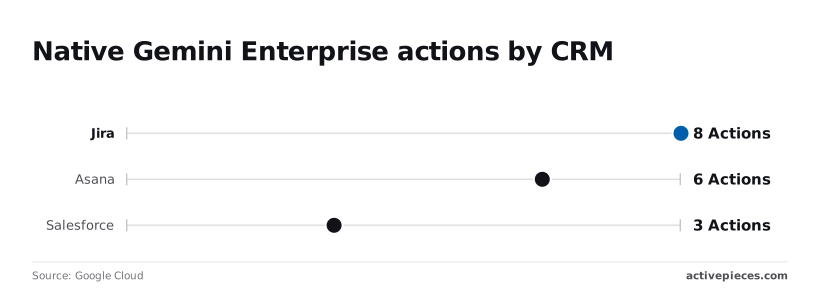
Native Gemini Enterprise actions by CRM
Google’s current library of native connectors provides a shallow feature set that limits users to basic search and retrieval rather than complex data manipulation.
Jira offers 8 Actions: a project manager can view a ticket but can't reorder a complex sprint backlog or manage custom field transitions.
Asana provides 6 Actions: while a user can create a task, they're unable to map dependencies or adjust project timelines natively through the chat interface.
Salesforce features 3 Actions: this restricts an account executive to viewing basic record details while blocking them from updating opportunity stages or logging complex call notes.
A 12x production deployment multiplier for governed environments means that for every hour spent setting up a basic connector, twelve more are required to ensure it meets corporate audit standards.
The authentication hurdle for third-party SaaS
Every external tool Gemini touches introduces a new identity management layer. Native integrations typically rely on individual OAuth tokens, which means an admin can't globally authorize a tool for a department.
Instead, every employee must manually handshake with each service, leading to "permission fatigue" where users abandon the AI because it asks for a login every time they request a CRM update.

Why native Google connections aren't universal
A "connected" app in the Google ecosystem is functionally a siloed window, not a universal bridge to your company's entire data stack.
Because these native actions are hard-coded by Google, you can't add a custom field from your proprietary lead-scoring model into the Gemini-Salesforce interface.
A "connected" app in the Google ecosystem is functionally a siloed window, not a universal bridge to your company's entire data stack.
You're stuck with the three generic actions Google provided, forcing your team to jump back into the browser tab to do the actual work.
You can follow the rest of this with the builder open. Start free, no card.
Three ways to expand Gemini beyond Google Workspace
Native extensions offer immediate utility for basic tasks within the Google ecosystem, but scaling Gemini to handle complex business logic requires moving toward Vertex AI or external automation platforms.
Native extensions for the casual user
Google’s native extensions function as a closed-loop system designed for speed and zero-config deployment. They're built for the individual contributor who needs to summarize an email thread or find a specific file in Drive.
They can't reach into external databases or trigger workflows in non-Google software. Because these extensions are hard-coded, they offer the lowest latency for internal searches, yet they provide the least amount of control over how data is mapped.
Vertex AI extensions for custom enterprise builds
Vertex AI connectors allow developers to build private bridges between Gemini and internal APIs. They provide a path for organizations with heavy engineering resources to create bespoke AI tools.
This approach offers the highest level of security and data isolation. Building these connectors requires significant manual coding for every new integration. If your engineering team is already backlogged, relying on Vertex AI means your AI strategy will likely stall at the prototype stage.
Automation platforms for cross-app business logic
Automation platforms allow Gemini to orchestrate tasks across the 130 different SaaS applications the average organization now manages.
| Feature | Native Extensions | Vertex AI Connectors | Automation Platforms |
|---|---|---|---|
| Setup Speed | Minutes | Weeks | Hours |
| App Support | Google Apps Only | Custom/Internal APIs | Hundreds of SaaS Tools |
| Complexity | Low (No-code) | High (Pro-code) | Medium (Low-code) |
By using an automation layer, you move from an AI that can only "read" your workspace to one that can "work" across your entire software stack.
How Activepieces bridges the gap to non-Google apps
Activepieces exposes 735+ integrations as agent tools, allowing Gemini to interact with software outside the Google Workspace ecosystem without a second migration.
The platform ensures that any integration registered in the system is instantly available to an agent as a tool schema, so you never have to wire up the same logic twice.
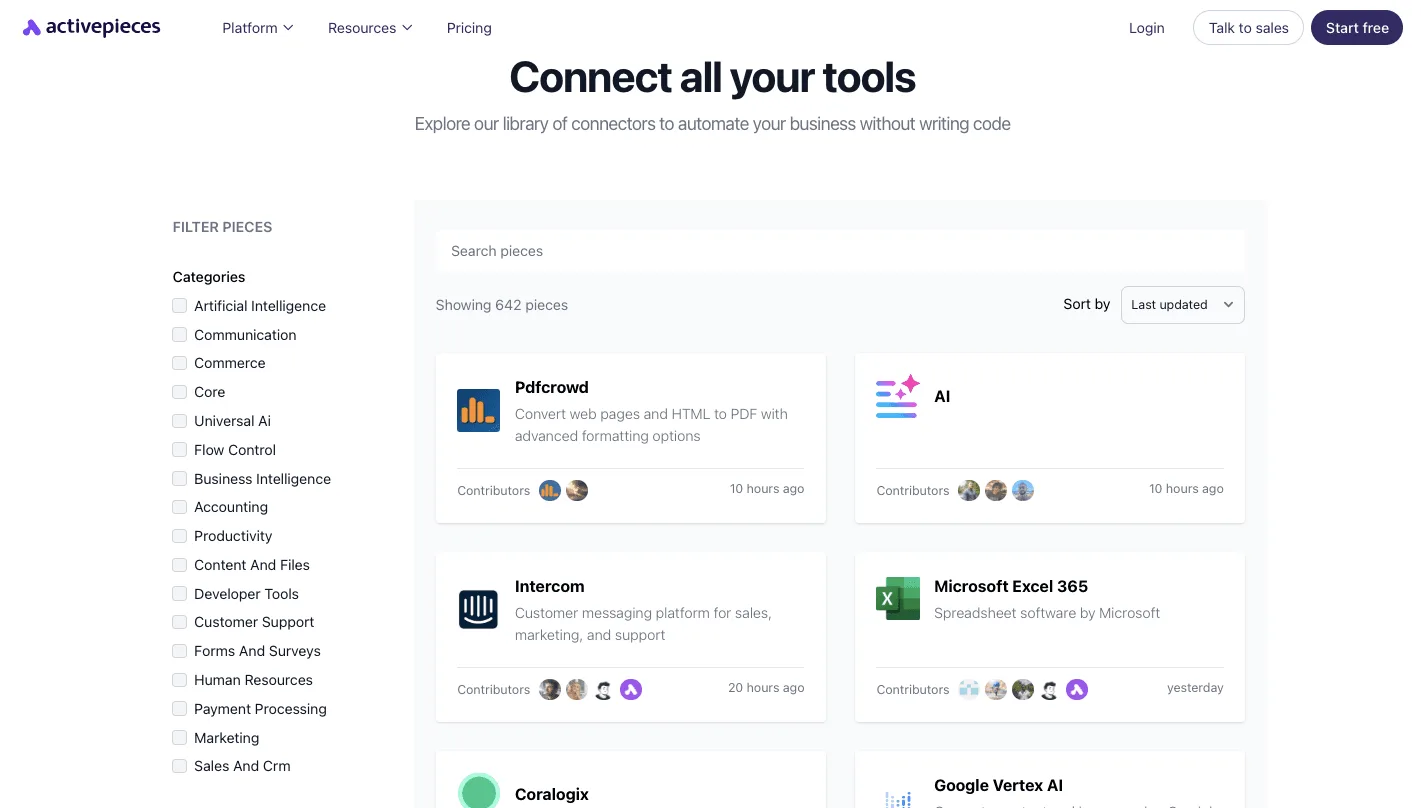
Check the Integrations Framework and MCP Server documentation, and the mechanism itself in packages/integrations in the open source repo, the same integration action that runs in a flow is the one exposed as an MCP tool.
This eliminates the need to maintain separate catalogs for automation and AI agents.
Triggering Gemini from external app events
When a new issue is opened in Linear or a payment fails in Stripe, Activepieces detects the event and pushes the details to Gemini immediately.
This means the AI begins analyzing the problem the moment it occurs, rather than waiting for a human to notice the notification and copy-paste the data into a chat box.
Feeding CRM data into AI prompts
Activepieces pulls live customer records from platforms like HubSpot or Zendesk. This ensures Gemini’s responses are grounded in actual customer history.
By querying these databases before the prompt is sent, the automation layer injects specific details directly into the instructions.
Activepieces applies the same enterprise governance to your agents as it does to your staff: RBAC, SSO and SCIM govern what it may connect to, not just what a person may open.
Check the enterprise RBAC documentation to confirm how access policies apply to what an agent may connect to, ensuring that customer data retrieval remains within governed boundaries.
Automating actions in Slack or Jira based on Gemini outputs
Activepieces takes the text Gemini generates and converts it into specific API calls that execute tasks in communication and engineering tools.
Activepieces posts the summary to a specific channel in Slack to alert the relevant department. It creates a structured ticket in Jira so developers can begin work without manual data entry. It updates a row in Airtable to keep the executive dashboard current.
MoneyGram and FundingSocieties run Activepieces in production to manage these types of complex automation environments. Each tool call the AI makes is logged individually in the run detail view, providing a clear audit trail of every external action taken.
Monday morning audit of AI connectivity
Finding manual copy-paste tasks to automate
Every time a project manager copies a status update from a Jira ticket into a Google Slide, they're performing a high-latency task. Identifying where employees manually move text reveals exactly where your AI strategy is failing to scale.
- Identify manual data copy-paste patterns between Google and external tools.
- Inventory currently active native extensions to see which departments are hitting limits.
- Flag recurring requests for "summary emails" that require data from non-Google platforms.
- Audit browser history trends for high-frequency switching between Google Docs and external databases.
- Interview department heads about the "last mile" of their reports to find the data sources Gemini is blind to.
Identifying where employees manually move text reveals exactly where your AI strategy is failing to scale.
Enabling Workspace extensions in the Admin Console
Activating native extensions is the foundational step. This allows Gemini to access your internal Google Drive and Gmail data.
Without these permissions toggled on in the Google Workspace Admin Console, the AI is restricted to public training data. It can't provide context-aware answers about your specific clients or projects.
Testing your first cross-app automation workflow
Success in AI connectivity is measured by the AI's ability to trigger a change in one system based on an event in another. A test workflow proves that the data pipeline is secure and functional.
One example is having Gemini draft a response in a Google Doc based on a new lead appearing in a non-Google CRM. If the AI can successfully pull the lead's name without a human hitting Ctrl+C, the business has moved past the native sandbox.
Frequently asked questions about Gemini connectivity
Does Gemini use my Workspace data to train its global model?
Google doesn't use data from Gemini for Google Workspace Enterprise, Business, or Education accounts to train its underlying foundation models. This means your proprietary internal strategy documents or sensitive client emails remain isolated within your specific organizational tenant.
They don't become part of the public knowledge base that informs responses for other users.
While the AI processes your files to generate answers, the model doesn't retain that data as a permanent learning point. This protects your intellectual property from leaking into the global AI ecosystem.
Can I connect Gemini to Microsoft 365 apps?
Gemini lacks native "Connected App" extensions for the Microsoft 365 ecosystem. It can't directly pull data from the Excel spreadsheets or Outlook inboxes where your team likely stores its non-Google records.
To bridge this gap, you must use an external integration layer to act as a translator between the two environments, which means your systems can finally exchange data without manual intervention.

Without this third-party bridge, your data remains trapped in functional silos. Spreadsheets stored in Microsoft Excel can't be queried by Gemini to update Google Slides presentations.
Calendar invites in Outlook are invisible to Gemini’s scheduling features. Word documents sitting in OneDrive can't be summarized alongside Google Drive files.
What is the cost of using Gemini Connected Apps in an enterprise plan?
Access to Gemini’s native Workspace integrations is bundled into the per-user monthly subscription fee for Google Workspace add-on tiers. Because this is a flat-rate subscription rather than a consumption-based model, your department can predict monthly software spend.
You don't need to worry about a sudden spike in costs if a team member runs a complex series of document queries.
However, this fixed cost only covers the "walled garden" of Google apps. Any automation that reaches into external CRM or accounting tools will require an additional budget for a middleware platform.
Related reading
References
Build it
Set this up in minutes.
No code required. Connect your accounts, and Activepieces runs it from there.
Start free Talk to sales