
Gemini Agent: What Google Launched, Pricing and Limits

Oct 16, 202611 min read
Google Cloud released the Gemini agent, a single agent for work that takes knowledge-work questions, content creation and coding from one prompt box.
Its launch pages state no price. Until they do, it's a product to watch, not a step in a workflow.
At Gemini at Work 2026, Google Cloud announced it, calling it "a universal agent for work".
The companion post calls it "your new single, universal agent for work." Neither page says how another app would call it, so Activepieces has no documented trigger or action to attach to the agent yet.
If you want to know who it is for and when it arrives, Google's launch pages don't name an audience or an availability date.
Gemini agent launched: what Google released and when
The admin docs describe Gemini Enterprise as central oversight for an organization's agents, which suggests an admin-managed rollout, but that's an inference, not a statement.
As of 2026-10-16, the table below shows what each page confirms. Two of four rows read "not stated", so budget nothing against this launch yet.
| Fact | What Google's page states | Google page linked | Date checked |
|---|---|---|---|
| Maker | Google Cloud | Google blog | 2026-10-16 |
| Announcement date | October 8, 2026 | Gemini at Work 2026 | 2026-10-16 |
| Who can use it | not stated | Gemini Enterprise docs | 2026-10-16 |
| Price | not stated | Gemini at Work 2026 | 2026-10-16 |
Prices and plan limits checked against cloud.google.com and docs.cloud.google.com and cloud.google.com and blog.google and github.com and docs.claude.com and claude.com and openai.com and gemini.google on October 16, 2026.
Because the agent itself carries no price, the Gemini Enterprise edition chart that follows is the only cost anchor available.
If you are running this arithmetic for your own team, see what the same workload costs on Activepieces.
What Gemini agent means for automation teams
Since the agent has no price of its own, its value to an automation team depends on something else: whether your existing workflows can call it.
Google has launched a Gemini agent, and its own pages confirm that it exists. What we found on those pages is a product description, not a documented endpoint.
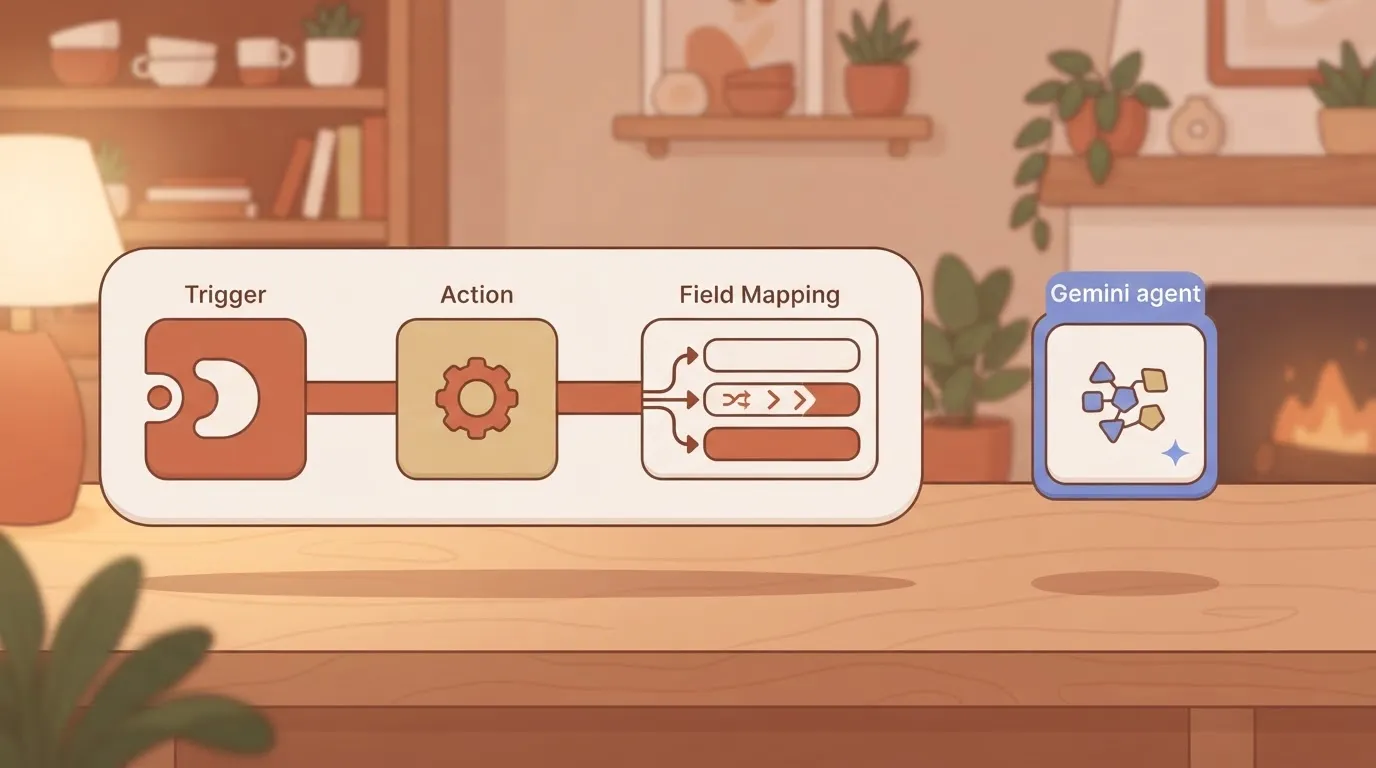
An automation team needs a trigger to start it, an action to invoke it, and a field mapping for what comes back. Without those, the agent is a place people go, not a step a workflow runs.
Gemini agent access and plan availability
Treat access as whatever Google's launch pages state for your account type, and nothing wider. If a page doesn't confirm that your plan or workspace gets the agent, assume it doesn't.
An automation team needs a trigger to start it, an action to invoke it, and a field mapping for what comes back. Without those, the agent is a place people go, not a step a workflow runs.
Check this before you build anything around it, because a workflow that depends on an unavailable agent fails on its first run.
Because the agent has no price of its own, the Gemini Enterprise edition chart is the only figure to budget against.
You can cost the edition, but you can't forecast a per-run cost for the agent, so any estimate of what an automated step will cost is a guess.
Can workflows call the Gemini agent?
To see the test, look at the illustration below. On the left is the Gemini agent. On the right is a workflow canvas with a trigger, a Gemini step, then Slack (team chat) and Google Sheets (spreadsheet) steps in a row.
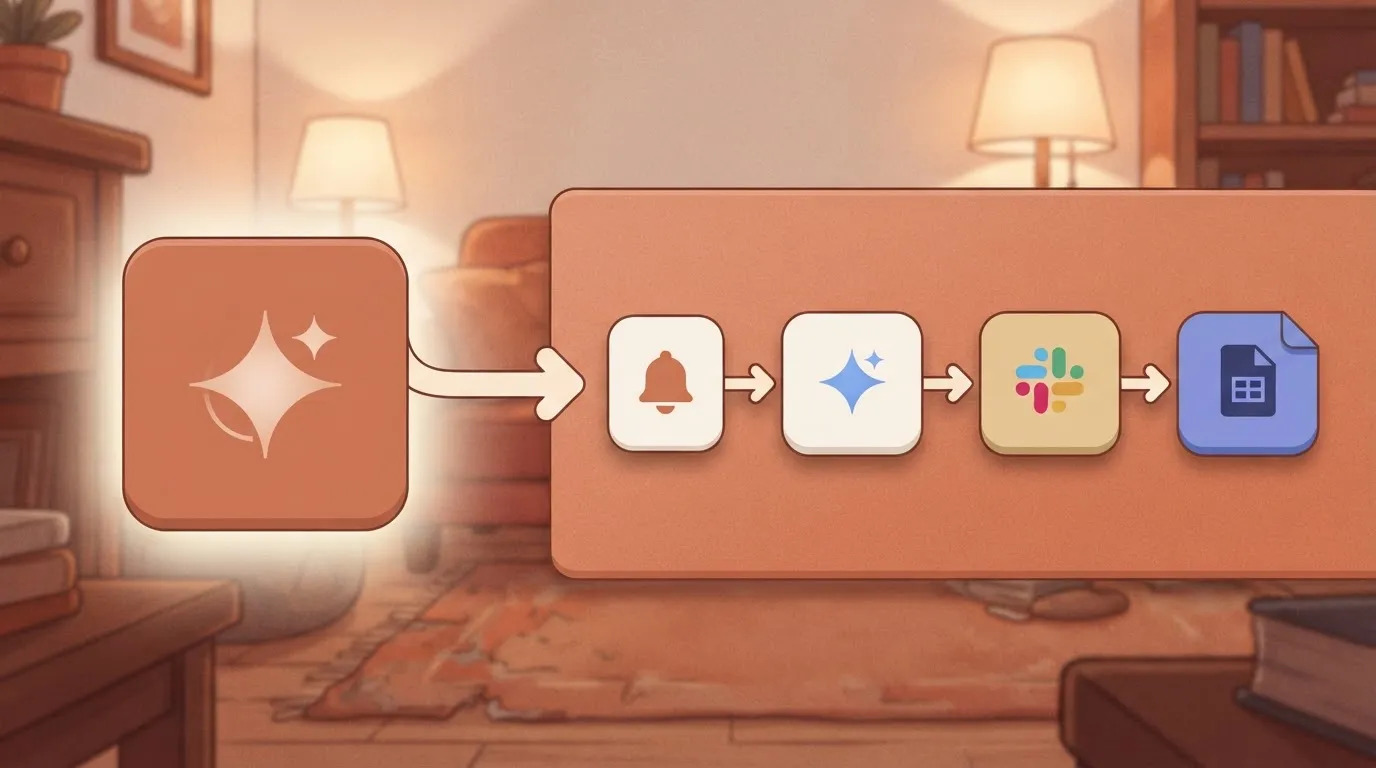
The gap between them, labelled "callable endpoint?", is the question that decides everything: until the answer is yes, the agent stays outside the flow. The rest of this integration weighs the launch by that gap.
New Gemini agent capabilities Google confirmed
Google's pages confirm these capabilities, and each describes what the agent does inside Google's own surface, not what it does when your workflow calls it.
Only the last two items below describe a way in from outside. That is why the list matters: it is what the Google blog, the Google Cloud pages and the Gemini Enterprise docs state outright, and the rest is what sits behind that door.

- A single universal agent for work, described on the Google blog launch post. Read it as the product pitch, not an interface.
- 200+ models in Model Garden, Google Cloud's catalogue of hosted models. That count says nothing about which models the agent can call, so don't plan around it.
- Agent Gateway with Model Armor, per the Google Cloud pages. The gateway is the control point for agent traffic, and Model Armor is Google's screening layer for prompts and responses. This is governance, and it changes what your calls will be allowed to do.
- Custom agents registered by an administrator, per the Gemini Enterprise docs. Your team can't ship one without whoever holds that admin role.
- Calls through the StreamAssist API, Gemini Enterprise's endpoint for sending a prompt and receiving a streamed answer, or through A2A, the agent-to-agent protocol. These are the only two entry points the pages name, so they decide whether a workflow can use the launch.
What Gemini agent pages leave unconfirmed
If you need pricing, per-seat or per-call, I could confirm nothing, so a cost estimate would be a guess. The pages give no firm availability by plan or region, so "who can use it today" stays open.
They don't document a webhook or callback for when an agent finishes, which matters if your flow needs a trigger rather than polling.
They also don't say which identity a call runs under, and that decides what data it can touch.
Worth checking against a plan that does not meter every step: one credit covers a whole run on Activepieces.
What Activepieces has already shipped for Gemini agent
Activepieces lists a Google Gemini integration, but its pieces page names no Gemini agent action, so we can't point to a shipped agent integration.
Gemini agent support shipped and its date
For anything agent-specific, the integrations page gives no launch date, and we won't invent one. What it confirms is the existing Google Gemini integration, so a workflow can call Gemini today as a step.

Whether that covers the new agent is unverified. We haven't run Gemini agent ourselves, and nothing here should be read as a test result.
Alongside Gemini, the same page shows how much surrounding Google work is callable:
- Google Sheets has 27 actions
- Google Drive has 17 actions
- Gmail has 11 actions
Check the action list for what you need before you design around it.
Connect it in a workflow today
Build it in this order:
- Start with a Schedule trigger set to "Every Hour".
- Add a Google Sheets step. The screenshot shows that setup: the trigger selected, the integration selector open with Insert Row, Update Row and Find Rows on offer, and a successful sample-data test in the settings panel. A passing test means the trigger fires and passes data on, which is the part to confirm before adding anything costly.
- Next, add the Google Gemini integration and pick from its actions.
- Then route the output into a Gmail or Google Drive step.
Test each step on sample data before you switch the schedule on.
The Gemini action you pick there doesn't stay inside the flow. Every integration is available as an MCP tool, so MCP-capable clients like Claude, ChatGPT and Cursor can use it.
The Integrations Framework and MCP Server documentation describe that path, and the code sits in packages/pieces of the open source repo, so you're building on existing implementations rather than from zero.
MoneyGram, Moneypenny, Alan and FundingSocieties run Activepieces in production.
Gemini agent cost and speed comparison
You can budget a scheduled run before you can predict how long it takes, because Google publishes token prices and seat prices for Gemini but no speed figures.
Gemini agent token pricing versus current options
On Google Cloud's pricing page, Gemini 3.8 Flash runs 0.75 to 3.75 dollars per 1M tokens, input against output.
An agent that writes long replies can cost more, so cap output length in the step. Gemini 4 Argon runs 2 to 10 dollars, so route only the hard reasoning steps to it.
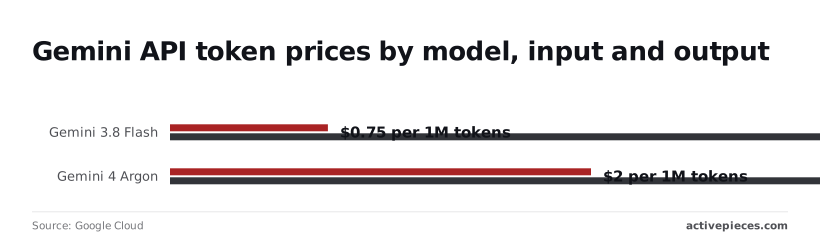
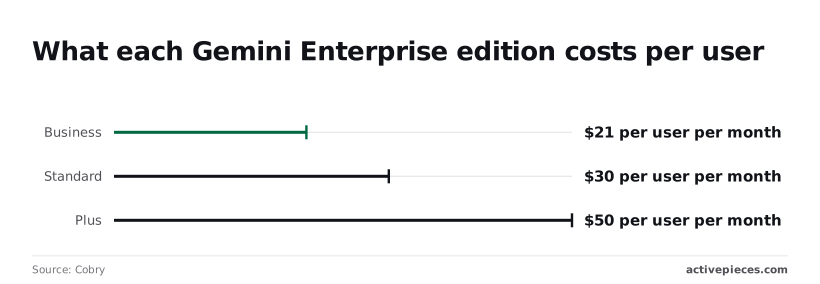
On top of tokens, seats are a separate bill. Cobry lists Gemini Enterprise at 21 dollars per user per month for Business, 30 for Standard and 50 for Plus.
A ten-person team therefore pays 210 to 500 dollars a month before any API usage. Claude Pro is 17 dollars a month on annual billing per Anthropic.
The table compares the monthly price per the makers' pages with the published speed.
| Plan | Monthly price (USD) | Published speed |
|---|---|---|
| Gemini free | 0 | none published |
| Google AI Plus | 4.99 | none published |
| Gemini Enterprise | 21–50 per user | none published |
| ChatGPT Plus | 20 | none published |
| Claude Pro | 17, annual billing | none published |
With every speed cell empty, price is the only column you can compare.
None of the five plans states a speed figure in the pages used here, making it impossible to compare them on speed, which means a reader evaluating these options cannot weigh this factor in their decision.
Don't promise a client a turnaround time from this launch. Time a sample run from your own workflow and use that number.
What to watch after Gemini agent launch
Once your timed run gives you today's number, the next job is to watch the places where that number can change, and Google's own pages are the only ones that count.
Check the release notes and the docs changelog for the agent, since a launch page is a snapshot and those two show what changed afterward.
Look for new triggers, tool-calling options, or output fields, because those decide whether a workflow step can hand the agent's result to the next app without a rewrite.
When it comes to availability, the question belongs to the docs, not the headline. Read the access section for which accounts, regions, and API tiers can call the agent, and note anything still labeled preview.
A preview label means your production flow may be calling something Google can change under you.
Then there is cost, the other thing to track. Google's pricing page is the source, and the checkable items are specific:
- Whether the introductory price on Gemini 3.8 Flash holds through its stated end date, and what the listed rate becomes afterward.
- Whether the introductory price on Gemini 4 Argon ends on its stated date, since that lands earlier and will move your per-run cost first.
- Any new line in the release notes that changes how input or output tokens are billed.
- Whether the Gemini connector's integration page in your automation platform shows a version newer than the one you installed, and what its changelog says it fixed.
Each of these is a date or a version you can compare against your own run history, so none of it needs a guess about Google's plans.
Frequently asked questions
Is Gemini agent free to use?
This article can't confirm that it is, so don't plan on free. Google's own pricing page for the product is the only place that settles it, and free access, a paid tier, and usage-based billing can all differ by account type.
Before you build a workflow that calls the agent on every run, read the pricing terms and work out what a busy day would cost you.
How do I verify integration availability?
Nothing in Google's pages confirms a ready-made connection, so treat it as unconfirmed until you check. Look in the integration catalogue for a Google AI integration that exposes the agent, and read its actions to see what it can do.
If there isn't one, the fallback is an HTTP request step against whatever endpoint and authentication method Google documents.
That works only if Google publishes such an endpoint for the agent. A launch with no callable interface is a product you can open in a browser, not a step in your flow.
Where does Google document Gemini agent?
Start with Google's own product page and its developer documentation, and treat everything else as secondhand.
The developer docs are where you find what actually decides whether automation works: the call format, the authentication method, the rate limits, and which models sit behind the agent. If a claim about the agent doesn't appear on a Google page, don't build on it.
It reflects what Google's pages said when the article was written.
Launches like this change quickly, and availability, pricing and interfaces are the details most likely to move. Compare any version or date mentioned here against Google's current pages and your own run history before you change a live workflow.
Related reading
References
Running the numbers
See what the same workload costs here.
Free forever plan, and every paid plan self-hosts at no extra cost.
See pricing Talk to sales