
Azure Document Intelligence Pricing per Model in 2026

Nov 4, 202614 min read
Azure Document Intelligence pricing in one table
How Azure Document Intelligence charges per page
If you remember one number, make it the page. Azure Document Intelligence is Microsoft's service for pulling text, tables and fields out of scanned documents, and it meters one unit: the page.
That holds whether you call it directly or from a workflow tool such as Activepieces.
Azure Document Intelligence pricing is the per-page charge Microsoft bills for analysing documents, set by which model processes each page (read, layout, prebuilt or custom) and multiplied by the pages you submit, including reruns.
According to SuperDupr, the pay-as-you-go rate for layout and prebuilt invoice extraction is $10 per 1,000 pages, which is a penny a page, so your costs climb linearly with pages processed.
Commit to a tier and the rate falls to $7.50, a 25% cut, but only if you actually reach the volume.
Every plan and model, priced and limited
To see how the layout and invoice rate steps down with committed volume, read the table below as a ladder: each rung lowers the per-page rate but ties you to a larger page count.
Activepieces allows unlimited flows on every plan, including the free one, and that leaves this ladder untouched: Azure still bills by the page, whatever the flow around it does.
| Tier | Price per 1,000 pages | Inclusions | Limits |
|---|---|---|---|
| Pay-as-you-go | $10 | Layout and prebuilt invoice rate | No volume commitment |
| 20K pages | $9.50 | Same rate, committed | Commitment of 20,000 pages |
| 100K pages | $9 | Same rate, committed | Commitment of 100,000 pages |
| 500K pages | $8 | Same rate, committed | Commitment of 500,000 pages |
| 1M pages | $7.50 | Same rate, committed | Commitment of 1,000,000 pages |
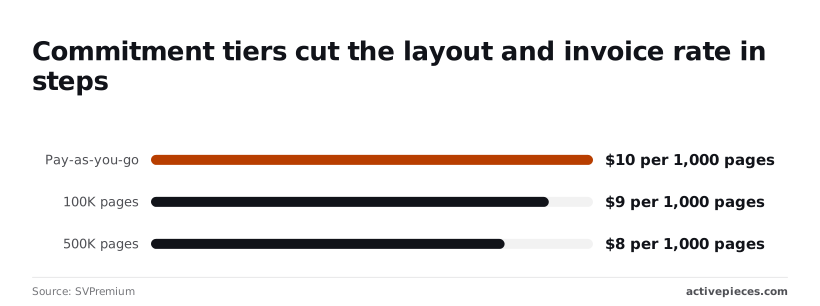
Per Plosys, the first rung saves only 50 cents per 1,000 pages, or $10 on a 20,000-page commitment, so small buyers gain little. At 1M pages the gap against pay-as-you-go is $2,500, which is where negotiating a tier starts to matter.
Outside this ladder, read, receipt, ID, custom extraction, classification and add-ons each have their own prices, so cost each model you call on its own line.
Before you commit to a tier, confirm the rates against Microsoft's own page, because they change. The rates above come from SVPremium's summary of Microsoft's pricing.
If you are running this arithmetic for your own team, see what the same workload costs on Activepieces.
What each tier costs at realistic monthly volumes
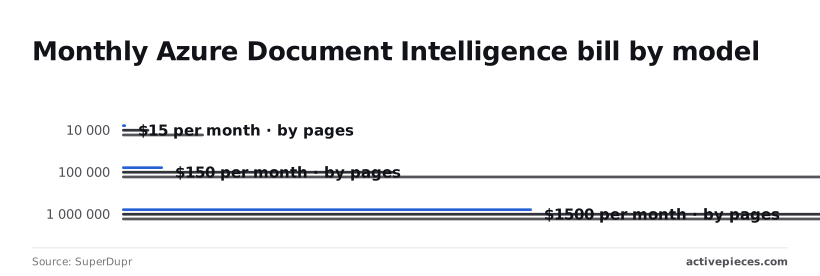
Price the page by model, because each page is the metered unit and the model sets the price per 1,000 pages: Read costs $1.50, prebuilt invoice $10 and custom extraction $30, according to SuperDupr.
Whatever the volume, custom extraction costs 20 times Read on every page, according to Superdupr. The chart shows that gap holding at every volume, on a log scale, so each step up in pages moves all three bars by the same factor.
At 1,000 pages the bills are $1.50, $10 and $30 a month, according to Plosys.
Azure Document Intelligence cost for 10,000 invoices
At 10,000 pages the bills become $15 for Read, $100 for prebuilt invoice and $300 for custom, meaning the premium option costs substantially more than the basic one.
Running invoices through the prebuilt model costs $85 more than Read-only OCR, so invoice extraction entails this material premium.
Step up to custom and it adds another $200 a month, so it needs a reason the prebuilt model can't meet.
Mixed document types at 100,000 a month
At 100,000 pages the bills are $150, $1,000 and $3,000. Sending everything to custom extraction is where the money goes.
If most of a mixed batch is plain text that only needs Read, routing it there instead of to custom saves up to $2,850 a month on that share. Route by document type before you call anything.
Where the free tier runs out
At 1,000,000 pages the bills reach $1,500, $10,000 and $30,000, turning custom extraction into a five-figure decision. SuperDupr's figures leave the free allowance out, and at that scale a small allowance is a rounding error.
Hidden costs and limits that inflate the bill
Once you run real volume, six other things move the total, because the headline rate prices one unit, a page analysed by one model.
- Blank and cover pages count as pages, so scanned batches cost more than the document count implies.
- Add-on features cost extra per 1,000 pages on top of the base rate.
- Custom models add training and hosting charges that accrue even when no pages go through.
- Throughput and file-size limits force splitting and queueing, which adds pages and engineering time.
- Storage and network transfer sit outside the analysis meter.
- Reruns bill every page again.
Per-page billing and add-on features
Count pages, not files, because that is what billing does. In Docspire's invoice sample, 40% of invoices run 1-3 pages and 35% run 4-10, so 60% are longer than three pages.
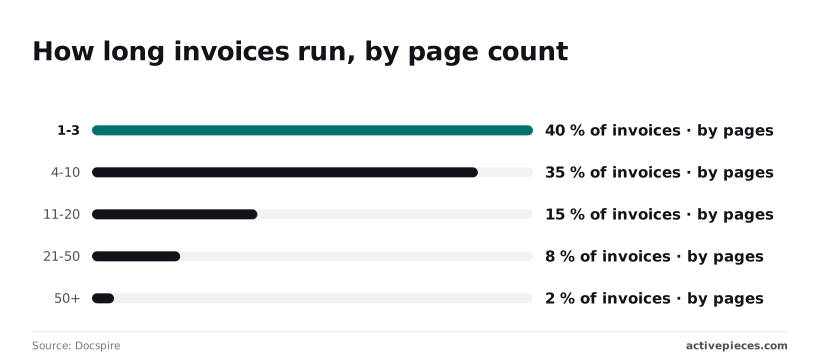
Another 15% run 11-20 pages, 8% run 21-50, and 2% exceed 50. A quarter of invoices pass 10 pages, so a small share of long files carries a large share of billed pages.
Enable an add-on and the meter charges it per 1,000 pages across the whole batch, not only the pages that need it.
Costs beyond the per-page meter
Beyond per-page analysis, a custom model carries further charges. At low volume that fixed cost is spread over few pages, so a custom model can cost more per page than a prebuilt one. Cost it as fixed plus variable.

When request-rate limits queue a large batch and file-size ceilings mean a 50+ page document may need splitting, every split adds orchestration work and a merge step, so budget for the labour, not just the pages.
Process a 20-page invoice three times and Azure bills 60 pages. Hash files before upload so retries and duplicates are caught before they reach the meter.
Azure Document Intelligence against Textract and Document AI
Because Azure, Amazon Textract and Google Document AI all bill per page, the gap between them is small next to the gap between model tiers. Accuracy on your own documents should decide the choice.
Because Azure, Amazon Textract and Google Document AI all bill per page, the gap between them is small next to the gap between model tiers.
Price comparison table
Checked against each vendor's pricing page on 2026-11-04, the table below shows which product each vendor bills for each job.
| Job (price per 1,000 pages) | Azure | Amazon Textract | Google Document AI |
|---|---|---|---|
| Plain OCR | Read model | Detect Document Text | Enterprise Document OCR |
| Invoices | Prebuilt invoice model | AnalyzeExpense | Invoice Parser |
| Forms | Layout or prebuilt models | AnalyzeDocument, forms feature | Form Parser |
| Custom extraction | Custom model, billed per page | Queries and adapters | Custom Extractor |
| Free tier | Free resource tier with monthly caps | Introductory free allowance | Read the current page for terms |
| Limits | File size and page caps per request | Separate sync and async limits | Page caps per request |
Which vendor wins on cost
When most of your volume is plain OCR or a prebuilt model it covers well, Azure tends to win, because you pay the lowest tier for most pages.
It also wins when you're already inside Azure, since egress and integration work drop out of the total.
If its model reads your documents correctly more often, Textract or Document AI wins. Every page that fails extraction gets rerun or reviewed by a person, and that cost can outweigh a lower per-page rate.
Worth checking against a plan that does not meter every step: one credit covers a whole run on Activepieces.
Cutting the bill by matching model to document
Send each document to the cheapest model that reads it correctly, then stop paying for pages and reruns that add nothing.
Use the cheapest model that works
From the sample test in the last step you get a pass or fail per document type. Where a page is plain text, such as a letter, a contract body or a cover sheet, the Read model returns the text you need.
Calling the invoice model on it bills a specialised rate for fields that page never contained. Route by document type before the call, and keep the invoice model for pages that have invoice fields.

Filter pages before they are billed
Send a blank back of a scanned sheet and Azure bills it like any other page, as it does duplicates, because the service charges for what you send, not what you use.
Drop them before upload with a cheap local check for near-empty images and matching file hashes.
Then cache the output by file hash, so a retry, a reprocessed batch or a re-uploaded attachment reads from storage and not from a second paid call.
At 100,000 pages, the chart shows the monthly bill. It starts from the baseline on the invoice model, then the bill after moving simple pages to Read, after filtering blank and duplicate pages, and after caching reruns.

Read left to right, each bar is lower than the last.
Setting Azure budgets and spend alerts
Create a budget on the resource in Azure Cost Management, with alerts at several thresholds below the limit. A loop that resubmits the same file will show up as a spike while you can still stop it, not as a surprise on the invoice.

Review the alerts whenever you add a document type, since a new type often arrives routed to the most expensive model by default.
Routing documents to Azure with Activepieces
Around the Azure call sits Activepieces, which charges 1 credit per flow run and does not count the steps inside it.
A ten-step flow therefore costs what a two-step shortcut costs, so the screening and review steps this article recommends add nothing to the bill, whereas Zapier's per-task billing and Make's per-module billing, both on their pricing pages, charge more each time you split the work finer.
Breaking intake into small gates is what keeps Azure's per-page bill down, and the workflow meter should not penalise it.
Only the steps before and after the call are yours to control, and that is where the savings sit. A new document type shouldn't be able to reach the expensive model without anyone choosing that.
Five steps, in this order, make up the flow below, and each one maps to a cost lever from earlier in the article.
Read it as a series of gates: every document that falls out at a gate is a page you never pay Azure to analyse.
- Trigger on a new attachment or upload. A new email attachment or a file landing in a storage folder starts a run. Nothing is polled by hand, and nothing is sent that didn't arrive.
- Screen for blanks and duplicates. Drop empty pages and files you have already processed before anything leaves your side. This is the step that stops reruns from becoming a second bill for the same document.
- Call Azure through an HTTP step. The request names the model explicitly, per document type. Because the model is written into the step rather than left to a default, a new type has to be assigned a model deliberately.
- Write the fields to a spreadsheet or database. Store the extracted values with the document's identifier, so a later lookup reads your own record and doesn't trigger a fresh extraction.
- Send low-confidence results to human approval. A reviewer corrects the uncertain fields, so a weak result is fixed once instead of resubmitted to Azure repeatedly.
If each document starts one run, the free plan's 1,000 credits a month cover 1,000 documents and Plus, at $20 a month, covers 10,000, which is small beside Azure's $10 per 1,000 pages for invoices.

Put that workflow line in the same per-volume calculation as the Azure meter.
A Monday-morning check of your document spend
Run that per-volume calculation against last month's real usage, in five steps, and you'll know what each model costs you rather than what the headline rate implies.
Pull the page counts
Open Azure Cost Management, filter to your Document Intelligence resource, and group by meter. Each meter maps to a model, and the unit is pages, so you get pages processed per model. Export it.
Re-price and test one swap
Multiply each model's page count by its rate from the pricing table earlier in this article. Compare the total with the invoice. A gap points to reruns, retries or pages sent that nobody needed to read.
Then pick the model carrying the most spend and test one cheaper model on a sample of those same documents. Compare field-level accuracy, not the overall impression.
If the cheaper model holds up, you have a saving you can price at your real volume.
Setting a cost alert and review schedule
Create a budget in Azure Cost Management scoped to the resource, with an alert at a threshold below your expected monthly total. A rerun loop will then trip the alert while it's still running, not when the invoice arrives.
Put a recurring entry in your calendar to reread the pricing page. Rates and model lineups change, and your table is only as current as your last visit.
Frequently asked questions
Is Azure Document Intelligence free to try? Yes, there's a free tier with a capped monthly allowance of pages, which is enough to test accuracy but not to judge cost.
Free-tier limits also restrict how much of a long document is analysed, so a trial on a short sample tells you little about a real batch.
Does Azure charge per page or per document?
Send a single 40-page contract and it is billed as 40 pages, because the metered unit is the page, not the document. Average document length matters more to your bill than document count.
Which model you call then sets the rate per page, which is why the same stack of files can cost very different amounts under the read, layout, prebuilt or custom models.
Is Form Recognizer the same service?
Yes. Form Recognizer is the earlier name for what Microsoft now calls Azure AI Document Intelligence.
Older tutorials, SDK packages and pricing references may still use the old name, but you're costing the same service, so check the current pricing page rather than an archived one.
Can I get a discount on high volumes?
Possibly, but not by default. Pay-as-you-go pricing is flat per page for each model. Reduced rates usually come through commitment-based arrangements or a negotiated agreement with Microsoft, and availability varies by feature.
Work out your per-model monthly page count first, because that's the figure any discount conversation starts from.
Does Azure charge for failed or rejected pages?
If a request is rejected before analysis starts, such as an unsupported file or a bad call, it shouldn't consume pages. A page that is analysed and returns poor or empty results is still a processed page and is billed.
When output is poor, reruns follow, and every retry adds to your page count. Test a small batch of your worst scans and read the usage figures before committing to a volume estimate.
Related reading
Running the numbers
See what the same workload costs here.
Free forever plan, and every paid plan self-hosts at no extra cost.
See pricing Talk to sales