Best Glean Alternatives for Enterprise Search Teams

Oct 19, 202613 min read
The best Glean alternatives depend on which of three constraints you can't accept: price, lock-in or depth of control.
Criteria: Price, Lock-In, Depth of Control
Glean is an enterprise work-AI and search platform that indexes a company's apps and answers questions across them, and teams that would rather wire up their own workflows with tools like Activepieces often start comparing options at this point.
Its scale is visible in its funding.
From $1.0B at Series C to $2.2B at Series D, $4.6B at Series E and $7.2B at Series F, TechCrunch reports the valuation climbing at every round. That's a more than sevenfold rise from C to F.
The vendor is unlikely to vanish. It also means investors expect enterprise-scale contracts, which is where the price complaints start.
Teams leave for three reasons:
- Glean sells by quote, so you can't model cost per seat before a sales call.
- The index, connectors and agents you build live inside one vendor, and moving them means rebuilding.
- You can't always choose the model, host the data or change how retrieval ranks results.

I score each alternative on those three, plus the unit it meters. Vendor pages were checked in October 2026, and any price I couldn't confirm there is left out.
The table shows that no row wins on all three, so read it for the trade each one makes.
| Product | Price | Core strength | Main limit | Who it suits |
|---|---|---|---|---|
| Glean | Quote-based, no public list price | Broad connector coverage and enterprise search | Cost can't be modelled in advance | Large firms that want a managed product |
| Microsoft 365 Copilot | $30 per user per month | Works inside Word, Outlook and Teams | Strongest on Microsoft data | Companies already standardised on Microsoft 365 |
| Atlassian Rovo | Included in paid Atlassian cloud plans | Search across Jira and Confluence | Centred on Atlassian content | Teams that live in Jira and Confluence |
| Elastic | Free self-managed tier, paid subscriptions above it | Search you can tune and host yourself | You build and run the assistant layer | Engineering teams wanting retrieval control |
| Onyx | Free open-source edition, paid enterprise tier | Self-hostable assistant over your sources | Fewer managed features than a suite | Teams needing data on their own infrastructure |
| Activepieces | Free self-hosted, paid hosted plans | Workflow automation between apps | Not a search engine | Teams automating work after the answer is found |
Because the last row is a different layer, the comparison continues with search and automation treated separately.
The fastest way to settle a shortlist is to try one. Activepieces is free to try, no credit card.
Microsoft 365 Copilot
Where Microsoft 365 Copilot fits
If your documents, mail and meetings already live in Microsoft 365, Copilot fits. It's weakest once the knowledge your teams need sits in other systems.
Microsoft 365 Copilot pricing
You pay per user, per month, as an add-on on top of a qualifying Microsoft 365 plan. Microsoft's pricing page has the current rate and the list of eligible plans.
Roll it out to a whole company and you pay for the base licence and the add-on on every seat that uses it. That costs far more than rolling it out to the few teams that search all day.
So the seat count you choose sets the bill.
Microsoft 365 Copilot strengths and limits
Inside Microsoft 365 the case is strong. Copilot searches SharePoint sites, OneDrive files, Outlook mail and Teams chats and meetings, and it works from the permissions those services already enforce.
That means you're not rebuilding access rules in a second system, and a person sees in answers only what they could already open.
Step outside Microsoft's own products and the limit shows up. Reaching a ticketing tool, a CRM or a code host means connectors, and each source depends on whether a connector exists and on someone configuring it.
Where a source has no connector, its content doesn't appear in answers. A company with half its knowledge outside Microsoft will get half-complete answers unless it does that connector work.
Lock-in is the third constraint, and it moves rather than disappears. Glean's dependency is on a search vendor. Copilot's dependency is on your productivity suite, because it only runs on a qualifying Microsoft plan.
Leaving Copilot later is easy, but leaving the licensing underneath it is not, so the switching cost is the whole Microsoft bill, not the add-on.
Copilot suits teams that already pay for Microsoft 365, keep most work inside it, and want one vendor and one permissions model. Teams whose sources are spread across many non-Microsoft tools will meet its search limit first.
Atlassian Rovo for teams on Jira and Confluence
When most of your knowledge sits in tools Atlassian doesn't own, Rovo stops being enough. Until then it fits teams whose work already lives in Jira and Confluence.
Jira is Atlassian's issue tracker and Confluence is its wiki, so for these teams Rovo searches the content they already create and maintain.
There's no separate search contract to negotiate, because Atlassian includes Rovo with its paid plans.
Search and agents work across Atlassian products and connected third-party apps, which means a question about a ticket, its design page and a linked document can be answered in one place.
The catch is the meter. Rovo is metered in credits, not seats, so the cost follows how often agents run, not how many people have access.
Look at the unit each vendor meters and what it charges, and the difference is in what you can forecast.
| Product | Metered unit | Price |
|---|---|---|
| Rovo | Credits, bundled with the plan | $0.01 per credit overage from Dec 3, 2026 |
| Copilot | User per month | $30 |
With Copilot the bill is fixed: users times price, while Glean is quote-based., so 200 seats costs the same whether they ask ten questions or a thousand. Rovo's bundled credits cover usage up to a point, and after that each credit costs one cent.
Before rolling out agents widely, check how many credits a typical agent run consumes, because overage then scales with automation volume, not headcount. Atlassian's pricing page states the credit allowance per plan.

Pricing is the smaller question. Rovo's connected-app search reaches outside Atlassian, but Jira and Confluence remain the core of what it understands.
If your contracts sit in a document store, your customer history in a CRM and your decisions in chat threads, most answers will come from content Rovo reads at the edge of its design.
That's the same limit as the previous tool, reached from a different direction: a vendor's search is deepest where its own products are.
Reading a table only gets you so far. Build the same workflow in Activepieces and compare it yourself.
Elastic Enterprise Search
Who Elastic suits and what it costs
Engineering-led teams that want to build their own search are the ones Elastic suits. It gives you control over relevance and data handling and charges for it in engineering time rather than licence fees.
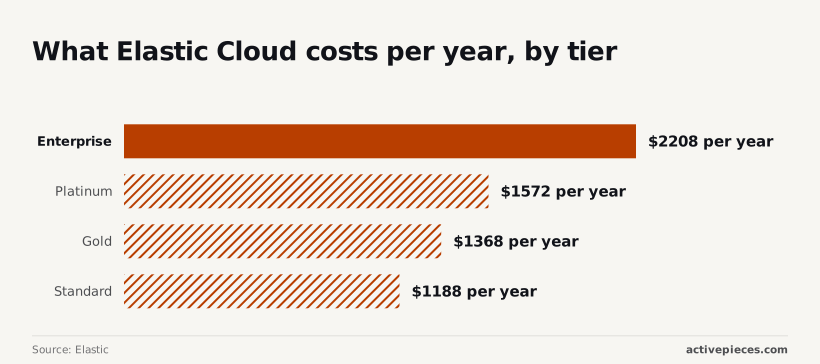
The licence is the small part of that bill. On Elastic's cloud pricing page, the Standard tier is listed at $1,188 per year, which is roughly $99 a month.
That's a figure a team can approve without a procurement cycle, and it's far below what a per-seat enterprise search contract typically reaches.
Step up to Gold at $1,368 a year and you pay only $180 more, so the move buys extra features at a modest premium. Platinum is $1,572, and Enterprise is $2,208, which is $1,020 (about 86%) above Standard.
Even at the top tier, the cost of a year's subscription is less than a month of a single engineer's time.
Build versus buy
That comparison is the real one. Glean arrives with prebuilt connectors and permission-aware indexing for the tools a company already uses. With Elastic you build and maintain those integrations.
Every source needs an ingestion pipeline, and every pipeline needs a way to carry document-level permissions through to query time, so a search never surfaces a file the user couldn't open. When a source changes its API, your team fixes it.
What you get in exchange is depth. Elastic's documentation covers relevance tuning in detail, along with its AI features for semantic and vector retrieval.
You decide how fields are weighted, which models embed your content, and how results are ranked. A vendor-run product has limits on that control, and here you set the settings yourself.

The trade is straightforward:
- The licence cost stays low at every tier, so the subscription is rarely the reason to rule Elastic out.
- The engineering cost is the variable, and it grows with the number of sources and the strictness of your permissions.
- Control is highest here, but only a team willing to own the pipeline gets to use it.
Onyx, the open-source Glean alternative
You get control over where your data lives, and in exchange you accept a younger product and thinner support than Glean offers. Onyx is the open-source enterprise search and AI assistant project formerly called Danswer, and it can run entirely on infrastructure you manage.
Five points usually decide an evaluation, and the list below shows where that trade lands on each. Read it as a checklist against your own stack, because the answer depends on which sources you need and who will operate the system.
- Setup is a self-hosted install rather than a vendor onboarding, so a team can evaluate on its own infrastructure before any contract. The cost is that upgrades, scaling and uptime become your engineers' work.
- Connectors cover common workplace sources such as Slack (team chat), Google Drive (documents) and Confluence (wiki pages). Coverage is a catalog, not a guarantee, so check every source you depend on against Onyx's connector list. A missing one means building or maintaining it yourself.
- Data stays in your environment, including the index and the queries run against it. Your security review can then rest on your own network rules, not on a vendor's attestations. If you also host the language model, no content leaves your boundary.
- Paid tiers exist above the free open-source edition, and some governance features sit behind them. Self-hosting removes a per-seat licence from the free edition, but hosting and engineering time become the cost. Compare against Onyx's pricing page, not against zero.
- Maturity and support are the gap. Glean is an established vendor with dedicated enterprise support. Onyx is a smaller company and a younger codebase, so expect more reliance on documentation and community, unless a paid tier includes support you can confirm in writing.
That last point is the one to test before you commit. If your team can absorb the operating work, the first four points favor Onyx.
Activepieces
Activepieces is not a search engine. It's a workflow automation platform with 741 integrations in an MIT-licensed core, and it replaces nothing in Glean's index; it sits around whichever search tool you pick and handles what happens after a result comes back.

Lock-in can reappear in the automation layer, and there it comes down to whether a flow can move.
Activepieces runs the same codebase on its managed cloud and self-hosted via Docker, Compose or Kubernetes, and git sync and release management let teams promote automations from a test environment to production and review them like software.
RBAC, SSO, SCIM and audit logs come with both, so hosting is a setting you can change later; MoneyGram, Moneypenny, Alan and FundingSocieties run it in production.
The flow below is a stale-document check, and it shows the division of labour: search finds the problem, automation does the follow-up.
- Your search tool flags a document as stale. Where the tool has no native connector, a webhook or HTTP request step receives the flag.
- A model summarises what's out of date, so the reviewer reads a short note instead of the whole document.
- The summary goes to the document's owner, and the flow waits for them to approve or reject it.
- The result is posted to Slack, or opened as a ticket in your tracker, so the decision leaves a record.
Before you point a high-volume trigger at it, check how your plan counts runs, because each step is a unit of work in the flow. A noisy staleness rule will cost you in proportion to how often it fires.
That flow is a small, concrete place to start: the free plan on Activepieces Cloud costs $0, allows unlimited flows and up to 5 users, and includes 1,000 credits a month.
How to choose a Glean alternative
Pick the constraint you can't live with, shortlist one tool against it, pilot that tool on your own data, and add automation only after search works.
Most projects never get past the early stages, which is why the order matters. MIT NANDA found that 80% of organizations explored enterprise AI, 20% reached a pilot, and 5% reached production.
Four in five explorers never run a real trial, so simply piloting on your own data puts you ahead of most. Only about one pilot in four reaches production, so the pilot has to test what breaks later: permissions, and cost at your actual volume.

- Pick the constraint you can't live with: price, lock-in or control. Whichever you choose, expect the other two to be where you compromise.
- Shortlist one tool that doesn't trade that constraint away. One tool gets a deep test. Three get a shallow look at each, and you learn nothing about permissions or cost.
- Pilot on your own data. Use real documents and the questions your team asks. Count the metered unit (seats, queries or connectors) at your real volume, not the demo's. Ask the vendor for the trial length in writing before you start, so the pilot isn't cut off mid-test.
- Check permissions with a restricted test user. Create an account that shouldn't see HR or finance files, then search for them by name. If anything appears, the tool isn't respecting source permissions, and that's a reason to stop, not a setting to fix later.
- Add automation separately. Once search returns correct, permission-safe answers, build workflows around it as their own layer. They route, notify and update records; they don't replace retrieval.
**If anything appears, the tool isn't respecting source permissions, and that's a reason to stop, not a setting to fix later.
Treat steps one to four as a gate. Automation is cheap to try and easy to swap because it sits beside search rather than inside it, so a failed search pilot never becomes a failed automation project.
Related reading
References
Still comparing
The fastest way to settle it is to build something.
Open source under MIT, so you can self-host the same thing later.
Start free Talk to sales