
Calendly Pricing: 2026 Plans and Hidden Costs Compared
Calendly pricing tiers dictate your monthly software expenses based on team size and feature requirements. Use this breakdown to select the plan.

Covers untangling inherited e-commerce spreadsheets for solo operators: what to fix first, what to leave alone, and what neglect costs.
ContributorSeptember 27, 202614 min read
This article was researched and fact-checked by an advanced research system.
Calendly’s 2026 pricing structure ranges from a restricted free tier to $15 per seat monthly for standard business plans, which often connect to Activepieces for workflow automation, with Enterprise tiers requiring custom quotes.
This tiered approach means that as your team grows or your workflow requires more than a single meeting type, you must move every user onto a paid seat regardless of their individual usage.

Free plan limitations for solo users
When a consultant only needs to automate one kind of meeting, such as a "15-minute intro," the Free plan offers one active event type to get started without manually swapping links.
While this allows for basic coordination, it lacks the automated reminders and follow-ups needed to reduce no-show rates for professional service providers.
If you are running this arithmetic for your own team, see what the same workload costs on Activepieces.
Standard and Enterprise: The cost of team features
Stepping up to paid tiers introduces the "feature tax," where access to shared team calendars and basic software connections requires a per-seat commitment for the entire organization.
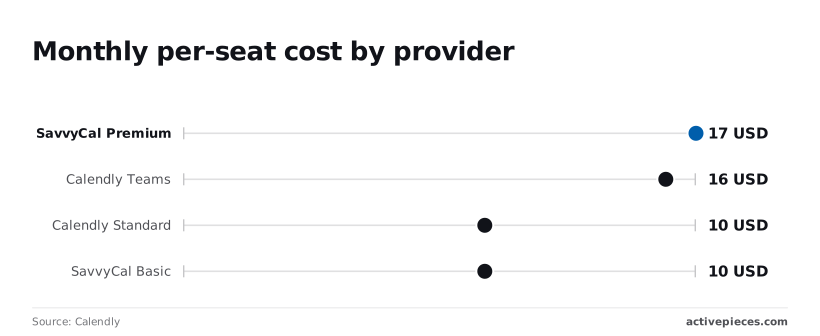
$10 USD per seat each month is the cost for Calendly Standard when billed annually. This is the entry price for removing branding from the booking page so the interface looks like your own business.
SavvyCal, a competing scheduling platform known for its interactive calendar overlay, matches this at $10 USD per month, which means users can access core scheduling features at a predictable, low-cost price point.
The market has standardized on a ten-dollar floor for basic professional features. $16 USD per seat monthly is is the price for Calendly Teams. This tier is required to access Salesforce so that sales data syncs automatically.
SavvyCal Premium costs $17 USD per month. Advanced scheduling features like collective booking for multiple hosts cost a 60-70% premium over entry-level paid plans.
Activepieces avoids taxing the builder for the complexity of their logic by metering only the run, not the individual steps inside it.
While other platforms charge more as a workflow becomes more granular, the Activepieces published pricing page shows 1 credit per flow run for any number of steps.
This ensures that a sophisticated ten-step automation costs exactly the same to execute as a basic two-step workaround, rewarding teams for building more reliable, detailed processes.
Comparison table of 2026 features and limits
The following table breaks down the 2026 plan tiers, so you can compare the specific features and pricing structures available for the upcoming year. Specific capabilities like unlimited event types or administrative controls require higher monthly commitments.
| Plan | Annual Price (per seat/mo) | Monthly Price (per seat/mo) | Key Feature Gate |
|---|---|---|---|
| Free | $0 | $0 | 1 Event Type |
| Standard | $10 | $12 | Unlimited Events |
| Teams | $16 | $20 | CRM Integrations |
| Enterprise | Custom | Custom | SAML Single Sign-On |
These price jumps increase overhead for agencies that only need advanced integrations for a few power users but must pay the top rate for everyone.
Identify hidden costs and usage limits
Scaling a team on Calendly introduces a series of "soft costs" that appear only after you have committed to their ecosystem. These expenses stem from a pricing structure that links essential administrative functions and basic communication tools to per-user licensing.
Your monthly bill grows even if your revenue-generating head count does not.
Why SMS and workflows require Professional plan
When a business wants to ensure prospects show up to meetings, it must pay a premium for its entire staff because the ability to send a text message requires the higher-cost Professional tier.
Your monthly bill grows even if your revenue-generating head count does not.
While email reminders are standard, accessing automated SMS reminders requires this move for every single person on the team, regardless of who actually needs text notifications.
The "Workflows" feature handles basic tasks like sending a thank-you note after a call and has monthly credit limits that scale per seat.
How Calendly workflow credits are used
A credit represents a single automated action triggered by a workflow event. For example, sending one SMS reminder consumes 1 credit, and sending a follow-up email consumes another.
A standard workflow for a high-value sales call typically consumes 3 to 4 credits per booking. This includes an initial confirmation, a 24-hour reminder, and a post-meeting survey.
If your team is highly active, you may find yourself adding unnecessary seats just to increase your total credit pool so that your automated sequences do not shut down mid-month.
Costs for admin and non-booking users
Nobody hosts a meeting in the operations department, yet Calendly charges a full subscription fee for administrative users who manage the backend.
In a typical office setup, an operations manager or an executive assistant needs access to the dashboard to adjust team availability. They might also fix integration errors with Salesforce or pull reporting data.
Because Calendly does not offer a free "admin-only" role, you pay the same rate for these managers as you do for your top-performing sales reps.
This seat tax means your overhead for software management increases linearly with the complexity of your organization. It effectively punishes you for having a dedicated support staff to keep the system running.

The 10-calendar limit on the Standard tier
The entry-level paid plan restricts each user to connecting only a small handful of external calendars, which prevents power users from managing complex schedules.
For a consultant who balances a personal Google Calendar, a primary work Outlook account, and several client-specific calendars to avoid double-booking, this limit is a functional ceiling.
If you exceed this count, the system will not check your availability across all your commitments. This leads to scheduling conflicts that look unprofessional to your clients.
On the entry-level paid plan, the only way to resolve this is to upgrade the entire organization to a higher tier. You pay more for everyone just because one executive has a complicated schedule.
This rigid structure ensures that as your business grows more sophisticated, your software costs will likely outpace your actual usage.
Calendly vs Top Competitors on Price and Performance
Calendly’s pricing structure remains the industry standard, but its competitors now offer similar monthly rates while including the very features Calendly locks behind its highest paywalls. You are no longer paying a premium for exclusive tools, but rather for the brand name itself.
Monthly per-seat cost by provider
The cost of scheduling software scales differently depending on whether you prioritize individual flexibility or administrative control.
You are no longer paying a premium for exclusive tools, but rather for the brand name itself.
Calendly charges a flat rate per user that increases as you unlock team-wide branding and advanced integrations. SavvyCal matches the mid-tier pricing of the market leader but includes multi-organizer links at no extra cost.
Acuity Scheduling uses a tiered model based on the total number of calendars rather than individual logins.
This favors businesses with many employees but few distinct booking pages. Google Calendar bundles basic booking pages into existing productivity suites, which removes the need for a separate software line item for small teams.
SavvyCal: Better UI for the same price point
By allowing the person booking the meeting to overlay their own calendar directly onto your availability, SavvyCal prevents the tab-switching fatigue that leads to abandoned bookings.
This matters because it has a more intuitive interface for both the sender and the recipient and costs the same as Calendly’s professional tier.
Calendly requires an upgrade for basic logic. SavvyCal includes features like ranked availability as a standard part of their core offering, which allows you to tell the system to prefer your morning slots over your afternoons.
Acuity Scheduling pricing for service businesses
Acuity Scheduling focuses on the administrative needs of businesses that exchange money for time, such as salons or clinics.
It includes built-in intake forms and payment processing in its entry-level tiers. A business owner can collect client information and deposits in a single step rather than hacking together three different apps.
This section of the market values the "all-in-one" workflow over the sleek, minimal design favored by tech consultants.
AI assistants often manage these workflows to handle data entry. For example, a developer might use GPT-6 Astra to write the custom logic that syncs Acuity appointments with a private patient database. This keeps sensitive records updated the moment a user fills a slot.
Google Calendar: The 'free' alternative for Workspace users
Google Calendar now includes "Appointment Slots" for any business using their office suite.
This provides a zero-cost alternative for teams that only need the basics. Because this is built into the email system you already use, there is no extra security review or billing setup required to start taking bookings.
This setup is ideal for high-volume, low-complexity tasks. You could use Gemini 3.8 Flash to scan your incoming emails.
The AI can automatically suggest the best Google Calendar booking link to a lead, which speeds up your response time without adding a single dollar to your software budget. Using the tools you already own avoids the "feature tax" entirely.
Worth checking against a plan that does not meter every step: one credit covers a whole run on Activepieces.
Automating Scheduling Workflows with Activepieces
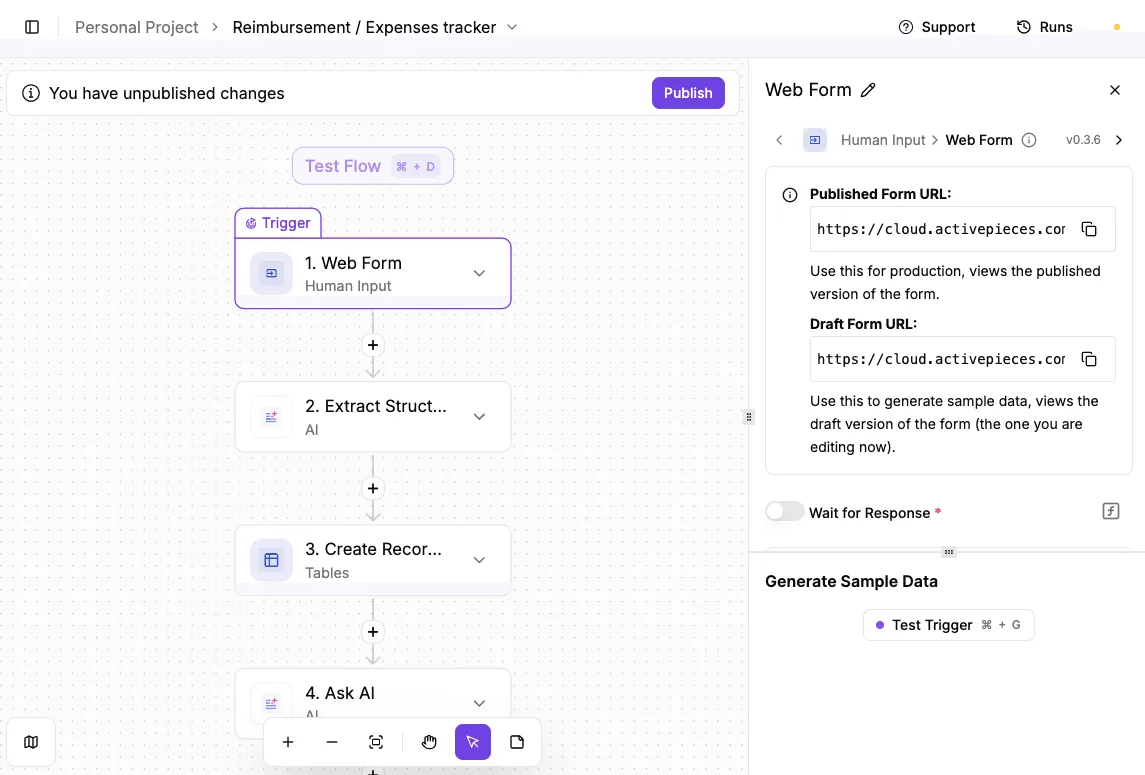
Activepieces is an open source, MIT-licensed AI automation platform that moves data between apps. It allows you to sidestep the high-cost tiers usually required to connect your schedule to the rest of your business tools.

It is a neutral middleman that picks up information the moment a meeting is booked. It carries it to your preferred database or software without requiring the expensive "Enterprise" permissions that Calendly locks behind a paywall.
Syncing Calendly events to your CRM without the Enterprise tier
By using Activepieces to watch for new invitee signatures, you can automatically send new lead information to a customer relationship manager (CRM), such as Salesforce or HubSpot, using any of its 735+ integrations.
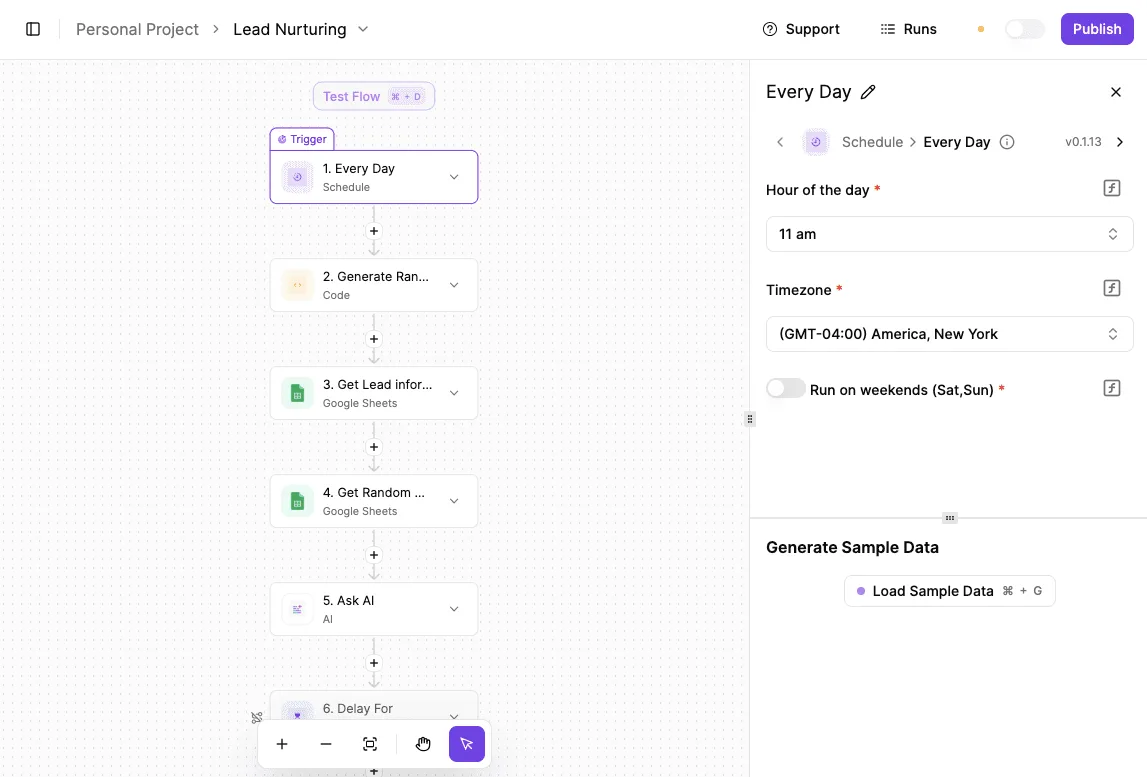
Because this bypasses the native, restricted integrations found in high-tier scheduling plans, you avoid paying for a premium seat just to keep your sales records updated.
This setup ensures your contact list stays current in real-time. Your sales team never attempts to cold-call someone who has already booked a demonstration.
Triggering post-meeting follow-ups across 100+ apps
Activepieces allows you to build a multi-step sequence that starts the second a call ends, a capability that MoneyGram and Moneypenny run in production to manage their own complex automation environments.
It connects your calendar to communication tools like Slack for internal alerts or Mailchimp for client emails. Instead of manually copying email addresses to send out "thank you" notes or resource links, the automation handles the delivery instantly.
This removes the risk of human error or delays. The client receives their follow-up materials while the conversation is still fresh in their mind.
Custom reports from Calendly booking data
By directing your raw booking data into a spreadsheet or a dedicated data tool, you can create visual reports on team performance.
You do not have to rely on the rigid, pre-built charts provided by the scheduling platform. You might send this data to Google Sheets for basic volume tracking and time-of-day analysis.
You might also send data to Airtable for managing complex project workflows tied to specific appointments or PostgreSQL for long-term storage and advanced business intelligence queries.
Moving data into these external environments gives you total ownership over your metrics. You can analyze conversion rates or consultant busy-work without being limited by what a specific software tier allows you to see.
Select the right team plan
Selecting a plan depends on whether you need simple link-sharing or complex logic to distribute leads across a department. The cost of picking the wrong tier is either paying for features your team never touches or hitting a functional wall that stops your sales process.
The 'solo founder' selection criteria
A single operator should prioritize the lowest tier that connects to their primary work tools to avoid manual data entry. If you only need to send a link to one person for one type of meeting, the basic free version works.
However, it lacks the ability to take payments or sync with a CRM, which is a database used to track customer relationships.
You should move to a paid tier only when you need to automate follow-up emails or connect to a professional calendar like Outlook to prevent double-booking.
The 'growing Sales team' selection criteria
Teams with more than two people usually require advanced logic to ensure every incoming meeting is handled fairly and efficiently.
You will need a higher-tier plan if your workflow requires round-robin scheduling, which automatically cycles through a list of available staff to ensure no single person receives too many calls.
Calendly features for sales teams
You will also need a higher tier for collective scheduling, which looks for a time slot when multiple specific team members, such as a salesperson and a technical engineer, are all free at once.
Salesforce integration is another high-tier requirement. This platform manages large-scale sales data and ensures meeting notes are logged without a human having to type them in.
When to walk away from Calendly entirely
When the cost of adding a single seat just to access one specific integration outweighs the time saved by the software, you should look for an alternative.
Because this platform bundles features into rigid tiers, a large team might find themselves paying a premium for every single employee just because the manager needs one specific reporting tool.
If your budget is tight and you have a high head-count, paying this "feature tax" for dozens of users who only need basic scheduling is a sign that the platform no longer fits your financial reality.
Frequently asked questions about Calendly billing
Calendly offers a standard discount for registered non-profit organizations, which reduces the per-user cost for charitable teams. This price break ensures that community-driven groups can access automated scheduling without the full financial burden of a commercial enterprise account.
Non-profit eligibility and annual billing cycles
Registered 501(c)(3) organizations and their international equivalents are eligible for a percentage-based discount on annual plans.
This lowers the overhead for administrative staff, so more of the organization’s budget can be directed toward mission-critical services. To secure this rate, you must submit proof of your tax-exempt status to their billing department before completing your purchase.
You can choose a monthly billing cycle if you prefer to avoid a large upfront cost.
This flexibility comes with a higher total price over the year. Paying month-to-month is helpful for seasonal businesses or short-term projects where you do not want to be locked into a twelve-month commitment.
For those not paying month-to-month, switching to an annual plan is the only way to lower the effective monthly rate.
Data retention and meeting volume limits
When you cancel a paid plan, your account reverts to the free version rather than being immediately deleted.
This means your historical meeting data and basic profile remain intact, so you do not lose your record of past appointments. However, any advanced features like automated workflows or multiple event types will be disabled.
This prevents you from using the complex scheduling setups you previously built until you re-subscribe.
Calendly does not set a hard cap on the total number of meetings a user can host in a month. This allows you to scale your outreach or client consultations without worrying about hitting a ceiling that stops people from booking time with you.
The restrictions are instead placed on the variety of meeting templates you can have active at once. Your growth is limited by how you organize your time rather than how many people you see.
Related reading
References
Running the numbers
See what the same workload costs here.
Free forever plan, and every paid plan self-hosts at no extra cost.
See pricing Talk to sales