Clerk Pricing 2026: Free, Pro and Business Plans

Nov 3, 202613 min read
Start on Clerk's free tier and move up only when a user count or a feature forces you to.
Clerk's a hosted service that handles sign-up, sign-in and user accounts, so you don't build those yourself, and you can wire new sign-ups into follow-up steps with a tool like Activepieces later if you need to.

Clerk pricing is the tiered, usage-based fee structure for Clerk's hosted authentication service, where a free plan covers small user counts and paid plans charge by monthly active users plus optional add-ons for extra features.
Read the last column first, because that's where the surprises come from.
Which Clerk plan fits you
| Situation | Recommended plan | Monthly cost | Catch that pushes up a tier |
|---|---|---|---|
| Solo prototype | Free | Nothing | Passing the included active-user allowance |
| 5-person launch | Free, then Pro | Nothing until you outgrow the allowance, then a paid base | Wanting paid-only features, or real traffic |
| Growing B2C app | Pro | Base fee plus a charge per active user past the allowance | Every extra monthly active user adds cost |
| B2B SaaS needing SSO | Pro with add-ons | Base fee plus add-on charges | Single sign-on for business customers is billed separately |
| Enterprise | Enterprise | Quoted by sales | Custom contracts, compliance and support needs |
For a solo builder or prototype, the free tier covers you.
For a team of 5 shipping a product, stay free while you're testing, then plan the move to Pro before launch day.
For a team of 25 needing SSO or admin controls, budget for Pro plus add-ons from the start. Single sign-on's the item most often missed. Add it to your estimate now, because it's a line on the invoice you won't see in a user-count forecast.

With heavy usage past the free user allowance, the bill follows monthly active users, meaning people who actually show up in a given month. Project that number for your busiest month, not your average one.
Then set alerts at the thresholds you calculate, so you hear about the overage before Clerk invoices it.
If you are running this arithmetic for your own team, see what the same workload costs on Activepieces.
Clerk's plans, prices and limits
$25 a month gets you Pro and $300 a month gets you Business, billed monthly, with Free at $0 and Enterprise priced by quote.
| Plan | Monthly price | Annual billing price (per month) | Who it suits |
|---|---|---|---|
| Free | $0 | $0 | Prototypes and early products |
| Pro | $25 | $20 | Small production apps |
| Business | $300 | $250 | Teams needing more controls |
| Enterprise | Custom quote | Custom quote | Large or regulated organisations |
Prices checked 3 November 2026 on the Clerk pricing page.

Commit for a year and you save $5 a month, or $60 a year, because Pro costs $25 a month billed monthly or $20 on annual billing.
According to Clerk, Business's $300 monthly or $250 annually, a $50 monthly gap that adds up to $600 a year.
As of the check date, both Free and Pro include 50,000 monthly retained users, which means the plans start with equal capacity.
Past 50,000, Pro charges $0.02 for each additional monthly retained user, and that rate holds through the 50K to 100K band, so costs in this range scale predictably with headcount.
**Free doesn't bill overage at all: to go past 50K MRUs you move to Pro.
What counts as a monthly active user
Not everyone who has ever signed up counts. A monthly active user's a person who actually uses your app during the billing month.
As I understand Clerk's definition, someone who signs up and never comes back doesn't count, while someone who returns later in the month does.
Count real customers, not your testers, because billing follows your live production instance. Development instances, the test copies of your app, aren't billed the way production is.
When apps outgrow Clerk's free tier
Launch day on the free tier
Picture a small app that launches on the Free plan with a few thousand signups. Nothing's billed, so nobody looks at usage.
Clerk doesn't bill on signups. It bills on retained users, meaning people who come back.
According to UXCam's retention benchmarks, only 25% of signups are still around on day 1, 8% on day 7 and 4% on day 30, which means most signups represent one-time usage rather than sustained engagement.

What happens when Clerk monthly active users spike
Then a mention in a newsletter lands, and signups jump. Even at 4% month-one retention, the returning users stack on top of the people already using the app, which means you need sustained new user acquisition to keep your monthly active users from declining.
Nobody gets a warning screen. The count simply passes the free allowance, and every retained user beyond it becomes a billable line.
Clerk overage pricing bands per retained user
Per retained user per month, overage's priced in bands.
According to OpenAPIPricing, the rate's $0.02 from 50K to 100K, $0.018 from 100K to 1M, $0.015 from 1M to 10M, and $0.012 above 10M, which means your cost per request declines 40% between entry-level and highest-tier usage.
At 5,000, 12,000, 50,000 and 100,000 users, the table below models the monthly bill on Pro billed monthly, before any add-ons. At 5,000 users the Free plan would cost nothing, but Pro is shown so the four rows compare like for like.
| Monthly active users | Included | Overage users | Overage at $0.02 | Monthly bill |
|---|---|---|---|---|
| 5,000 | 10,000 | 0 | $0 | $25 |
Set alerts on the thresholds you expect to cross, so the next surprise arrives as a notification and not as an invoice.
The watcher shouldn't add a bill of its own, though, and on Activepieces it doesn't: a flow that checks your Clerk user count and posts to Slack or email costs 1 credit per run whether it has two steps or ten, so splitting the check, the comparison and the alert into separate steps costs nothing extra.
A daily run uses about 30 of the free plan's 1,000 credits a month, and Zapier's per-task and Make's per-module billing, both on their pricing pages, charge for each step inside it.
Hidden costs and limits Clerk users hit
Five charges sit outside your user count, and each one's easy to assume was already included, which is why the invoice outruns the headline price.
The list below pairs each with the plan it needs and how its monthly add behaves.

- Paid add-ons you assumed were included need a paid plan, and each is billed per unit, so the add rises with how much you use it.
- SSO and other enterprise connections need a paid plan that offers them, and each customer who wants single sign-on can add a separate line.
- Organization and member limits start on the free tier, and the add depends on how far past the cap you grow.
- Session and retention limits are tied to plan level, so the add is the step up to the next plan, not a small fee.
- Mid-cycle upgrades land on any plan, so an upgrade made in a panic costs more than one planned.
A business customer will ask for these early, so the cost arrives ahead of the revenue. Price them into your first contract.
In production, session length and data retention decide how long people stay signed in and how far back you can look. Hitting one means a forced plan change, and a mid-cycle upgrade's the most expensive moment to find that out.
Worth checking against a plan that does not meter every step: one credit covers a whole run on Activepieces.
Clerk versus Auth0, Supabase and Firebase
While you're small, Clerk's competitive. Past a few thousand active users, Supabase Auth, Firebase Auth or a self-hosted server usually cost less, and you pay Clerk's premium for setup speed.
Cost at 12,000 and 50,000 users
The table shows the shape of each bill rather than a quote, since vendors change prices.
| Free allowance | Price past it | Cost at 12,000 and 50,000 MAU | SSO pricing | Migration effort | |
|---|---|---|---|---|---|
| Clerk | Free tier for monthly active users | Per user, monthly | Grows steadily with users; add-ons stack on top | Add-on, charged per connection | Moderate; its prebuilt screens must be replaced |
| Auth0 | Free tier | Per user, by plan | Grows with users, and with plan tier when you need more features | Usually reserved for higher plans | Moderate to high |
| Supabase Auth | Free tier inside the database plan | Bundled with the plan, then per user | Often the lowest of the hosted options | Available on paid plans | Low if you already use its database |
| Firebase Auth | Free tier for basic login | Per user past the free tier | Low for basic login, higher with enterprise features | Needs its upgraded identity tier | Moderate |
| WorkOS | Free user management | Charged per SSO connection | Cost follows customers, not users | Its main product | Moderate |
| Self-hosted open source | No license fee | Servers and staff time | Flat hosting cost, plus someone's hours | Included in the software | High |
Enterprise SSO pricing compared
When a customer's employees need to log in with their company account, that's SSO, short for single sign-on. Most vendors charge for it by the connection, meaning per customer company.
WorkOS built its pricing around this, so it suits a product with few users but many corporate buyers. Clerk and Auth0 treat it as an extra, so one large customer can change your bill more than a thousand ordinary sign-ups.
If your data already lives in Supabase's database, Supabase Auth's cheaper. Firebase's cheaper if you only need basic login.
Self-hosting, using a free login server such as Keycloak, is cheaper only if someone on your team can keep it patched. Leaving Clerk later means re-creating user records and screens, so price the exit before you sign up.
Billing guardrails to set on Monday, including an Activepieces alert
Since leaving Clerk's costly, the cheapest protection is catching growth early: alert at 80 percent of your user allowance, review add-ons monthly, and give the bill one named owner, which means overages never sneak up on you.
Three Clerk billing alert rules to adopt
First, the alert fires at 80 percent of the monthly active user allowance, not at 100, leaving only a 20-percent buffer before you hit your ceiling, which means you lack breathing room for normal traffic fluctuations. With a 10,000-user allowance, that's an alert at 8,000.
Second, someone reads the add-on list once a month. Add-ons are the charges nobody remembers agreeing to.
Third, one person owns the spend, and the team writes down the date they plan to move up a plan. Without an owner, everyone assumes someone else is watching.
Add-ons are the charges nobody remembers agreeing to.
Setting up alerts for user counts
In Activepieces, an automation tool, you build a flow of steps that run without anyone clicking. The example here, a flow named Calendly Tracking, starts with a trigger (a canceled Calendly booking) and then splits into a Slack message and a Gmail email.
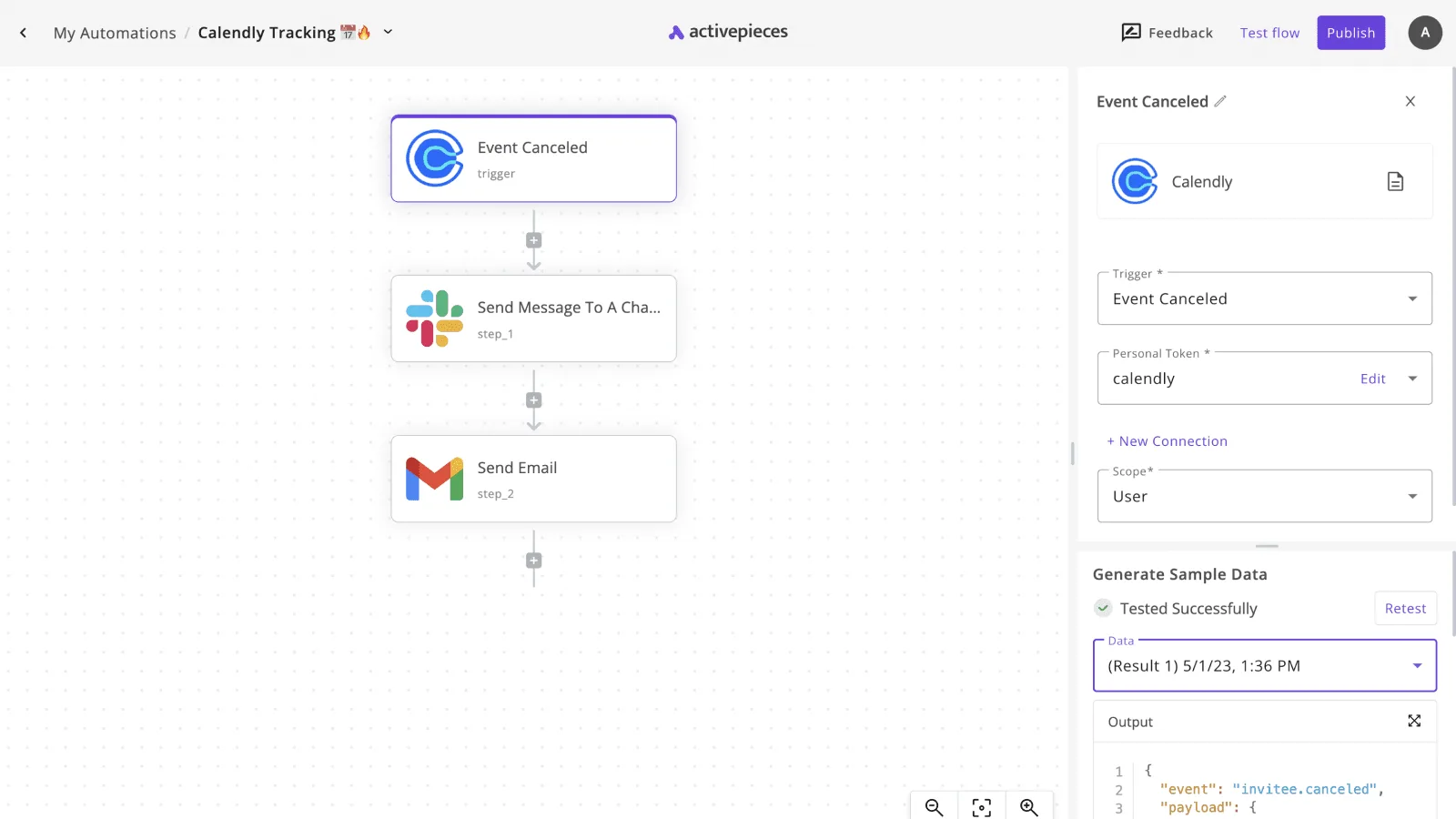
Swap the trigger for a schedule, daily or weekly. Add a step that calls Clerk's API with your secret key to get the current user count.
Add a condition comparing that count to 80 percent of your plan's allowance, so you get automatic alerts before hitting limits. If it's over, send the Slack message, the email, or both.
Two honest limits. This counts users, and your bill follows monthly active users, so treat the number as an early warning, not a forecast of the invoice. And it says nothing about add-ons, which is why the monthly review stays on a human's calendar.
For Monday, the checklist is:
- For plans with a monthly active user allowance, write down your plan's monthly active user allowance and the 80 percent mark, making them a team-wide reference point so everyone knows where the boundary is, so the team can escalate before capacity is exhausted.
- Name the person who owns the Clerk bill.
- Open the billing page and list every add-on currently switched on.
- Build the scheduled Activepieces flow and send yourself a test alert.
- Put the planned upgrade date and the next add-on review on the team calendar.
Frequently asked questions
These are the questions the monthly review tends to raise. The answers come from Clerk's pricing page and docs as written in November 2026. Plans change, so confirm each answer on the page it points to before you act.
Is Clerk free for production apps?
Yes, Clerk's free plan can run a live app, not just a test project, up to the monthly active user allowance listed on its pricing page. The catch's that some features sit only on paid plans.
If your launch plan needs one of them, the free tier isn't really free for you. Read the feature comparison on the pricing page against your own list before you launch.
Does Clerk charge per user or per monthly active user?
Not everyone who has ever signed up gets billed. Clerk bills on monthly active users. A dormant account that never comes back shouldn't run up your bill.
The exact rule for when someone counts as active is in Clerk's docs on billing and usage, and you should read it, because that definition's the number your invoice is built on.
Can you cancel or downgrade Clerk mid-month? You can change your plan from the billing section of the Clerk dashboard, and no phone call is required.
What I can't tell you is how your current billing period is treated when you do. Check Clerk's billing documentation first, then make the change early in a cycle so a mistake costs you less.
Does Clerk offer discounts for startups or nonprofits? Don't assume so, and don't budget around one. The pricing page's the only place to confirm whether a startup or nonprofit offer exists today.
If none is listed, a short message to Clerk's sales or support team costs you nothing and gives you an answer in writing. Plan your numbers at list price until you have that answer.
What happens if I exceed the free tier limit?
You'll need a paid plan, and waiting to find out is the expensive way to learn the details. Clerk's pricing page explains how usage above an included allowance is handled.
Put an alert on your user count well below the limit, so the upgrade's a decision you make on your schedule and not a surprise on an invoice.
Related reading
References
Running the numbers
See what the same workload costs here.
Free forever plan, and every paid plan self-hosts at no extra cost.
See pricing Talk to sales