
Cloudflare Workers MCP: How to Build a Remote Server

Nov 14, 202614 min read
Moving Model Context Protocol servers from your local machine to a globally distributed edge network is the core function of Cloudflare Workers MCP.
Cloudflare Workers MCP refers to the deployment of Model Context Protocol servers on a serverless edge platform to provide AI agents with secure, low-latency access to tools and data sources without the limitations of local hosting.
This transition eliminates the requirement for a constant physical connection between an AI agent and your private laptop. By making this shift, you allow your tools to remain accessible even when your primary workstation is offline.
What Cloudflare Workers MCP is
The shift from local to edge MCP servers
When the original implementation of the Model Context Protocol relied on local stdio transports, tool execution was restricted to the specific machine where the agent was running.
This created a significant operational bottleneck: if you closed your laptop, the agent lost access to every connected database and API. You can now host your tool definitions in a persistent environment by migrating these servers to Cloudflare Workers.

Remote transport allows models like Claude Opus 5.5 or Gemini 4 Carbon to invoke enterprise-grade tools securely.
Rapid adoption of this standardized communication is evident in the npm downloads for the MCP SDK, which climbed from 102,000 in December 2024 to 350,000 by February 2025.
80% of the protocol's utility has moved beyond experimental hobbyist use into a core component of the production AI stack, signaling that the technology has reached a critical threshold of enterprise reliability, which means businesses can now confidently integrate these tools into their live infrastructure.
Core components of the Cloudflare MCP stack
The stack acts as a secure bridge between reasoning models and the proprietary data silos you need to access.
Within this architecture, Cloudflare Workers serves as the serverless execution environment, isolating tool logic from the underlying host infrastructure. Standardized JSON-RPC communication is handled by the MCP SDK, which allows different models to query the same tools without custom integration code.
Latency overhead is reduced by Hyperdrive, which acts as a connection pooler when an agent needs to query a legacy Postgres database.
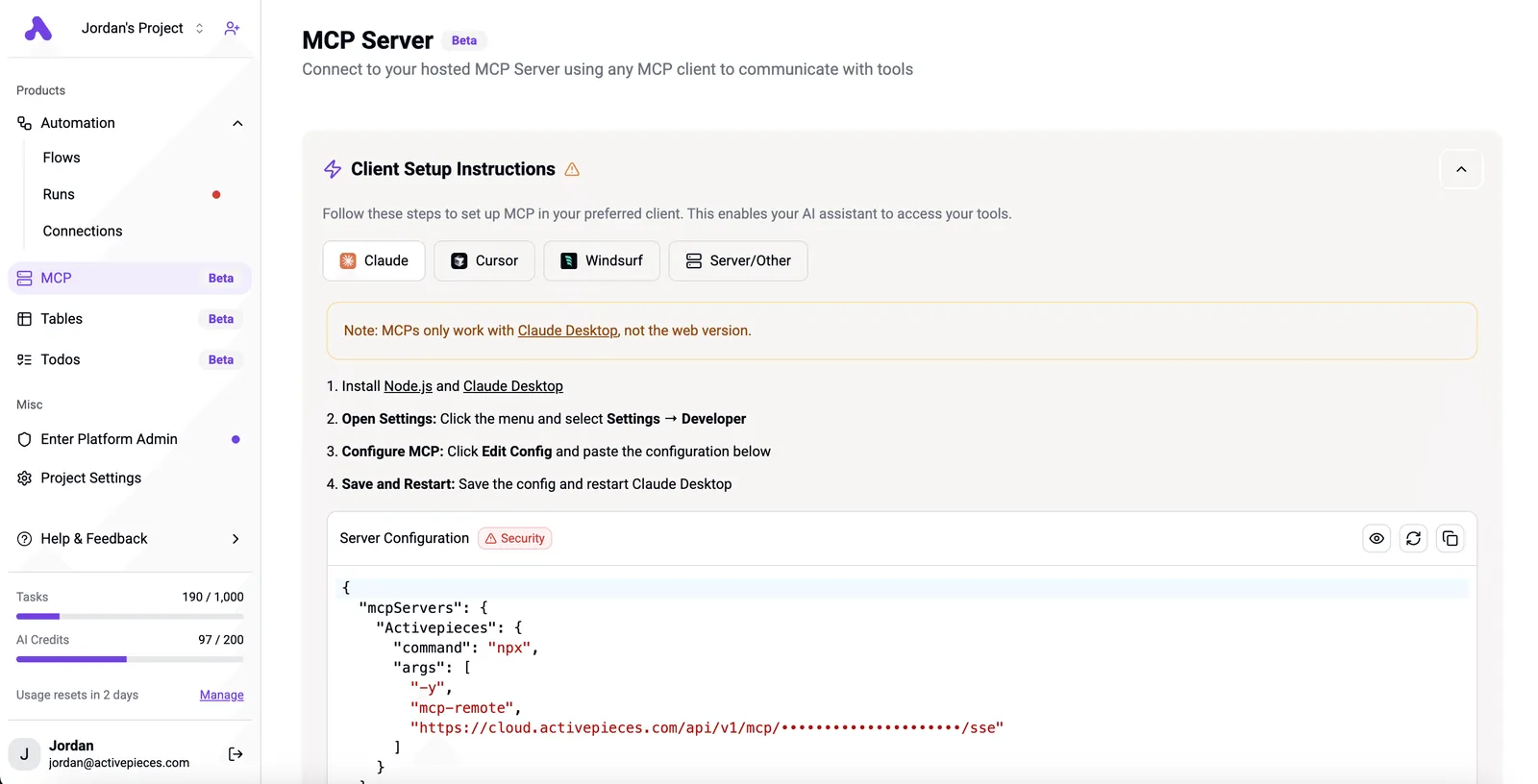
Activepieces runs as a per-project MCP server, allowing Claude, Cursor, or Windsurf to build and modify automation flows directly through the protocol.
Your coding assistant becomes your automation builder because it has real CRUD control over the logic, rather than just answering questions about a UI it cannot reach.
You can verify this by connecting a desktop client to the server endpoint and observing the tool calls as the agent updates a flow in the run trace.
Your coding assistant becomes your automation builder because it has real CRUD control over the logic, rather than just answering questions about a UI it cannot reach.
Why the edge matters for AI agents
Latency and security risks inherent in tunneling local traffic to the cloud are solved by running MCP on the edge.
When a reasoning model such as GPT-6 Astra triggers a tool, the request goes to the nearest data center rather than traversing the public internet to your home office. This proximity reduces the round-trip time for complex multi-step workflows.
Each tool execution is isolated because Cloudflare Workers has a per-request sandbox.
This architecture transforms your AI agent from a fragile local script into a resilient enterprise service.
This takes minutes, not a project: automate it in Activepieces free.
How Cloudflare Workers host MCP servers
A persistent, globally accessible endpoint is provided by Cloudflare Workers, allowing Model Context Protocol (MCP) servers to communicate with remote AI clients using standardized web protocols.
The SSE transport protocol explained
Server-Sent Events (SSE) are the primary transport layer for remote MCP implementations. They allow a Cloudflare Worker to maintain a unidirectional stream of data to the LLM client over standard HTTPS.

The Worker uses SSE to push tool execution results and context updates to the client without the overhead of maintaining a two-way WebSocket connection.
Structured data is received as a continuous stream by the LLM client under this architecture. The client doesn't wait for a single, bulky HTTP response that might time out during complex database queries.
Connecting Claude and ChatGPT to the edge
Frontier models can now call tools hosted on Cloudflare’s infrastructure because leading AI interfaces support remote MCP endpoints.
Claude Desktop connects via a configuration file that points to a local bridge or proxy script, which relays requests to the Worker’s URL. This allows the model to pull in real-time data from external repositories.
Because Claude Desktop currently only supports local stdio communication, you must use a local bridge or proxy script to translate the desktop client's stdio commands into the Worker's SSE format.
This bridge acts as a lightweight intermediary that allows the local application to communicate with the remote edge environment.
Setting up a local MCP bridge with Node.js
The bridge is typically a Node.js script that runs on your machine to relay messages between the local Claude app and the remote Worker. You can use community tools like mcp-proxy or the official sse-client examples found in the MCP TypeScript SDK repository.
To start the bridge, you run a command such as npx @modelcontextprotocol/inspector sse <YOUR_WORKER_URL> in your terminal. This command creates a local stdio interface that you then link in your Claude Desktop configuration file, effectively routing your local agent's requests to the global edge.
Configuring Claude Desktop for your MCP server
Running the bridge command generates a local transport address that the AI agent needs to recognize. You must manually add this command to your Claude Desktop configuration file, typically located at ~/Library/Application Support/Claude/claude_desktop_config.json on macOS or the equivalent AppData path on Windows.

Inside the mcpServers object of this file, you define a new entry where the command is npx and the arguments include the full inspector or proxy string.
This step is what finally tells the local AI agent to route its tool requests through the bridge to your Cloudflare Worker.
GPT-6 Astra uses remote tool definitions to trigger the Worker. Gemini 4 Carbon interfaces with the Worker to execute complex reasoning tasks against proprietary datasets that the model's training set doesn't include.
Securing API keys with Cloudflare Workers secrets
Sensitive credentials are managed through encrypted environment variables within Cloudflare Workers.
The architecture prevents API keys for services like GitHub or Stripe from being exposed to the LLM client. The AI model only sees the final output of the tool, so the underlying authentication tokens remain strictly within the Cloudflare sandbox.
The Worker only executes pre-defined, scoped logic. You can rotate these secrets within the Cloudflare Dashboard to instantly revoke access across all distributed edge nodes without redeploying the MCP server code.
Costs and resource limits for MCP hosting
Operational overhead for Model Context Protocol (MCP) servers scales directly with the frequency of tool calls generated by agentic workflows.
Workers Paid vs. Free tier for AI tools
The operational ceiling for an MCP server is determined by the selection between Cloudflare’s Free and Paid tiers.
A high-velocity agent using a model like Claude Sonnet 5.5 can exhaust the entire daily quota in minutes because of the strict daily request cap. Moving to the Paid tier removes the daily request limit.
| Feature | Workers Free | Workers Paid |
|---|---|---|
| Daily Requests | 100k | No Limit |
| CPU Time | 10ms | 5min |
| Monthly Price | $0 | $5+ |
The Free tier is a zero-cost sandbox. The Paid tier is the baseline requirement for any enterprise-grade MCP implementation that requires predictable uptime.
CPU time limits for Cloudflare Workers MCP tools
Compute duration limits are the primary technical bottleneck for MCP tools that perform heavy data processing or interact with slow external APIs.
A tool that scrapes a complex website or runs a large database query will exceed the 10ms CPU limit of the Free tier. Long-running agentic work is supported by the 5-minute limit on the Paid tier.
Cloudflare doesn't charge for egress bandwidth on these tiers. A tool can return large JSON payloads from a GitHub repository or a Salesforce instance without inflating your monthly bill based on data volume.
Scaling MCP servers on the Business tier
Higher priority on the global network and increased burst tolerance are provided by the Business tier to prevent latency spikes when hundreds of agents attempt to access the same tool simultaneously.
You can follow the rest of this with the builder open. Start free, no card.
Common mistakes in edge MCP deployments
Edge-hosted Model Context Protocol (MCP) servers fail when you treat the global edge as a simple extension of your local development environment.
The risk of unauthenticated MCP endpoints
Any external actor can execute internal tools if an MCP server is exposed to the public internet without an identity layer.
- 83% of servers carry disqualifier flags, meaning they fail basic automated security headers and are vulnerable to common cross-site scripting attacks. 53% rely on static keys, leaving those systems vulnerable to credential theft if a single key is compromised, which means over half of the infrastructure is exposed to a single point of failure. This increases the risk of a single leaked credential compromising the entire toolset indefinitely.
- Only 8.5% use OAuth 2.0, which is the only industry-standard method to verify that the AI agent is acting on behalf of a specific user, leaving the vast majority of implementations vulnerable to unauthorized access.
Fixing timeouts from the 10ms CPU limit
Standard serverless workers operate under a 10 ms CPU time limit on the Free plan. This causes complex reasoning tools to time out and return empty responses to the model.
If a tool exceeds this limit, the model interprets the failure as a missing capability. This leads to "hallucinated" workarounds where the agent guesses the data it couldn't retrieve.
Using Durable Objects for stateful MCP tools
Standard workers are stateless by design. An AI agent can't "remember" the context of a multi-step operation across different tool calls without an external storage layer.
To maintain a consistent state, you must implement Durable Objects, which provide a single point of coordination and persistent storage. This ensures that when an agent performs a sequence of dependent actions the environment remains stable and predictable between each discrete request.

Automating Cloudflare MCP tools with Activepieces
Activepieces transforms Cloudflare Workers from passive endpoints into reactive components by exposing its MIT-licensed core as a tool provider for edge-hosted agents.
Triggering MCP functions from 100+ SaaS apps
Every external connection in a workflow represents a potential security boundary that you must manage.
Every connector registered in Activepieces is instantly available as an agent tool. Once an integration is connected, it functions both as a step in a visual flow and as a schema on the per-project MCP server, with no secondary integration or export step required.
You can verify this dual-purpose architecture in the open source repository, where the same integration actions found in the 748 integrations are exposed directly through the MCP server, so developers can audit the exact logic powering every connection.
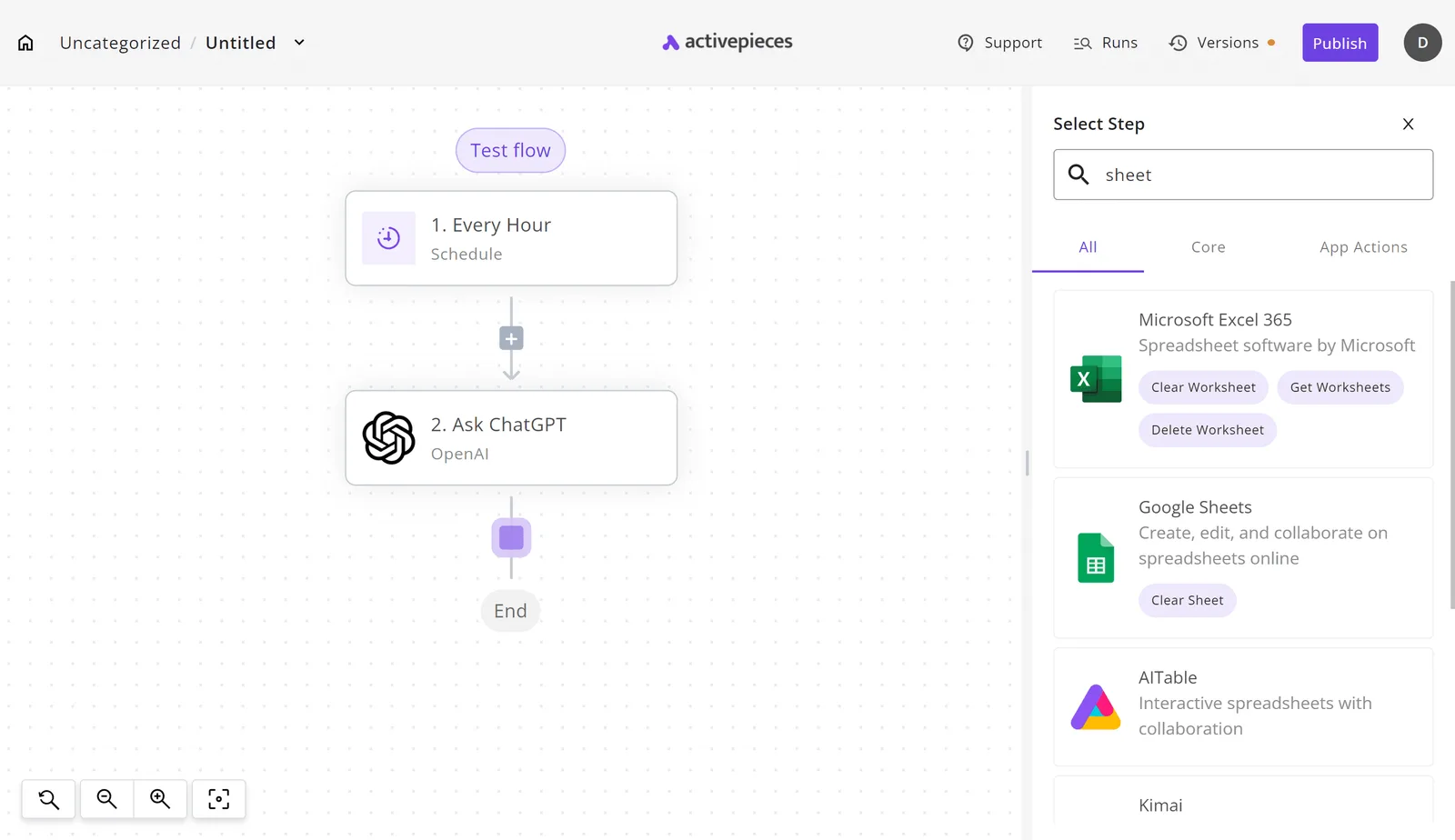
A visual interface for mapping these triggers to actions is provided by the Activepieces flow builder. You can filter through spreadsheet tools like Google Sheets or Microsoft Excel 365 as seen in the integration selector.

Chaining edge tools into multi-step workflows
Multiple discrete tools must work in a specific sequence to maintain data integrity during complex operations.
By using Activepieces, you can chain a high-reasoning model like Claude Fable 5.2 for initial analysis. You then pass the output to a Cloudflare Worker that interacts with a private database. Finally, the system sends a notification via an internal messaging app.

Monitoring MCP execution at scale
Centralized audit logs are necessary when moving tool execution to the edge to track what your AI agents are doing with company data.
Teams at MoneyGram and FundingSocieties are among those who use Activepieces. The platform provides a unified execution history for every workflow, showing exactly what data was passed to the Cloudflare Worker and what the response was.
Implementation steps for your first MCP Worker
Fragile local tunnels are replaced with a hardened, production-grade endpoint when you deploy a Model Context Protocol (MCP) server on Cloudflare Workers.
The following deployment path establishes a secure bridge between the edge and the model:
- Initialize Wrangler
- Install MCP SDK
- Define Tools/Resources
- Deploy to Edge
- Configure LLM Client
Creating an MCP Worker project with Wrangler
Wrangler, the Cloudflare command-line interface, is the primary deployment mechanism for moving MCP logic from a local directory to the global edge network.
Initializing a new project with this tool generates the necessary configuration files. This ensures the environment is compatible with the V8 isolate runtime.
Writing MCP tool schemas for Claude and GPT
Existing functions are wrapped in structured JSON schemas using the MCP SDK. This ensures that models like Claude Sonnet 5.5 or GPT-6 Astra can understand exactly which parameters to pass.
Mapping these functions correctly ensures the agent can interact with external data sources without manual intervention.
Testing with the MCP Inspector tool
The MCP Inspector provides a local testing interface to validate that the worker responds correctly to model requests before it's exposed to a live agent.
Running this utility identifies missing environment variables or malformed JSON responses. Successful validation in the inspector confirms that the worker is ready to handle high-reasoning tasks from models such as Gemini 4 Carbon.
Frequently asked questions about Cloudflare MCP
Can i run MCP on Cloudflare Pages?
Cloudflare Pages functions primarily as a static site hosting service. It lacks the persistent execution environment required to maintain the long-lived state often needed for complex Model Context Protocol (MCP) interactions.
While Pages can trigger serverless functions, the standard Cloudflare Workers environment provides a more direct integration with the MCP SDK. You avoid the overhead of routing tool calls through a front-end framework’s API layer.
Does Cloudflare MCP support WebSockets?
Cloudflare Workers supports the WebSocket protocol. This allows an AI agent to maintain a continuous, bidirectional connection for real-time tool updates.
Without this persistent link, a model like Gemini 4 Carbon would have to re-establish a handshake for every individual data request. This significantly increases the risk of timeout errors during multi-step reasoning tasks.
What is the latency difference vs local MCP?
A network hop is introduced when moving tool execution from a local machine to a globally distributed edge.
However, it removes the processing bottleneck of your local CPU.
Because Cloudflare executes code in data centers physically close to the model providers' inference endpoints, the round-trip time for a tool call is often lower than routing traffic from a residential ISP to a centralized cloud server.
Is there a limit to how many tools one Worker can host?
The script’s total memory allocation governs the number of tools a single Worker can host. It isn't limited by a fixed count of functions.
If a Worker exceeds its memory limit while loading large dependencies for multiple tools, the platform will terminate the instance. You must monitor resource consumption when consolidating many complex capabilities into one deployment.
Build it
Set this up in minutes.
No code required. Connect your accounts, and Activepieces runs it from there.
Start free Talk to sales