
Cloudflare Workers Pricing 2026: Free vs Paid Plans

Nov 3, 202614 min read
According to Developers, start on Free at $0, and move to Paid at $5 a month the day you hit the daily request or CPU-time cap, which is a handy line to know whether you're wiring up a side project or a workflow built with Activepieces.

Enterprise is custom-quoted and only matters once a contract or compliance requirement forces it, so the standard user's starting cost is $5 per month, with overage and storage billed on top.
As of November 3, 2026, Cloudflare's pricing page shows these figures.
The table below maps four common situations to one plan each, with the catch that pushes you up a tier.
| Situation | Recommended plan | Monthly cost | The catch that pushes up a tier |
|---|---|---|---|
| Hobby project | Free | $0 | The daily request cap stops the Worker mid-day |
| Side project hitting the daily cap | Paid | $5 minimum | Storage products are billed separately from the Worker |
| Production API | Paid plus usage | $5 plus overage | CPU time, not request count, drives the bill |
| Enterprise or compliance | Enterprise | Custom quote | SSO, SLAs or contract terms Paid doesn't cover |
Solo developer: Free at $0 until the daily cap
A personal project or a prototype you're still pitching carries no cost on Free.
The limit is the daily cap: once you reach it, requests stop until the next day.
Small team in production: Paid, $5 minimum
The first time a real user hits the cap, buy Paid at $5 a month.
Heavy traffic or API volume: Paid plus overage
At volume you stay on Paid, but the $5 stops being the number that matters. Usage past the included amounts is billed on top, and CPU time is the line that surprises people because a slow handler costs more than a busy one.
Price the storage products around Workers as separate line items. KV for key-value data, R2 for object storage and D1 for SQL databases each carry their own charges.
When a customer's procurement team asks for single sign-on, a service-level agreement or negotiated terms, that is the moment to move to Enterprise. The price is a quote, so it can't be budgeted from a pricing page.
Cloudflare Workers plans, prices and limits compared
Cloudflare Workers is a serverless platform that runs code on Cloudflare's network. It sells three plans: Free, a low flat-fee Paid plan, and contract-priced Enterprise, with the jump that matters being Free to Paid, that's where the subscription funnel gets decided.
To see which limit you would hit first and what crossing it costs, use the table below, which shows how the three differ on every dimension that moves a bill.
The table, with check date and source links
| Free | Paid | Enterprise | |
|---|---|---|---|
| Monthly price | No charge | Flat base fee per account | Negotiated contract |
| Included requests | Daily allowance | Monthly allowance | Set in contract |
| Included CPU time | Small daily allowance | Monthly allowance | Set in contract |
| CPU per invocation | Short, hard ceiling | Much longer ceiling | Highest, by agreement |
| Subrequests | Low ceiling | Far higher ceiling | Set in contract |
| Overage | None; requests fail past the cap | Billed per extra million requests and per extra CPU time | Contract rates |
| Support | Community | Standard account support | Named account team |
Every figure behind these rows comes from Cloudflare's own pricing page and its Workers limits documentation. I've kept the cells relative because Cloudflare revises allowances and rates. Read the exact current values on those two pages before you quote anything.
How Cloudflare Workers bills requests and CPU time
Whether or not your code does anything expensive, a request is one invocation of your Worker, so every page load, API call or webhook hit adds one to the request count.
CPU time is different. It measures the time your code actively computes, not how long the response takes to arrive.
Waiting on a fetch to another server generally doesn't add to it, but parsing a large payload, encrypting, or rendering does. Two Workers with identical traffic can therefore bill very differently.
If you are running this arithmetic for your own team, see what the same workload costs on Activepieces.
What Cloudflare Workers costs at realistic monthly usage
From 1 million to 200 million requests a month, the bill is the $5 base plus whichever of request overage or CPU overage your workload trips first. CPU usually trips first.
Two Workers with identical traffic can therefore bill very differently.
Take the current published rates from Cloudflare's pricing page and run the arithmetic below with your own measured CPU time.
As of November 3, 2026, Paid includes 10 million requests and 30 million CPU milliseconds a month. Beyond that, requests cost $0.30 per additional million and CPU time costs $0.02 per additional million milliseconds.
At every volume the formula is the same:
- Requests over the included allowance, multiplied by the per-request overage rate.
- Total CPU milliseconds (requests × average CPU ms) over the included allowance, multiplied by the per-CPU-ms rate.
- Add both to the $5 base.
The examples below assume an average of 10 ms of CPU per request.
Low traffic: why Free usually holds
If traffic is steady at 1 million requests a month, Free usually holds, because the daily request cap is a daily limit and not a monthly pool. The catch is spikes.
10 million requests: what the $5 plan covers
At 10 million requests a month, Free is usually out because the daily cap is the constraint, and the $5 plan is where you land. Whether you pay anything beyond the base depends on average CPU time per request.
At 10 ms, 10 million requests use 100 million CPU milliseconds. The requests are fully covered, but CPU is 70 million over the allowance, which adds $1.40 and makes the month $6.40.

If a route only routes, redirects or reads a header, it often stays inside the included allowances. One that parses large JSON bodies or renders HTML may not.
50 and 200 million requests: overage maths
By 50 million and 200 million requests, overage becomes a real line item. Calculate request overage and CPU overage separately, then add them.
At 50 million requests, 40 million are over the allowance, which adds $12.00. CPU is 500 million ms, 470 million over, adding $9.40, so the month is $26.40.
At 200 million requests, request overage is $57.00 and CPU (2,000 million ms) adds $39.40, for $101.40 in total.
At 200 million requests, a small change in CPU per request moves the total more than the request count does.
Why CPU time per request moves the bill most
You can forecast request overage from analytics, because it grows in a straight line with traffic. CPU overage depends on code: a routine that costs a few extra milliseconds per call is multiplied by every request you serve.
Measure real CPU time on production-like requests before you quote.
Hidden Cloudflare Workers costs and limits people hit
The Workers fee is usually the smallest line on the bill. The daily request cap, the CPU ceiling and the storage products around it decide what a client really costs you.
Free plan daily cap and what happens past it
One busy launch day on a client site can use up the Free plan's 100,000 requests by mid-afternoon.
Past the cap, requests fail with an error (Cloudflare error 1027) instead of slowing down, so visitors see a broken page until the counter resets at 00:00 UTC.
CPU-time and subrequest limits
Because Free caps CPU at 10 ms per request, a handler that parses large JSON or signs tokens can fail on Free even though traffic is tiny.
Free also allows 50 subrequests per invocation, so a Worker fanning out to several APIs hits that wall early.
Paid raises the subrequest limit to 1,000 and bills CPU time beyond its included allowance.
When that fan-out is really a scheduled workflow, Activepieces bills one credit per flow run, so a ten-step flow costs what the two-step workaround did. Zapier meters per task and Make per module, which charges you for splitting work into smaller, safer steps.
MoneyGram, Moneypenny, Alan and FundingSocieties run it in production.
Cloudflare Workers storage and database pricing billed separately
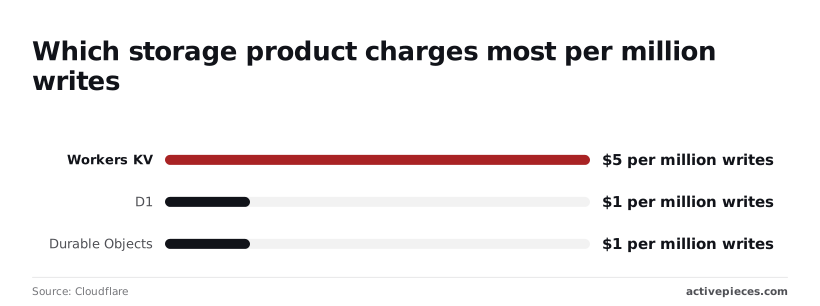
Writes are where the storage meters differ most, and each product has its own. Workers KV charges (source), R2 charges $4.50, and D1 and Durable Objects charge $1 each, making write-heavy KV workloads your biggest cost lever.
Pick the store by write pattern, not habit: a write-heavy job such as counters or session updates costs five times more on KV than on D1.
Other products carry their own allowances and overage.
KV reads include 10M, then cost $0.50 per million; KV writes include 1M, then cost $5 per million; Queues include 1M operations, then cost $0.40 per million, since the write limit is ten times tighter than reads, you'll hit overage charges on writes first.
Workers AI allows 10,000 Neurons per day, and Vectorize allows 50M dimensions.
Set billing notifications on the account before launch, so you hear about an overage from Cloudflare and not from the invoice.
Worth checking against a plan that does not meter every step: one credit covers a whole run on Activepieces.
Cloudflare Workers pricing versus Lambda, Vercel, Deno Deploy
For I/O-heavy, bursty client work, Workers is usually the cheapest of the four. It bills the CPU you use rather than the seconds you spend waiting on someone else's API.
To see which line item will actually land on the invoice, use the table below, which shows how each platform meters that work. Confirm current rates on each vendor's pricing page before you quote a client.
| Workers | AWS Lambda | Vercel Functions | Deno Deploy | |
|---|---|---|---|---|
| Free allowance | Daily request cap and a per-request CPU limit | Monthly free tier of requests and compute | Hobby plan with usage limits | Free tier with request and bandwidth limits |
| Entry price | Flat monthly paid plan | No subscription, pay as you go | Per-seat Pro plan | Monthly paid plan |
| Billing unit | Requests plus CPU time | Requests plus duration times memory | Active CPU time plus memory | Requests plus CPU time |
| Cold starts | Rarely noticeable | Real, with paid mitigations | Present, reduced by shared instances | Rarely noticeable |
| Egress | No bandwidth charge | Charged per data transferred out | Charged beyond plan allowance | Included allowance, then overage |
| Where it wins | Light, bursty glue code | Deep AWS integration | Frontend-led teams | Deno-native TypeScript projects |
Workers versus Lambda: billing unit and egress
Say a function waits two seconds on a slow CRM call. Lambda bills duration multiplied by memory, so you pay for the wait. Workers bills CPU time, and waiting isn't CPU, which makes the same job cheaper to run and easier to price flat.

Lambda also charges for data leaving AWS, so a client whose workflow returns large payloads generates a cost that scales with their volume. Workers doesn't charge for bandwidth.
Lambda wins when the rest of the client's stack already lives in AWS and the function needs private network access to it.
Workers versus Vercel and Deno Deploy
Every contractor you add changes the bill before any traffic arrives, because Vercel's entry plan is per seat. That suits a frontend team shipping one product, but it's awkward when you're hosting many small client automations under one account.
Vercel wins when the function is part of a site it already deploys.
Deno Deploy is the closest match to Workers on cold starts and billing model. It wins when the client's code is already written for Deno, because you skip a porting step.
If the job is moving data between two SaaS apps a few times a day, a hosted no-code workflow is often cheaper than your hours writing and maintaining a Worker.
Keep the Worker for anything high-volume, latency-sensitive, or billed per request, where per-task pricing would cost the client more than the CPU time.
What Activepieces does about this
The costs in this article come from a Worker doing glue work: fan-out calls, scheduled jobs, and writes to KV or D1 that nobody budgeted for. Activepieces takes that work off the Worker.
A flow that pulls from one SaaS app, branches, and writes to another runs as a flow, not as handler code burning CPU milliseconds.
It bills one credit per flow run, whatever the step count, so splitting a job into smaller, safer steps doesn't raise the price. The same job costs the same as a flow, so you can compare it with a Worker's CPU overage.
The core is MIT-licensed and can be self-hosted, which means you can run it next to your own infrastructure. MoneyGram, Moneypenny, Alan and FundingSocieties run it in production.
My advice is unchanged: start on Free, move to the $5 Paid plan when you hit the cap, and keep Workers for high-volume, latency-sensitive routes. Put the low-frequency automations on Activepieces, so your Cloudflare bill stays near the $5 floor.

Frequently asked questions
Is Cloudflare Workers really free?
Yes, the Free plan costs nothing and needs no card, but it comes with a daily request allowance and a per-invocation CPU-time ceiling.
As of November 2026, that's enough for a client's internal webhook or a low-traffic form handler. It's not enough for anything you would put on an invoice as a monitored service.
What happens when I exceed the Workers free limit?
Once the daily request cap is hit on Free, the Worker stops serving and visitors get an error until the counter resets. The allowance resets daily, not monthly, so a traffic spike costs you a bad afternoon, not a bad month.
Going over the CPU-time limit on a single invocation fails that request alone.
On Paid, nothing is cut off. Usage past the included amounts is billed, which is why a runaway loop on a shared account lands on your invoice, not the client's.
Does Cloudflare Workers charge for bandwidth or egress?
No, Workers doesn't bill for bandwidth or egress on responses it serves. Your costs come from requests and CPU time.
If Cloudflare answers from cache before your Worker runs, your code doesn't execute, so it doesn't consume CPU time. A Worker that calls the cache itself still counts as an invocation.
The separately billed products around Workers, such as storage and databases, have their own pricing, so check each one before you quote a client a flat fee.
Can I cancel the Workers Paid plan at any time?
Yes, it's a monthly subscription you can cancel from the dashboard. Once you downgrade, the account goes back to Free limits, so a Worker that relied on Paid headroom may start failing at the daily cap.
Is Workers Paid billed per account or per Worker?
Per account. One Paid subscription covers every Worker on that account, and included usage is pooled across them. That pooling is the quiet cross-subsidy: one client's busy Worker can use up the allowance that a quiet client's Worker would otherwise have shared.
If clients should pay for what they consume, put each on their own account, or track per-Worker usage and bill it back.
Related reading
References
Running the numbers
See what the same workload costs here.
Free forever plan, and every paid plan self-hosts at no extra cost.
See pricing Talk to sales