
CoreWeave Pricing 2026: GPU Cloud Costs Compared

Nov 2, 202616 min read
Pay on demand if your jobs are short and irregular, such as ones kicked off by a workflow tool like Activepieces whenever a trigger fires, and move to a committed contract only when your GPUs would otherwise sit busy around the clock.
Checked 2 November 2026. The hourly rate matters less than how long you commit, how many GPUs you must rent at once, and what storage and networking add.
Read the catch column first, because it's where the surprise bills come from. The table below pairs each situation with the option that usually fits and the catch that pushes you up a level.
Which CoreWeave plan fits you
| Situation | Option | Monthly cost at published rates | Catch |
|---|---|---|---|
| Solo user or small experiment | On-demand, smallest GPU shape | Hourly rate times hours you actually run | Quota approval and GPU-count minimums can block a single card |
| Team of 5 running regular jobs | On-demand, reserved once usage is steady | Sales quote for reserved | Commitment length locks you in |
| Team of 25 needing SSO and admin controls | Committed contract | Sales quote | Access controls sit behind the sales conversation |
| Heavy or continuous usage | Long-term reserved cluster | Sales quote | Storage and networking lines add to the GPU total |
Each situation below explains why that row lands where it does.
If you are a solo user or running a small experiment, on-demand is the right fit because you pay only for hours you run, so an idle weekend costs nothing for compute.

The catch is access: you may need quota approval, and a minimum GPU count per node can force you to rent more than you need.
When your team of 5 is running regular jobs, start on-demand, then ask for a reserved quote once your usage looks the same week after week.
If you chain training runs in Activepieces, steady scheduling is the sign that reserved capacity may pay off, and the run is the meter there: a ten-step chain costs the same 1 credit as a two-step one, where Zapier bills per task and Make per module.

The catch is commitment length, since you pay whether or not the GPUs are busy.
If your team of 25 needs SSO and admin controls, expect a committed contract and a sales quote. CoreWeave usually puts single sign-on and admin controls on a higher tier, so the real cost includes the tier, not just the GPUs.
Heavy or continuous usage is what long-term reserved capacity is built for, and its price is a sales quote. Budget storage and networking separately, because they can move the monthly total as much as the GPU rate does.
If you are running this arithmetic for your own team, see what the same workload costs on Activepieces.
CoreWeave pricing table with every current option
CoreWeave is a GPU-focused cloud that rents H100, H200, A100, L40S and GB200 machines by the GPU-hour.
The table below shows what each one is for so you can shortlist before you price anything. Don't read it as a rate card, because it carries no dollar figures.
| GPU | Generation | Best fit |
|---|---|---|
| A100 | Older Ampere | Steady training and inference where price matters more than speed |
| L40S | Ada | Inference, graphics and smaller models |
| H100 | Hopper | General large-model training and serving |
| H200 | Hopper, more memory | Larger models that strain H100 memory |
| GB200 | Grace Blackwell | Largest training runs and rack-scale deployments |
Take your shortlist and get each chip's hourly rate, node size, bundled CPU and RAM, minimums and term directly from CoreWeave before you compare totals.
A wrong rate in a budget does more damage than a blank one, because you'd plan around it.
On-demand versus reserved capacity
On-demand means you pay for the hours you use and can leave. Reserved means you promise a length of time and a quantity in exchange for a lower rate.
A wrong rate in a budget does more damage than a blank one, because you'd plan around it.
Doing nothing about this choice is the expensive path: a reserved commitment you don't fill is paid for anyway, and on-demand used all month usually costs more than it needed to. Match the term to how steady your workload is.
Expect the large or newest configurations, GB200 above all, to be sold by quote rather than from a public price.
Treat any option without a visible rate as a sales conversation, and ask for node size, minimum order and term in writing before you compare it with the others.
What CoreWeave costs at realistic usage
Once you have the rates in writing, the bill for a given job depends far more on how many hours CoreWeave charges you for than on how many hours you actually compute.
The three workloads below show how that gap opens up, and the chart puts each one's monthly total side by side, split into GPU, storage and egress, so you can see which line dominates where.
Take this from the chart: the dominant line changes with the workload shape. GPU time leads in every case, but storage and egress take a different share each time, and that share is what a sticker-price comparison hides.
Of the three, the one-week 8-GPU fine-tune is the easiest to underestimate:
- The arithmetic is simple: GPU count times hours times the hourly rate
- The catch is that billing starts the moment the node is allocated, not the moment training starts
- Setup, loading data and debugging a failed first run all bill at full rate, so the paid hours run longer than the running hours
- Storage matters here too: your dataset and checkpoints sit on disk before and after the week, and that line keeps billing after you release the GPUs unless you delete it
- If a provider has a minimum term or minimum order, it may bill a one-week job as if it were longer

CoreWeave cost for always-on inference
If a service stays up all month, it bills about 730 hours, and in this case running hours and paid hours are nearly the same.
That makes the GPU line predictable, and it makes a commitment discount worth asking about, since you'll use every hour of it.
The surprise arrives in egress.
Every response you send back to users leaves the provider's network, so the more traffic you serve, the more that line grows.
Check how the provider charges for egress before you size the budget, because a busy service can make it a real share of the total.
CoreWeave cost for multi-node training
Everything gets multiplied in multi-node training. You pay for several nodes at once, and the nodes must be allocated together, so one idle machine stalls the job while all of them keep billing.
Networking between nodes becomes part of whether the job runs well at all, and checkpoint storage grows with the size of the model.
The gap between running and paid hours is widest here, because a restart after a failure means the whole group sits idle until it's back.
Estimate each workload with paid hours, not running hours, and price storage and egress as their own lines before you compare providers.
Hidden costs and limits CoreWeave users hit
Beyond the GPU rate, CoreWeave bills for storage, data leaving the platform and idle capacity, and several of those terms are settled only in a sales conversation.
The checklist below shows which of five lines have a published figure and which you must ask about, so you know what to settle before signing.
- Storage per GB-month: $0.015 to $0.07 depending on tier, per PricingSaaS and DataStorage.com
- Egress charges: free
- Quota approval wait: confirm with sales
- Commitment length: confirm with sales
- Idle node billing: confirm with sales
CoreWeave storage and data egress costs
At $0.07 per GB-month for distributed file storage, a 1 TB working set runs about $70 a month, which means teams designing distributed systems cannot ignore storage costs.
According to PricingSaaS and DataStorage.com, hot object storage is $0.06, warm is $0.03 and cold is $0.015, so architects have a strong financial incentive to tier data according to access frequency.

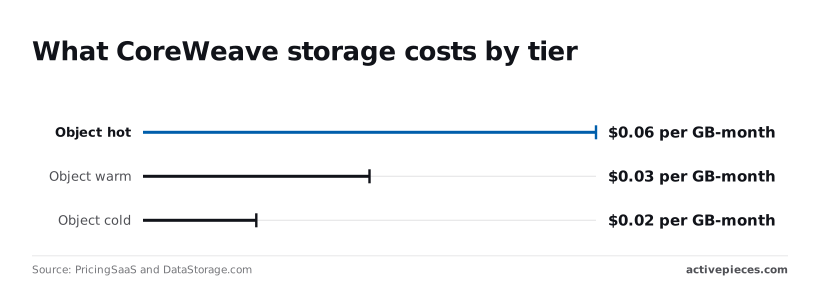
Moving finished checkpoints from hot to cold cuts their cost by three-quarters. Egress, the fee for pulling data out, is free on CoreWeave's object storage, but confirm it in writing.
When a new account tries to launch a large GPU count, it typically can't do so immediately. How long approval takes is something to confirm with sales, and until you do, don't schedule a launch date around it.
Before you sign, know that commitment length sets your rate, and a longer term usually costs less per hour but locks you in.
Whether a reserved node bills while it sits idle is also a confirm-with-sales question. If it does, you pay for every hour your team isn't running jobs.
Which support tier is included, and whether single sign-on or admin controls cost extra, are likewise confirm-with-sales items. Ask now, because a missing one means a plan upgrade later.
Worth checking against a plan that does not meter every step: one credit covers a whole run on Activepieces.
CoreWeave versus Lambda, Nebius and AWS on price
At $6.16 per GPU-hour, CoreWeave's on-demand H100 rate is mid-pack: above Lambda and Nebius, below AWS, so price-conscious customers should evaluate the cheaper alternatives first. The hourly rate is only the first line of your bill, but it's the one you see first.
Comparable GPU rates side by side
According to Galactic, Lambda and RunPod, another GPU rental service, both charge $3.99 per GPU-hour, leaving the choice between them dependent on service quality rather than price.
Per Galactic, Nebius charges $4.50, CoreWeave $6.16, AWS $6.88, and Google Cloud, the other large general-purpose cloud, $11.06, meaning teams should avoid GCP for any cost-sensitive workload. Google Cloud costs nearly three times what Lambda does for the same chip.
Gpucloudhq's table shows the four providers' rates and what each gap from CoreWeave comes to over a 730-hour month, roughly one GPU running nonstop.
| Provider | H100 rate per GPU-hour | Monthly difference vs. CoreWeave, per GPU |
|---|---|---|
| Lambda | $3.99 | about $1,584 less |
| Nebius | $4.50 | about $1,212 less |
| CoreWeave | $6.16 | baseline |
| AWS | $6.88 | about $526 more |
Run eight GPUs all month and those gaps multiply by eight, so the rate matters at scale. It still isn't the whole bill.
Where CoreWeave, Lambda and Nebius win
On rate alone, Lambda wins, and CoreWeave isn't the cheapest. If your job is a short experiment with no special requirements, paying $2.17 more per hour than Lambda buys you nothing you asked for.
Nebius sits in between. It saves about $1,212 per GPU-month against CoreWeave, which makes it the first alternative to price out if you want a lower rate without leaving a GPU-focused provider.
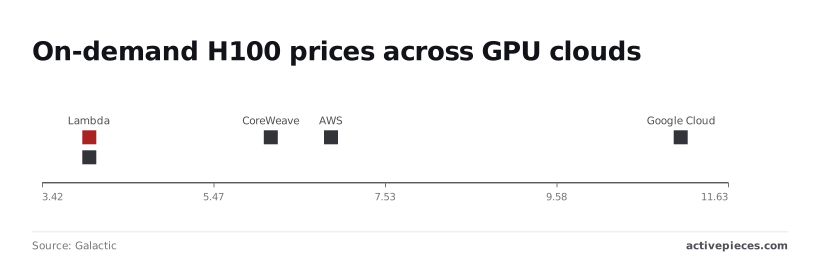
If the rest of your systems already live on AWS, its premium of about $526 more per GPU-month than CoreWeave can make sense, because moving data between clouds is its own expense.
When its commitment terms, storage and networking come in lower than the others', CoreWeave earns a place on your shortlist. That's what the cost lines in the next section test.
Watching GPU spend with Activepieces
A scheduled Activepieces workflow can watch your GPU bill between invoices, comparing a usage export against a budget and alerting Slack or email when you drift over.
Activepieces connects those checks to Google Sheets, Slack and Gmail among its 746 integrations, and it is MIT-licensed at the core, so the budget check costs 1 credit per run however many steps it has.
What a spend-alert workflow does
A cluster nobody switched off after a test run costs the same as one working flat out, and you usually learn about it when the invoice arrives.
Idle nodes keep billing. An alert turns that month-end surprise into a message you can act on the same day.
Copy the shape of the flow below.
It starts on a schedule, reads budget rows from Google Sheets, loops through them, fetches usage over an HTTP request, and passes the result through two AI steps, completing a fully automated budget-analysis workflow, which means the analysis runs on schedule automatically without anyone needing to trigger it.
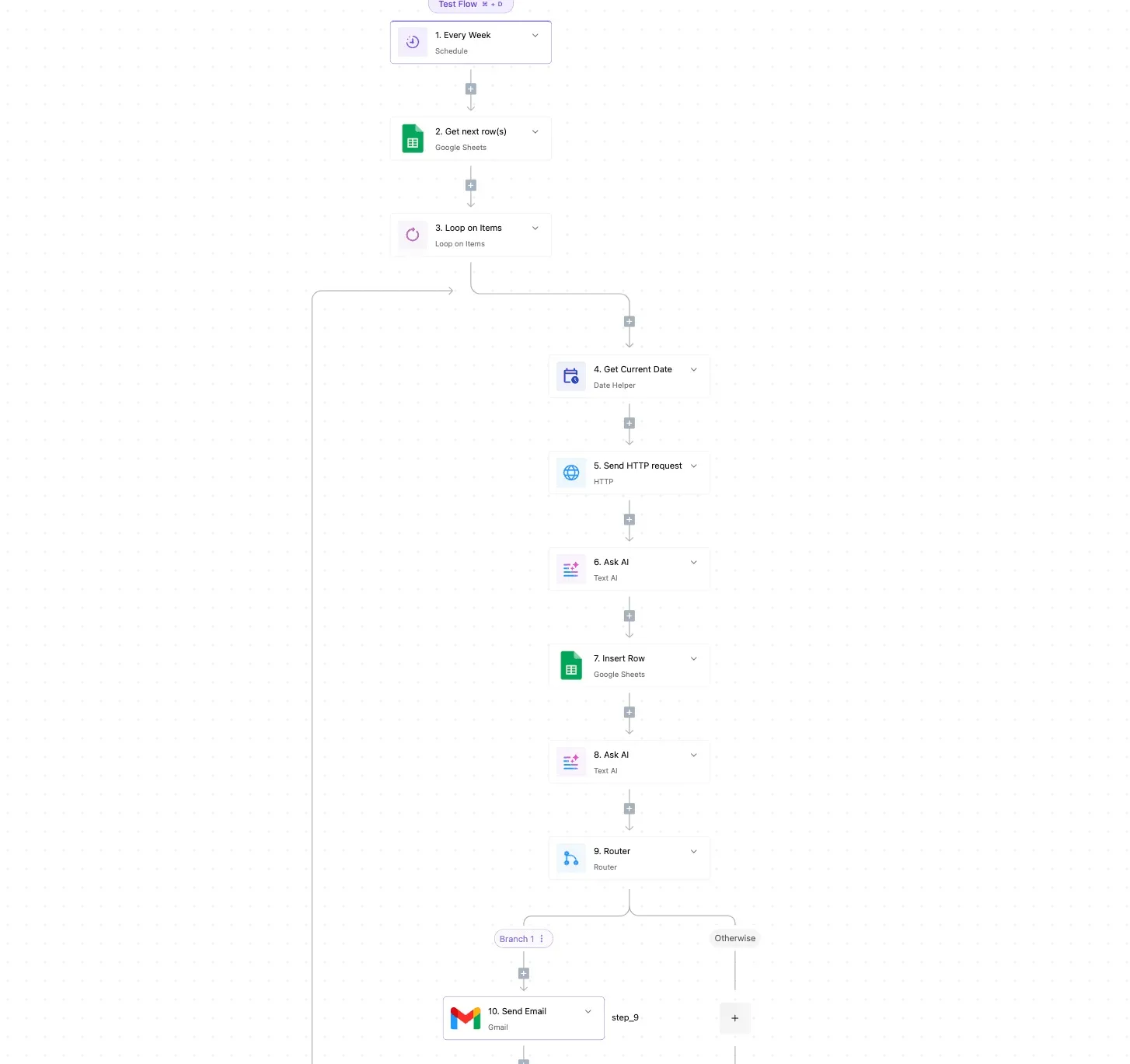
It then writes a record back to the sheet and uses a router to split into Branch 1 or Otherwise before a Gmail step sends the email.
Take from it that the checking happens on a timer, not on someone remembering, and that the router is where "under budget, stay quiet" separates from "over budget, tell a person."
What follows is the limit on that picture, because the flow is only as good as the data feeding it.
What it cannot do
It doesn't replace a GPU cloud. It runs nothing on GPUs, and it won't shut down a node unless the provider gives you a way to do that from outside.
Harder to get around is the dependency on CoreWeave itself. Whether the HTTP step can pull usage depends on what CoreWeave exposes, whether that's an API, a billing export or only a dashboard.
Check its documentation before building anything. If usage data is only visible in a console, this workflow has nothing to read, and you're back to checking by hand.
It also shows the bill, not the reasons for it. Storage and networking lines will only appear if the export includes them.
Monday checklist before you commit to a plan
If you skip the homework, you pay for it later. A commitment sized on a guess usually means paying for GPUs that sit idle, or an invoice with lines you never saw coming.
Six steps, in this order, prevent that, so the process requires all six steps to be completed in sequence.
- Record your GPU type, the hours you run, and the share of those hours spent idle.
- Confirm quota, egress and storage terms in writing.
- Start on-demand.
- Set a budget alert.
- Reserve capacity only after two months of real usage.
The first three steps happen before any money moves, which means the budget cannot be spent until all three have been cleared, and the last three keep you honest once it does, so any improper use of funds will eventually be discovered.
Measure your CoreWeave GPU hours first
Pull the usage export and write down which GPU model you ran, how many hours it was switched on, and how many of those hours it did no work.
Most people skip the idle share, and it's the number that makes a long commitment expensive: you pay for a reserved GPU whether or not it's busy.
Remember the earlier caveat. Storage and networking lines will only appear if the export includes them, so check for them before you trust the total.
Questions to ask in your CoreWeave quote
Send your measured numbers to sales and ask for a quote in writing.
Then ask whether your GPU count is covered by your quota or needs approval first, what leaving the network costs for the data you move out, and how storage is billed when your GPUs are off.
A verbal answer isn't a price. Compare the written quote with the table line by line, not just on the hourly rate.
Start on-demand, because it lets you stop without a penalty while you learn your real pattern.
Set a budget alert at a level that would surprise you, so a runaway job gets caught in days rather than at month end. After two months of data, you'll know what to reserve, and for how long.
Frequently asked questions
Getting started and free credits
Once you know what to reserve, a few practical questions remain that the body left open.
Does CoreWeave have a free tier or free credits?
Don't plan around either. I can't confirm a standing free tier, and any trial credits are a sales decision rather than a posted offer.
Ask when you talk to them, because a small test budget costs you nothing to request and saves you paying full rate to find out the setup doesn't fit.
Can an individual sign up for CoreWeave without a sales call?
You may be able to open an account on your own, but treat that as the easy part.
Larger blocks of GPUs and reserved terms are usually arranged with their team, and that's where the real pricing gets set. A solo buyer should confirm current minimums before building a budget around the sticker rate.
Egress and comparing totals
Does CoreWeave charge for data egress?
Their object storage has been marketed without egress fees, which matters if you move large datasets out often.
Don't assume that covers every line on the bill, though. Read the storage and networking items in your quote one by one, since a surprise there lands on the monthly total, not the hourly rate.
Is CoreWeave cheaper than AWS for H100 GPUs?
Sometimes, and the hourly rate alone won't tell you. The answer turns on commitment length, how many GPUs you must take, and what storage and networking add.
Price the same workload on both for a full month, including those extra lines, and compare the totals instead of the headline rates.
Leaving a contract
Can I cancel a CoreWeave reserved contract early?
Assume you can't, at least not for free. A reserved contract is a promise to pay for the term, so you owe the remainder if your needs shrink.
Read the termination and resale clauses before signing, and ask directly whether unused capacity can be transferred or sold. Getting that in writing now beats discovering the answer after your usage drops.
Related reading
References
Running the numbers
See what the same workload costs here.
Free forever plan, and every paid plan self-hosts at no extra cost.
See pricing Talk to sales