
Muse Wonder API Pricing for Every Tier and Workload

Oct 15, 202614 min read
Muse Wonder API pricing by plan
Muse Wonder API pricing at a glance
Muse Wonder charges per million tokens, with separate input and output rates. Meta lists them at $1.25 to $4 per million input tokens and $4.25 to $20 per million output tokens, depending on tier.
As of the 2026-10-15 check, the plan names and the mapping of plans to those rates are unconfirmed, so this article quotes the range and no single figure. A wrong number here would send you into a budget meeting with a figure nobody can defend.
Muse Wonder API pricing is the per-million-token billing model Meta uses to charge for Muse Wonder, with separate input and output rates that vary by plan tier and are subject to that plan's limits and overage rules.
When your software sends text to the model and gets text back through the API, each call bills by tokens: the pieces of text going in (your prompt, the email you paste in) and the pieces coming out (the model's reply).
A call from your own code and a call from a flow in Activepieces meter the same way at the model, and Activepieces itself costs $0 on its Free plan with unlimited flows on every plan, so the tokens are the part of the bill that varies.
Summarise tickets or write replies to them, and the same plan produces very different bills. That is why input and output have separate prices: a short classification reply costs far less than a long drafted answer.

It is also why the rest of this article prices a workload, not a rate card.
All plans in one table
Put every plan against the same six questions in a pricing grid:
- monthly price
- input and output price per million tokens
- included usage
- rate limits
- what happens when you go over
Meta's range fills the token-price columns only as a range. We couldn't confirm the plan names, which tier carries which rate, or any other figure, so every plan gets the same answer elsewhere: not stated.
That leaves you the list of what you must still collect yourself before comparing anything.
Build the grid from the vendor's pricing page, one row per plan, with those six columns, before you compare headline rates.
The overage column matters most. A plan that throttles you at the limit and a plan that quietly bills extra are different risks, and the second one is the one that surprises finance.
For this article, the gap is everything:
- plan names
- prices
- included usage
- limits
- overage terms
A plan that throttles you at the limit and a plan that quietly bills extra are different risks, and the second one is the one that surprises finance.
Treat each as unknown until you see it written on the vendor's page or in your contract.
If you are running this arithmetic for your own team, see what the same workload costs on Activepieces.
What each plan costs at realistic monthly usage
Price your own step at three volumes before the busy week: a quiet month, a normal one, and the spike. The cheapest plan at one volume often isn't the cheapest at the next.
The arithmetic, with assumed token counts
Take one step: summarising a customer email. Assume an input of a pasted email thread plus instructions, and a short summary as output. Those token counts are assumptions, so replace them with the length of your own tickets, especially your longest and angriest ones.
When a rambling complaint with three forwarded replies arrives, it can cost many times what a one-line password reset does, so an average hides your real bill.
For each plan, monthly cost is runs times the cost of one run, plus any platform fee, minus whatever allowance the plan includes, plus overage on the rest.
Where a higher plan starts to pay for itself
If plans work the usual way, a higher plan costs more up front and less per unit beyond its allowance, so it may lose at 1,000 runs, where you pay for allowance you never touch.
It starts to win once your overage on the lower plan exceeds the difference in base fee.
Find that crossing point for your workload. Moving up too early wastes a fixed fee every month, and moving up too late means paying overage rates on every spike.
Monthly cost by volume, in a table
Read the table below as structure, not price: it shows how each kind of plan builds its bill at each volume, using the assumed tokens per run. Fill in your own rates and token counts, and watch which row goes lowest as you move right.
| Plan structure (tokens per run are assumptions: your own input and output counts) | 1,000 runs | 50,000 runs | 1,000,000 runs |
|---|---|---|---|
| Pay per token, no base fee | Runs × per-run token cost | Runs × per-run token cost | Runs × per-run token cost |
| Base fee with included allowance | Base fee only, if inside allowance | Base fee, plus overage if allowance is exceeded | Base fee plus overage on nearly everything |
| Higher tier, larger base fee | Base fee only, mostly unused | Base fee, likely inside allowance | Base fee plus overage at the lower per-unit rate |
Hidden costs and limits Muse Wonder users hit
Five things can break a bill that looked safe on paper: rate limits, output pricing, long prompts, retries and past price changes.
Muse Wonder API rate limits and quotas
The spread is wide: Meta lists Muse Wonder at 1.25 to 4 dollars per million input tokens and 4.25 to 20 dollars per million output tokens, depending on tier.
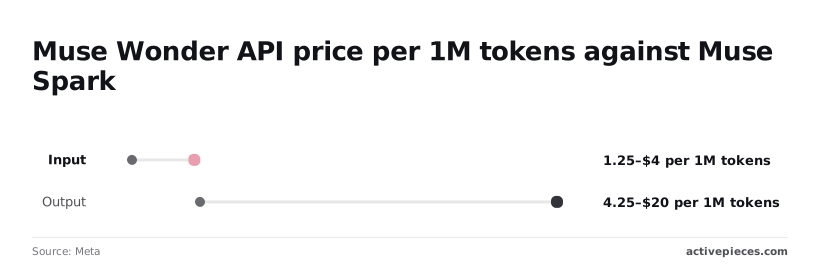
The same email-summary step can therefore cost more than three times as much on one plan as on another.
Cheap has a price too. The cheap end buys you a lower ceiling on requests, and a ceiling is a cost.
Picture 300 angry-customer tickets arriving after an outage. If the plan throttles you, replies go out late, and a late reply to an angry customer costs more than the tokens saved.

Output tokens, long context and retries
Because output costs roughly three to five times input, a verbose classifier costs more than a terse one.
When a burst is throttled, it delays work or forces retries. Per-tier request caps are on the pricing page, but I haven't confirmed the numbers, so treat them as unverified.
At 4.25 to 20 dollars per million output tokens, a long reply costs far more than a long question.
If there is a higher rate for very long prompts, it would hit anyone pasting whole threads. Unverified; I found no documented surcharge.
If a call fails, tokens already generated may still bill. Unverified; check the docs before assuming a retry is free.
Past your quota, you may be blocked or billed at a higher rate, and that decides whether a spike is an outage or an invoice. Unverified.
None of the unverified items should enter your estimate as zero. Ask Meta support in writing and keep the answer.
The workflow around the API call can add its own meter on top of the model's, and retry branches and logging steps are where that shows.
The Activepieces pricing page lists 1 credit per flow run whatever the number of steps, so a retry branch adds no credits, whereas Zapier's pricing page bills per task and Make's per module, so each extra step there is another billed unit.

MoneyGram, Moneypenny, Alan and FundingSocieties run Activepieces in production.
Pricing changes in the changelog
Read the changelog before you sign a volume plan, because a price you budgeted in spring can be a different price by autumn.
Worth checking against a plan that does not meter every step: one credit covers a whole run on Activepieces.
Muse Wonder API against the closest alternatives
At the top tier's $20 per million output tokens, Muse Wonder costs double Claude Sonnet 5.5 and Gemini 4 Argon at $10 each, so your token budget shrinks by half if you switch. At the $4.25 low tier it costs less than half of them.

The rival figures come from AI Signals.
Side-by-side price table
To see at a glance where Muse Wonder isn't the low-cost pick, the table shows output price and the cost of one fixed job, with cheaper rivals marked.
| Model | Output price per 1M tokens | Cheaper than Muse Wonder? | Cost of 1,000-run job (output only) |
|---|---|---|---|
| Muse Wonder | $4.25–20 | n/a | $0.85–$4.00 |
| Claude Opus 5.5 | $20 | No: same as top tier, dearer than the low tier | $4.00 |
| Claude Sonnet 5.5 | $10 | Only against the top tier | $2.00 |
| Gemini 4 Argon | $10 | Only against the top tier | $2.00 |
| GPT-6 Astra | $50 | No, 2.5 times dearer than the top tier | $10.00 |
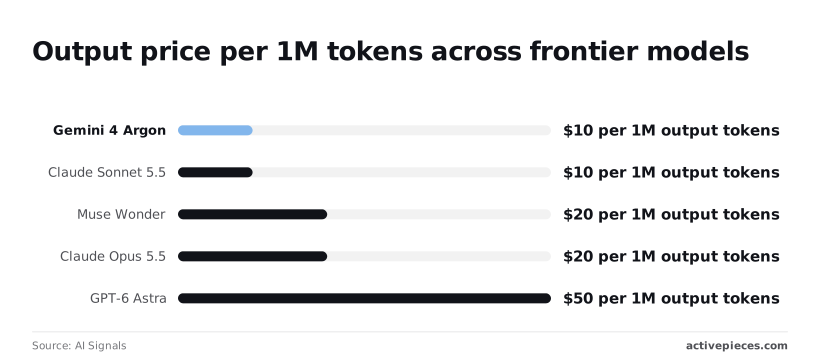
Because input prices, free tiers and rate limits aren't in the confirmed figures, they're left out rather than guessed. Take them from each vendor's pricing page for the plan you would actually buy, and add them before you decide.
Cost of the same 1,000-run job
Assume each run returns 200 output tokens, such as a short ticket classification with a one-line reason. That's 200,000 tokens per 1,000 runs, so Muse Wonder costs $0.85 to $4.00 on output, depending on tier.
For the same job, Sonnet 5.5 and Argon cost $2.00. On Muse Wonder's top tier you pay twice as much if it gives you nothing extra, while on the low tier you pay less than half.
GPT-6 Astra costs $10.00, so picking it for a simple step is the expensive mistake here.
So the tier decides the verdict. Muse Wonder loses to Sonnet 5.5 and Argon at the top, beats them at the bottom, and falls somewhere between on the tiers in the middle.
Since the tier-to-rate mapping is unconfirmed, price your job at both ends before you compare.
For email summaries, input tokens may be the larger share of your bill, and they are excluded here. Rerun the sum with your own average email length before trusting any of these totals.
When price should not decide
If a cheaper model misclassifies an angry customer's refund demand as routine, it costs far more than the $2.00 you saved, so one error erases months of savings.
Test each candidate on a real batch of your hardest tickets first. If the cheaper model passes, use it. If it fails even a few, pay for Muse Wonder or Opus 5.5 on those steps and keep the cheaper model for the easy ones.
Metering Muse Wonder API usage with Activepieces
You can make that split in Activepieces.
It has an HTTP Send Request step to call the model, and the run details of each flow show the exact input and output of every call, as in the 1271ms, status 200 run pictured below, so the routing decision is something you read in the trace instead of guessing.
Calling the API from a workflow
Add an HTTP Send Request step after your trigger. Set the method to POST, put the Muse Wonder endpoint in the URL field, and send your key in the Authorization header.
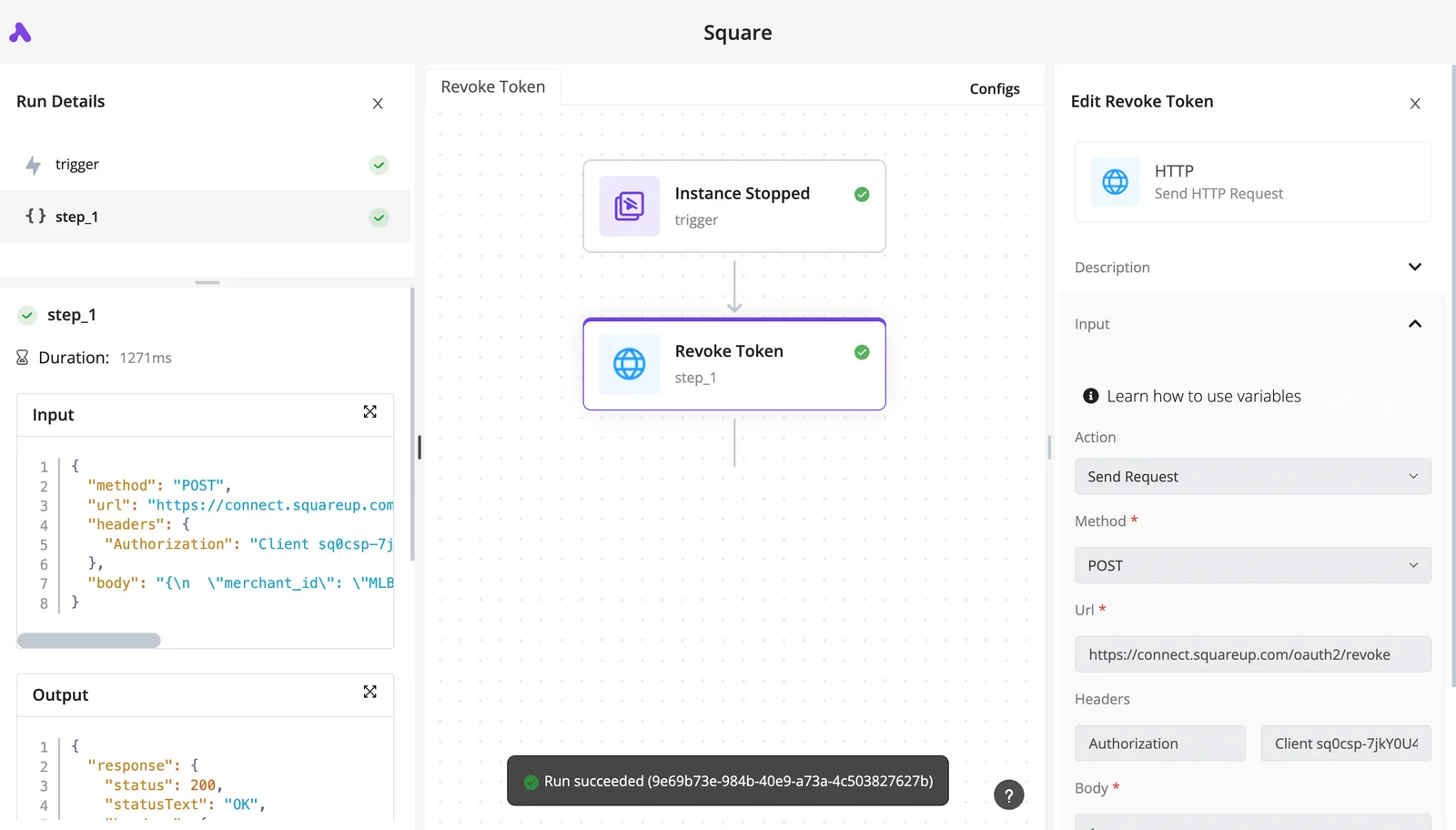
In the screenshot below, a finished run of exactly that kind of step, here calling a different service, shows green checks on both the trigger and step_1. The step took 1271ms, and the output shows status 200.
Open the run details and you can read the exact input and output of every call. That's what you'll need when someone asks why a ticket was classified wrongly.

Next, add a second step that reads the usage fields in the response.
Logging usage and alerting before limits
Write the input and output token counts from each response, with the flow name and run ID, to a sheet or database table. Without that row, one expensive step hides inside the monthly total and you find it on the invoice.
Watch the allowance on Activepieces too. Its pricing page lists 1,000 AI credits a month on Free, 10,000 on Plus ($20) and 50,000 on Team ($200), meaning you need a paid tier to exceed 1,000 monthly credits.
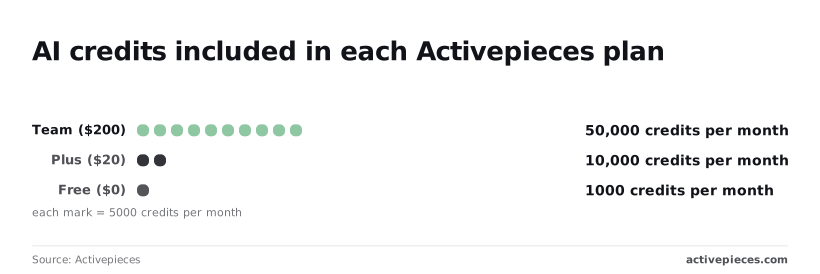
So Free covers a test, not a live inbox.
For $20, Plus gives you ten times Free's credits. Team costs ten times Plus for five times the credits, so move up only if the logs show you need the volume.

Do not confuse these credits with Muse Wonder's: the 1,000, 10,000 and 50,000 belong to Activepieces, so you still watch your Muse Wonder bill separately.
Add a branch that sums the logged tokens and sends a message to your team chat when the month passes about 80% of your budget, giving your team time to cut usage before the ceiling hits.
An alert at 100% only tells you the damage is done, by which point the charges are already incurred.
In the first week, work through these steps:
- Build the HTTP step and run it on five real tickets, not sample text.
- Log tokens per run from day one.
- Mark every step where the cheaper model got it wrong.
- Route only those steps to Muse Wonder or Opus 5.5.
- Set the 80% alert, which notifies you before you're locked into overage costs.
- Compare the week's logged total against each tier before you upgrade anything.
Frequently asked questions
Five questions are still open after the pricing comparison, and none can be answered from a vendor-page fact dated 2026-10-15, so every answer below is marked unverified.
Treat each as a ticket to send to Muse Wonder's sales or support team, and keep their written reply.
Is there a free tier for the Muse Wonder API?
Unverified. We have no dated vendor-page fact on a free tier, its limits or whether it allows production use. Assume nothing.
If you build a pilot on a free allowance and it turns out to be trial-only, you find out when the pilot stops working in front of the people you promised it to.
Ask whether the allowance expires and whether it can be used for real traffic.
Does Muse Wonder charge for failed or retried requests? Unverified. The vendor's billing terms for errors, timeouts and retries aren't confirmed here.
This matters because an automation that retries on failure can bill you several times for one email. Ask support in writing which failure types are billed, then check your first invoice against your own logs.
How often does Muse Wonder change its API prices? Unverified. We found no dated statement on price-change frequency or notice periods. A budget built on today's rate can be wrong next quarter without any action from you.
Ask what notice you get before a change, and note the date you priced your workload so you can tell whether a later difference is your usage or their rate.
Can I set a spending cap on the Muse Wonder API?
Unverified. We can't confirm whether the plans offer a hard cap that stops requests or only an alert, and the difference is large.
If a cap blocks traffic, it can cut off a customer-facing reply at the worst moment. An alert lets you keep serving but leaves the bill open.
Is Muse Wonder cheaper than its main alternatives? Unverified as a general claim. Cheaper depends on your own mix of input and output, your volume and the plan you land on.
Take one real week of tickets or emails, price it on every tier of each candidate, and compare the totals. Don't compare the headline rates.
Related reading
References
Running the numbers
See what the same workload costs here.
Free forever plan, and every paid plan self-hosts at no extra cost.
See pricing Talk to sales