
CodeRabbit Pricing 2026: Plans, Costs and Limits

Nov 2, 202614 min read
CodeRabbit pricing across plans
How CodeRabbit per-developer pricing works
Per developer, per month: that is the fee, across three paid plans (Essentials, Team and Advanced) and a free trial, meaning your costs scale with each hire.
The plan you pick also sets how many repositories you can link and how many reviews run per hour.
CodeRabbit pricing is the per-developer, per-month subscription model for its AI code review tool, in which each paid plan (Essentials, Team or Advanced) sets the cost per seat along with the repository and hourly review limits a team gets.

If you also run automation around your code, Activepieces is priced separately and never appears on a CodeRabbit invoice; its Free plan costs $0 and includes unlimited flows and 1,000 credits a month.
Every plan, price and limit in one table
Read the table below for the levers, not the numbers. It shows how each plan's billed and which limits move from plan to plan, taken from coderabbit.ai on 2026-11-02.
| Plan | Billed as | What changes by plan |
|---|---|---|
| Free trial | No per-seat charge while it runs | Same review features, on a clock |
| Essentials | Per developer, per month; annual and monthly rates differ | Linked repositories, reviews per hour, inclusions |
| Team | Per developer, per month; annual and monthly rates differ | Linked repositories, reviews per hour, inclusions |
| Advanced | Per developer, per month; annual and monthly rates differ | Linked repositories, reviews per hour, inclusions |
Prices and plan limits checked against app.coderabbit.ai on November 2, 2026.
Because every paid row is built the same way, the price gap between plans's only half the comparison. The other half's what each tier lets you do.
A billable seat's a developer whose pull requests CodeRabbit reviews, not everyone with a login. That means your headcount and your seat count can differ, and the difference's where the real bill comes from.
**A billable seat's a developer whose pull requests CodeRabbit reviews, not everyone with a login.
If you are running this arithmetic for your own team, see what the same workload costs on Activepieces.
What CodeRabbit costs at realistic team sizes
Multiply the people who open code changes by the plan's monthly seat price and by twelve.
At three developers you pay $864 to $2,592 a year; at fifteen, $4,320 to $12,960; at fifty, $14,400 to $43,200, which means team size dramatically affects your bill.
Work from $24, $48 and $72 per seat per month for Essentials, Team and Advanced, which is what CodeRabbit's pricing page implies.
| Developers | Essentials (seats × $24 × 12) | Team (seats × $48 × 12) | Advanced (seats × $72 × 12) |
|---|---|---|---|
| 3 | 3 × $24 × 12 = $864 | 3 × $48 × 12 = $1,728 | 3 × $72 × 12 = $2,592 |
| 15 | 15 × $24 × 12 = $4,320 | 15 × $48 × 12 = $8,640 | 15 × $72 × 12 = $12,960 |
| 50 | 50 × $24 × 12 = $14,400 | 50 × $48 × 12 = $28,800 | 50 × $72 × 12 = $43,200 |
At $864 on Essentials, a three-person team pays less than a single month of one engineer's salary. Moving to Advanced costs $2,592, so the extra $1,728 has to buy something you would actually use.
Fifteen developers
Put fifteen seats on Team and the bill comes to $8,640 a year, and Advanced adds $4,320 on top of that, which means Advanced costs 50% more than Team.
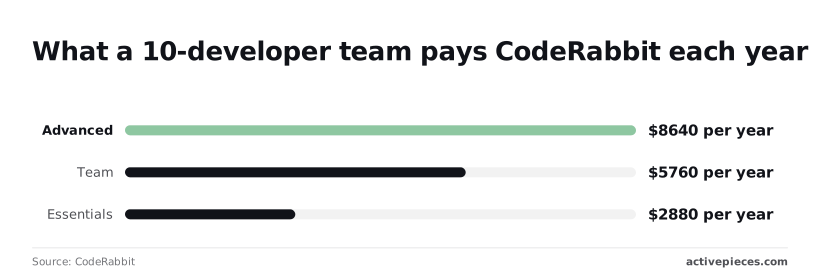
For scale, a 10-developer team pays $2,880 on Essentials, $5,760 on Team and $8,640 on Advanced, per the same pricing page.
Fifty developers and the enterprise threshold
At fifty seats the gap between plans's $28,800 a year, so your choice of tier has material cost implications. That runs from $14,400 to $43,200, and the most expensive plan at this scale costs three times what the cheapest plan costs.
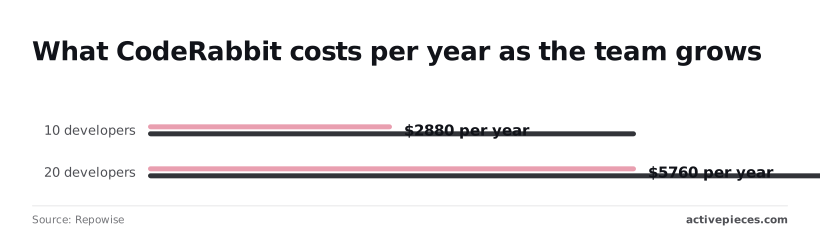
Doubling headcount doubles the cost, according to Repowise, which puts 10 developers at $2,880 to $5,760 and 20 developers at $5,760 to $11,520.
CodeRabbit hidden costs and limits
Beyond seat count, buyers get surprised by four things. Those are hourly review caps, features that are only on higher plans, seats that shift as contributors change, and the time spent sorting noisy comments.
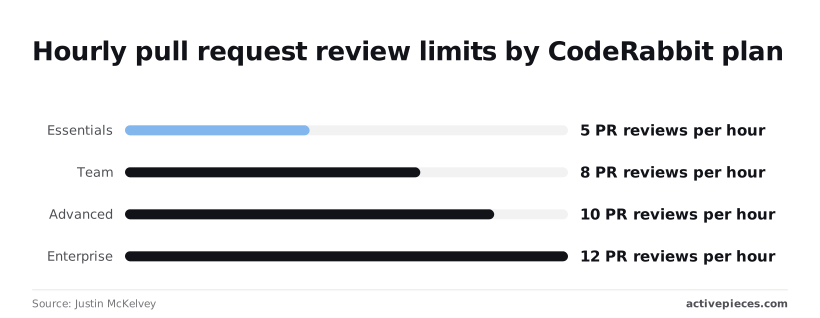
According to Justin McKelvey, Essentials allows 5 pull request (PR) reviews per hour, limiting teams with higher-velocity code review. Team allows 8, Advanced 10 and Enterprise 12. A PR's a bundle of code changes waiting for approval.

Five an hour sounds roomy until a release morning, when ten developers open PRs at once. The extra ones wait, and so do the people who wrote them.
Features gated behind higher plans
Not everything that moves with the plan is a cap. Some features are only on higher tiers, so the plan that looked affordable may lack the one thing you bought the tool for. Check the feature list against your actual workflow before you pick.
When the trial ends, billing starts. The trial runs 14 days with no credit card needed, so if nobody has tested on your busiest day by then, you're paying before you know.
Nobody announces it when contractors, new hires and people who rotate between projects change who counts as a seat. The invoice simply drifts upward, and a departed contributor you forgot to remove keeps costing you every month. Audit the list quarterly.
When a tool comments on everything, developers learn to skim past all of it. Every minute spent dismissing trivial remarks's paid salary, and it never appears on the bill. Count it anyway.

CodeRabbit against the closest alternatives on price
CodeRabbit's neither the cheapest nor the dearest review tool, and the differences show up in who gets billed and what's capped.
As checked in November 2026, the five tools sit side by side in the table below. Read the billing basis column first, because it decides how your headcount turns into a bill.
| Tool | Entry price | Billing basis | Free tier | Usage limits | Self-hosting |
|---|---|---|---|---|---|
| CodeRabbit | Paid per-developer plan | Per developer seat | Yes, with fewer features | Rise with plan level | Higher-tier plans |
| GitHub Copilot code review | Part of a Copilot subscription | Per Copilot user | Limited, through free Copilot | Drawn from Copilot's own allowance | No separate option |
| Greptile | Paid plan | Per seat, with usage on top | Trial rather than free plan | Tied to review volume | Larger plans |
| Qodo | Paid team plan | Per user | Yes, aimed at individuals | Capped on the free plan | Enterprise plans |
| Graphite | Paid team plan | Per seat | Yes, for small use | Capped on the free plan | Enterprise plans |
Where CodeRabbit is cheaper or dearer
When most of your people actually open pull requests, CodeRabbit's cheaper, because a flat seat's easy to predict. It's dearer when your team has many occasional contributors, since each one can still count as a seat.
Copilot's review feature costs little extra if you already pay for Copilot, so you'd be paying twice for similar work.
When a CodeRabbit alternative is the better buy
Choose Copilot's review if your team already lives inside Copilot and wants one invoice. Choose Qodo or Graphite if the free tier covers a small team, which means paying nothing while you test.
Choose whichever tool has self-hosting on a plan you can afford if your code can't leave your own servers. Price that requirement first, because it can rule out the cheapest option.
Worth checking against a plan that does not meter every step: one credit covers a whole run on Activepieces.
Choosing the right CodeRabbit plan without overpaying
Buy the lowest plan whose limits fit the team you actually have. Reach that answer in a fixed order, because skipping ahead's how small teams end up paying for features nobody opens.
- Pilot one repository on the trial.
- Count only active committers.
- Check whether you need compliance controls or self-hosting.
- Pick the lowest plan whose limits fit.
- Weigh the annual discount against lock-in.

Skip the pilot and all you've bought is a guess.
Connect one active repository, let the trial run through ordinary pull requests, and note whether reviewers act on the comments or scroll past them. If they scroll past, no plan's a bargain.
Counting real committers before buying CodeRabbit seats
Pay for a seat only when someone is regularly pushing code that gets reviewed. Designers who read pull requests, managers who approve them, and a contractor who committed once last spring aren't the same as your daily authors.
Pull the list of people who actually committed during the trial and price that list, not the headcount in your chat tool.
When upgrading your CodeRabbit plan is worth it
Move up a tier when a requirement forces you to, such as an auditor asking for specific controls or a rule that code can't leave your own servers. Wanting extra features "in case" 's how teams overbuy early.
Once the plan's chosen, take the annual discount only if the pilot convinced you the tool stays. Otherwise the saving's smaller than the cost of being locked into seats you stop using.
Connecting CodeRabbit to the rest of your tools with Activepieces
Automate your seat usage reporting
It won't lower your CodeRabbit bill, but Activepieces, an automation tool that moves information between the apps your team already uses, can run a scheduled flow that gathers the usage data you export and posts a weekly summary to Slack for whoever manages seats, and since a run costs 1 credit however many steps it has, a weekly report fits well inside the Free plan's 1,000 monthly credits.

Unused or busy, a seat costs the same, and the lock-in described above is only a problem if you can't see who has stopped opening their reviews.
How the workflow works
Here's what it does in practice. A developer opens a pull request on GitHub, CodeRabbit reviews it, and Activepieces carries those events on to Slack, your ticket tracker or a report.
If the tracker your team uses isn't among its 746 integrations, counted straight from the open source monorepo, you can have AI generate the missing one and add it privately to your own instance, with no vendor release to wait on.
Roughly 60% of that catalogue was written by contributors outside the company, which means you depend on external developers for the majority of the codebase.
Read the flow below as a single event with three consequences: one pull request fanning out to three places, a message in a Slack channel, an entry in your ticket tracker, and a line in a weekly report document.
So that a finished review doesn't sit unread for days, the Slack message tells the team one is waiting. The ticket entry turns a serious review comment into a task someone owns, instead of a remark that scrolls away.
CodeRabbit weekly seat report and its limits
It's the weekly report that bears on your bill. It lists who opened pull requests and who received reviews, so a person who appears nowhere for several weeks stands out.
Be clear about what this is. It's optional plumbing.
It doesn't change CodeRabbit's plan, its limits, or what counts as a seat, and it doesn't replace CodeRabbit or any cheaper review tool. You still have to read the report and act on it, and the cancelling or reassigning happens in CodeRabbit, not here.
If your team's small and everyone obviously uses the tool, skip it. If you have contractors coming and going, a report that names the quiet seats's worth an afternoon to set up.
A Monday-morning plan for pricing CodeRabbit
Do six things this week, in order, and you'll have a price for your actual team instead of a plan name. Skip them and you pay for whatever count the vendor's invoice assumes, which's usually higher than the number of people who use the tool.
- Open the vendor's pricing page and write down the date. Prices and limits change, and the date tells you how stale your notes are.
- List the people who have actually committed code recently. That's your real headcount, not the org chart.
- Run a two-week pilot on a few active projects, so you see real usage instead of a demo.
- Record how many review comments your developers acted on. Comments ignored are noise you'd be paying for.
- Price one cheaper alternative against the same list and the same pilot.
- Set a reminder to recheck the page before renewal.
Build this table yourself from the page you dated in step one, because a copy of someone else's table is already out of date.
Give each plan a row, and give each row three columns: the price per seat, the limits that matter to your team, and what the plan leaves out.
If a limit blocks work you already do, that plan isn't your plan, however cheap its row looks.
Read the vendor's own terms for what a billable seat is before you read the price. Then hold it against your committer list from step two.
If the vendor counts more people than you found, you're paying for quiet seats, and that gap's the first thing to raise at renewal.
Frequently asked questions
Is CodeRabbit free for open source projects?
Yes, CodeRabbit has made its paid review features free on public open source repositories. That means a volunteer project can get the same review a company pays for.
There is one catch: the offer covers public repositories only, so a company's private code never qualifies. Check that your project meets the vendor's definition of open source before you plan around it.
Does CodeRabbit charge per developer or per repository?
It charges per developer, not per repository. Adding another repository doesn't by itself add to the bill. Adding another person who submits code for review does.
Spread across many repositories, a small team costs less than the same repository count with a large team. The open question's who the vendor counts as a developer, so ask how they count before you sign.
Can I change CodeRabbit plans mid-billing cycle?
I couldn't confirm how CodeRabbit handles mid-cycle changes, and I won't guess at credits or proration. The cost of guessing wrong's paying twice for the same weeks.
Before you upgrade to unlock a limit, ask the vendor in writing what happens to the unused part of the current period. Keep the answer with your billing records.
Does CodeRabbit offer a free trial?
Terms change, and so does trial length, though CodeRabbit has offered a trial of its paid plan. Treat the pricing page on the day you sign up as the final word.
Run the trial on your real team, not one volunteer, because a trial with one person tells you nothing about what a full set of seats'll cost.
Can CodeRabbit be self-hosted, and what does that cost?
Yes, self-hosting's offered, but as far as the public pricing information shows, only on the top enterprise tier, and that tier has no published price. You get a quote from sales.
Budget for more than the license, because running the software yourself also means paying for the servers and the staff time to keep it running.
Related reading
References
Running the numbers
See what the same workload costs here.
Free forever plan, and every paid plan self-hosts at no extra cost.
See pricing Talk to sales