DeepInfer Automation: What It Is and How to Use It

Nov 11, 202613 min read
DeepInfer Automation Defined and the Fastest Path
DeepInfer Automation Limits in Short
DeepInfer automation is running DeepSeek's open-source DeepInfer project from scripts or workflows instead of by hand. Setup is fast. The documented limits, not the install, are where runs break, so read them before the first run.
Fast uptake isn't the same as tested. According to Trendar, on 20 October the repository had 10,863 GitHub stars. A day later it had 17,496, a jump of 6,633, so most of the attention arrived in 48 hours.
By 22 October, Trendar shows, it was 19,709, and the daily gains shrank to 1,195 on 23 October (20,904) and 825 on 24 October (21,729). By 26 October the count was 22,950.
Read those stars as interest, not successful runs. Most of those people starred a README, not the limits page, and some will automate it before reading either.
Activepieces means nobody has to be hired to wire that automation: describe it in the built-in chat and it publishes a live flow, the artifact a builder would otherwise assemble by hand.
That flow sits under the account's RBAC and audit logs like any human-built one, so a run that hits an undocumented limit leaves a run trace anyone can open and read, with no certification needed to follow it.
I took every claim about DeepInfer here from three of its own pages, read on 11 November 2026. The table shows which page supports what. Treat anything outside these pages as unverified.
| Item | Detail |
|---|---|
| Date checked | 11 November 2026 |
| GitHub README | What the project says it is and how it describes its own use |
| inference_deployment_qa.md | Deployment questions and the limits the project documents |
| Hugging Face model card | What the model release itself states |
Anything those pages don't state is left out, so a gap in this article is a gap in the docs.
It installed without trouble, this one small team's first automated run. It failed later, at a limit the documentation never listed, not at a step in setup.
Each later section returns to that run and asks the same question: was this written down before the team started?
This takes minutes, not a project: automate it in Activepieces free.
Setting Up DeepInfer Automation Module by Module
Set DeepInfer up one documented module at a time, as the team did in five steps, and each module's docs page states its limit before its settings screen lets you find it by failing.
- Account, plan and API access. Start with the plan, not the API key. The plan sets what every later module may do, so a limit you skip here resurfaces in step 3 or step 5 as an error with no obvious cause. Read what your tier permits for access and usage before you create credentials, and record it somewhere the whole team can see.
- The input and data source. Connect one source, and check what the input module says about supported formats and size before you point it at real data. A source that connects without complaint isn't a source the module will fully read. The failure shows up later as missing records, which look like a processing fault and aren't.
- The core processing module. This is where the team spent the most time, and where the documented limits matter most. Find the processing module's stated constraints on how much it takes per request and what it does when a request exceeds them. Whether it rejects, truncates or quietly skips decides whether you see the problem or only the gap it leaves.
- Output and delivery. Set the destination, then read what the output page says about format and delivery behaviour. A run that finishes isn't a run that delivered. Confirm what happens to results when the destination is unreachable, because the default may be to discard them.
A run that finishes isn't a run that delivered.
Step 5: Schedule or trigger the first run
Choose a manual trigger for the first run, even if you plan to schedule later. A schedule starts the clock on every limit above without anyone watching. Run it once by hand, with the limits from steps 1 to 4 written next to you.
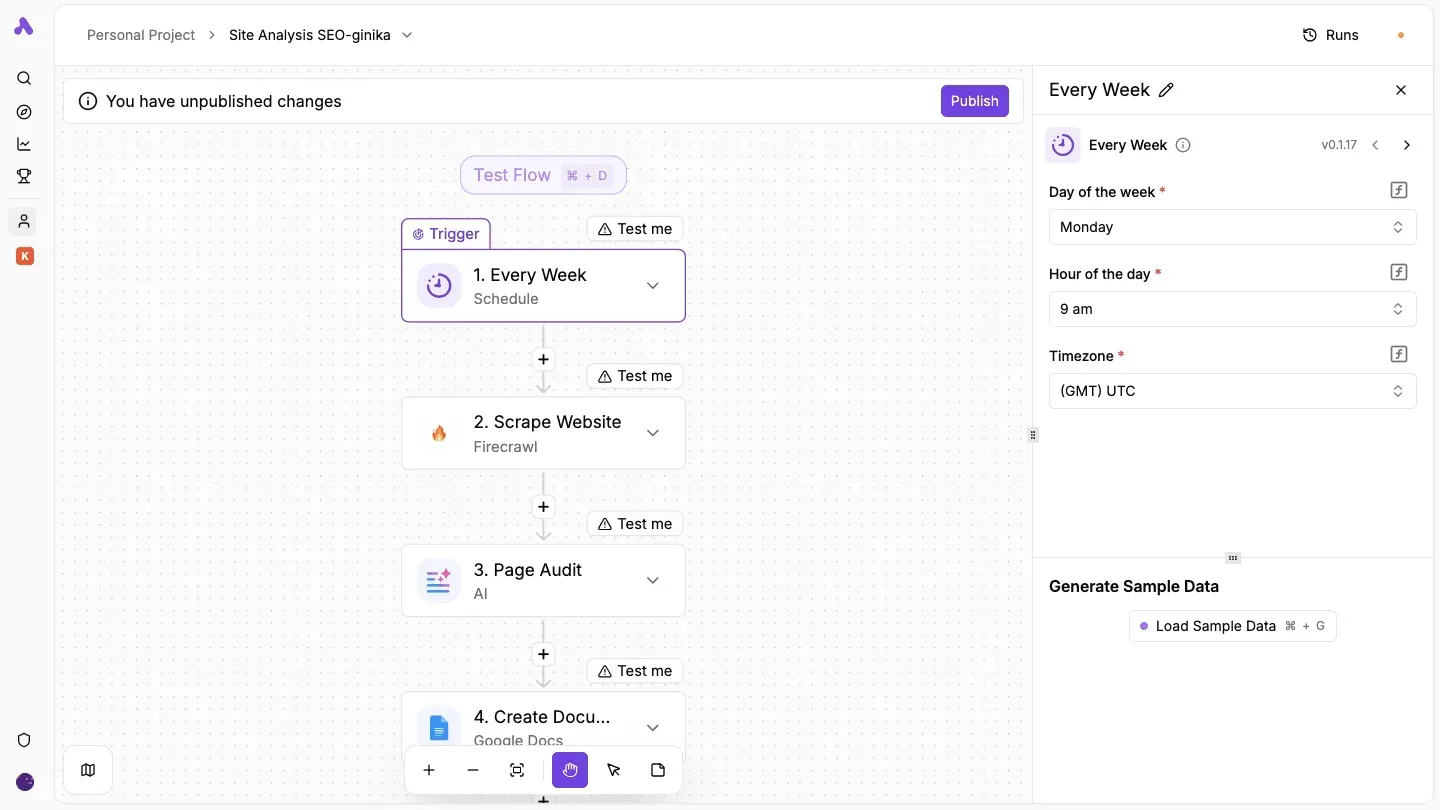
Those four written limits met the team's actual data on the first run, and the next section reports what it did to them.
Documented DeepInfer Limits That the First Run Hit
The first run had nothing to plan against. The only hard numbers DeepInfer's documentation gives are GPU counts per stage;.
Read the table below as a list of questions to settle before a run, not figures to budget around. It lists each limit and marks every cell without a published value.
| Limit | Value per tier | Behaviour at limit | Test run use |
|---|---|---|---|
| Rate limit | not documented | not documented | Ask for a figure before writing retry logic |
| Size cap | not documented | not documented | Send the largest real input first |
| Concurrency | not documented | not documented | Run one job at a time and log the result |
| Timeout | not documented | not documented | Time a full-length job and record where it stops |
| Plan quota | not documented | not documented | Get the allowance in writing before the run |
You can't quote a number from any of these rows, so each gap is a place where the first run could fail without warning.

Rate and concurrency limits
DeepInfer publishes no request rate or job concurrency. The nearest figure is hardware: the DeepSeek DeepInfer deployment Q&A documents 2 – 8 GPUs for prefill and 64 – 128 GPUs for decode.
In practice, decode needs roughly the same number of GPUs as prefill (about 1:1). A trial sized for the prefill stage therefore covers at most one-sixteenth of what the docs say decode needs.

You can't size a test with realistic data in advance, because the docs give no input size cap and no timeout. A job that stops partway gives no way to tell a limit from a fault. Start with your largest real input, not a sample.
A first run can spend money without any stated ceiling, because no plan quota and no overage price is documented. The docs don't say whether going over is queued, throttled, rejected or billed.
Ask for the allowance and the overage terms in writing before the first job.
You can follow the rest of this with the builder open. Start free, no card.
DeepInfer test run errors and their fixes
Anything you can't find on that page, treat as a test-only finding and ask support to confirm it in writing.
DeepInfer authentication and permission errors
When the job needed a scope the connection didn't have, the run failed even though the connection looked authorized. The failed run in the screenshot shows the shape of it.
Quote the run ID to support, because it's all you have: the builder reports it and offers an Edit Run button, but it gives no reason. Copy it, with the time, before you change anything.
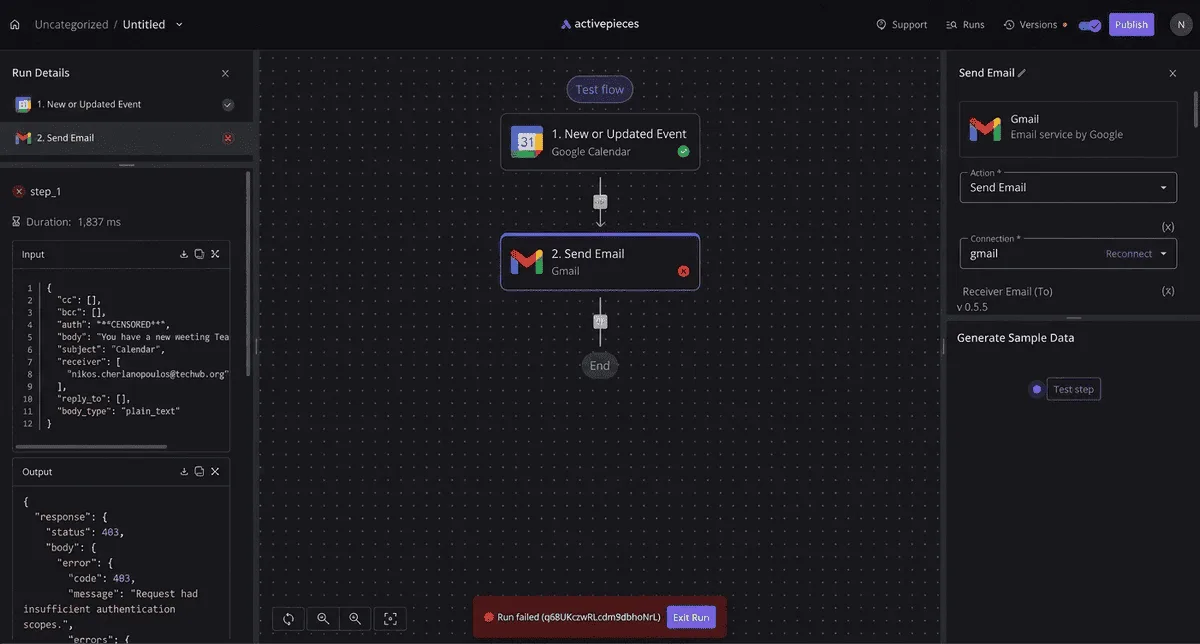
The fix was to re-authorize with the full set of permissions the step needs, then rerun from the failed step instead of from the start. Every rerun after that is a record you could process twice, so check for duplicates.
DeepInfer input format and validation errors
Fields arrived in a shape the step didn't expect, and the run stopped at the step that read them. That made rejected input the cheapest class to fix and the easiest to repeat.
The fix is to compare your source fields against the documented input format before the first job, not after the first rejection. A mismatch you find in advance costs a few minutes. One you find mid-run costs the run.
Limit and timeout errors
These are the errors the written allowance was meant to prevent. A job that exceeded a documented limit stopped partway, and what had been processed before the stop wasn't obviously separable from what had not.
The fix was to split the work into batches that fit inside the limit and log which batch finished last. Record the allowance next to each batch, so the next person doesn't rediscover it.
DeepInfer silent failures with no error
These cost the most, because nothing flagged them. Runs reported success while some records never reached their destination, and we found the gap only by counting records at both ends. Reconcile source and destination counts after every run. No message will tell you to.

Add the hours and affected records for each error to your own log as you go. They are what you will want when you ask for the overage terms.
Passing DeepInfer Output to Other Apps With Activepieces
Results leave DeepInfer by whatever route its documentation lists, a webhook, an API or an export. Activepieces earns a place only when that route needs retries or failure alerts you can't get otherwise.
Check the limits page for that route before the first run. If the docs list none of the three, there's nothing for a workflow tool to attach to, and no tool changes that.
When a Direct DeepInfer Integration Is Enough
If DeepInfer's documentation names a built-in connection to the app that receives your results, use it. One result goes to one destination, the destination is the system your team already reads, and a missed delivery is something someone would notice and rerun by hand.
Put a middle layer here and you get one more account, one more credential and one more place for a run to fail without anyone seeing it.
Read the connection's documented behavior on failure. If it says nothing about what happens when the destination rejects a result, assume the result is dropped, and test that on day one with a deliberately bad destination.
When a separate workflow tool earns its place
Activepieces connects to 747 integrations, counted from its open-source, MIT-licensed monorepo, so the app receiving your results is likely already covered, and every flow it runs sits under your own RBAC and audit logs. Here it would sit between DeepInfer and everything downstream.
A webhook trigger receives the result when DeepInfer sends one, or an HTTP step calls DeepInfer's API on a schedule if the docs describe that route.
From there the same result can fan out to several destinations, and Activepieces can reshape it to fit each one and retry it when a destination is down.
A failed step can also send an alert to a person, so a dropped result shows up as a message rather than a gap found weeks later.
That's the whole case for it, and it's conditional. You need documented output you can reach, more than one destination or a transformation in between, and a cost to silent failure. If you have only one of those, the direct route is simpler.
If DeepInfer's own limits cut a run short, Activepieces can't recover results that were never produced. It handles what happens after a result exists.
Five Rules for Preventing DeepInfer Automation Failures
Because nobody had read the limits page first, the day-one test hit failures, and the team added five rules to block them.
Together they cover the run's whole life, from before it starts to after it's forgotten. The list below sets each rule beside the failure it prevents.
- Check the planned run against the limits you know before starting, since the documentation gives no rate, size, timeout or quota values.
- Cap the test batch at a size the limits comfortably cover, which prevents a failed test from burning the whole allowance in one go.
- Send an alert when a run fails, which prevents a silent stop that looks like success until someone notices the output is missing.
- Record a date to recheck the docs and pricing, which prevents working from limits that have since changed.
- Name one owner for the automation, which prevents a failure that everyone saw and nobody handled.
Before the first run, read the limits page and the pricing page side by side, and write down which published limit your plan comes closest to. Then cap the test batch well under it.
A small batch that fails tells you something. A full batch that fails mid-run tells you the same thing at the full cost.
During the run, the failure alert is the rule that does the most work. Without it, a run that hit a limit and stopped looks identical to a run that has nothing to report.
Send the alert to a place a person actually reads, and include which run failed.
Every month, put the recheck date in a calendar entry, not in someone's memory. On that date, reread the documented limits and the pricing page, and compare them with what the automation now does.
The named owner does this, and also answers the alert. If the owner changes, the entry changes with them.
Frequently asked questions
Where the pages are silent, the answer is "not documented", and every answer below comes only from DeepInfer pages carrying the 11 November 2026 checked date.
An entry with a named owner can still be wrong about what the vendor never wrote down, so these gaps are worth reading before the first run.
Cost and unattended runs
Does DeepInfer automation have a free tier? Not documented.
The checked pages state no free tier, so plan as if a first run could be billed. Get the answer in writing from DeepInfer before you put a team's workload on it.
Can DeepInfer run on a schedule without anyone watching? Not documented.
The checked pages don't say that unattended scheduled runs are supported or what happens when one fails with nobody there. Until you have that answer, a person should watch the first scheduled runs, because a silent failure won't announce itself.
Limit behaviour
What happens to a run that hits a limit halfway? Not documented.
The pages describe limits but say nothing on whether a stopped run resumes, restarts or leaves partial output behind. Treat any half-finished run as unreliable, and test a deliberate limit hit on day one so the behaviour isn't first seen in production.
Integration and change tracking
Does DeepInfer have an API for automating it from other tools? Not documented.
The checked pages don't describe an API for driving DeepInfer from other tools. Anything you build that assumes one has no documented support behind it, so confirm with DeepInfer before designing around it.
Where does DeepInfer publish changes to its limits? Not documented.
The checked pages name no changelog or notice channel for limit changes. A limit can therefore move without warning, so re-read the limits page on a fixed date, and add that date to the entry's owner's calendar.

Related reading
References
Build it
Set this up in minutes.
No code required. Connect your accounts, and Activepieces runs it from there.
Start free Talk to sales