
Devin Integration: How to Set It Up (2026 Guide)

Nov 15, 202614 min read
Connect Devin where tasks already start and keep its permissions narrow. A Devin integration links Devin to Slack, GitHub, a ticket tool or its API, and the fastest path is the narrow one.
If a handoff needs a bit of glue between those tools, a workflow builder like Activepieces can sit in the middle without widening what Devin itself can touch.
A Devin integration is a connection between Devin, the autonomous AI software engineer, and the tools where work begins, such as Slack, GitHub, a ticket tracker or its API, set up with scoped permissions so Devin can only take the actions a given task needs.
This reflects Devin's docs, pricing page and changelog as checked on 15 November 2026.
Connecting Devin to task sources
Quickest way to connect Devin to your team
Pick the one place where your team already says "someone should fix this," and connect Devin there and nowhere else:
- If that sentence is typed in a chat channel, connect the channel.
- If it's filed as a ticket, connect the ticket queue.
- If it's written as a GitHub issue, connect the repository.
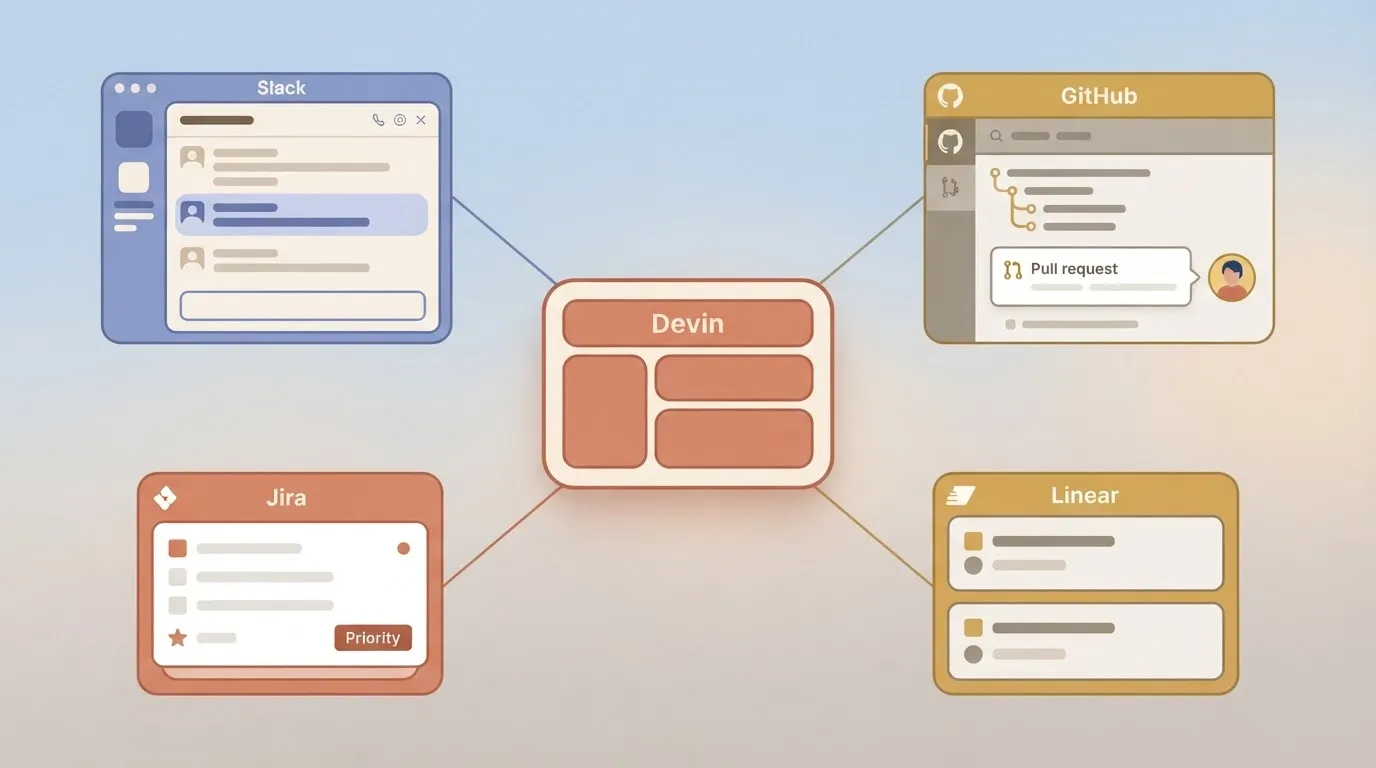
In Devin's documentation, the connections fall into these groups:
- Slack, where a teammate can hand Devin a task in a thread
- GitHub, where Devin reads repositories and opens pull requests
- Ticket tools such as Jira and Linear, where an issue can become a task
- Devin's own API, for starting and tracking sessions from your own systems
What an integration can and cannot do
Do not expect the integration to decide which tasks deserve an agent, or to shrink Devin's access to match the task. It delivers a task to Devin and carries the result back to where you can review it.
Permissions are set on the connection, so a broad grant on the repository connection stays broad whatever the ticket said.
For sources outside the native list, you bridge through the API, and Activepieces lets you do it narrowly: once you connect a integration there, an agent can call it, because the action that runs as a flow step is also a tool on the project's MCP server, reachable from Claude, ChatGPT, Cursor or your own agent.
**Permissions are set on the connection, so a broad grant on the repository connection stays broad whatever the ticket said.
This takes minutes, not a project: automate it in Activepieces free.
Numbered setup steps that work today
Touch one repository and one channel on the first setup, and nothing else.
- Install Devin's GitHub app on your organization.
- Grant it a single test repository, not all repositories.
- Confirm Devin can see that repository and no others.
- Install the Slack integration.
- Invite Devin to one channel.
- Tag it there with a small task, such as a typo fix or a failing lint rule.
- Check that a session appears and that it is working in the test repository.

Checking each connection
If a step fails its check, stop there; later steps will only hide the cause.
You need permission to install apps on the GitHub organization. Install the app, choose the selected-repositories option, and pick the test repo.
The check's in Devin's own repository list: if it shows more than you granted, the permissions are wrong, and you fix that before anything else.
For Slack, you need rights to add apps to the workspace. Install it, then invite Devin only to the channel you picked.
The check's a session appearing, linked from the thread. A silent channel means the invite or the install failed, not that Devin's thinking.
Treat the issue tracker, Linear or Jira, as a third connection, added only after Slack works. Authorize it against one project or team, then assign Devin a single low-stakes ticket.
The check's that the ticket produces a session.
Use the API last, once the human-triggered paths work. Create a credential with the narrowest scope your account allows, send one session request against the test repository, and confirm the session shows up alongside the ones from Slack.

Settings, limits, and error fixes
When something breaks after you narrow access, it is almost always one of four settings:
- the permission granted
- the event that starts a session
- the idle timeout
- the plan
Checked 2026-11-15, the table shows what each entry point needs and what starts work.
| Entry point | Permission or scope | What starts a session | Idle sleep |
|---|---|---|---|
| GitHub | Access to named repositories only | Mentioning Devin on an issue or pull request | 30 min default |
| Slack | App installed in the workspace, invited to channels | Mentioning Devin in a thread | 30 min default |
| Linear/Jira | Access to the projects Devin should read | Assigning or tagging Devin on a ticket | 30 min default |
| API | A service key | A create-session call | 5 min |
Plan, usage and concurrency limits
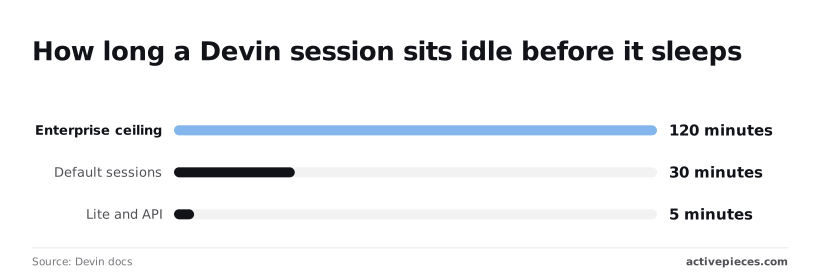
According to the Devin docs, API and Lite sessions sleep after 5 minutes idle, so a reviewer who answers in ten finds a cold session.
According to Devin docs, default sessions sleep after 30 minutes, which covers most review cycles, so you'll stay logged in for a typical review.
Per Devin docs, enterprise extends that ceiling to 120 minutes, which suits slow approval chains.
Because every wake-up consumes usage, a short timeout can cost more than it saves.
Fixing Devin integration errors in Slack and tickets
If Devin doesn't respond in Slack or tickets, check the channel first. A mention in a channel Devin was never invited to produces silence, not an error.
Then check that the ticket project is inside the scope you granted. If a session did start and went quiet, assume it slept and mention Devin again.
When a clone or push fails, the repository's outside the access you granted. Add that one repository, not the organization.
If pushes succeed but the pull request fails, check branch protection. A rule requiring reviews or checks blocks a push, and the fix's a different target branch, not wider permissions.
If you see an authentication error, the key is wrong, expired or scoped to another organization, so reissue it before debugging anything else.
A rate limit error means too many sessions started at once. Queue the requests and retry after a pause instead of looping, because a retry loop spends usage while it waits.

You can follow the rest of this with the builder open. Start free, no card.
The strongest case against integrating Devin at all
Connecting Devin's now so cheap and easy that spend, access and review load can grow faster than finished work.
Devin pricing as the case against integrating
The number that moved's the entry price. According to Cognition, Devin's cheapest paid plan cost $500 a month in December 2024 and $20 a month in April 2025, so even a solo developer could now afford a subscription.

It was still $20 in April 2026. That's a 96% drop, so price no longer forces anyone to decide which tickets deserve an agent.
With that gate gone, the skeptic expects teams to wire Devin to every ticket source. Vague tickets then burn usage on guesses, write access lets the agent push to repositories nobody scoped, and each pull request lands in a reviewer's queue.
| The skeptic's claim | The number that would disprove it | What it depends on | |
|---|---|---|---|
| Vague tickets burning usage | Unclear tickets turn usage into guesswork | Share of tickets ending in a merged PR, compared with usage spent on those that don't | Whether the ticket states a testable outcome |
| Repo write access | An agent that can write anywhere will | Count of repositories and actions the agent can reach, equal to what its tasks require | How narrowly permissions are scoped |
| PRs costing review time | Review time exceeds time saved | Review minutes per PR below the minutes to write the change by hand | Task size: small, bounded changes review fast |
Why scoped integration still holds
Read closely, the objection's a case against over-connecting, not against connecting. A narrow integration starts Devin only from the queue where tickets already carry acceptance criteria, which addresses the first row.
It grants only the repositories and actions those tickets need, which addresses the second. It restricts the agent to small changes, which addresses the third.
The $20 entry point, per Techcrunch, supports this approach: a pilot on one queue costs little, so you can read the three numbers before widening anything.
If merged-PR share is low or review minutes exceed hand-writing time, you've found the ticket type to exclude, and no permissions were granted beyond that queue.
Triggering Devin from unsupported apps
For a tool Devin has no native integration with, call Devin's API to create a session from the event that starts the work. Post the result back to whoever asked. Where a native integration covers your tool, use that instead; it's less to maintain.
When Devin's native integrations are enough
If the place your tasks start's already one Devin connects to, such as the issue tracker or chat tool your team files work in, stop there.
Build your own trigger only in the narrower case: tasks start in a tool with no native connection, such as a customer-facing intake form, a support queue, or an internal request tracker.
Otherwise people copy the request into Devin by hand. That's a pipeline with no owner, and when someone forgets, the request sits unanswered and nobody can say why.
Building a workflow that triggers Devin sessions
In any automation tool the shape's the same, and Activepieces is one no-code way to build it.
A run there costs 1 credit however many steps it has, so each form submission through the three-step flow below uses 1 of the free plan's 1,000 monthly credits.
The order to build it in:
- Set the trigger on the event that actually starts the task, such as a new form submission, and pass through only the fields Devin needs to understand the request.
- Add an HTTP step that calls Devin's API to create a session, with the task description built from those fields. Use an API credential limited to the repositories this queue touches, so a malformed submission can't reach further than the queue itself.
- Add a step that posts the pull request link to the requester, in the channel or inbox they already watch.
That last step's what gives the flow an owner.
Starting your Devin integration with one repository
Start with one test repository and one entry point, and let nothing widen until you've measured what Devin's output costs you to review.
Follow this sequence:
- Connect GitHub to a single throwaway or low-stakes repository, with permissions limited to that repo.
- Add one entry point, such as a labelled issue or a single channel message, that starts a task.
- Run three small, well-specified tasks. Each needs a stated outcome and a way to check it, so a reviewer can say pass or fail without interpreting intent.
- Record review minutes and usage for each run, in a sheet with a named owner. "We'll eyeball it" isn't a record, and without one you can't tell a good week from a lucky one.
- Widen permissions only if the results hold, and widen one thing at a time: a second repo, or one more action, never both.
Give Devin tasks with a visible finish line. Examples are bumping a dependency and fixing what breaks, adding tests around an existing function, or fixing a bug that already has a reproducing case.
Avoid tasks where the finish line's a matter of opinion. Examples are authentication changes, database migrations, anything touching production configuration, and tickets that say "clean this up."
Hand Devin a vague ticket and it produces a confident diff, and a reviewer then has to work out what was meant before judging whether it was delivered.
What Activepieces does about this
The risk in this article is an agent wired to everything at once, so Activepieces works the other way around: you pick the few actions an agent may take and leave the rest unreachable.
Every connector in Activepieces is also a tool on the project's MCP server. The same Slack, Jira or Google Sheets action that runs as a flow step can be called by Claude, ChatGPT, Cursor or your own agent.
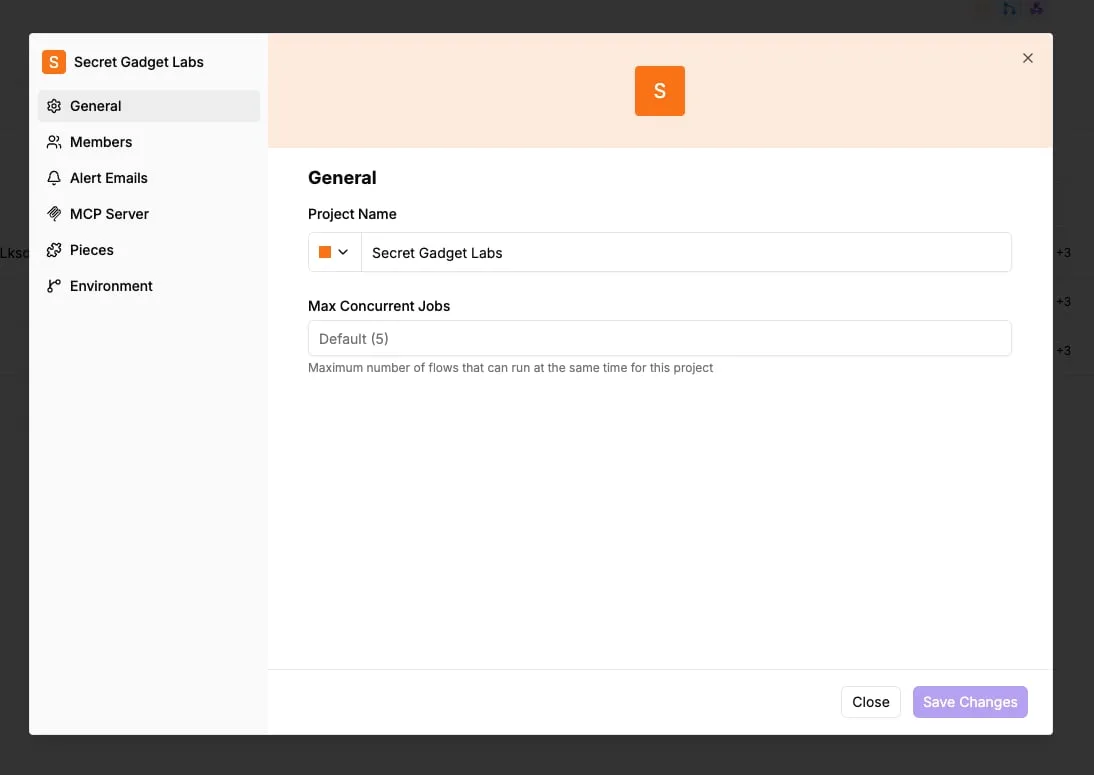
You switch on the three or four actions the task needs and nothing else, and you don't publish a second catalog for the agent.
For Devin, that gives you a narrow bridge from sources it doesn't cover natively.
A flow takes the trigger, such as a form submission or a support-queue item, passes only the fields Devin needs, calls its API with a credential scoped to one repository, and posts the pull request link back to the requester.
Each step is configured and tested on its own, so widening access means changing one step.
The code is open. The community edition is MIT-licensed, and the connectors live in packages/integrations in the public repo, so you can read what an action does before you give an agent access to it. Cost stays easy to predict as well.
A run is 1 credit however many steps it has, and the free plan includes 1,000 credits a month, enough to pilot one queue and measure review minutes before you widen anything.
Frequently asked questions
Once you compare review minutes against work saved, a few narrow questions are left, and each has a short answer.
Does Devin integrate with Jira and Linear? Yes, both are supported as places where a task can start, alongside Slack. Connect one project or team first, not the whole workspace.
If a ticket can trigger a session, then everyone who can file or label a ticket can spend your usage, so decide who that's before you switch it on.
Can I use Devin without connecting GitHub? Yes, if your code lives on another supported host, since GitHub's one of several source integrations.
Without any repository connection, Devin can still work in a session, but it has nothing to open a pull request against. That makes the output harder to review, so the review minutes you measured earlier will likely go up.
Does Devin have a public API? Yes. It lets you create and monitor sessions from your own systems, which is the cleanest way to start work from a trigger you control instead of a chat message.
Issue a dedicated credential for each use, so that when one misbehaves you can revoke it without breaking the others.
Can Devin work in a private repository?
Yes. Grant access to the specific repositories it needs, not the whole organization. Write access is needed only if you want Devin to push branches and open pull requests.
Pair that with branch protection and required human review on the main branch, so a session can propose a change but never merge one.
If a session runs away, that is a separate matter from permissions. Terminate it from the session view, then revoke the credential behind the integration that started it. Stopping the session ends the spend, while revoking the credential prevents the same trigger from starting another.
Is Devin integration included in every plan? Not necessarily. Which integrations and API features you get depends on your plan, and vendors change those tiers often.
Check the current pricing page against the exact triggers you intend to use before you commit. If a trigger you need sits on a higher tier, count that cost against the work saved, the same way you counted review minutes.
Related reading
References
Build it
Set this up in minutes.
No code required. Connect your accounts, and Activepieces runs it from there.
Start free Talk to sales