
Is Workato HIPAA-Compliant? BAA, Plans, and Controls

Oct 19, 202616 min read
Workato supports HIPAA workloads today, but which plan includes the BAA, and at what price, isn't published; as of 2026-10-19 that's an "ask sales" answer.
The claims live on Workato's trust page and its pricing page, and both are worth reading before a call, much as you would with any other automation vendor, including open-source-leaning ones like Activepieces.
Workato HIPAA Compliance Defined, With the Requirements Table
What 'HIPAA compliant' means for an automation platform
No regulator certifies an automation platform as HIPAA compliant. What exists is a vendor that signs a business associate agreement, secures its own infrastructure, and can show an auditor evidence of both. That covers the vendor's side only.
If a recipe writes a patient record into a job log, that is your incident, not theirs. The recipes, connectors and error handlers your team builds sit on your side.
If a recipe writes a patient record into a job log, that is your incident, not theirs.
So the paperwork buys you a legal footing, and the controls you configure decide whether you stay on it.
Requirement, offer, plan and cost, as published
The table below lines up the seven things a compliance reviewer will ask for. Read the plan and cost columns first: every "ask sales" is a line item you can't price into a client retainer until someone quotes it.
| Requirement | What Workato offers | Plan | Cost |
|---|---|---|---|
| BAA | Offered to customers handling PHI | Ask sales | Ask sales |
| SOC 2 report | Report available to customers | Ask sales | Ask sales |
| HIPAA attestation | Stated on its trust page | Ask sales | Ask sales |
| Encryption | Described on its trust page | Ask sales | Ask sales |
| Audit logs | Platform activity logging | Ask sales | Ask sales |
| SSO/RBAC | Single sign-on and role-based access | Ask sales | Ask sales |
| Log retention | Retention period not stated publicly | Ask sales | Ask sales |
Every plan and cost cell reads the same way, so you can't tell from public pages whether HIPAA features sit in a base tier or in an add-on. Get that in writing before you bill any client for the platform.
What Workato does not publish
Log retention is the gap that matters most. If PHI lands in a job log, retention decides how long it sits there and who can read it.
Ask for the retention window, whether you can shorten it, and whether masking is configurable per recipe.
Everything below works on Activepieces' free plan. Start without code or a credit card.
Patient data in workflow logs
In this illustrative composite, a clinic-group operations team found patient data in its automation run logs because its own intake workflow had copied full payloads into step-level history.
The timeline below is invented for illustration; it shows how an ordinary failure alert becomes a disclosure question, so take from it that the vendor's paperwork never entered the story.
- 02:10: the alert fires on a failed intake sync.
- The on-call engineer opens the run log.
- A single step shows the full intake payload.
- The engineer checks who has viewer access.
- The engineer pauses the workflow.
- 09:00: the operations lead confirms the discovery.
Each step is small, and the decisive one is the fourth: the access question determines whether this is a cleanup or a reportable event.
02:10: the sync fails and the error carries a patient record
The alert is routine, a failed sync between the intake form and the scheduling system. The engineer opens the run log expecting a status code and finds the whole submission instead: name, date of birth, reason for visit.
The workflow builder had mapped the entire payload into a step so it would be easy to debug. That convenience is the leak, and no vendor certification touches it, because the clinic's own design put the data there.
By 06:30 a morning analyst searching older runs finds the same fields in every one. Four days of history means every patient who submitted intake in that window is sitting in plain view, so the problem isn't one bad run but a standing pattern.
Anyone cleaning up has to treat each retained run as a copy of a record.
Who had access to the PHI run logs
The operations lead confirms the discovery and asks the question that sets the cost: who could open those logs? In this composite, the viewer list included contractors and a shared team login, none of whom needed patient data to do their jobs.
A shared account is the quiet cross-subsidy here, since one login's broad access was carrying risk for every client behind it. That access list, not the incident itself, is what the controls on your side must fix first.

What the incident cost in hours and records
Three things hit the business directly: engineer hours, records exposed and days of history purged. On top of them runs a 60-day notification clock that starts when you discover the leak.
Illustrative internal costs of a PHI log leak
The composite figures below are illustrative, not measurements from a real client. The chart shows each cost in its own unit, so read the bars against each other for shape, not for a total.
Hours are what you would invoice. Exposed records are what the clock is counted from. Purged days are what you lose to stop the exposure.
Price the engineer-hours bar first if you run agency ops. Tracing a leak through a workflow's run history is unbilled unless the retainer names it, so a shared account quietly makes every other client subsidize the one whose workflow leaked.
The purged-history bar is a trade. Deleting logs removes the exposed data but also the evidence of who viewed it, so you pay twice for the same cleanup.
Together the bars show that the cheapest unit to prevent is the one that looks smallest, the records. Every other cost scales with how many were visible and for how long. What follows is what the regulator charges for not having looked.
Published regulatory figures
The 60-day limit comes from the HIPAA Breach Notification Rule: notice to affected individuals is due without unreasonable delay and no later than 60 days after discovery.
Treat 60 days as a ceiling, not a target, because the days spent purging and tracing come out of it.
The settlements are published, and they all sit in the same category: failing to run a proper risk analysis.
Northeast Radiology paid $350,000, and Health Fitness paid $227,816, which means one organization's settlement obligation exceeded the other by more than $122,000.
VPN Solutions paid $90,000, Elgon $80,000, Comstar $75,000 and Comprehensive Neuro $25,000, so the enforcement action touched at least four entities across a wide cost spectrum.

The top figure is fourteen times the bottom one. That range matters more than any one entry, because the penalty tracked the organization's scale and the gaps found, not the bare fact of a violation.
A written analysis of your own workflows is the cheapest document in this section to produce.
Why the signed BAA didn't prevent the leak
Shared responsibility: vendor safeguards versus customer setup
Your own workflow review matters because a business associate agreement (BAA) and a vendor audit cover only the vendor's infrastructure. You decide what data enters each step, who holds roles, and how long logs are kept.
That holds for Workato and for every comparable platform. A leak through a misconfigured workflow breaks no clause in the vendor's paperwork, so the vendor's attestation won't protect you from it.
Three mistakes buyers make with any HIPAA-eligible platform
The first mistake is treating the signed BAA as a control rather than a contract. The second is reading the vendor's audit report as if it covered your workflows. The third is shipping a PHI-handling workflow without anyone reviewing it first.
"Our vendor was compliant" is not a defense regulators accept. According to HHS OCR, 31,191 investigated complaints ended in corrective action, against 15,561 closed with no violation found.
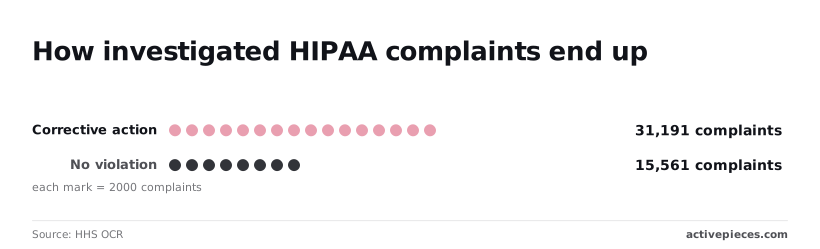
So about two in three investigated complaints required the organization to fix something, and an investigation is more likely to leave you with a remediation plan than a clean closure.
How logs, connectors and roles expand PHI exposure
Run history is the usual place a workflow's PHI ends up outside its intended path, and every item below widens it. The chart of complaint outcomes shows how often that exposure ends in corrective action, so check your own workflows against this list:

- Logging full payloads in step output, which copies PHI into every run record
- Broad viewer roles, which let people with no clinical need read those records
- Long log retention, which keeps that copy long after the workflow's purpose is served
- Unvetted connectors in PHI flows, which send data to services your BAA may not cover
- No review before go-live, so none of the above is caught while it's cheap to fix
Each mistake costs little to avoid at build time and a great deal to unwind after an incident, because deleting exposed logs doesn't undo who already saw them. Fixing them is mostly configuration work you can finish before a security review begins.
Vendors usually keep control back in the build you can put inside your own network, shipping it without the access and audit features and leaving the full set in their paid cloud.

Activepieces doesn't sell a smaller product to the teams that need the most control.
The air-gapped build carries audit logs, custom RBAC, SSO, SCIM, release management and secret manager integration, the same set the managed cloud offers, so run history can stay inside your network with the viewer roles and audit trail intact.
Regulated and public-sector organisations run the air-gapped edition in production, and MoneyGram, Moneypenny, Alan and FundingSocieties run Activepieces too. It carries no HIPAA certification or BAA, so the controls on your side stay your work either way.
Easier to see it running than to read about it: set it up free, no card.
Workato HIPAA rules that prevent repeat leaks
Each rule that stopped a repeat is small, has a named owner, and can be enforced without buying anything new.
The table below pairs every rule with the leak it closes and the person who answers for it, so you can see at a glance which ones are settings and which are process.
| Rule | What it prevents | Product setting or process | Owner |
|---|---|---|---|
| Mask PHI fields | Patient names and IDs sitting in step output | Drop or mask fields before any step that stores output | Workflow builder |
| Shorter retention | Old run history becoming a standing archive of PHI | Shortest run-history retention the platform allows | Platform admin |
| Split roles | Contractors reading run history they have no need to see | Separate build, deploy, and view-logs permissions | Platform admin |
| Connector allow-list | PHI flowing to apps without a business associate agreement (BAA) | Approved-connector list for PHI workflows | Security lead |
| PHI sign-off | Unreviewed workflows going live | Written approval before activation | Compliance officer |
| Alert on unmasked identifiers | Masking that silently stops working | Log scan that pages on identifier patterns | Security lead |
The first two rows are the ones that matter most, so start there.
Mask PHI before it reaches workflow logs
Masking belongs at the step that first touches the data, not at the log. If a field is never stored, nobody has to defend its retention or its readers later.
Treat any new field from a clinical system as sensitive until someone says otherwise, and have the builder drop what the workflow doesn't need.
Your proof is the alert row: a scan for identifier patterns tells you the day a change breaks masking, rather than the day an auditor finds it.
Limit log retention and restrict access to PHI
Run history is a copy of your patient data that you didn't budget for. Shorten how long it lives, then shrink who can open it.
Role splitting is also a billing point: when one shared admin login serves every client, the client with PHI is quietly getting protection the others are subsidizing, or the others are exposed to it.
Give PHI work its own roles and charge for the review time.
No setting replaces the last rule, sign-off, which is the process control. The approver checks the connector against the allow-list, confirms masking is in place, and records who approved it. Without that record, the allow-list is a suggestion.
Activepieces for Teams That Need Data to Stay Inside
Activepieces lets a regulated team keep PHI in its own environment, because its MIT-licensed core runs self-hosted or fully air-gapped. It claims no HIPAA certification or BAA, so the team carries the compliance work for that deployment.
What the platform offers, by requirement
Here's what Activepieces states it offers, with the same enterprise feature list in the self-hosted air-gapped docs as in the managed cloud, so a reviewer can check each line against the requirement it answers:
- SOC 2 Type II, covering the vendor's own operations
- SSO and SCIM, so access follows your identity provider and leavers lose it automatically
- Custom RBAC, so a contractor can build flows without seeing the connections that carry PHI
- Audit logs, so you can show who changed a workflow and when
- Managed cloud in an EU or US region
- Self-host or air-gap deployment
None of this stops a flow you built from writing PHI into a log. RBAC and audit logs limit who can build and let you reconstruct what happened, but the logging choices inside each flow stay yours.
With no BAA on offer, the paperwork that would normally let a vendor share that risk doesn't exist here, and you should price the review time into your own side of the ledger.
Self-host or managed cloud: the trade-off
Managed cloud costs you the least effort. Activepieces runs the infrastructure, you pick an EU or US region to fit residency rules, and the free plan is $0 with unlimited flows, so a reviewer can try it before anything is signed.
The catch is that your workflow data now sits in the vendor's environment, which is exactly the boundary a PHI-handling team has to justify to a reviewer.
Self-hosting, or running air-gapped, moves that boundary inside your network. Data never leaves your environment, and you control retention and log destinations. The cost is that patching, backups, uptime and access hardening become your labor.
Teams forget to price that labor. It's easy for a shared platform team to absorb it quietly while one department's compliance-heavy workflows get billed as if they were ordinary ones. If a business unit needs this isolation, it should carry the cost of it.

For the SOC 2 report, security documents and enterprise pricing, go through Activepieces sales. Ask them to put in writing what they cover and what stays with you, because that's the line a reviewer will test.
Frequently asked questions
Does Workato sign a BAA, and on which plan?
Get that answer from Workato in writing, because a BAA is a contract term tied to a plan, not a feature on a pricing grid. Its trust page is the place to start, and the signed document is the place to finish.
If your agency runs several clients in one shared workspace, ask whether the BAA covers that workspace or only a dedicated one. Otherwise one healthcare client may be riding on a plan the others are subsidizing.
Does using a HIPAA-eligible platform make my workflows compliant? No. Eligibility covers the vendor's infrastructure, and your workflows are still yours to build safely.
The common failure is a recipe that writes patient details into run logs, or passes them to a step that sits outside any agreement. The vendor's paperwork never sees that. Your reviewer will.
Which Workato connectors are in scope for PHI?
Ask Workato for the list in writing rather than assuming every connector qualifies. The connector is only half the question.
Say a workflow reads a record in a covered system and posts a summary to a team chat tool. It has moved PHI into a tool with no agreement behind it. Scope is set by where the data lands, not by where it started.
What should I ask for in a security review of an automation vendor? Ask questions whose answers you can file with the contract. The set below separates paperwork from controls, so use it with every vendor, Workato included:
- Will you sign a BAA, and which plan does it attach to?
- What do run logs store: inputs, outputs, or both?
- How long are those logs kept?
- Who can view them, inside your company and inside ours?
- Can fields be masked before they reach the logs?
- Where is the data hosted, and can we choose the region?
A vendor that answers all six in writing has told you where its responsibility ends and yours begins.
Activepieces lets you test the hosting and log-storage answers yourself, since its core is MIT-licensed: clone the repository, read the queue and worker architecture, and run it self-hosted or air-gapped before deciding.