Dreamina MCP: Setup Guide and Credit Costs (2026)

Nov 15, 202614 min read
Dreamina MCP is a Model Context Protocol server that exposes Dreamina's image and video generation as tools an AI client can call.
The assistant asks, the server translates the request, and Dreamina generates and bills for it, much as it would when the same client is wired into a workflow builder like Activepieces.

Dreamina MCP refers to the practice of connecting an AI assistant to Dreamina through the Model Context Protocol, so the assistant can generate images and videos on its own and every call it makes is charged against the account's credits.
Dreamina MCP Defined and How the Connection Works
Client, server and tool: the three parts
Start with the client: it's the AI assistant or app you talk to. The server's a small program that advertises what it can do. The tool's one named action on that server, such as "generate an image", with parameters the model fills in.

A tool call goes out, a generated asset comes back, and the meter moves every time. Nothing in the protocol sits between the call and the meter.
Whether a call should happen, how many may happen, or who gets told afterward, MCP doesn't decide. It standardizes the plumbing.
Official or community server: what the vendor pages say
I'm not asserting that Dreamina publishes an official MCP server, as of this check on 2026-11-15. Treat any server you find as community-built unless Dreamina's own documentation links to its repository.
That matters because the server holds your Dreamina credentials and spends your credits. A community server is code you're trusting with a billing relationship. Read it before you run it.
You need four things in place first:
- A Dreamina account with credits you're willing to lose.
- An MCP-capable client, whether a desktop assistant, an editor agent, or a workflow platform.
- A server you have read, with its credentials stored outside the prompt.
- A decision on who can trigger it, and whether anyone is watching.
Connecting takes minutes. Deciding what the agent may spend while you sleep takes longer, and the connection works fine without it.
This takes minutes, not a project: automate it in Activepieces free.
The 02:14 Overnight Run That Burned the Credits
Without a cap, one failing retry loop on video generations can burn several months of a small plan's credits before anyone wakes up. Here's a constructed team, not a real one, and every number below is assumed.
02:14:07 generate_video -> error: render_timeout (retrying)Asked for a product clip, the agent gets a timeout and treats it as a reason to try again. It retries every three minutes. By 03:00 that's 15 generations, and nothing in the setup says stop.

By 07:30, another 90 generations have gone through. No approval step interrupts it, and no log line names the cost, so no one could tell it was happening.
At 08:15 the loop is still running, and the team stops it at 120 generations. Many outputs are near-duplicates, so someone has to sort them by hand.
The bill in credits, hours and money
Here's how the night adds up and what to take from it: the per-generation cost's the lever, and the loop count multiplies it.
| Figure | How derived |
|---|---|
| 120 generations | One every 3 minutes, 02:14 to 08:15 |
| 100 credits per generation | Assumed for illustration, not a quoted price |
| 12,000 credits | 120 × 100 |
| 3 cleanup hours | Assumed, sorting and deleting duplicates |
| $150 | 3 hours at an assumed $50 an hour; credit cost not converted |
Set 12,000 credits against the monthly allowances HoneyVid lists. Basic gives 1,575, so the night costs about 7.6 months of it. Standard gives 3,885, about three months.

Advanced gives 17,600, so the night takes roughly 68% of a month. Ultra gives 59,000, about a fifth.
On the two smaller tiers the allowance's gone long before 08:15, which means by mid-morning the service's inaccessible.
Why an Unattended Agent Overspent on Dreamina
Nothing in the tool path said stop:
- The model chose when to call Dreamina
- The model kept calling after errors
- The model spent a shared credit balance with no cap, no approval and no record of which call did it
Once MCP exposes Dreamina's generation tools to the assistant, the model decides when to use them. "Keep iterating until it looks right" is an instruction with no end condition, and the protocol doesn't supply one.
Why Dreamina MCP credits need a spending cap
Because every generation burns credits, the bill scales with the loop. A GCP coding loop billed $82,000, which means a loop's cost is limited only by the account's ceiling.
A Copilot Studio agent billed $47,914, revealing the need for agent-level cost controls. An Anthropic API loop billed $9,000, and a DN42 network scan billed $6,531.30, meaning both services are significant cost vectors.

Even the smallest, a Claude Code loop at $2,100, would drain a typical creative budget overnight.
To the model, a rate-limit or timeout error reads as "try again." Each retry's a fresh paid call, so the failure mode is the spending mode.
Same credential, same account: the agent used the one I use by hand. Without a call log, the morning showed a balance of zero and no way to say which prompt drained it.
To the model, a rate-limit or timeout error reads as "try again." Each retry's a fresh paid call, so the failure mode is the spending mode.
| Mistake | What it caused here | How visible it was | Cheapest fix |
|---|---|---|---|
| No spend cap | Credits ran until the balance hit zero | Invisible until the morning | Hard credit limit on the account |
| No approval | Every call ran unreviewed | Silent | Require confirmation above a call count |
| Broad credentials | The agent could spend the whole account | Silent | A separate key with its own small balance |
| No call log | No way to trace the spend | Obvious only after the fact | Log each call's prompt and cost |
| Vague prompt | Endless "improve it" retries | Looked like normal work | State a maximum number of attempts |
Each cheapest fix is configuration, not code, so none needs a protocol change.
You can follow the rest of this with the builder open. Start free, no card.
Rules established after the Dreamina incident
After the incident the team capped daily credits and retries, put approval on costly generations, scoped the key, and started reading the log each morning. Only the approval and retry rules live in the client; the rest needed tooling outside it.
Read the table for where each control sits, and read the Dreamina column as strictly what the docs state: where documentation is silent, we assumed the control doesn't exist.
| Control | Sits in client | In Dreamina account (as documented) | Needs outside tooling |
|---|---|---|---|
| Daily credit ceiling | No | Not documented | Yes, a proxy that counts spend |
| Approval for costly generations | Yes, per-tool prompts | Not documented | No |
| Scoped credential | No | Not documented | Yes, a separate key store or account |
| Retry limit | Yes, loop iteration cap | Not documented | No |
| Morning log review | No | Not documented | Yes, a call log you read |
That column is mostly empty, so the guardrails're yours to build.
Set a hard daily credit ceiling in a proxy between the agent and the tool, and cap retries in the client's loop. The ceiling stops a runaway job at a number you chose. The retry cap stops one failed call from becoming forty paid ones.
Because video generation costs more than a still image, route it through the client's per-tool approval prompt. Cheap calls run unattended. Expensive ones wait for a human, which overnight means they wait until morning.
9 internet-facing MCP servers had no OAuth sign-in, according to an arXiv survey. On those, the credential's the only gate. Give the agent its own key, separate from your main account, so a leak or a loop's limited to what that key can spend.

Make every call write a line: timestamp, tool, arguments, credits. Read it every morning. Without that file, the next incident gets reconstructed from the invoice.
Activepieces for Capped, Approved Generation Runs
For a repeat generation job, Activepieces, an MIT-licensed automation platform, lets you write the sequence once as a flow, and a run costs 1 credit however many steps it has, with unlimited flows on every plan, including free.
The night above was an agent with a key and nothing else: no role, no log, only code that kept running.
Activepieces puts an agent inside the same access model as your staff: RBAC, SSO and SCIM decide which connections it may use, and the enterprise RBAC docs state that those access policies apply to what an agent may connect to.
In the run detail view, every tool call an agent step makes is listed on its own line with its input and output, which is the call log the table above said was missing.
MoneyGram, Moneypenny, Alan and FundingSocieties run it in production, on an MIT-licensed core with 750 integrations, so a failure here affects these four companies and 750 integration points. None of this replaces a Dreamina MCP server; it governs what runs around one.
A fixed sequence instead of an improvising agent
Where an agent improvises, a workflow doesn't. You write the sequence once: take the brief, build the prompt, request the generation, check the result, deliver it.
Each step is a node, so the agent can't add a sixth step or loop back to the third on a whim.
Put the retry limit on the step, not in a sentence in a prompt the model may ignore. A failed generation stops after the limit and reports, instead of resubmitting forever.
The approval step puts a pause before the expensive node, so nothing's requested until a person says yes.
Exposing the workflow over MCP
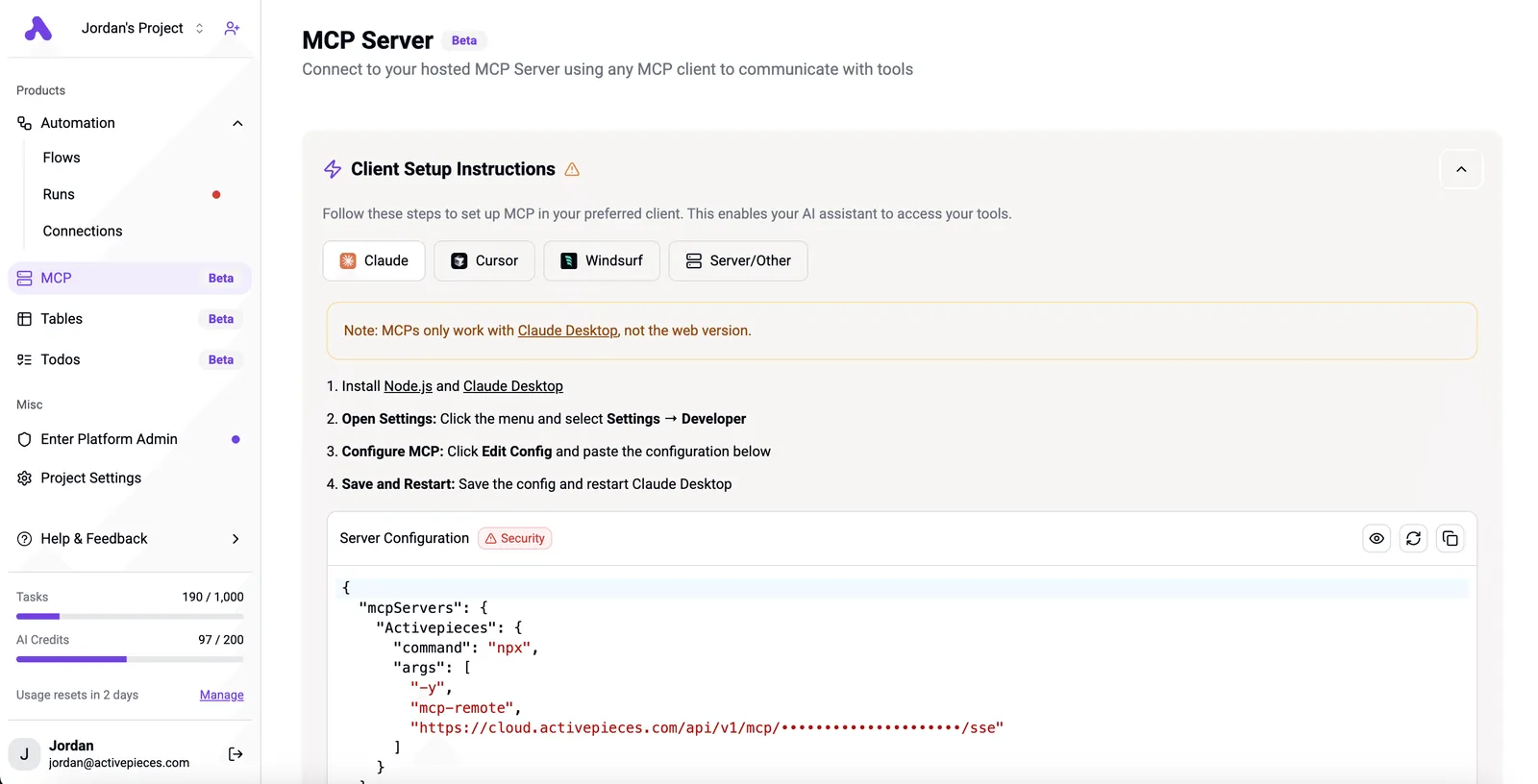
Here's where MCP comes in: Activepieces can expose a flow as a tool to MCP-capable clients such as Claude, ChatGPT and Cursor, and MCPs are included on the free plan, which comes with 1,000 credits a month and unlimited flows.
The assistant then doesn't see "generate anything, any time."
It sees one bounded tool, such as "run the approved product-shot job," and whatever sits behind it's the workflow's steps, limits and pause.
The comparison below shows the difference in where the loop lives, and the point to take from it's that the cap sits in the workflow, outside the model's reach.
What this doesn't change
Do not expect any of this to change Dreamina's pricing. Each generation still costs what Dreamina charges, and a workflow only controls how many you can trigger and who signs off.
Search the 750 integrations in Activepieces' open source monorepo, under packages/integrations/community, for a Dreamina connector before you plan around one, in case it already exists.
If there isn't one, the generation step has to go through a generic HTTP request, which is more setup for you.
The Monday Checklist Before Connecting Dreamina MCP
Before the agent runs unattended, do six steps that close the gaps the log alone cannot: a separate key, a written ceiling, approval and retry limits, one watched run and a daily read.
- Confirm the server's source on Dreamina's own pages, so you install the server they publish and not a lookalike with a similar name.
- Create a separate key for the agent. If it leaks or misbehaves, you revoke one key and your own account keeps working.
- Record the credit ceiling: the most the account can spend before it stops. Write it somewhere the agent can't edit.
- Set approval and retry limits. Anything that spends credits in bulk waits for a human, and a failed generation gets a small, fixed number of retries.
- Run one supervised test.
- Schedule a daily review of the log.
Set Dreamina MCP retry limits and ceiling first
Of everything here, the retry limit matters most. A tool that fails and is simply called again will keep going all night, and every attempt's metered.
The ceiling's your backstop for that case, so write it down before the first call, not after the first surprise bill. Approval is the other brake: set it so video generation, the costlier of the two kinds of call, always pauses for a yes.
Running a supervised first Dreamina MCP test
Sit with it and ask for one image. Watch the call appear in the log, check that it used the separate key, and compare the credits consumed with what you expected.
Then force a failure, for example by revoking the key mid-run, and confirm the agent stops at the retry limit instead of looping.
Daily review of Dreamina MCP credit usage
Read the log every morning, looking for calls you didn't expect, retries that hit the limit and credits used against the ceiling.
Because credit pricing and limits change, recheck Dreamina's pricing page before you set the ceiling and again whenever the numbers in your daily review stop matching what you expect. Everything here was checked on 15 November 2026.
Frequently asked questions
Where the pricing page ends, a few questions stay open, so each answer below says which vendor page should settle it, or flags it as unverified.
I couldn't confirm one, so treat it as unverified. Check Dreamina's own site and documentation for a published server before trusting anything.
A community server is someone else's code holding your account credentials and spending your credits, so read what it calls before you connect it.
Does Dreamina MCP cost extra on top of a Dreamina subscription?
Unverified. The protocol itself isn't a billed product. What matters is whether the server's generation calls draw on the same credits as the web app, and only Dreamina's pricing page can say.
Assume every call spends credits until you have seen your balance move after a single test. That's also why the spend ceiling belongs in your setup, not in your assumptions.
Which AI clients can connect to a Dreamina MCP server?
Any client that speaks MCP and supports the transport the server uses. That's a property of the client, not of Dreamina.
Check your client's documentation for how it adds servers and whether it asks you to approve each tool call.
Approval prompts are the feature you want on, and some clients let you switch them off for unattended runs, which is exactly the configuration this article warns against.
Is MCP the same as an API?
No. An API is an interface to a service. MCP is a protocol that lets an AI client discover and call tools in a uniform way.
A Dreamina MCP server would typically sit in front of Dreamina's generation endpoints and translate between the two. It doesn't add limits, approval or logging on its own, so those remain your job.
Can I use Dreamina MCP without writing code? Possibly, depending on the server and client. Many clients accept a server through a settings screen or a small configuration file, which is configuration rather than programming.
Whether Dreamina's route works that way is unverified. Running a community server may still mean installing and launching software yourself, so look at its setup instructions before you commit.
Related reading
References
Build it
Set this up in minutes.
No code required. Connect your accounts, and Activepieces runs it from there.
Start free Talk to sales