
Elastic Cloud Pricing: Costs by Tier (2026 Guide)

Nov 8, 202615 min read
Elastic Cloud bills by usage, not by seat. You pay hourly resource rates for what your deployment consumes, and the entry price on the pricing page is only the starting point for that meter.
Elastic Cloud pricing is the usage-based model by which Elastic charges hourly for the compute, storage and data transfer a hosted Elasticsearch deployment consumes, with the total set by subscription tier, cloud region and workload shape rather than by a single list rate.
Elastic Cloud pricing in 2026, answered
What Elastic Cloud is
Elastic Cloud is Elastic's managed service for Elasticsearch and Kibana. Elastic runs the clusters, and you send data in and query it out.
Whether that data comes from your app's own code or from a pipeline built in Activepieces, which reaches 747 integrations from an MIT-licensed core, the meter treats it the same way, meaning the breadth of integrations doesn't create metering variables.
Four things set the total:
- Tier: the hardware class your data sits on, which sets the hourly rate per unit of resource.
- Region: the cloud provider and location you deploy in, which shifts that rate up or down.
- Storage: how much data you keep and for how long, which grows with every retained day.
- Data transfer: what moves in and out of the deployment, which is easy to miss until the invoice arrives.
Treat these as multipliers on each other. A cheap rate on the wrong tier still costs more than a fair rate on the right one, and what follows is how the two products apply them differently.
Hosted deployments versus Serverless projects
If you size a hosted deployment yourself, you pay hourly for the capacity you provisioned whether or not queries are running. That suits steady, predictable load, because idle headroom is the cost you're choosing.
On Serverless there is no sizing step, and the bill follows what you actually ingest, retain and search. That suits spiky or unknown load, but it makes the bill follow your traffic, so a busy month costs more.
No entry price appears in this article, because no current figure could be confirmed. The pricing page on elastic.co was last checked on 2026-11-08. Treat any number you find elsewhere as unconfirmed until it matches that page.
If you are running this arithmetic for your own team, see what the same workload costs on Activepieces.
Every Elastic Cloud plan, price and limit
Four hosted subscription levels and two serverless project types make up Elastic Cloud, and they bill on different units, so no single headline rate compares them. Price each against your own ingest, retention and search volume before you pick one.
Elastic Cloud plans compared in a table
Read across each row and you see what you're charged for and what you get, and which rows bill on capacity you reserve and which on data you move. I left out dollar figures I couldn't confirm; read the current number off the pricing page.
| Plan | Starting price | Billing unit | Included | Limits | Best for | Source |
|---|---|---|---|---|---|---|
| Hosted Standard | Lowest hosted rate, varies by region | Reserved capacity per hour | Core search and observability features | Fewer premium features than higher levels | Steady, predictable workloads | Elastic pricing page |
| Hosted Gold | Above Standard | Reserved capacity per hour | Standard plus added features | Feature-gated below Platinum | Teams needing extra controls | Elastic pricing page |
| Hosted Platinum | Quote or pricing page | Reserved capacity per hour | Gold plus advanced features | Price may need a conversation | Security-heavy deployments | Elastic pricing page |
| Hosted Enterprise | Quote or pricing page | Reserved capacity per hour | Full feature set | Price may need a conversation | Large, data-tiered estates | Elastic pricing page |
| Serverless Search | Usage-based, no reserved floor | Ingest, retention, search compute | Managed scaling | Spend follows query load | Spiky or unpredictable search | Elastic pricing page |
| Serverless Observability | Usage-based, no reserved floor | Ingest and retention | Managed scaling | Spend follows data volume | Logs and metrics with variable volume | Elastic pricing page |
Whether or not you use the capacity, hosted rows charge for it. Serverless rows charge for what you use, which is cheaper when load is uneven and harder to forecast when it's not.
Moving up a hosted level buys features, not more capacity. If your workload doesn't need those features, the upgrade is pure overhead on every hour of the bill.
I distrust any level whose price I can't read without a sales call, and Platinum and Enterprise are the ones to check first.
Because Search and Observability are separate projects with separate meters, their spend tracks different things. Search spend tracks queries, while Observability spend tracks the data you keep. Pick the project whose meter matches the thing your app does most.
Usage fees that grow an Elastic Cloud bill
Either per GB ingested on Serverless or per GiB-hour of RAM on hosted deployments, you pay on a meter, and each compounds differently as data grows.
Per GiB-hour of RAM, Hot is $0.095 and Warm is $0.042, with Cold storage at $0.01 per GiB-month.
Over a 730-hour month, a GiB of hot RAM costs about $69, warm about $31, so moving older data down a tier cuts that line by more than half.
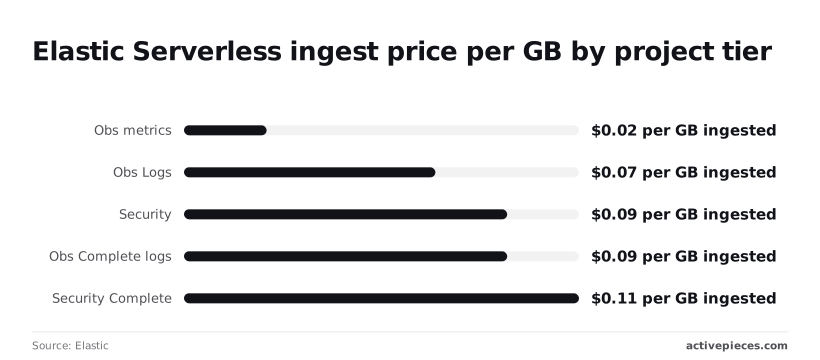
There is no hourly clock on Serverless. Elastic charges $0.023 per GB for observability metrics, $0.07 for Logs Essentials, $0.09 for Security Essentials and Observability Complete logs, and $0.11 for Security Complete.
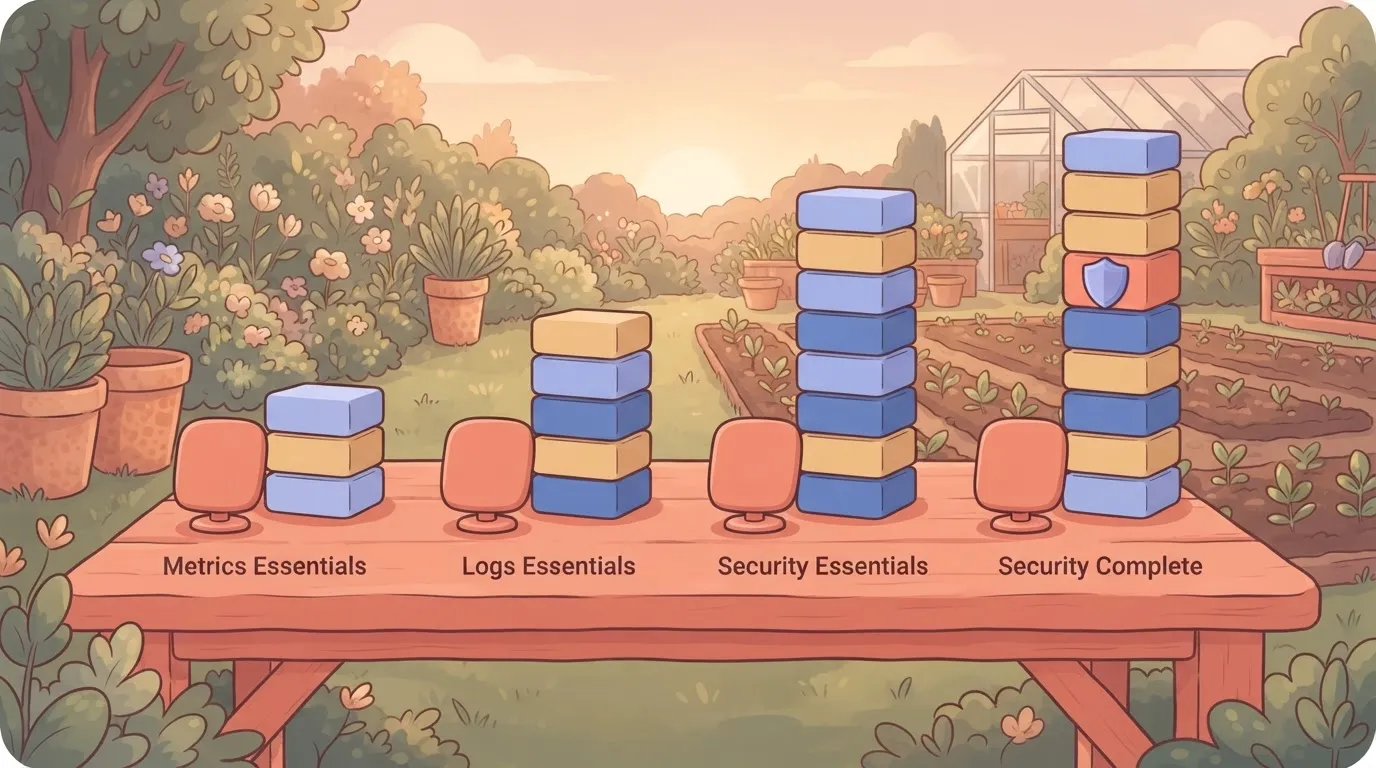
Metrics are the cheap stream, so send them there rather than into a logs tier.
Ingest alone, before retention and transfer:
- 100 GB a month of metrics at $0.023 comes to $2.30, which keeps monitoring costs negligible.
- 500 GB of logs on Logs Essentials at $0.07 comes to $35, so detailed logging remains budget-friendly.
- According to Elastic, 500 GB of security data on Security Complete at $0.11 comes to $55.
The third costs $20 more than the second for the same volume, so the tier label matters as much as the gigabytes.
When a higher Elastic Cloud plan costs less
Moving from Logs Essentials ($0.07) to Complete ($0.09) adds $0.02 per GB, or $20 on every 1,000 GB. Pay it only if you need the extra features.
If you would otherwise run a second tool for them, the $20 is the cheaper side of the trade.
Once volume is steady and predictable, a hosted deployment starts to win. Its cost is set by RAM hours, not by gigabytes, so a fixed cluster stops growing with ingest.
Its warm and cold tiers also hold older data at $0.042 per GiB-hour and $0.01 per GiB-month.
On a quiet day you pay for nothing, which is why Serverless wins when volume is spiky or small.
Hidden Elastic Cloud costs and limits teams hit
Quiet days are where provisioned deployments hide their extra charges. Zones, replicas, data transfer, storage tiers, gated features and commitments all sit on top of the base rate.
Run in more than one zone for high availability and you pay for each. A node priced at X becomes roughly two or three times X once the cluster spans zones, so the quote for one node understates a production cluster.
Replica shards add storage on top, so the same data is billed more than once.
**A node priced at X becomes roughly two or three times X once the cluster spans zones, so the quote for one node understates a production cluster.
Data transfer and storage tier charges
Traffic that crosses zones or leaves the cloud is billed separately from compute, so a chatty cluster costs more than its node count suggests.
Retention is the quieter line. Elasticsearch retention is $0.047 per GB-month, while Security Essentials, Observability Logs Essentials and Observability metrics are each $0.017.
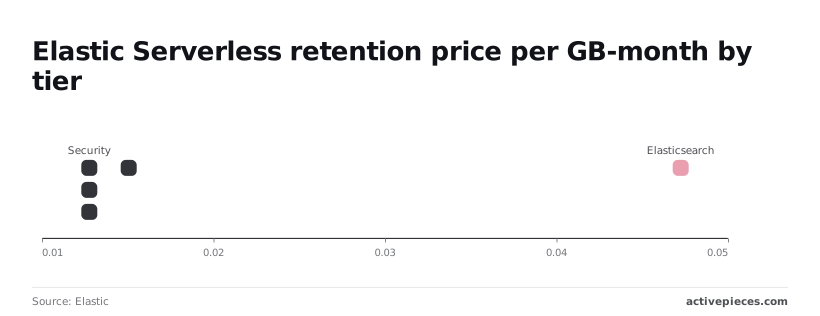
On 1 TB retained, that's $47 against $17 a month per Elastic, nearly three times as much for identical bytes. Security Complete sits at $0.019, or $19 per TB, so it's close to the cheap group.
Those gaps compound with retention length, so the next question is what you're allowed to use at each level.
Elastic Cloud features locked to higher tiers
A feature on the comparison page may not be on your plan, because some capabilities only unlock at higher subscription levels. Check this before you size anything, because upgrading the whole deployment to reach one feature reprices every node.

Buying through a cloud marketplace usually means a prepaid commitment, and unused commitment is money spent on nothing.
Support is priced as its own level, so the plan you can afford and the plan that answers a 3 a.m. page may differ. If a figure needs a sales call to confirm, price it at the worst case.
Worth checking against a plan that does not meter every step: one credit covers a whole run on Activepieces.
Elastic Cloud versus its closest alternatives
Priced at the worst case, Elastic Cloud is cheapest when one deployment must serve search, logs and security together. For a single narrow job, one of the alternatives usually costs less.
Elastic Cloud and alternatives compared in a table
To see which cost drivers apply to your workload and which ones do not, read the table by how each of the five options charges. Read the small-workload column as a method, since none of these figures is a confirmed quote.
| Pricing model | Entry cost | Cost for the same small workload | Bundled | Lock-in | Source date | |
|---|---|---|---|---|---|---|
| Elastic Cloud | Tier, region, storage, transfer | Trial, then a paid tier | Price at the tier you need, plus transfer | Search, logs, security | Moderate | Vendor pricing page |
| Amazon OpenSearch Service | Instance hours and storage | Free tier for new accounts | Instances you size yourself | Search and logs | Moderate, tied to AWS | Vendor pricing page |
| Algolia | Search requests and records | Free starter plan | Grows with query volume | Search only | Higher, proprietary API | Vendor pricing page |
| Grafana Cloud | Usage of logs, metrics, traces | Free tier | Grows with data ingested | Observability only | Lower, open formats | Vendor pricing page |
| Self-hosting | Your servers and your time | No license fee | Hardware plus staff hours | Whatever you build | Lowest | Not applicable |
If you would otherwise run two or three separate services, Elastic Cloud wins. Search, log analysis and security tooling share one deployment, so you pay for one set of storage and one operations burden. Its open-source roots also keep migration realistic.
Algolia is cheaper when your only job is site search and your query volume is modest. Grafana Cloud is cheaper when you need observability and nothing else.
OpenSearch Service suits teams already living inside AWS. Self-hosting is cheapest only until you count the hours someone spends keeping it running.
Watching Elastic Cloud spend with Activepieces
Activepieces won't make Elastic Cloud cheaper. It can tell you the bill is drifting before the invoice does, and because every plan, free included, has unlimited flows, you can run one check per deployment without hitting a flow cap.

That is the part of self-hosting's hidden labor you can automate.
Cost per run applies here too. The Activepieces pricing page lists 1 credit per flow run, any number of steps, so a four-step check that fires once a day uses about 30 of the free plan's 1,000 monthly credits.
Zapier's per-task billing and Make's per-module billing, as set out on their own pricing pages, would each count the four steps separately, so you're charged four times per execution. A surprise at month end costs a full cycle of overspend.
What the Elastic Cloud spend workflow does
It is a scheduled flow with four steps. A timer trigger starts it on a cadence you choose. An HTTP step then calls Elastic's APIs to pull current usage for your deployment.

Usage then goes to a condition step that compares it against a budget you define. If the threshold is crossed, a final step posts to a channel, such as a Slack room or an email list, so a person sees it.
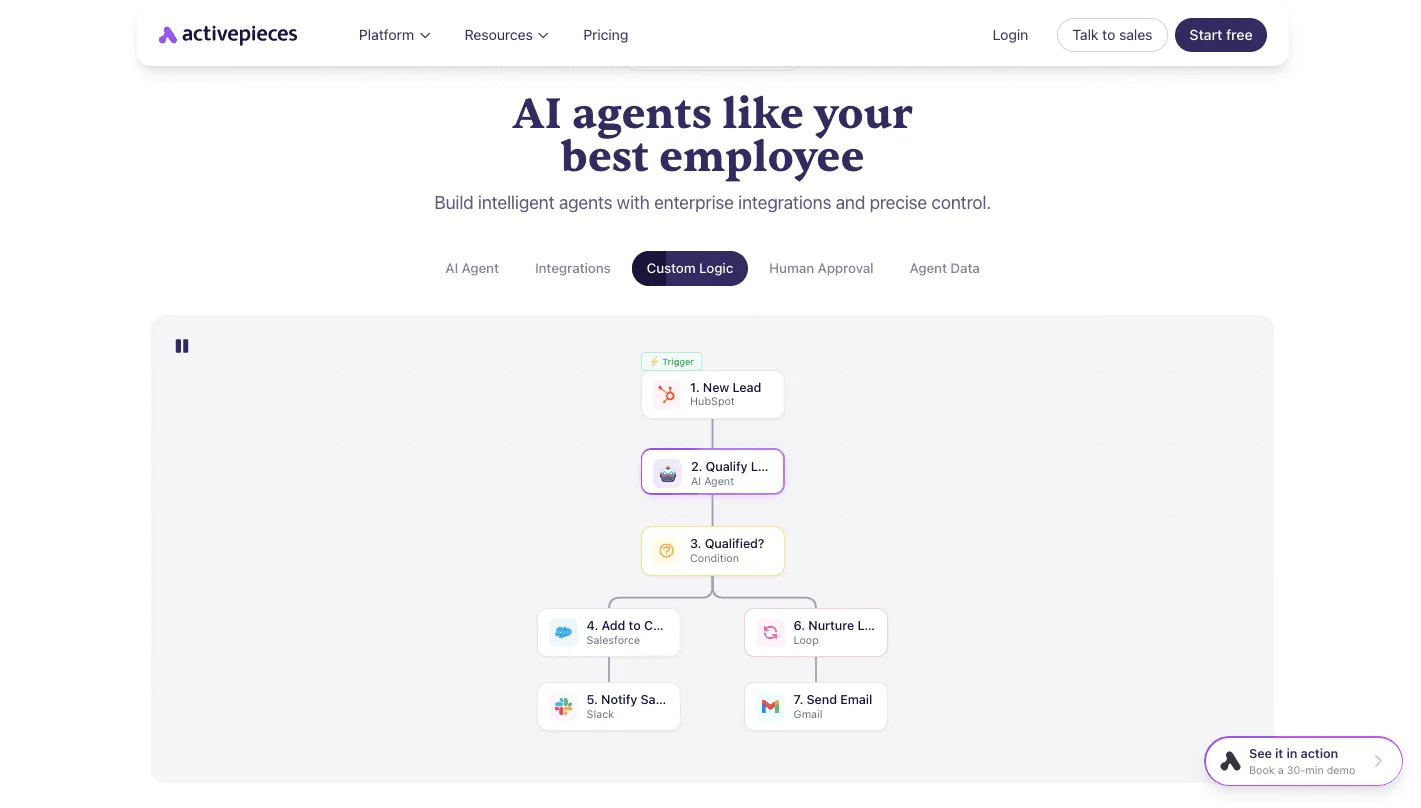
The canvas reads top to bottom: a trigger, a condition that routes the path, and notification steps below it. That last step can be any of the 747 integrations, so the alert lands wherever your on-call already looks.
Swap the lead-qualification steps for usage, budget and alert, and you have the same skeleton. The point to take from it is that the logic is visible, so whoever inherits the flow can see why an alert fired without reading code.
Treat what this adds as monitoring only. It reads numbers and reports them. Tier, region, storage and data transfer still set what you pay, and changing those remains your decision.
You also take on a small maintenance job: if the API response changes, your flow breaks quietly unless you test it.
When Elastic Cloud built-in alerts are enough
If your question is simply 'tell me when spend crosses a line,' start with the alerting and billing notifications Elastic already provides in its console.
They cost you no build time and no flow to maintain, and for a single deployment with a steady workload they're usually sufficient.
Reach for a custom workflow when the rule is yours rather than the vendor's. A budget per team, a comparison across several deployments, or a message routed into the channel where your on-call already looks all qualify.
Without one of those needs, the extra moving part is a cost, not a saving.
Seven steps to reduce your Elastic Cloud bill
Drop whatever extra component you can't tie to a need, then work from last month's invoice rather than the pricing page. The seven steps below move from measurement to action, so each one relies on what the one before it found:
- Export last month's usage.
- Find the top three cost lines.
- Right-size nodes and zones.
- Set retention and tiering.
- Test Serverless against Hosted.
- Set a budget alert.
- Recheck the pricing page.
Audit your last Elastic Cloud invoice
Export the usage detail, not the summary total, and sort it by cost. A total tells you that you overspent. Only the line items tell you whether the cause was compute, storage or data transfer.
Because pricing here is set by tier, region and usage, the same workload can produce a very different bill depending on where it sits. Write down the three largest lines and what drives each. Everything after this depends on them.
Cut your three biggest Elastic Cloud costs
Work on the largest line first. If it's compute, check whether your nodes and zones match real load. Extra zones buy resilience, and you should keep them only if you need that resilience.
If it's storage, set retention to what you actually query and move older data to cheaper tiers.
Then run your real workload on Serverless and on Hosted side by side and compare the invoices. A workload with steady, predictable traffic often prices differently from one with sharp spikes. Only the comparison will show you which one yours is.
Set an alert below the figure that would hurt, so you hear about a runaway line while it's still cheap to fix.
Then put a review on the calendar and recheck the pricing page at that date. Plans and rates change, and a choice that fit last quarter may not fit this one.
Frequently asked questions
There is a free trial, but no permanent free plan. The trial lets you run a real deployment and measure your own ingest and query load before committing.
Take the usage numbers from it rather than from the pricing page, because your bill depends on that load.
Is Elastic Cloud billed hourly or monthly?
Both. Usage accrues by the hour, and the charges are invoiced monthly. A deployment you spin up for an afternoon of testing costs only for the hours it ran, but one left running all month is billed for all of it.
Idle test clusters are a common source of surprise line items, so shut down what you're not using.
You can pay for Elastic Cloud through a cloud marketplace. It's sold through the AWS, Google Cloud and Azure marketplaces as well as directly. If you already have a cloud spending commitment that would otherwise go unused, buying that way can draw it down.
Check with your cloud account owner how marketplace purchases count against it, since terms vary by agreement.
Is Elastic Cloud cheaper than self-hosting Elasticsearch?
It depends on whether you count your own time. Self-hosting removes the vendor's margin but adds servers, storage, backups, upgrades and on-call hours.
For a small team, those hours usually cost more than the markup. At large, steady volume, a team that already runs search infrastructure can come out ahead. Price both with an honest estimate of engineering time before deciding.
Region changes the price. Rates depend on the cloud provider and the region you deploy in, because the underlying infrastructure costs differ.
Data transfer charges can also change with where your applications sit relative to the cluster. Put the cluster near the services that feed it, and compare regions before you pick one by habit.
Related reading
Running the numbers
See what the same workload costs here.
Free forever plan, and every paid plan self-hosts at no extra cost.
See pricing Talk to sales