
Featherless AI Pricing: Plans and Costs (2026 Guide)

Nov 7, 202616 min read
Featherless AI sells flat monthly plans, and what you're really buying is a concurrency ceiling and a context cap, not a token allowance.
It's a serverless inference service for open-weight models: you call a catalogue of hosted models through an API, whether from a script or from a workflow tool like Activepieces, and never manage GPUs.
Featherless AI pricing is a flat-rate subscription model in which a monthly fee gives unlimited tokens across its catalogue of open-weight models, with usage bounded by a concurrency limit and a context-length cap instead of per-token billing.
Start by working out your monthly cost per request on a per-token API. Then ask whether a fixed fee beats that figure at your volume.
Understanding Featherless plans and limits
Current plans
Five things decide whether a plan fits: price, model class, concurrency, context cap and extras. Featherless AI lists three plans: Chat, Developer and Business. Chat has an entry-level flat monthly fee, and Developer starts from a higher monthly credit amount billed per token.
Read each limit for what it does to a workload. I couldn't confirm model class, concurrency, context cap or extras for either plan, so I've left them unstated instead of guessing.
Checked 7 November 2026.
Left unverified, these are the limits that matter most. Concurrency determines how many parallel requests a job can run, and the context cap decides whether long documents fit at all.
Confirm both on the pricing page before budgeting, because the headline price tells you least about what you'll pay per useful run.
What a flat-rate subscription means here
Until you hit a limit, your marginal cost per request is zero. That's excellent if you spread calls across many models, and poor if you push one model hard, because you pay for catalogue breadth you never use.


Fanning requests across several models is easy to script, but the plan's concurrency cap still sets how fast that fan-out can run.
The accounting is simple. Divide the monthly fee by the requests you'll realistically send. If the result is lower than your per-token cost for the same requests, the plan wins.
If you need more parallel capacity than the cap allows, you're paying for a higher tier, and the saving shrinks.
I couldn't confirm a free tier or trial on the checked date, so I won't describe one.
If you need to test, look for a trial on the pricing page itself, and check whether it carries the same concurrency and context limits as the paid plans. A trial with looser limits tells you little about production behaviour.

If you are running this arithmetic for your own team, see what the same workload costs on Activepieces.
What each Featherless plan costs in practice
Use the Chat plan lightly or heavily and the $25 is the same, meaning heavy usage becomes more economical.
Its price per million tokens therefore depends entirely on how much you push through it, and only your own volume tells you whether it beats per-token billing.
Worked bill for one named workload
Picture a support-ticket triage pipeline that runs the same batch of tickets through several open-weight models to find which classifies best. The bill is $25 divided by the millions of tokens you send.
Add a model to the comparison and the flat fee doesn't change, so every extra model you test lowers your cost per run.
If you settle on one model and run it all month, that advantage disappears and you're paying a subscription for what a per-token meter would charge by the unit.
Effective cost per million tokens at three usage levels
At light, medium and heavy monthly volume, the chart shows effective cost per million tokens for Chat at $25 flat and for Developer on per-token billing, enabling you to select the right plan for your volume.

Which plan is most cost-effective depends on your monthly usage.
Together AI, a per-token host, serves Llama 3.3 70B at $0.88, and that's the reference line.
As volume rises, Chat's line falls, because the same $25 is spread over more tokens. The per-token line stays level. The point to take is where Chat's falling line meets the reference: left of it you overpay for the plan, right of it you gain.
Whether that crossing matters depends on reaching the volume it implies, and the limits decide whether you can.
Concurrency, context and model-tier limits people hit
Three limits matter more than the headline price:
- A cap on simultaneous requests means a batch job queues instead of finishing in parallel. A heavy month may therefore be gated by wall-clock time before it's gated by tokens.
- A model's context window sets how much of a document fits in one call, and splitting long inputs into several calls raises your token count and your latency.
- If a model is locked to a higher plan, the $25 price doesn't cover it. The model you wanted to compare may not be in the bundle, which means your actual costs could exceed $25 if you need that specific model.
Check each of these against your workload before you subscribe. A trial won't show you the queueing.
When Featherless AI costs less
Queueing aside, the believers have a real case. A flat fee makes Featherless AI cheaper when you spread modest traffic across many models and never want to estimate a token bill.
Nothing counts tokens, so a long-context job or a runaway agent loop costs the same as an idle month, and finance gets one fixed line item to budget.
The plan price is the ceiling. It is paid for in limits on concurrency, not in unlimited speed.
Access to a very large model catalogue
When Featherless AI listed 1,922 models in August 2024, one key already covered a decent shelf of open-weight options. By June 2025 Featherless reported 6,700, and by July 2025 11,800.
The plan price is the ceiling. It is paid for in limits on concurrency, not in unlimited speed.
That's roughly 1.8 times in a single month, so new fine-tunes arrive faster than you can evaluate them.
According to Featherless, the November 2026 count of 53,400 is about 28 times the 2024 figure. It's what sits behind the "40,000+ models on one key" claim. For a team comparing candidates, that means one invoice and one integration instead of a dozen.
To see which claims carry the case, the table sets each believer argument against the worked numbers and marks whether it survives.
| Believer argument | What the worked numbers show | Holds? |
|---|---|---|
| Capped spend | The bill cannot exceed the plan price, however many tokens you push | Yes |
| No surprise bills | True for tokens, but concurrency and context limits become the hidden cost once you hit them | Partly |
| 40,000+ models on one key | The catalogue is real at 53,400, but a given workload uses a handful | Partly |
| No token meter | Wins on token-heavy work spread across several models; loses to per-token pricing on one model at high volume | Partly |
On paper, the flat rate wins only where all of these conditions apply together:
- Heavy token use occurs
- The use is spread across several models
- The concurrency is modest
Remove any one of those conditions and the per-token meter starts to look cheap.
Worth checking against a plan that does not meter every step: one credit covers a whole run on Activepieces.
Comparing Featherless with other providers
Rotate through many open-weight models at modest concurrency and Featherless AI beats Together AI, Fireworks AI and OpenRouter. For one model at steady volume, any of the three per-token meters comes out cheaper.
Comparison table on price model, limits and catalogue
Here is how each vendor charges and what it caps. Read the rate-limit and worked-cost columns together: a flat plan fixes your bill but limits parallel requests, while a meter has no ceiling on spend.
Prices change often; confirm them on each vendor's pricing page before you commit.
| Pricing model | Worked-workload cost | Catalogue | Rate limits | Batch/cache discount | Free tier | When it wins | |
|---|---|---|---|---|---|---|---|
| Featherless AI | Flat monthly plan | Same bill however many tokens you send | Very wide open-weight range | Capped by concurrent requests per plan | None to rely on; the flat fee replaces it | Check its page | Many models, light parallel load |
| Together AI | Per token | Grows in line with tokens | Broad open-weight range | Scale with account usage | Batch discount offered | Check its page | One or two models at volume |
| Fireworks AI | Per token | Grows in line with tokens | Broad open-weight range | Scale with account usage | Batch and cached-prompt discounts offered | Check its page | Repeated prompts, steady throughput |
| OpenRouter | Per token, routed across providers | Grows in line with tokens | Widest, aggregated from many hosts | Depend on the provider behind each model | Varies by provider | Some free models, with tight limits | Comparing providers, one key |
Where a cell says "check its page", I couldn't confirm a free tier, so assume nothing until you've looked.
When one model carries most of your traffic, a meter wins. Your cost then tracks real usage, and batch or cached-prompt discounts apply to exactly the repeated work you do. A flat plan gives you nothing there, and its concurrency cap becomes a bottleneck.
If your work is exploratory, the plan wins: swapping models weekly or running agents that call different specialists. You pay once and never price a new model before trying it, and the bill can't spike.
The cost is the concurrency ceiling, so check it against your peak load first.
Calling the Featherless AI API from Activepieces workflows
Calling Featherless AI's OpenAI-style API from an Activepieces HTTP step lets you automate requests and track usage, but it does nothing to the price you pay.
Since the concurrency ceiling is what decides whether the plan fits, the useful job for a workflow is watching that ceiling, not shaving the bill.
Activepieces runs whichever model you've already settled on, using your own provider key at your own rate, so the model spend stays on your Featherless or per-token bill and never passes through ours; a platform that resells you a model has made that choice and set its price before you open it.
Bring-your-own-key starts on the Plus plan, $20 a month with 10,000 credits, where every AI step is 1 credit, and MoneyGram, Moneypenny, Alan and FundingSocieties run Activepieces in production, so it's proven for production use.
You can reach the same flows from Claude, ChatGPT, Cursor or any MCP client.
Connect Featherless AI through an HTTP step
Because the API follows the OpenAI request shape, you don't need a dedicated connector. Add a trigger (a schedule works well), then an HTTP request step set to POST.
Point it at the chat completions path on Featherless AI's base URL. Put your API key in an Authorization header, and send a JSON body with the model name and your messages. The response comes back as JSON that later steps can read.

Two jobs that suit the plan
That makes two small jobs practical, which means you can pursue them individually. One is a scheduled summary, such as a morning digest of a document folder.
The other is a model comparison, where one flow sends the same prompt to several open-weight models and stores the answers side by side.
The second job is the one that fits the plan, since switching between models is what you're paying a flat fee for.
Reading the example screenshot
In the screenshot below, the same pattern appears in a different context: a two-step flow with a trigger and an HTTP step. It has a POST method, an endpoint URL, an Authorization header, and a run-details panel with the JSON going in and out.
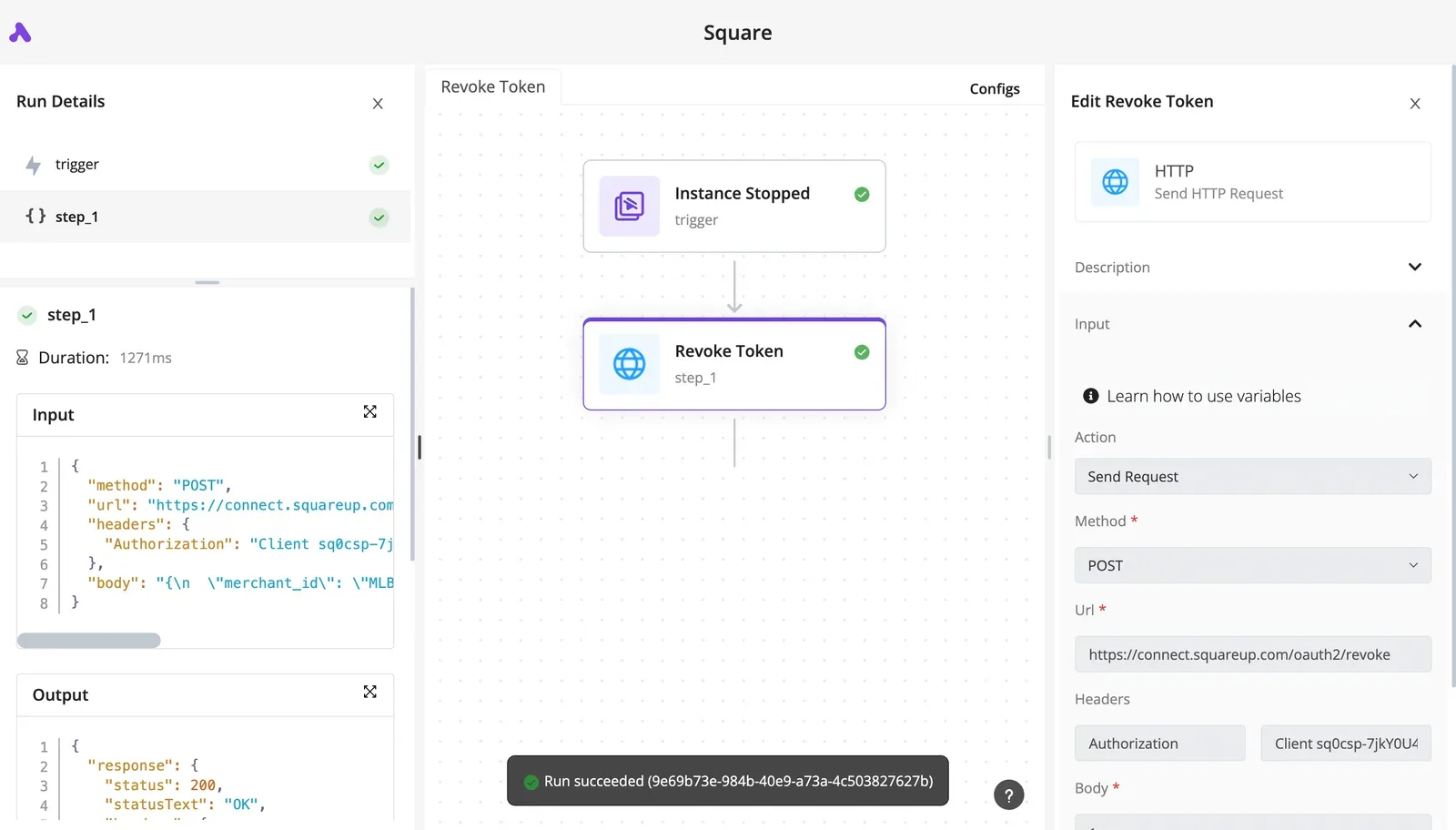
The endpoint there belongs to a payment service's token revocation, not Featherless AI, so take only the structure from it. The Featherless AI version swaps the URL and body, and the run panel is where you'll read what each call returned.
Unattended runs and your concurrency limit
Once a workflow like this runs unattended, each execution is a request counted against your plan. A loop that fans out across models can reach your concurrency limit faster than a person typing would.
Log usage to see if you need a bigger plan
Add a final step that writes each run's model name and outcome to a spreadsheet or database table. If the API returns token counts in its response, store those too; if it doesn't, log the request count alone.

Most of all, watch for a failed call or a rate-limit response, because it marks the moment your load met the ceiling.
After a few weeks, read the log for two patterns. Frequent rejections at busy hours mean your peak concurrency is above what the plan allows, and a bigger tier or a per-token API is the fix.
A log with few rejections spread across many different models means the plan suits you, and you can stop checking.
Featherless AI tier selection
Pick the cheapest Featherless AI tier whose concurrency cap clears your measured peak. Do so only after you've priced the same week of traffic on a per-token provider and confirmed the current page.
A log with few rejections spread across many models means the plan suits you; this is the procedure that turns that hunch into a decision.
Measuring your Featherless usage before choosing a plan
Start with a week of logs, because a single day hides the spikes that decide which tier you need. The steps run in order:
- Log every request for seven days, recording token counts and which model served it.
- Record peak concurrency: the most requests in flight at the same moment, not the average. Your tier's cap has to clear the peak, so an average will undersize you and you'll meet the limit at the worst time.
- Count how many distinct models you called. If one model carries nearly all the traffic, the plan's main selling point is going unused, and that already leans toward per-token billing.
The chart of tokens per day against peak concurrency belongs right after this list. It shows whether your load is steady or spiky, and a spiky shape means you should size to the spikes, not the baseline.
Price it two ways
Take the week's token totals and price them on one per-token provider, using its current input and output rates. Multiply the week up to a month, and keep the result as your baseline.
Then price the same month on each Featherless AI tier. The plan is flat, so the number barely moves with volume; what changes is whether the tier's concurrency cap is high enough for your peak.
A tier that is cheap but caps below your peak costs you queued or rejected requests, which isn't a saving.
Set the two results side by side. If the per-token baseline is lower and you use one model, the flat plan loses.
Among the tiers whose cap clears your peak, take the cheapest. Don't buy headroom you can't point to in the log. Before paying, reread the pricing page. Plans and caps change, and a figure you copied weeks ago may no longer apply.
Frequently asked questions
As of 7 November 2026 I couldn't confirm a Featherless AI free plan, so budget as if there isn't one. Check the current pricing page before you build anything that depends on free access.
If you're testing, a paid month on the cheapest tier is still a bounded cost, and you can price it against per-token usage afterward.
Per-token billing is how the Developer plan charges: Chat is a flat monthly subscription, while Developer is metered by token.
That's the whole trade. A heavy single-model workload gets no volume discount, so a per-token API usually wins there, while a workload spread across many models gets a fixed bill however many you try.
Can I cancel a Featherless AI subscription at any time?
It's a monthly subscription, so you should be able to stop it without a long-term commitment. I haven't verified the exact mechanics, such as whether you keep access until the period ends or get a prorated refund.
Read the billing terms before you pay, and put the renewal date in your calendar. An unnoticed renewal is the most common way a flat fee stops being cheap.
Is the Featherless AI API compatible with the OpenAI SDK?
Yes. The API follows the OpenAI chat-completions format, so you normally point the SDK at Featherless's base URL, swap in your key, and change the model name.
Test the parameters you depend on, such as tool calling or structured output, because support can vary by model. An open-weight model that lacks a feature will fail in ways the SDK can't hide.
How many requests can Featherless AI handle at once?
Concurrency is capped by your plan, and it's the limit that matters most in this article.
The cap isn't necessarily one request per connection. Larger models may consume more of your allowance than small ones, so a mixed workload can hit the ceiling sooner than a request count suggests.
Read the current plan limits, then watch your rejection log under real load. If you need more parallelism than your tier allows, the sensible alternative is a per-token provider rather than a bigger plan.
References
Running the numbers
See what the same workload costs here.
Free forever plan, and every paid plan self-hosts at no extra cost.
See pricing Talk to sales

