n8n SAML Setup: How to Configure SSO (2026 Guide)

Oct 26, 202614 min read
n8n SAML is single sign-on through a SAML identity provider, much as it is in other Activepieces-style automation tools that hand authentication off to a central identity system. This is per the n8n docs checked on 26 October 2026.
Staff sign in through the company directory instead of separate n8n passwords. The risk is that if you enforce it before testing it, you can lock out everyone, including the owner.

n8n SAML and login failure
What n8n SAML is in one paragraph
Instead of checking passwords itself, n8n hands authentication to your identity provider (the system that holds your staff logins), which vouches for each user.
According to SSOJet, only 28–47% of B2B SaaS firms with $2–5M ARR support enterprise SSO, so a small vendor can still get away without it.

That rises to 54–81% at $5–15M and 78–94% at $15–50M, which means SSO becomes a procurement expectation somewhere in that range.
By $50–100M it's 91–98%, and at $100M+ it's 96–99%, so at that size a vendor without SSO is the exception. If your clients are in the upper bands, your automation tool will be held to the same standard.
08:55: SAML enforced, every login rejected
Here's an illustrative scene, not a reported case: it shows how a sound configuration on paper turns into a total lockout.
Illustrative scene: a row of 40 team laptops, each showing an n8n sign-in that redirects to the identity provider and returns to an error screen. At a desk, an admin stares at the screen, puzzled. Everyone is unharmed.
At 08:55 the admin enforces SAML, and by 09:00 every laptop is stuck in the same loop. The owner account loops with the rest.
Who was affected: 40 users and 62 active workflows
Nobody could edit the 62 active workflows, because SAML locked out all 40 users in this illustrative scenario. SAML destroyed nothing, but nobody could fix anything either.
Whether you stay on n8n or move to Activepieces, which lists SSO on its $200-a-month Team plan, the same question applies: how do you get back in when the identity provider fails, not something premium pricing protects against.

A staged rollout with a break-glass owner login answers it.
This takes minutes, not a project: automate it in Activepieces free.
Lockout cost in hours, runs, and seats
You can count the lockout's cost three ways:
- Hours when nobody could open the editor
- Workflows that kept running against those that stalled
- Hours until an owner could sign in
None of these is a published n8n figure, and this write-up gives no number for any of them.
The takeaway is that n8n publishes no benchmark for a failed SAML switch-over, so every cost here is one your own team has to measure.
| Figure | Scenario's own or published n8n figure | Unit |
|---|---|---|
| Staff hours without editor access | Scenario's own, counted from the failed switch-over to the first successful owner login | Hours |
| Workflows kept running | Scenario's own, counted from the active workflows that continued on their triggers | Workflows |
| Workflows stalled | Scenario's own, counted from those that needed a person to edit or re-authorise | Workflows |
| Recovery hours | Scenario's own, counted from detection to restored sign-in | Hours |
| Seats affected | Scenario's own, counted from the people routed through the new SAML login | Seats |
SAML governs who signs in to the editor, so every person routed through the new login lost the ability to build, fix or inspect anything until access came back.
n8n workflows running or stalled during SAML lockout
In this scenario, workflows that were already active kept firing on their schedules and webhooks, because they don't depend on anyone being signed in.
The stalled ones were the workflows that needed a human: a broken credential to re-authorise, a failed run to inspect, a change to push.
n8n SAML lockout recovery time and contacts
Because the change had locked out the only people able to undo it, recovery was slow. With no break-glass owner login, someone had to reach the identity provider's administrator and the n8n instance's host to restore sign-in from outside.
With a staged rollout, one local owner account would have stayed outside SAML, and that single account is what would have made the recovery number small.
n8n SAML sign-in configuration issues
At four points in the sign-in chain the setup failed, and each one was a configuration detail that a single test login would have exposed before anyone was locked out.
In n8n's SSO documentation, the integrations are an identity provider (the service that holds your users and passwords), a metadata file or URL that tells n8n how to talk to it, and an ACS URL where the identity provider posts its answer.
Beyond those, the chain needs three more things. These are an entity ID that names n8n as the intended recipient, an attribute mapping that carries the user's email, and a signing certificate that proves the answer is genuine.
Any link can fail; read the sequence below, which happens on every login, as a checklist of what has to match on both sides.
- The user opens the n8n instance in a browser.
- n8n redirects the browser to the identity provider's sign-in page.
- The user authenticates there, with whatever password or second factor the provider requires.
- The identity provider posts a signed assertion back to n8n's ACS URL. It carries the entity ID and the user's email attribute.
- n8n validates the certificate against the one in the metadata, matches the email to a user, and signs them in.
Past step 3, everything depends on values you typed into two different admin screens, and the fault sits wherever they disagree.
n8n SAML URL and attribute mapping mismatches
First came the instance URL. Behind a reverse proxy, n8n can believe its address is an internal one, so the ACS URL and entity ID it advertises differ from the public address registered with the identity provider.
The provider then posts to a place n8n doesn't expect, or rejects the request outright.
Second came the email attribute. The provider wasn't sending it under the name n8n looks for, so the assertion arrived signed and valid but with nothing to identify the person.
Enforcing SSO before a test login
Third, a process choice: SSO was switched to enforced before anyone had completed a login through it. Enforcement is what turns a misconfiguration from an annoyance into a lockout, because password sign-in stops being an alternative.
Compounding it was the fourth fault. No local owner account sat outside SAML, so there was no way back in to correct the URL or the attribute mapping.
Enforcement is what turns a misconfiguration from an annoyance into a lockout, because password sign-in stops being an alternative.
A test login with enforcement still off, plus that one owner account, would have turned all four faults into a fifteen-minute fix rather than a recovery project.
You can follow the rest of this with the builder open. Start free, no card.
n8n SAML pricing and plan requirements
On n8n's two cheapest listed plans, Starter at EUR 20 and Pro at EUR 50 per month billed annually, you won't find SAML single sign-on. The fifteen-minute fix above therefore starts with a quote request, not a checkout.
Ranked by listed monthly price, n8n's two cheapest plans lack SAML, self-hosted Business lists $800/mo with it, and Enterprise is "contact sales".
| Plan | Listed price | SAML | LDAP | OIDC |
|---|---|---|---|---|
| n8n Starter | EUR 20/month, annual | No | No | No |
| n8n Pro | EUR 50/month, annual | No | No | No |
| Self-hosted Business | $800/mo, billed annually | Yes | Yes | Yes |
| Self-hosted Enterprise | Contact sales | Yes | Yes | Yes |
| Cloud Enterprise | Contact sales | Yes | Yes | Yes |
You can't budget the licence from the pricing page alone. Re-check the page and ask for a written quote before you plan the migration.
With "contact sales" on Self-hosted Enterprise and Cloud Enterprise, there's no published figure to compare those on, though Self-hosted Business lists $800/mo billed annually.

Self-hosting adds your own server and upgrade work, but I can't put a number on the difference. Ask for both quotes with the same user count.
What the list price leaves out
Look outside n8n: the bigger line item may be there. SAML needs an identity provider, the system that holds your user accounts and sends n8n the sign-in assertion. Ranked by per-user monthly price, Microsoft's Entra pricing page lists these tiers:
- Okta Essentials, $17. For 50 users that is $850 a month.
- Entra ID Suite, $12, or $600 a month for 50 users, so doubling your user count requires an additional $600 in monthly platform spend.
- Entra ID P1, $7, or $350 a month for 50 users, since losing 10 users frees up $70 monthly.
- Okta Starter, $6, or $300 a month for 50 users, which means a five-person hiring cycle adds only $30 to your monthly expense.


The spread between Okta's two tiers is $11 per user, so the tier you pick can cost more than the n8n plan itself.
Lockout rules and Monday checklist
Rehearse on staging, test with one non-owner account, keep an owner login that works without SAML, enforce off-hours, record the certificate expiry, and name the rollback step before you start.
Before enforcing: test, stage, keep a break-glass login
Because enforcement was the first real test, the lockout happened. A staging instance exists to absorb the mistakes that SAML setups reliably produce: a wrong callback URL, a mismatched attribute, a user the identity provider never assigned to the app.
Then test with one ordinary member, not an owner. Owners tend to be the people who configured everything, so their login passing says little about whether a colleague's will.
Keep a break-glass owner login too. If the identity provider fails or is misconfigured, an owner who can still sign in is the only person who can undo the change.
Confirm it works on your own version with enforcement switched on. Don't infer it from the documentation, because that's the assumption the lockout punished.
When the signing certificate issued by your identity provider passes its end date, logins fail exactly as they would after a bad configuration, but months after anyone remembers the setup.
Write the date into a shared calendar, with a reminder far enough ahead to rotate it during working hours, and name one person who owns the task.
An Activepieces flow can send that expiry reminder for you, as an optional companion task and not an alternative to n8n SAML.
The Slack step it would use is one of 744 integrations in the MIT-licensed open source monorepo, and its source sits in packages/integrations/community on GitHub, so you can read exactly what the step does before you rely on it.
Unlimited flows are included on every plan, including free, so one reminder per certificate costs nothing extra.
- Record the certificate expiry date and its owner.
- Rehearse the full SAML setup on staging.
- Confirm the owner break-glass login works.
- Test with one non-owner account.
- Enforce off-hours, when a failure costs the least.
- Write down the rollback step, and who is allowed to take it.
Do the first four this week. Enforcement waits until someone can state the rollback step without opening a document.
Activepieces for the reminders around n8n SAML
Activepieces doesn't replace n8n SAML. It handles the chores around the rollout, such as a reminder that the identity provider's signing certificate is about to expire or that an access review is due.
After the cutover meeting, reminders like these get forgotten, and a forgotten certificate renewal is exactly how a tested setup turns back into a lockout.
Be precise about the boundary. Activepieces runs scheduled flows across its 744 integrations, with unlimited flows on every plan including free, which means increasing your automation count won't require upgrading your plan.
It doesn't sit in front of your n8n instance, it doesn't issue or validate SAML assertions, and it won't give you a break-glass owner login.
Nothing on its own pages says it does, so this article doesn't claim it. The sign-in path stays with n8n and your identity provider.
What a reminder workflow looks like
What it can do is run a scheduled flow that posts a message where your team already reads.
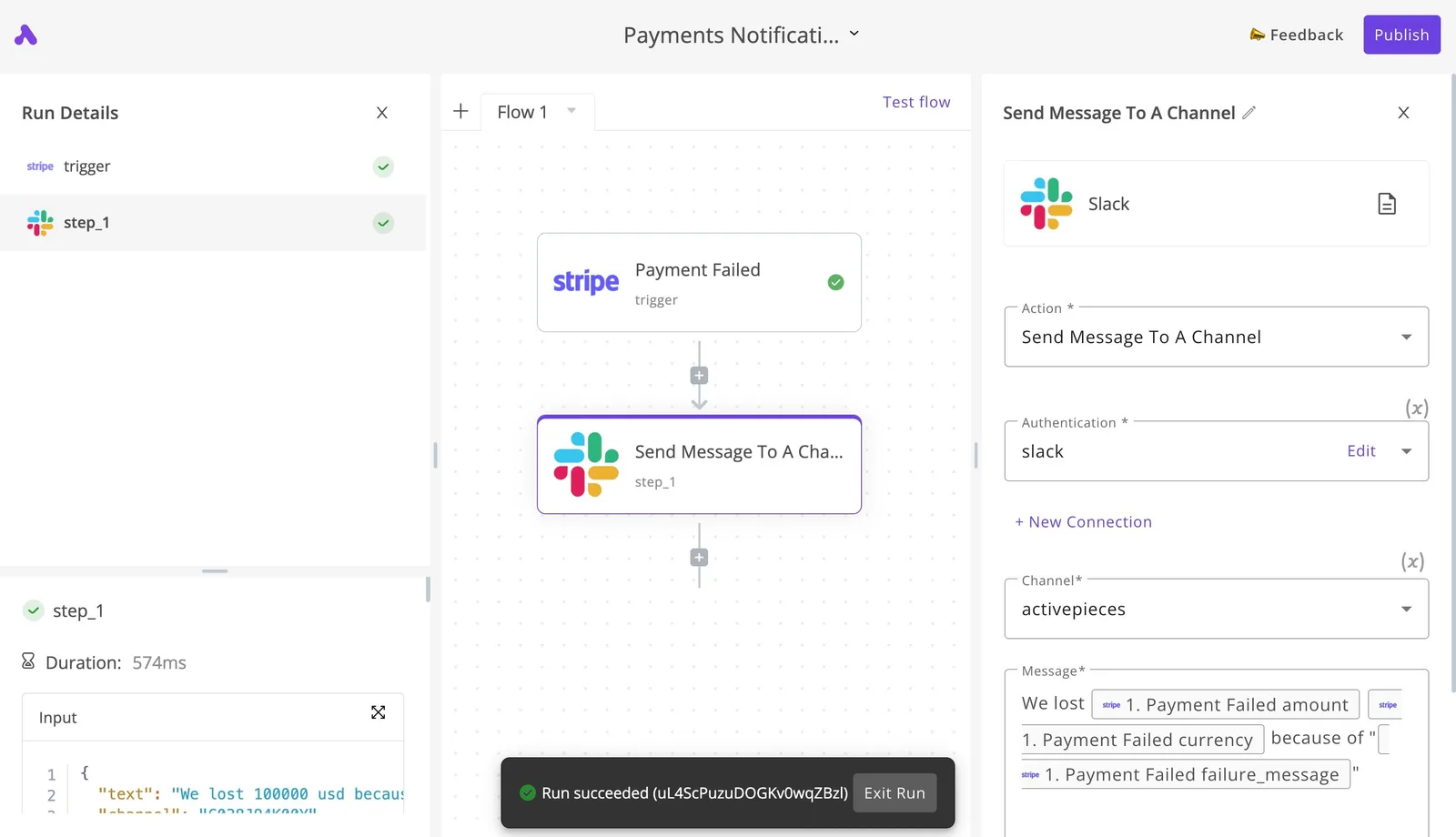
The screenshot below shows the shape of that kind of flow: a two-step automation where a trigger feeds a Slack action that sends a message to a channel.
In this run, the step is marked completed and the canvas reports "Run succeeded", which is the check worth copying.
Before you rely on a reminder, run it once and confirm the message actually landed in the channel. A reminder that fails silently is worse than none, because the team assumes it's covered.
Because the example here is a payment-failure alert, not a SAML reminder, treat it as a template for the pattern rather than proof of a certificate workflow.
You would swap the trigger for a schedule and rewrite the message text to name the certificate, its owner, and the rollback step your team can already state without opening a document.
Frequently asked questions
No. n8n treats SAML as an enterprise-licensed feature, so the free Community Edition doesn't include it. Confirm your plan's entitlement in n8n's current docs and with sales before building a rollout around it, because plan packaging changes.
Can n8n SAML work alongside local email logins?
Yes, and for a staged rollout that's the point. Keep email login available while you test SAML with a small group, and don't enforce SAML for everyone until a test user has completed a full sign-in.

The article's break-glass owner login depends on this overlap. If your version removes email login once SAML is enforced, you need a different recovery path before you flip the switch.
Because n8n speaks standard SAML 2.0, a provider that exports SAML metadata should work in principle. The docs walk through setup with common providers, but "works in principle" isn't "tested in your tenant".
Check attribute mapping (email, first name, last name) with a pilot account first, since a mismatched attribute is the usual reason a valid login fails.
How do I recover if SAML locks everyone out?
Use the owner account that still has a local login, if you kept one.
If you didn't, recovery means access to the host: on a self-hosted instance, n8n's command-line tooling and environment settings let an administrator reset user management or disable the SSO configuration. Look up the exact command for your version in the docs before you need it.
On Cloud, you don't control the host, so open a support request, and expect delay. That delay is why the local owner login is worth testing in advance.
Does n8n SAML provision users automatically?
Partly. Per the docs as I read them, a successful SAML login can create the user account on first sign-in, which is just-in-time creation. That is not full lifecycle provisioning.
I found no documentation of directory-driven deprovisioning, so removing someone from your identity provider may not remove their n8n account or revoke their credentials and workflows. Treat offboarding as a manual step until n8n's docs say otherwise.
Related reading
Build it
Set this up in minutes.
No code required. Connect your accounts, and Activepieces runs it from there.
Start free Talk to sales