
Airtable API Rate Limit: How to Avoid 429 Errors
Airtable API constraints cause data gaps when request thresholds are exceeded during peak traffic.

Covers Gmail automation for support ops: filter syntax, SMTP integration limits, and the edge cases that break email workflows.
ContributorSeptember 24, 202612 min read
This article was researched and fact-checked by an advanced research system.
How Airtable rate limits break funnels
The 429 error code that halted lead processing
When an HTTP 429 error appears, it signals that your automation has exceeded the platform's allowed request frequency. It's an immediate server-side refusal to process any further data.
Nobody notices for three days when this happens during a synchronized push from a billing platform like Zuora. Because a batch of 50,000 records can trigger at once, the system severs the connection between your lead source and your database until the lockout period expires.
Tens of thousands of updates will simply vanish into the logs. This leaves the system in an inconsistent state. Without a buffer, the system treats these as completed tasks even though the destination rejected them. It's leaving your CRM blind to new revenue.
Why the 'five Requests Per second' rule is a hard ceiling
Airtable enforces a strict limit of five requests per second per base, which means developers must implement aggressive rate-limiting or queueing logic to avoid service interruptions. It's a structural bottleneck for any business scaling beyond manual data entry.
Activepieces addresses this by charging one credit per flow run, regardless of how many steps are inside it. This pricing model encourages builders to break complex Airtable updates into smaller, more reliable steps without being taxed for the extra granularity.
The run is the meter, so the vendor doesn't penalize the exact discipline required to stay under a 429 ceiling.
This constraint is significantly more restrictive than the 50 records per job handled by the Salesforce bulk API, so integration throughput will be bottlenecked by the slower platform.
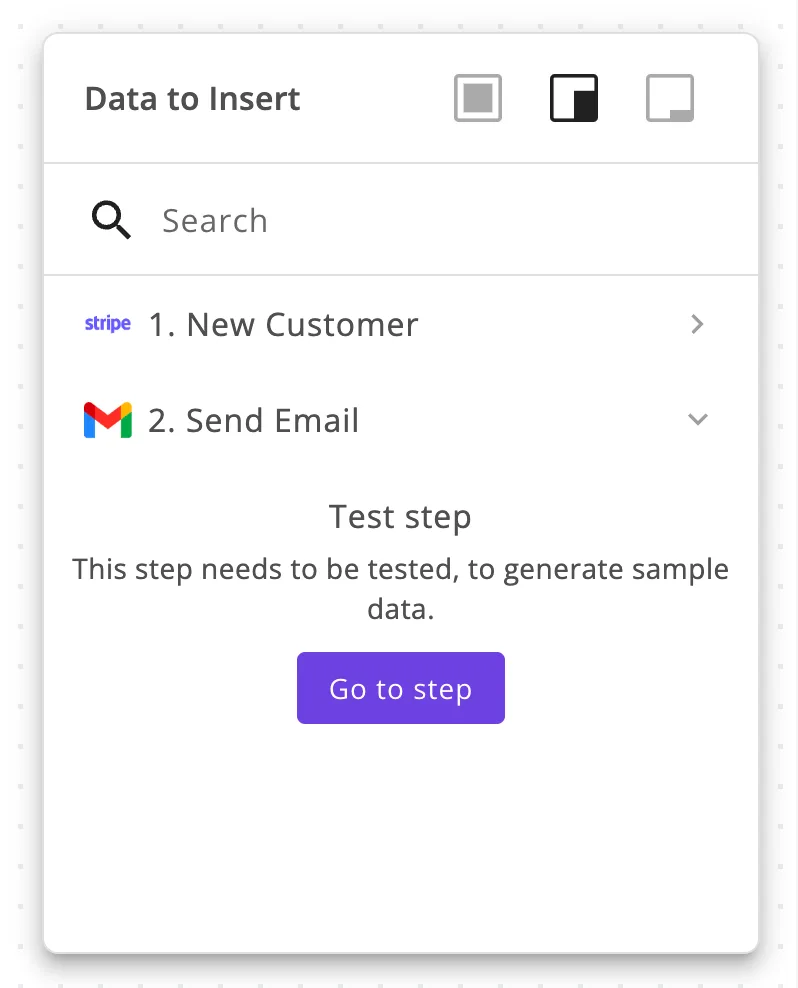
The interface below illustrates the fragility of these unmanaged connections. A single untested step in a multi-app flow can prevent the generation of sample data required to validate the logic.
Cost of dropped records from 429 errors
1,200 records can be dropped in a single minute of sustained 429 errors during a peak traffic window, leaving critical data out of sync until manual reconciliation occurs, which means your team is forced into reactive firefighting instead of feature development.

If the automation doesn't have a built-in retry logic, those leads are gone. It's a permanent loss of potential revenue. For a marketing team, this means 1,200 potential customers never receive an onboarding email.
For the ops team, it means spending a Saturday morning cross-referencing CSV exports to find the missing entries.
This takes minutes, not a project: automate it in Activepieces free.
Business costs of Airtable API throttling
Throttled automation pipelines generate a massive financial deficit because the labor required to manually repair data exceeds the cost of the original subscription.
Four hours of manual data reconciliation
Manual recovery is a high-cost engineering task that diverts expensive talent away from product development to perform administrative cleanup.
Throttled automation pipelines generate a massive financial deficit because the labor required to manually repair data exceeds the cost of the original subscription.
If a pipeline drops 1,000 records, a DevOps engineer must spend roughly 33 hours (assuming two minutes of verification per record) to ensure the database matches the source of truth.
The following table illustrates the direct labor cost of this recovery based on hourly contract rates from Paymetric Labs.
| Engineer Level | Hourly Rate | Total Cost for 1,000 Records |
|---|---|---|
| Junior | $65 | $2,145 |
| Mid-level | $95 | $3,135 |
| Senior | $128 | $4,224 |
| Principal | $162 | $5,346 |
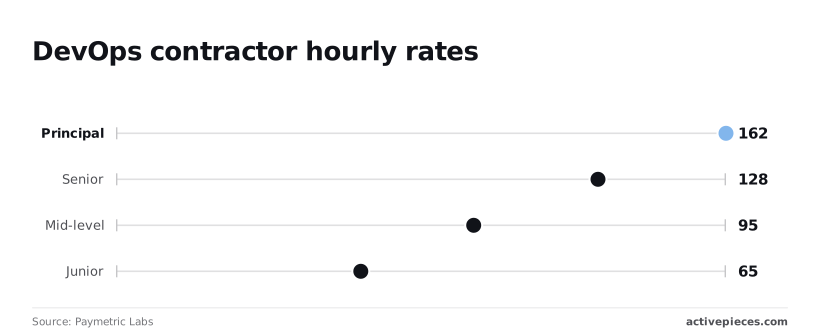
Over $4,000 in senior engineering time can be lost to a single afternoon of rate-limit errors, making the cost of technical debt immediately visible on the balance sheet, which means the project's budget is being depleted by avoidable infrastructure failures.
Silent failures in async Airtable workflows
Silent failures occur when a 429 "Too Many Requests" error isn't caught by a basic webhook listener. This means the system assumes a task is complete while the data is actually discarded.
In simple scripts, a rate-limited Airtable request often fails silently, leaving no trace in the destination UI. This differs from a 500-series server error which might trigger a generic alert.
Customer churn from throttled fulfillment emails
Inconsistent data delivery directly erodes customer trust by creating a gap between a user's action and the company's response.
When a fulfillment workflow is throttled, a customer who expects an immediate license key or onboarding link may wait hours for a manual re-run.
Inconsistent data delivery directly erodes customer trust by creating a gap between a user's action and the company's response.
Because 32% of customers will leave a brand they like after just one bad experience, a single burst of API traffic can trigger a permanent loss of lifetime customer value.
Why typical rate limit workarounds fail
Standard workarounds fail because they attempt to treat a structural throughput ceiling as a temporary traffic jam. They ignore the hard 5-requests-per-second limit that Airtable enforces regardless of your workflow's complexity.
The limits of Airtable's native batching API
Airtable’s native batching API only allows for 10 records per request. This means a single burst of 50 updates consumes your entire second-long rate limit and forces the next operation to fail.

According to Web Push Notifications, a low-volume system handles 10 messages per batch, which matches Airtable’s maximum but leaves no room for error during traffic spikes.
Web-push-notifications finds that a standard SaaS platform typically handles 75 messages per batch. This is a 7.5x efficiency gain that Airtable users lack, so they remain significantly slower at managing complex workflows.
| Throughput Tier | Messages per Batch | Impact on Airtable Users |
|---|---|---|
| Airtable Native / Low Volume | 10 | Operations stall during minor traffic spikes |
| Standard SaaS | 75 | Airtable requires 8 separate requests to match one standard batch |
| High Volume | 200 | Airtable requires 20 requests, guaranteeing a 4-second lockout |
| Peak Throughput | 500 | Airtable requires 50 requests, causing a 10-second system blackout |
Why 'sleep' steps in Zapier aren't a reliable fix
Adding a "Delay" or "Sleep" step merely shifts the bottleneck. It holds tasks in a pending state that can eventually timeout or exceed the tool's own task limits.
When you receive 100 Shopify orders in a minute, a 200ms delay between Airtable steps ensures you stay under the 5-request limit.
However, the final order won't be recorded for 20 seconds, creating a window where the system reflects an incomplete state, by which time a customer might have already abandoned their cart, so the business risks losing a sale due to a momentary synchronization lag.
The complexity of spreading data across multiple bases
Spreading data across multiple Airtable bases to multiply your rate limits introduces a massive synchronization tax. You now have to manage cross-base linked records that don't update natively.
Each base technically has its own rate limit, but you're forced to build "traffic controller" logic to decide where data goes, which often requires more API calls to the very system you're trying to protect.
You can follow the rest of this with the builder open. Start free, no card.
Eliminating 429 errors with Activepieces concurrency controls
Activepieces prevents 429 "Too Many Requests" errors by acting as a shock absorber between high-velocity event triggers and Airtable’s strict per-base rate limits.
Managing request velocity with built-in queues
Queueing ensures that a sudden burst of data from a source like a Shopify storefront doesn't exceed the five-requests-per-second threshold imposed by Airtable.
MoneyGram and FundingSocieties run Activepieces in production to manage complex automation environments where these execution states must be handled reliably.
By holding these executions in a pending state, the platform allows the automation to process records sequentially rather than all at once, transforming a potential system failure into a manageable stream.

Configuring retry logic that doesn't burn API credits
Automated retries in Activepieces use exponential backoff to wait for a cooldown period before attempting a failed request again. This prevents a feedback loop of repeated 429 errors.
Activepieces syncs flows to git and promotes them through Release Management, ensuring that retry logic and concurrency settings are versioned and reviewed in a test environment before hitting production.
This Git Sync capability allows teams to treat their Airtable integrations as stable, versioned software rather than opaque scripts that only exist in a vendor's UI.
Decoupling the trigger from the Airtable write action
Separating the initial data capture from the final database write allows you to batch records together, significantly reducing the total number of API calls made to Airtable.
Activepieces provides 735+ integrations, including specific spreadsheet actions such as "Insert Multiple Rows" that consolidate dozens of individual updates into a single API call. This allows builders to stay well below rate limits while maintaining high throughput across their entire stack.

By choosing the "Insert Multiple Rows" action from the Apps modal, you shift from a one-to-one execution model to a bulk-processing model that preserves your API overhead.
Weekly Airtable API audit checklist
Maintaining this reliability requires a proactive audit of your base architecture to ensure your API consumption doesn't outpace Airtable’s fixed rate limits.
Auditing your peak-hour request volume
You must cross-reference your external service logs against Airtable’s rate limits to identify which workflows are most likely to fail during high-traffic windows.
To stabilize your environment, perform the following steps every Monday morning. Identify bases with more than three active integrations, as these are high-risk zones where concurrent requests frequently collide, meaning they require prioritized monitoring to prevent service degradation.
Check for "Update Record" loops in Airtable Automations where a field update inadvertently triggers the same script, consuming your request quota in seconds.
Verify if any single API key or Personal Access Token is shared across multiple services, which pools your rate limit and increases the likelihood of a global failure.
Implementing a 'dead letter' queue for failed writes
Every mission-critical integration needs a "Dead Letter" queue (a dedicated table or external log) to capture data that Airtable rejects due to rate limiting or schema errors.
Without a secondary storage location for failed payloads, a "429 Too Many Requests" error results in permanent data loss because the source system assumes the delivery was successful.
Switching to batch updates for bulk data processing
Transitioning from individual record updates to the Airtable Batch API reduces your total request volume by a factor of ten, significantly lowering the risk of hitting rate ceilings.
The Airtable Batch API is best for scheduled syncs where latency is acceptable but volume is high. Single Record Updates are best for real-time triggers where immediate feedback is required for a single user action. Webhook Triggers are best for incoming data from external platforms to avoid unnecessary polling requests.
Frequently asked questions about Airtable API performance
Do Enterprise accounts have higher rate limits?
Enterprise Scale accounts provide a higher per-second request ceiling compared to Free, Team, or Business tiers. This allows larger organizations to run multiple concurrent integrations without immediate throttling.
A department can sync a customer relationship management tool like Salesforce while simultaneously running a heavy reporting script. This increased capacity means the two processes don't compete for the same narrow bandwidth.
However, this limit is still a hard cap rather than an infinite resource, so developers must still implement retry logic to handle occasional bursts that exceed the higher threshold.
Does the Webhook trigger count against the 5 RPS limit?
Incoming webhooks that trigger an Airtable automation don't count against the standard API rate limit for data retrieval or record updates. This separates your intake traffic from your processing traffic.
These triggers operate on a different infrastructure path. A sudden spike in form submissions or external signals from a version control system like GitHub won't block your backend scripts from reading data.
This architectural split allows you to build high-volume data ingestion pipelines that remain functional even when your outbound API calls are maxed out.
How do I track my current API usage in real-time?
Airtable doesn't provide a live dashboard or a specific endpoint to poll for current consumption. This forces developers to monitor the 429 Too Many Requests status codes in their own application logs to detect congestion.
Because Airtable lacks a centralized counter, you must aggregate logs across all your disparate scripts and services to see the true total of your environmental load.
Relying on these error headers means you're reacting to failure rather than anticipating it, necessitating a middleware layer to log every outgoing request.
Can I request a rate limit increase from Airtable?
Rate limits are fixed at the plan level and can't be increased on an ad-hoc basis for specific bases or API keys. This means your only path to higher throughput is a formal plan upgrade.
Since you can't buy your way out of a specific bottleneck without moving the entire organization to a new tier, efficient payload design is your primary tool for scaling.
This lack of flexibility requires teams to optimize their code through record batching (sending multiple updates in a single call) rather than hoping for a configuration change from support.
Related reading
References
Build it
Set this up in minutes.
No code required. Connect your accounts, and Activepieces runs it from there.
Start free Talk to sales