
Google Docs API Rate Limits for Developers (2026)

Nov 1, 202615 min read
Your own code can create, read and edit Google Docs through the Google Docs API, a REST interface.
It enforces per-minute quotas that a hand-built integration (or even a workflow tool like Activepieces calling the same API) usually discovers only when a burst of requests starts coming back as 429 errors.
The Google Docs API and the Monday failure
What the Google Docs API lets you do
You can create a document, read its content, and send batched edits to it: insert text, replace placeholders, change formatting, add tables.
For contract work that means one template and a loop. Each pass copies the template, swaps in the client's name, term and amount, and leaves a finished document in a shared folder.
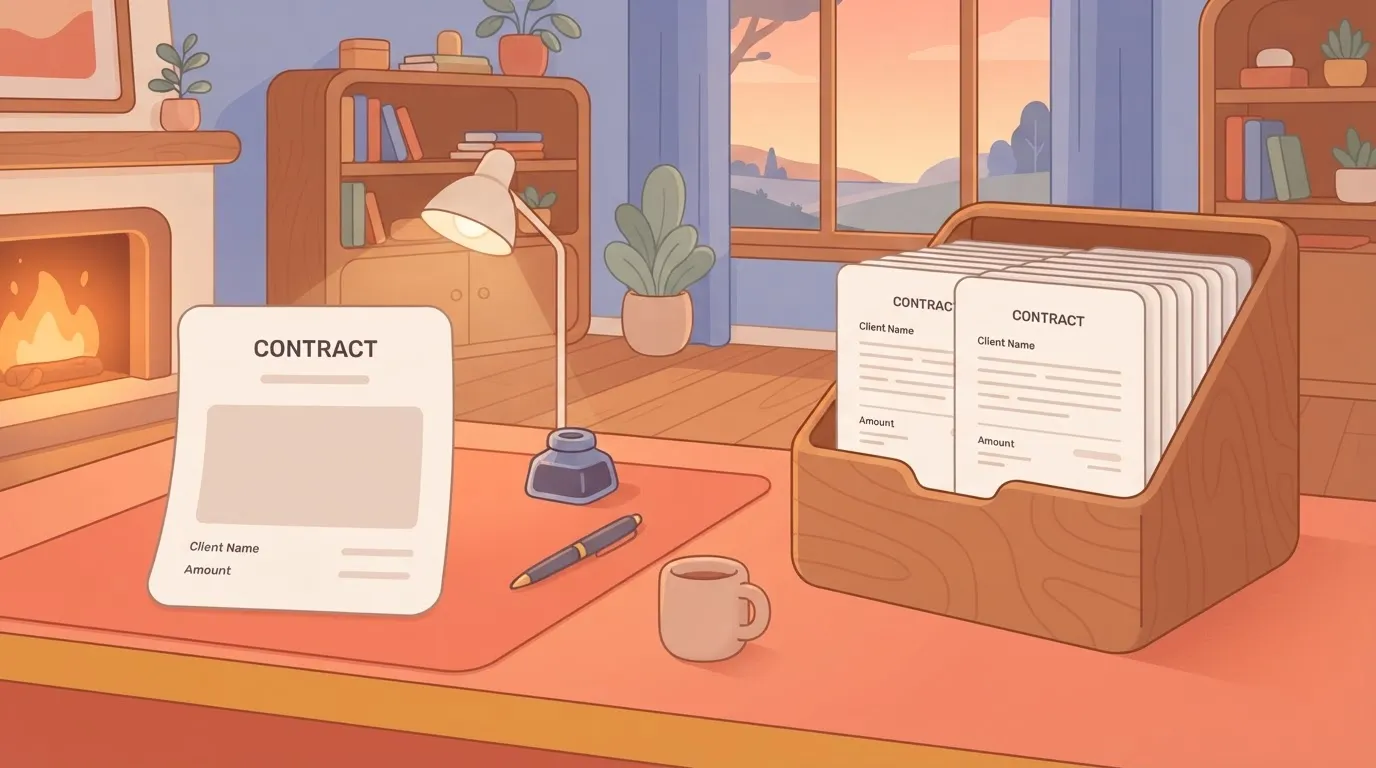
That loop's the trap. One document is a handful of calls, so the code passes every test you run by hand. The quota never shows up in the design because the design only ever ran one document at a time.
How the Docs API returned 429 errors
This is an illustrative composite, not a single named customer, but the pattern is common. A Monday job starts at 09:00 to write 200 contract documents. It fires them as fast as the loop will go.

By 09:02 the API begins answering with 429, "too many requests," because the project's spent its per-minute allowance.
What the code lacked:
- A queue to hold the remaining work
- Batching to cut the call count
- A backoff to slow down
So it retries immediately, which adds more requests to a quota that's already spent, and the failures pile up.
Below is the shape of it:
- 200 documents entering one funnel
- A few passing through
- The rest bouncing back marked 429
If you'd rather not maintain the script, you can describe the job instead of coding it.
Tell the built-in chat in Activepieces that the Monday run writes 200 contracts and must stay under 60 writes a minute per user, and it publishes a live flow on the Google Docs integration (create document, append text, find and replace) with a retry and a delay step, the same flow a builder would have wired by hand.

That flow runs under the same RBAC and audit logs as every other flow in the account, and its run trace says plainly whether a 429 was hit and what happened next, so nobody needs a certification to read it.
Missing documents and silent Docs API failures
Nobody saw a 429. What they saw was a shared folder with fewer contracts than expected, and a sales manager asking why a signing was late.
The job's own status said "completed," because the loop had finished. It had simply finished by giving up on most of its documents.
That gap is the real failure. A quota you can't see in the run trace turns into missing files and a support thread, not an error message.
Everything below works on Activepieces' free plan. Start without code or a credit card.
Access and authentication the workflow was built on
Before a single request is sent, four setup decisions get made in Google's console, and they sit under every Docs integration. Per Google's authorization docs, checked 2026-11-01, they are:
A quota you can't see in the run trace turns into missing files and a support thread, not an error message.
- Enable the Docs API in a Cloud project
- Set up the OAuth consent screen
- Pick the scopes the flow will request
- Choose an OAuth client or a service account
Whose limits you hit depends on whose identity the calls run under, and these choices decide that. Get them wrong and the first sign's a 403 or an unexpected consent prompt, not a quota error.
Because the API's switched on per Google Cloud project, requests are tied to that project. If several flows share one project, they share its quota.
A burst from one flow can therefore start 429s in another that did nothing wrong. Record which project each flow uses in its description.
Run as an OAuth client and the flow acts as a person who's granted consent, so it can reach whatever documents that person can. A service account acts as itself, so it reaches only documents explicitly shared with it.

Pick the one that matches who should own the access, because switching later means re-authorising every connection.
Docs API scopes and the consent screen
When a user approves your scopes, the consent screen's what they see, and the scopes you choose determine how much review it faces. Google Workspace lists two Docs scopes, both sensitive.
Only one of the five avoids extra verification, so a flow built on any other scope can sit in review while you wait to go live. The two restricted scopes are the ones to avoid unless the flow truly needs them.
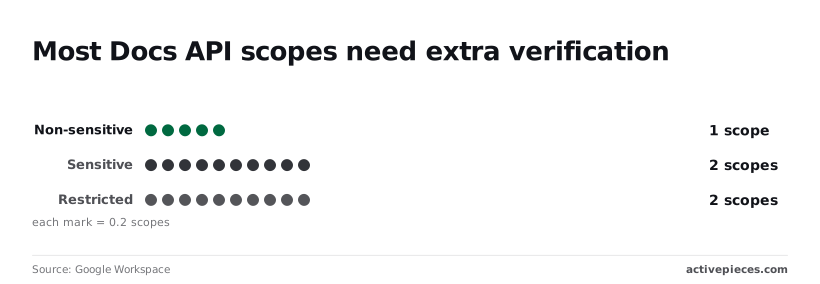
Read it as a pick list: choose the narrowest scope that lets the flow do its job, then move on to where its limits get written down.
The endpoints and minimal request the workflow used
All the flow needed was three Docs API methods, and each one's a separate HTTP request, so each is a separate call that a per-minute quota will count.
Documents.create, get and batchUpdate
documents.create makes a blank document from a title and returns its ID. Create calls are the ones a bulk run fires first, so they're where a burst starts.
documents.get returns the full document body as JSON. Call it before editing and you're paying a request just to find out what's already there.
documents.batchUpdate applies a list of edits to one document in a single request. Every edit you pack into one call is a call you didn't make separately.
A minimal Docs API batchUpdate request
To find the document ID, look in the browser URL between /d/ and /edit; the API takes it in the path. This inserts text at the start of a document:
curl -X POST "https://docs.googleapis.com/v1/documents/DOCUMENT_ID:batchUpdate" \
 -H "Authorization: Bearer $ACCESS_TOKEN" \
 -H "Content-Type: application/json" \
 -d '{"requests":}'
Swap in your own ID and a valid OAuth access token. An expired token returns an authentication error, not a quota error, so don't read every failure as a limit.
In a no-code builder this same request's one step, filled in field by field. The screenshot shows an HTTP request step, number 5 in the flow, with a method, a URL, two header fields and a query parameter pulled from a loop item.
For Docs you would change the method to POST, point the URL at the batchUpdate path, put the bearer token in an Authorization header and add a JSON body.
Copying and sharing sit outside what the Docs API does, since it edits documents. Copying a template is files.copy in the Drive API, and granting access is permissions.create.
A flow that clones a template for every new customer therefore makes Drive calls as well as Docs calls, and each API has its own limits to write down.
Cost of Docs API quota failures
By 11:30 the Drive and Docs quotas had already cost the team a morning's worth of contracts. Some were never generated, some were generated twice, and the rest were still sitting in a queue nobody had built.
Reading the 11:30 snapshot
It sorts 200 contract documents by the state they were in at 11:30: generated, failed, duplicated by blind retry, and still waiting. Read it for the proportions between the bars, not for the exact counts.
Missing contracts and the hand-built fix
A customer is waiting on a contract that doesn't exist, and nothing in the flow tells anyone. The first alert's usually a customer emailing to ask where it is.
For each missing contract, someone opens the template, copies it, fills in the fields by hand, and files it in the right folder.
Duplicate documents and backlog from retries
Duplicates are the quieter cost. A flow that retries immediately after a 429 (the HTTP status for "too many requests") fires again into the same exhausted window.
If the first call actually succeeded but the response was lost or late, the retry creates a second copy. Now a folder holds two contracts for one customer, possibly with different edits, and someone has to decide which is the real one before it's sent.
Last is the backlog, the "still waiting" bar: documents the flow never reached because earlier retries consumed the quota. Without a queue they have no place to wait, so they depend on the trigger firing again.
Easier to see it running than to read about it: set it up free, no card.
Docs API quotas and errors that caused failure
200 writes went out in a minute against a per-user write quota of 60. The 429 responses were the API behaving as documented, and nothing in the flow was built to absorb them.
Per-minute read and write quotas
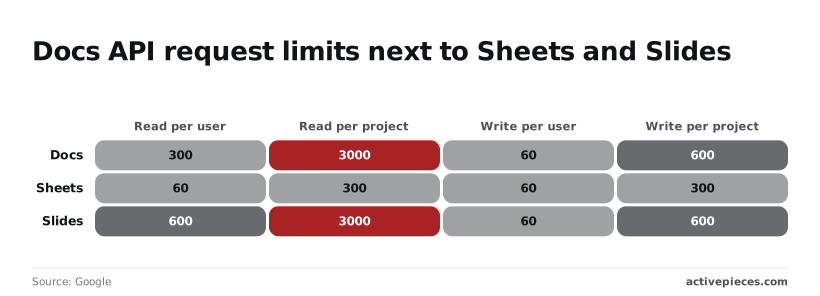
Per Google's Docs API limits page, the defaults are 300 reads per minute per user and 3,000 per project. Writes default to 60 per minute per user and 600 per project.
The bars below show reads with plenty of headroom, and the 200-write job sitting well above the 60 line.
Writes are the problem, because a single user's token, which is what most hand-built flows run under, gets only 60 a minute. At 200 writes, 140 are refused in the first minute.
On the same page, Sheets is listed at 60 and 300 reads and 60 and 300 writes. Slides is listed at 600 and 3,000 reads and 60 and 600 writes (per user and per project, in that order).
Docs writes are therefore as tight as Sheets and Slides per user, so moving the job to another Workspace API won't buy you room.
429 and how Google says to back off
When a 429 comes back, you've exceeded a quota, and it's the one error here worth retrying. Google's guidance is to retry with exponential backoff: wait, retry, and lengthen the wait each time.
A flow that retries immediately sends the same burst again and gets the same refusals. Queue the writes, batch edits into fewer requests where the API allows, and the 60-a-minute ceiling becomes a pace instead of a wall.
Repeating a 400, 403 or 404 changes nothing, because each describes a request or a permission that's wrong.
| Status | Usual cause | Retry? | Fix |
|---|---|---|---|
| 400 | Malformed request, such as a bad edit range | No | Correct the request body |
| 403 | The account lacks access to the document | No | Share the document with the account, or fix the granted scopes |
| 404 | Wrong document ID, or no visibility of it | No | Check the ID and the sharing |
Prices and plan limits checked against docs.claude.com and claude.com and openai.com and gemini.google on October 31, 2026.
A 401 means the credential is missing or expired, so refresh it before retrying. A 5xx is Google's side and is worth retrying with the same backoff. Every other status in the table should stop the run and say why in the trace.
Rules for handling Docs API rate limits
The only statuses worth retrying as-is are 429 and the 5xx family, and five rules, applied in order, keep a burst of writes from turning into a wall of them.
Queue, batch and back off Docs API requests
Fire 200 edits at once and a few dozen get through, with a run of 429s for the rest, because Docs allows 60 write requests per user per minute.
The order below puts the fix where the failure starts, at the front of the pipeline, and works back to the alert that tells you when it slips.
- Queue every write and cap the queue below 60 per minute per user, so the quota's never the thing that slows you down.
- Send one
batchUpdateper document, so ten edits to a file cost one request, not ten. - Check for a duplicate before any create call, so a retry can't leave two copies of the same document.
- On a 429 or 5xx, wait 1 second, double the wait on each retry, cap it at 60 seconds, and add jitter so parallel workers don't retry in lockstep.
- Alert when usage nears the quota, so you hear about it before the trace does.
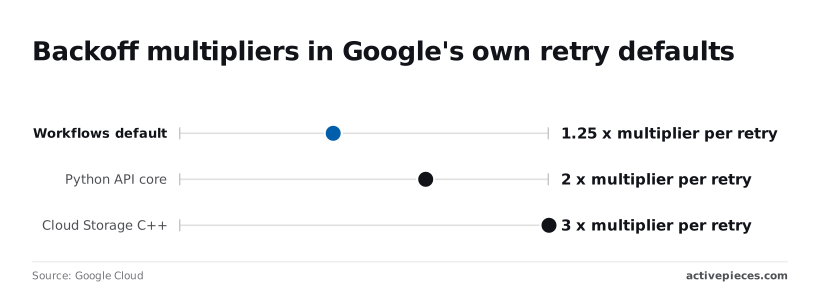
On that doubling, Google's own libraries don't agree. The Workflows default multiplies the wait by 1.25 per retry, which means a slow climb that can still be hammering a throttled endpoint after several attempts.
The Python API core library multiplies by 2, which is the figure used above and backs off fast enough to clear a per-minute window.
The Cloud Storage C++ client multiplies by 3, so its waits hit a cap quickly and then sit there. Pick one multiplier, write it in the description, and don't let each library apply its own.
How to check Docs API retries and 429s
Open the run trace from the weekend's busiest job and look for any 429. If there's one, the trace should show the wait, the retry and the outcome.
If a 429 appears with no retry after it, the backoff isn't wired in. If the queue depth sat at its cap for hours, the volume written in the description is wrong. If two documents share a title, the duplicate check failed.
What Activepieces does about this
Activepieces is where we put the limits into the description and keep the trace readable afterwards.
You tell the built-in chat in Activepieces the volume, the burst and the retry behaviour: 200 contracts every Monday, no more than 60 writes a minute per user, back off on a 429 or a 5xx.
It then publishes a live flow on the Google Docs integration, with create document, append text and find and replace steps, plus the delay and retry steps the description called for.
The quota stops being something you discover at 09:02 and becomes a line in the brief.
The open-source core is MIT-licensed, so you can read the Docs integration and the retry logic for yourself instead of taking our word for how they behave.
You can self-host it, which matters here because a self-hosted instance means you know exactly which Google Cloud project, and therefore which shared quota, your flows run under. We can't raise Google's 60-a-minute write ceiling, and nothing in the product pretends to.
What it does is make the pace you chose visible and keep it consistent across flows.
The second half of the argument is the run trace. Each run records every step, including whether a 429 came back, how long the flow waited, whether it retried and what the outcome was.
So the Monday check described above is a matter of opening the weekend's busiest run and reading it, not reconstructing events from a half-empty shared folder.
A job that gives up on most of its documents no longer reports "completed" without anyone being able to see why.
Flows run under the same RBAC and audit logs as everything else in the account, so who changed the retry settings, and when, is on record.
That covers the part of the failure no script gives you: someone other than the original author can see what the flow was told to do and what it actually did.
Frequently asked questions
Is the Google Docs API free to use? Yes. Google doesn't charge for Docs API calls, and there's no billing line to watch.
It's still governed by per-minute quotas, so free doesn't mean unlimited. A burst of requests from one project can still be refused with a rate-limit error, and your integration needs queuing and backoff to survive it.
Can I request a higher Google Docs API quota?
Yes, in some cases. Quotas for your project are listed in the Google Cloud console, and the Docs API entry lets you submit an increase request there.
Google reviews it and may decline, so an approval isn't something to build a launch date around. Spend the first effort on batching and spacing your calls, and treat a raised quota as a margin, not a fix.
Can a service account edit documents I own?
Only if you give it access. A service account is its own identity with its own Drive, so it can't see your files by default.
Share the document with the service account's email address, as you would with a colleague, and it can edit within the role you grant.
In a Google Workspace domain, an administrator can instead enable domain-wide delegation so the account acts as a specific user. Documents the service account creates belong to it, not to you, which is why people later find files they can't open.
Does the Google Docs API support comments?
No. The Docs API reads and changes document content and structure, but it has no methods for comments. Comments and replies live in the Drive API, under its comments resource, and you call them with the document's file ID.
Your integration therefore needs the Drive API enabled and the right scope on the same credentials. If a comment step fails while edits succeed, the missing scope or the disabled Drive API is the first place to check in the run trace.